JSON Reader
The JSON Reader reads a JSON document as a data source. A JPath expression, a path through the document's properties, addresses every transaction and every field. The reader can therefore read almost any JSON with a repeating structure.
The document does not have to be a file on disk. The reader takes its data from an IO controller, and a webservice is the common case. It is the only reader whose controller drop-down offers http(s) Url first. Where the controller is HTTP the reader can also be stepped: it issues a request per record and builds the dataset over several calls.
The document, and what the reader makes of it
JSON is nested, so the structure is already in the document. You tell the reader which parts of it become transactions and which become fields.
Example
{
  "exportedOn": "2016-03-12T09:14:00Z",
  "orders": [
    {
      "orderId": "FBRN-309242",
      "currency": "USD",
      "customer": {
        "title": "Mr",
        "firstName": "Ronald"
      },
      "lines": [
        { "lineNo": 1, "qty": 5, "skuCode": "A1-103/0" }
      ],
      "charges": [
        { "chargeType": "Delivery", "amount": 29.00 }
      ]
    }
  ]
}
orders is the array that repeats, so it is the entry point and each object
in it becomes a top-level record. lines and charges are arrays too, so
each becomes a child transaction. customer is a single object, not an
array, so it is not a transaction. The reader folds its properties into the
order as fields.
You can see two results of this in the field mapping:
- A nested object is flattened into its parent. Its field names take the
property it came from as a prefix, such as
customer_firstNameorshipTo_city, with a JPath ofcustomer/firstName. A forward slash separates path segments, not a dot. - A nested array becomes a transaction of its own, whose JPath is relative
to its parent's and carries the array suffix:
lines[].
Setup
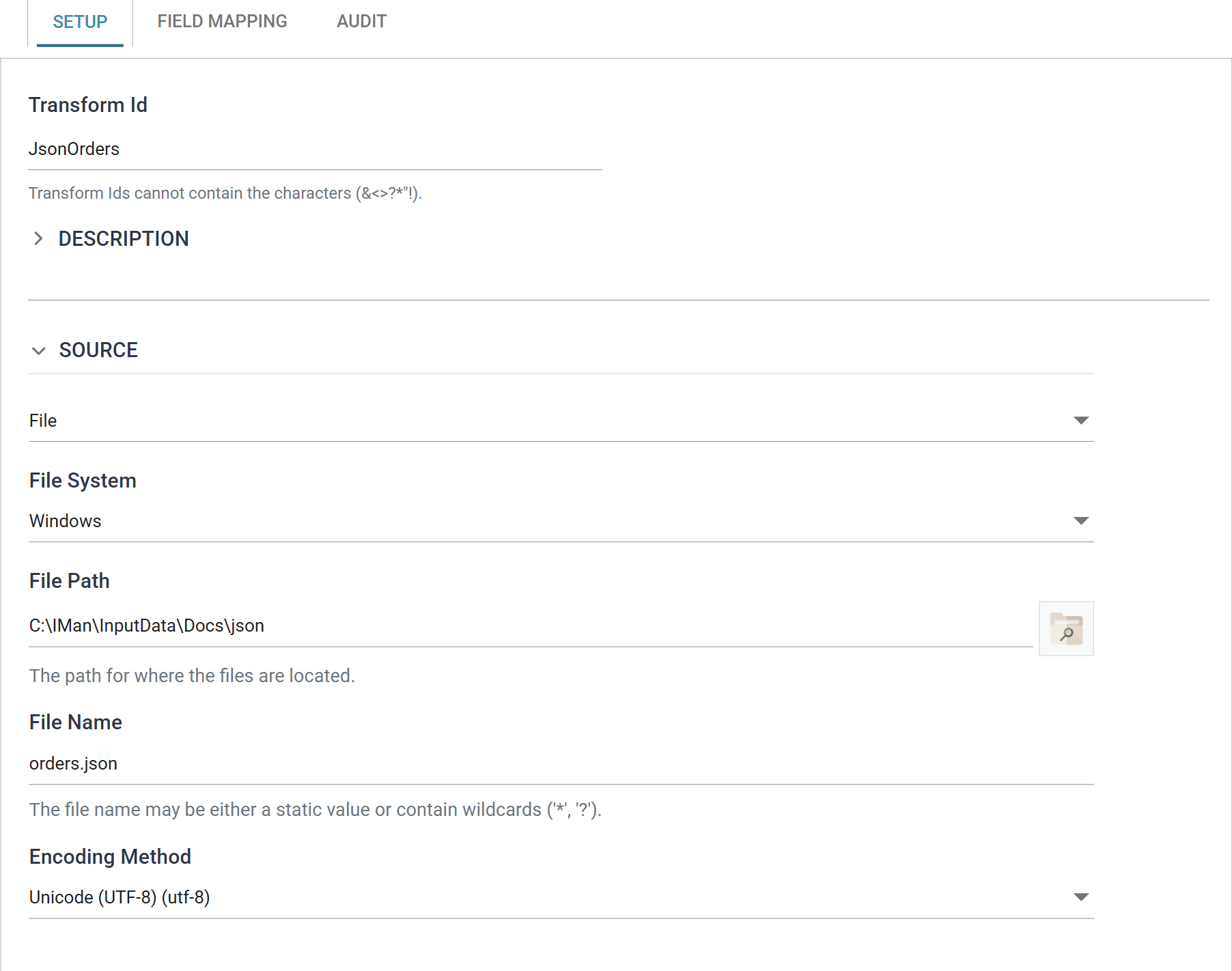
The Setup tab holds only the Source section. This reader has no Options section. The entry point, the transaction paths, the tree and the field grid are all on Field Mapping, because each is a JPath into a document the reader must read first.
Transform Id, Description and Priority are the same on every transform and are described under Transform > Setup.
Source
The Source section holds the IO controller, which says where the document is read from, and the controller's own fields.
The drop-down at the top of the section chooses the controller. The JSON Reader accepts four:
- http(s) Url — Encoding Method, Webservice Behaviour, Http Headers, Query Url, Evaluate Url, Http Operation, and Request Body when the operation is not a GET
- File — File System, File Path, File Name, Encoding Method
- Email — Email Server, From Address Like, Subject Like, Attachment File Name Contains, Data As Attachment, Delete From Server, Encoding Method
- Transaction — Field
Each controller's own page describes its fields.
Field Mapping
You define the entry point, the transactions and the fields on the Field Mapping tab.
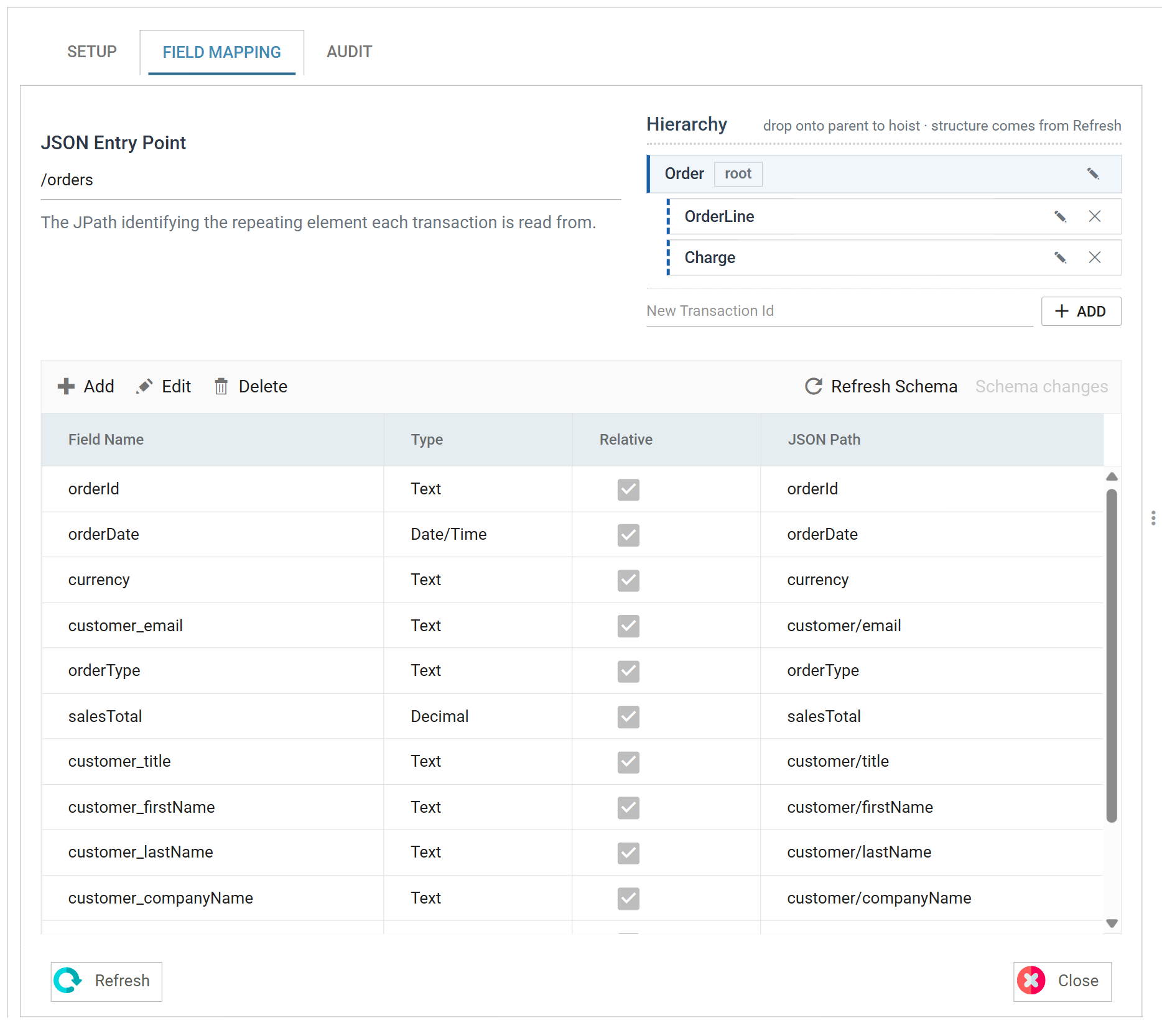
JSON Entry Point
The property where the records begin to repeat — the point in the document where the dataset starts.
In the example that is /orders: the reader produces one top-level record per
object in the orders array, and every path below is relative to it.
Where the repeating array is at the top of the document with nothing above it, leave this blank or set it to a single forward slash.
Schema changes
The reader does not read the document until you ask it to. Press Refresh Schema on the field grid's toolbar and IMan opens the document, works out what properties it holds, and compares them with the stored definition. The item beside it reports what the comparison found and opens the review.
The two items and the review dialog are the same on every reader. Field Mapping > Schema changes describes them.
Detection builds the transaction tree and the JPaths for you, so start there. Set the source and the entry point, refresh, and correct what detection produced. You do not need to type every path by hand.
Transaction
The tree lists the transactions the reader produces. Select one to open its fields in the grid below.
Press Add to add a transaction by name, the pencil to rename it and the cross to delete it. Deleting a transaction also deletes its children. Drag a node onto another to re-parent it. IMan creates the root with the transform; it has no cross and no parent to move to.
Transaction JPath
Every transaction below the root has a path of its own, relative to its parent.
![The Transaction JPath field showing the value lines[]](../../../assets/Documentation/Resources/Images/UG/7.Readers/json-03.png)
The root has no such field: its path is the JSON Entry Point.
Detection writes an array's path with the [] suffix, as in lines[] and
charges[]. The suffix marks the property as a repeating array, not a single
object. Field paths inside it are plain property names.
The field grid
The grid lists the fields of the selected transaction. Add, Edit and Delete on its toolbar work one field at a time; unlike the CSV and Excel readers there is no batch edit.
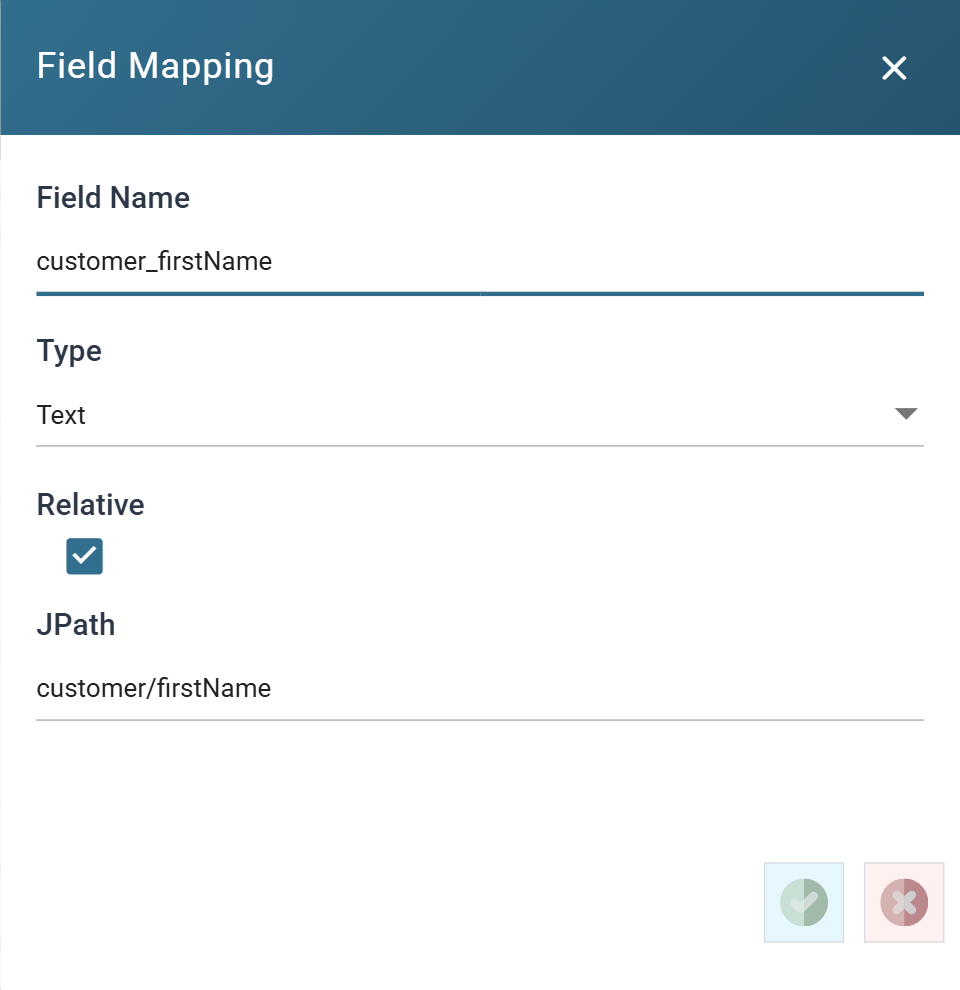
Field Name
The name of the field, unique within its transaction.
Detection names a field after the property it came from, prefixing the names of
any objects it was nested inside: customer_firstName for
customer/firstName. You can change the name. The reader uses the JPath, not
the name, to read the value.
Type
The data Type of the field.
Detection reads names and paths, not types, so every newly detected field arrives as Text. JSON does distinguish a number from a string, but the reader does not take the type from it. Set the type here where a value is a number or a date.
Relative
Whether the field's JPath is resolved against its transaction, or against the document.
Ticked, which is the normal case, the path starts from the object the
transaction was read from, so salesTotal means this order's total.
Unticked, the path is absolute and the reader resolves it from the root of the
document. Use this to copy a value from outside the record onto every record,
such as the exportedOn timestamp at the top of the example, repeated onto
each order.
JSON Path
The expression that fetches the field's value.
To reach a property nested inside an object, name each property in turn,
separated by a forward slash: customer/firstName.
IMan checks the path when you leave the field and reports a path that cannot resolve straight away. You do not have to wait for an empty column after a run.
Hoisting a repeating array
A repeating child does not have to stay a child. Hoisting folds it into its
parent as a fixed number of numbered columns. Use it when a downstream system
wants charges_1, charges_2, charges_3 on the order instead of a child
table.
There is no button for it. Drag the child transaction onto its parent in the tree.
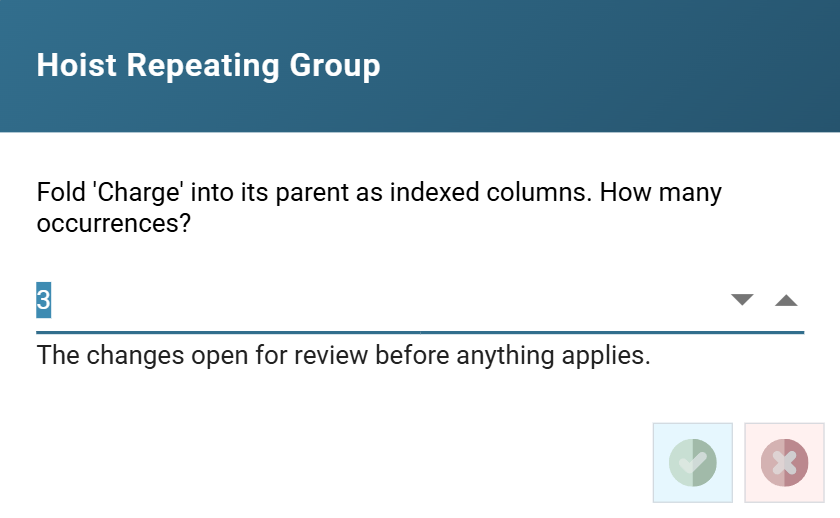
The count defaults to the most occurrences the reader saw in the source: three, for the sample above. A lower count drops the extras. A higher count leaves the surplus columns empty.
IMan applies nothing at that point. The proposed changes open in the Schema Changes review, with every row set to Apply. OK commits them and Cancel leaves the definition as it was.
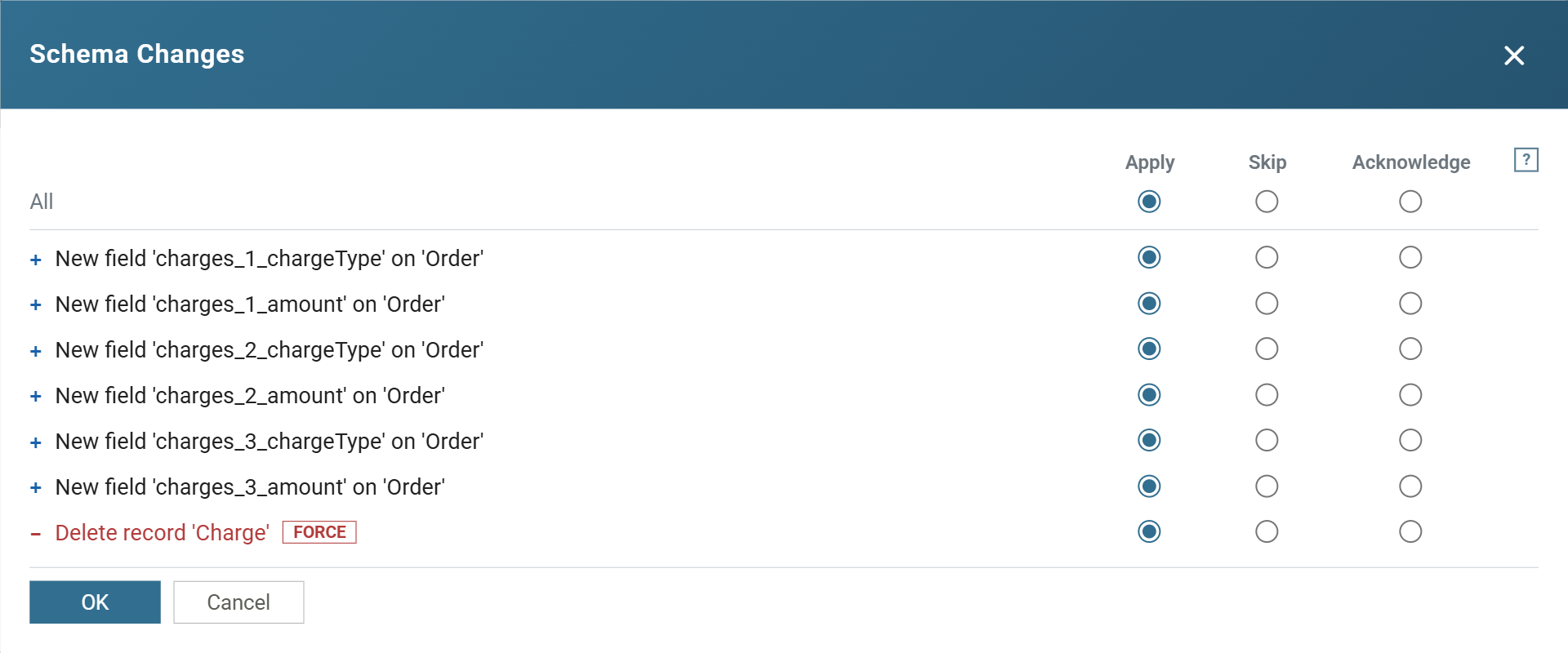
Two things to note in what it proposes:
- The new field names are built from the path and the property, such as
charges_1_chargeTypeandcharges_2_amount, one set per occurrence. - The child transaction is deleted. It is marked
FORCEbecause a later refresh cannot undo that deletion. Hoisting replaces the child; it does not duplicate it.
IMan offers hoisting only after Refresh Schema has run in the open pane, because the occurrence count comes from the detected schema, not from the definition.
SYS.INPUTFILE
Records read through the File or http(s) Url controller can carry a
SYS.INPUTFILE field holding the file or URL the record came from. Add a field
of that name with any JPath. The controller supplies the value; it is not read
from the document.
See Streamline processing for what it is for.
Audit
Supported counters
- PROCESSED — incremented for each record read.
- INSERTED — incremented for each record placed into the dataset.
Action on Transform Error
The setting and the rest of the tab are described on Transform > Audit.