Database Reader
The Database Reader reads from any ODBC or OleDB compliant data source. It
issues a SELECT statement over a connection, and the result set becomes the
IMan dataset.
The statement must be a select query returning a single result set. The reader does not return values from stored procedures, and it does not handle queries returning multiple or nested tables.
It also builds hierarchical datasets, with headers and details from one result set. See Hierarchical data below.
Setup
Transform Id, Description and Priority are the same on every transform and are described under Transform > Setup.
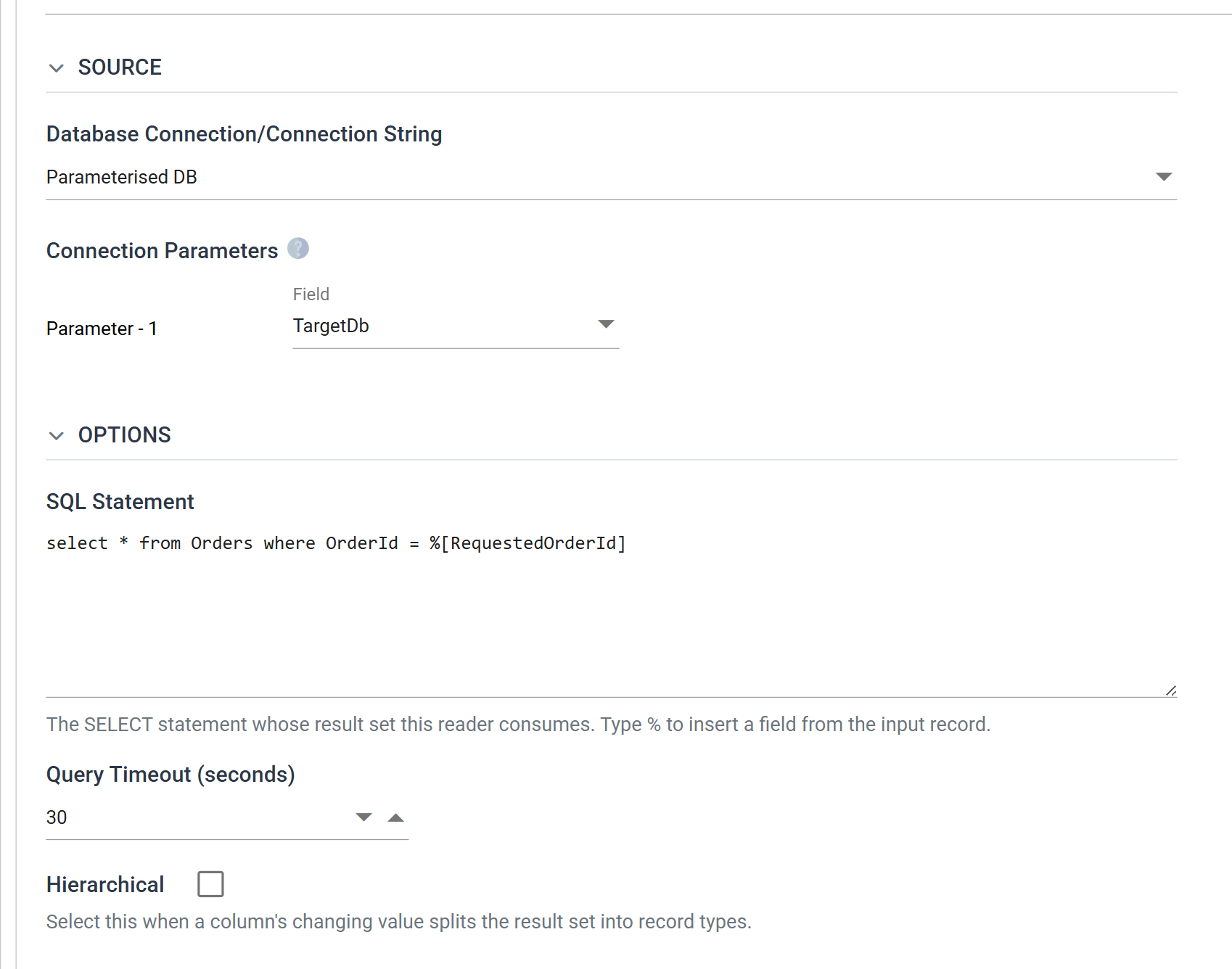
Source
The source is fixed here. The file readers offer a choice of IO controller (File, http(s) Url, Email, Transaction). A database read has only its connection, so this section holds only the connection.
Database Connection/Connection String
Either pick a saved connection from the drop-down (see Database Connections) or type a connection string directly into the same control.
The string must be ODBC or OleDB format. Native .NET connection strings are not valid. connectionstrings.com is a good reference for building one.
When the connection string you type holds a password, IMan masks it in the same way as a saved Database Connection, and a Show secrets button appears under the box. Press it to show the stored values, and press Hide secrets to mask them again. Showing them needs the Can reveal a stored secret in full permission.
Connection Parameters
Renders only when the connection string carries parameters, and only when the reader is the child of another transform.
A connection string can take part of its value from the incoming data. Each incoming row is then read from the database that the row names. For example, this connection is parameterised on its database segment:
It gives one row per parameter beneath the connection, each with a Field.
You can write a parameter in two forms. IMan recognises %[Name] anywhere in
the string. It recognises the bare %Name only where it is the whole of a
segment's value, as in Database=%1, because a password may contain a
percent sign. A name may be a number or a word.
Field
The field, supplied by the preceding transform, whose value names the database to read from.
The drop-down offers only the fields the reader carries from its parent, not the fields the reader itself produces. IMan has to resolve the connection before the read can run, so a column the read returns cannot supply a value.
A parameterised connection needs a parent
The rows appear only on a reader that is the child of another transform. A top-level Database Reader has no incoming data to resolve a parameter from, so IMan offers no rows and you cannot save any:
"The database reader's connection string is parameterised but there is no input to resolve its parameters from. Connection parameters require the reader to be the child of another transform that supplies data."
Unlike the Database Writer, the reader has no sample value. At design time IMan resolves the connection from the first row of the preceding transform's preview, which is a real value.
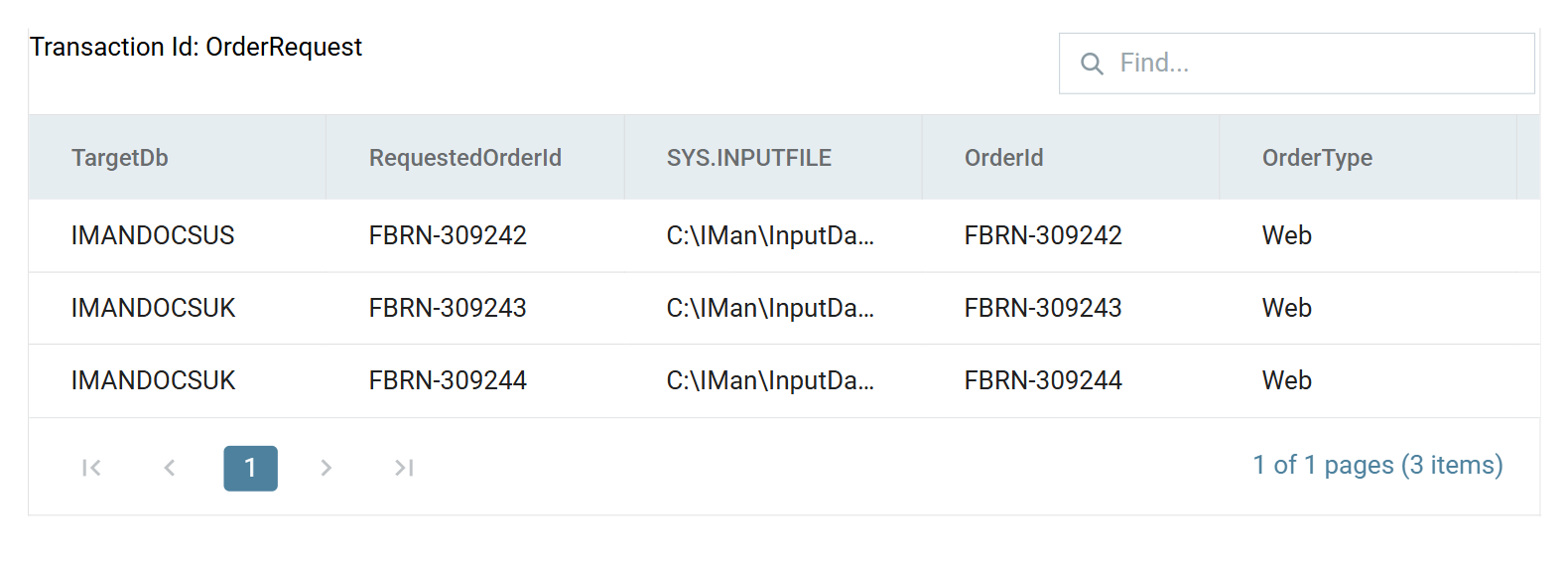
At run time IMan resolves the connection once per incoming row. A dataset whose rows name two databases opens two connections, and the reader is still a single transform:
What a value may contain
A bound value names a database, server, instance or file: an identifier or a path. IMan refuses any other value before it is substituted. IMan then checks that the resolved string names the same kind of provider and the same set of segments as the template. An unmapped parameter, a field that the input does not supply, and an empty value each raise their own error naming the parameter.
Options
SQL Statement
The SELECT statement whose result set this reader consumes.
The on-screen help says how to reference the incoming data: "The SELECT statement whose result set this reader consumes. Type % to insert a field from the input record."
Parameterising the SQL statement
Type % to open a picker of the fields the preceding transform supplies.
Choose one to insert it as %[FieldName]. IMan resolves the statement once per
incoming row, so one reader fetches a different row for each record it is
given:
As with the connection parameters, the reader must have a parent to supply the fields and their values.
Textual values need no quote marks
Textual values do not need surrounding quote marks. The example above
resolves correctly against an nvarchar column.
Query Timeout (seconds)
How long a query may run before IMan abandons it. The default is 30.
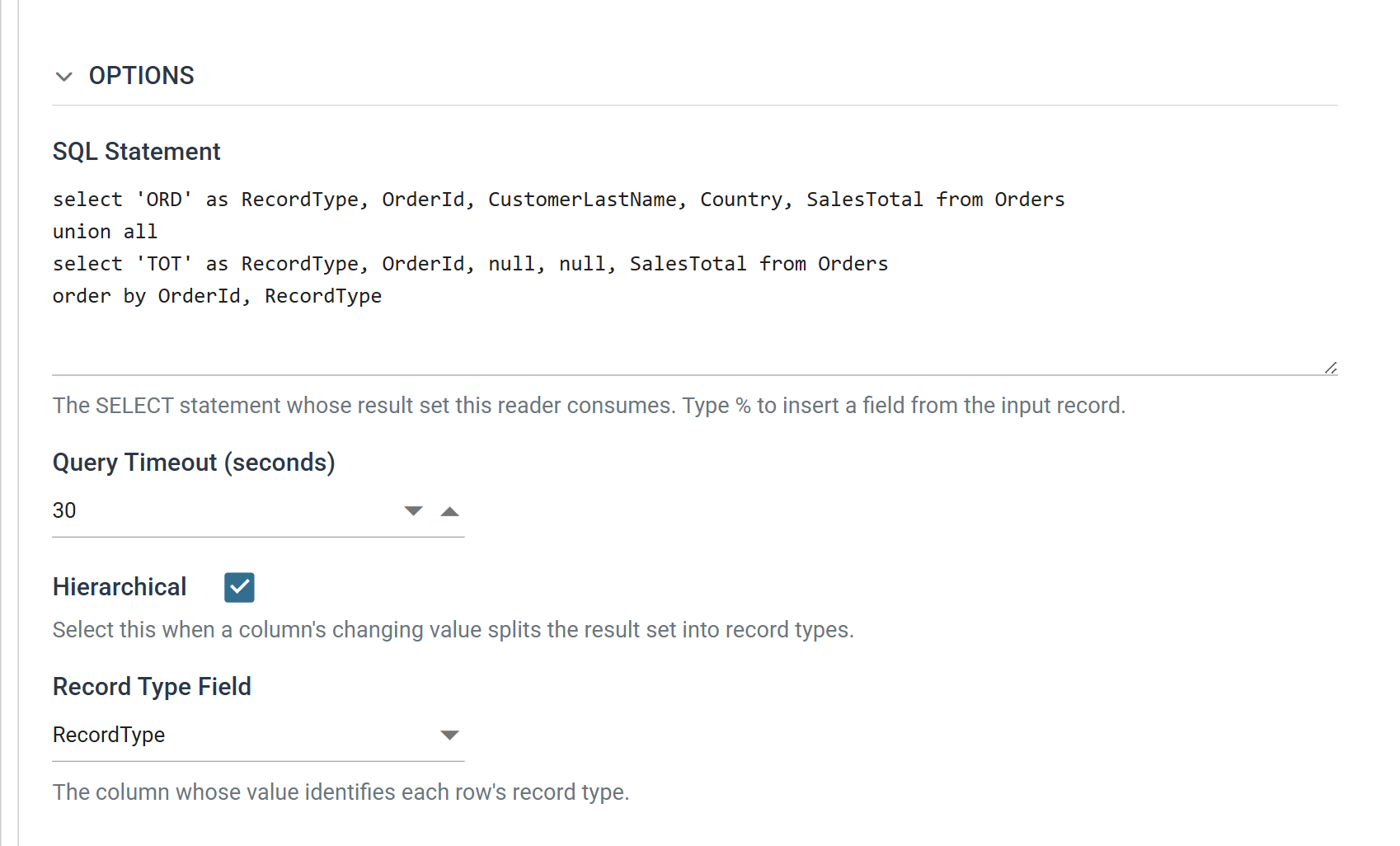
Hierarchical
Tick this when a column's changing value splits the result set into record types, that is, when one query returns headers and details together.
Its help text says as much: "Select this when a column's changing value splits the result set into record types."
Record Type Field
Renders only when Hierarchical is ticked.
The column whose value identifies each row's record type.
Hierarchical data
A hierarchical dataset can be built from one query where the result set distinguishes its record types. Two things must be true of the query:
- a column identifies the type of each row — header, detail, sub-detail;
- that column is in the same position for every row. A
UNIONgives you this.
Example
One query returning an order row and a totals row for each order. The first column is the discriminator:
select 'ORD' as RecordType, OrderId, CustomerLastName, Country, SalesTotal from Orders
union all
select 'TOT' as RecordType, OrderId, null, null, SalesTotal from Orders
order by OrderId, RecordType
| RecordType | OrderId | CustomerLastName | Country | SalesTotal |
|---|---|---|---|---|
ORD |
FBRN-309243 | Ward | United Kingdom | 1532.60 |
TOT |
FBRN-309243 | 1532.60 | ||
ORD |
FBRN-309244 | Esperanca | United Kingdom | 1935.00 |
TOT |
FBRN-309244 | 1935.00 |
Tick Hierarchical before running the first Refresh Schema. The record type of the first row becomes the root transaction and every other type a child of it. This happens only while IMan creates the definition. If the fields were detected flat and you make the reader hierarchical afterwards, the root has no record type against it. Every run then fails at load with "Sequence contains no matching element". Renaming the root does not fix it. You have to delete the reader from the diagram and build it again.
Each transaction needs keys, and each child at least one more than its parent. Without them the run stops before reading anything:
"There are no keys defined on the parent transaction [ORD]. Key [1] could not be found for child [TOT]. Each child must have at least one more key field than its parent."
Refresh with a query that returns every transaction type
Use a query that returns every transaction type. You cannot define extra types by hand afterwards. They come only from what Refresh Schema detects.
Field Mapping
Schema changes
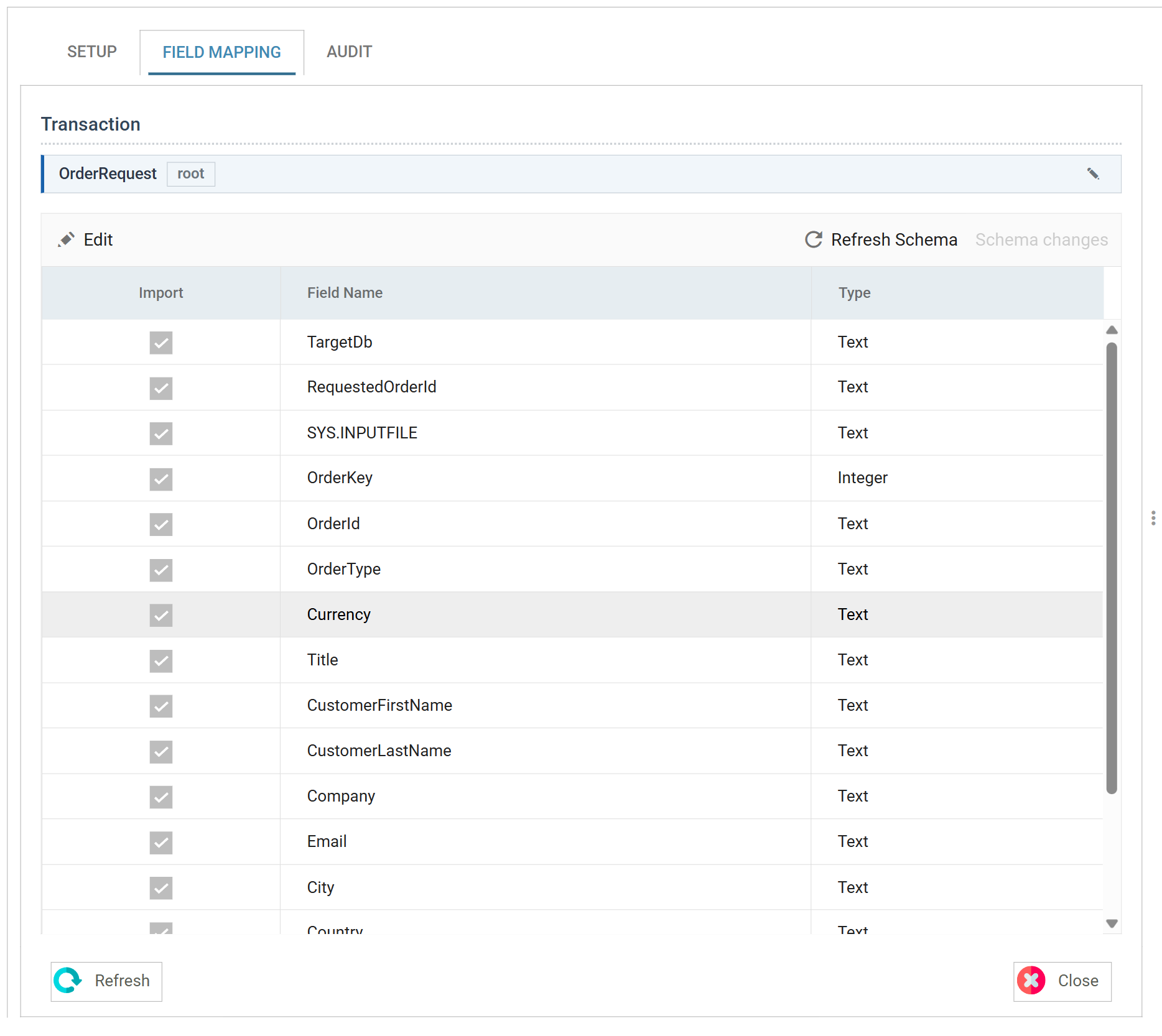
Press Refresh Schema on the field grid's toolbar and IMan queries the database, compares what comes back with the stored definition, and lists the differences for you to review before it applies any of them. Every reader carries the same two toolbar items. Transform > Field Mapping describes them.
Until you run Refresh Schema and apply its changes, the grid shows the definition from the last refresh. If you change the query, the grid still shows the old fields until you refresh.
Transaction
A flat reader shows one transaction and a selector above the grid. A hierarchical one shows the tree instead, with the root at the top and each detected record type beneath it. Selecting a transaction opens it in the grid.
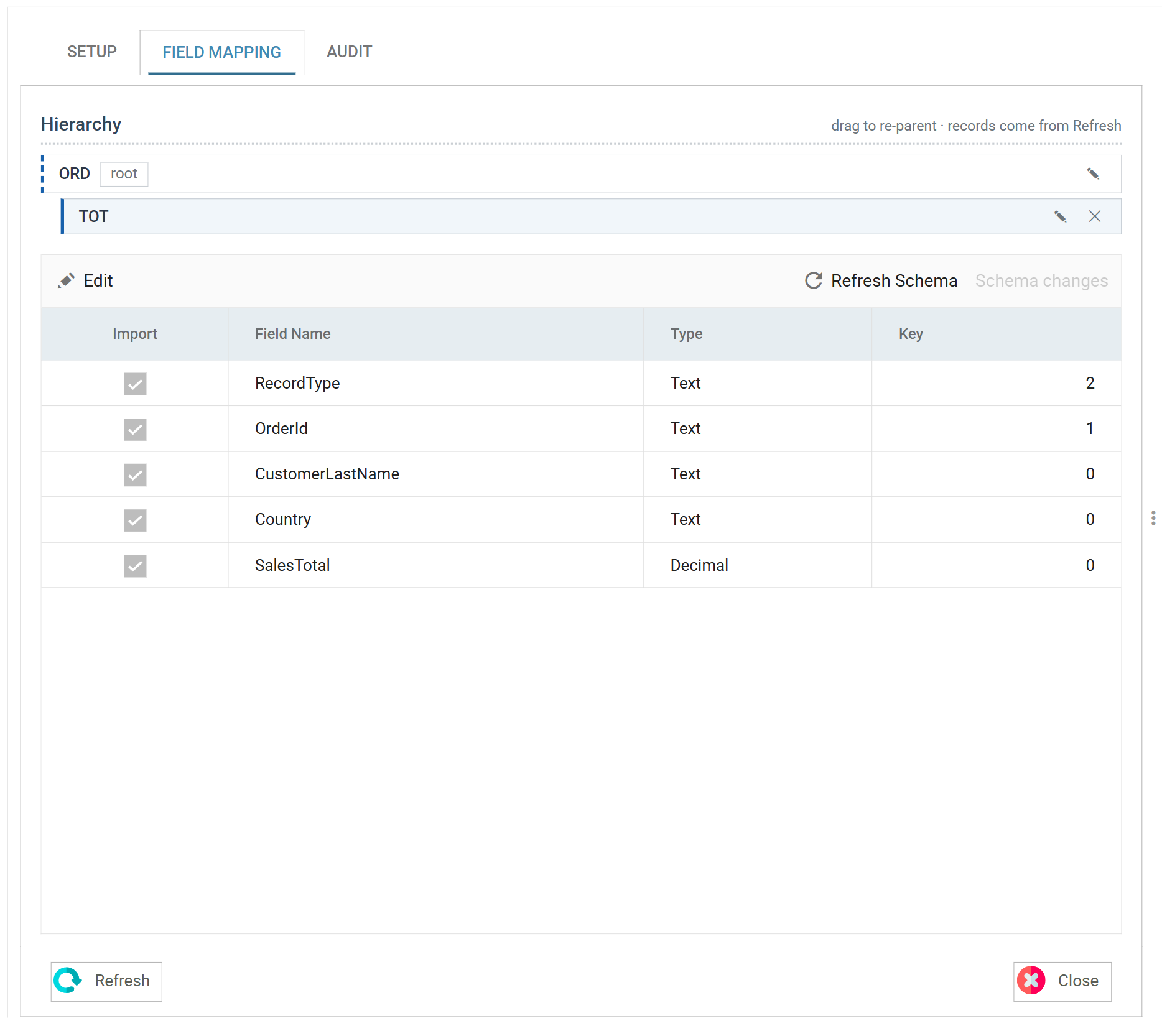
You can rename a transaction from the tree. The detected names are the values
of the Record Type Field, such as ORD and TOT. Rename
them to something anyone working on the integration will recognise.
Import
When ticked, the field is included in the dataset. When unticked, it is left out.
Field Name
The name identifying the field, taken from the query's result set. It cannot be changed here. To change it, alias the column in the SQL:
Type
The data type of the field.
Detection reads names and positions from the result set and takes the type from
the column where the driver reports one, so a decimal column arrives as
Decimal and a datetime as Date/Time.
Key
Hierarchical datasets only.
The key places a record correctly within the dataset: a child's key
fields must match its parent's. The value is a number (0, 1, 2), not a
check box, and 0 means the field is not a key.
Each child transaction must have at least one more key than its parent. The extra key identifies each individual child record within its parent.
Audit
Supported counters
- PROCESSED — incremented for each record read.
- INSERTED — incremented for each record added to the dataset.
The rest of the tab is described on Transform > Audit.