Audit Tab
The Audit tab is the last tab of every transform setup pane. It sets three separate things: what happens when the transform errors, what it writes to the detail log, and the lines it contributes to the Audit Report.
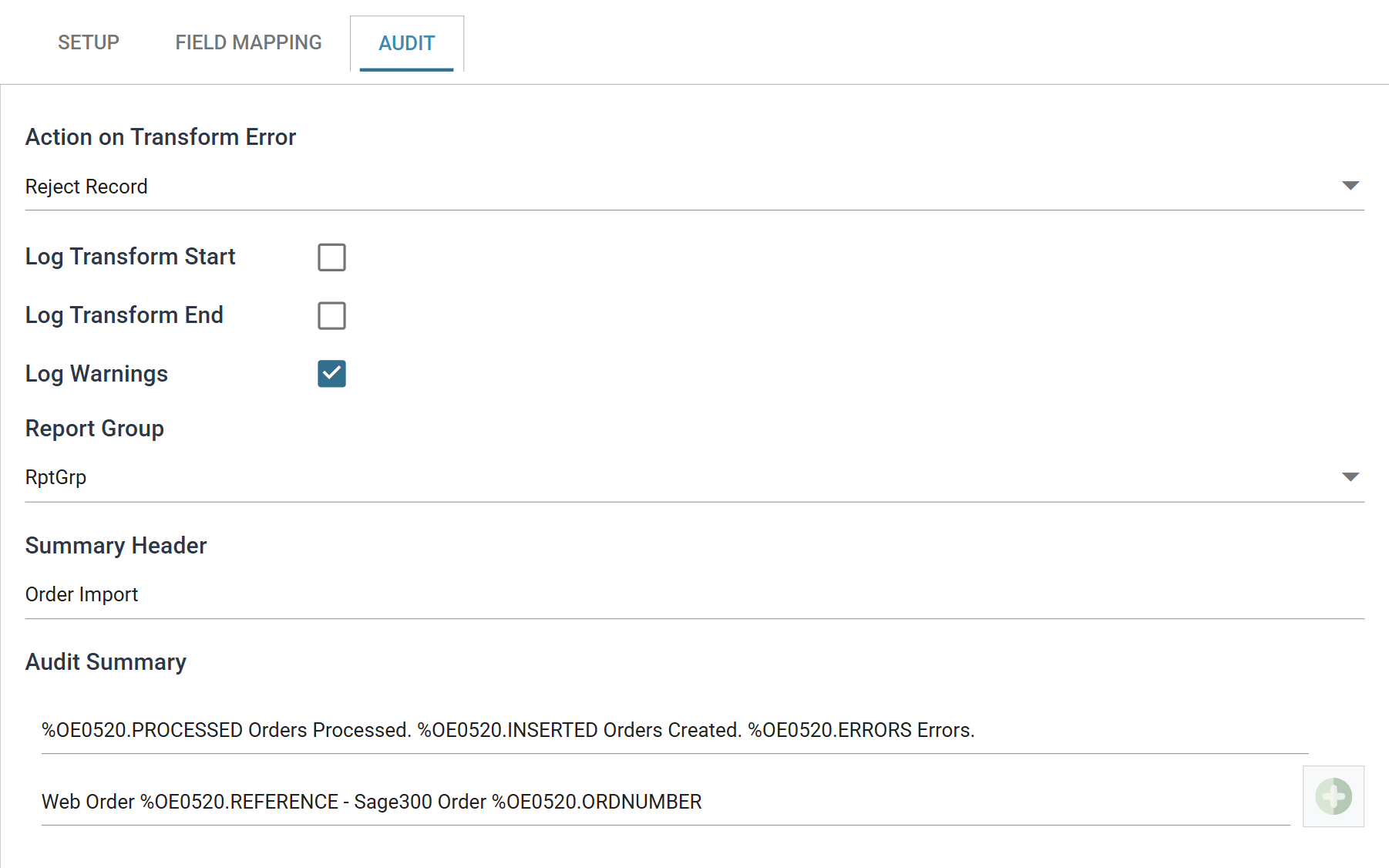
Action on Transform Error
What the transform does when a record raises an error.
- Abort
- IMan re-throws the error and the transform fails. The whole integration then stops, unless its Action on Transform Failure is Continue.
- Reject Record
- The transform rejects the record, and the record and any files associated with it do not continue downstream. Processing carries on with the next record.
- Continue
- IMan records the error and processing carries on. The record stays in whatever state the failure left it in.
The last two differ only where the transform has something to reject, such as a connector writing a document. In transforms that evaluate a script for each record, such as Map and Filter, both abandon the rest of that record's processing and move on. There, the choice between them changes nothing, and the decision that matters is whether to use Abort.
Continue can hide failed records
With Continue, an integration can finish successfully even though some of its records failed. Use it when partial success is acceptable and someone reads the errors on the Audit Report afterwards. Do not use it if nobody reads that report.
Log Transform Start
Writes an event to the detail log when the transform begins.
Log Transform End
Writes an event to the detail log when the transform finishes.
Log Warnings
Writes any warnings raised during the transform to the detail log. This covers warnings only. IMan always logs errors.
Only connector transforms generally raise warnings
Only some transforms raise warnings. Warnings come from an application's own API, so this setting affects connector transforms and generally has no effect elsewhere. For more on APIs see Application Connectivity.
Report Group
The group this transform's audit lines are collected under on the Audit Report.
Report Groups divide the report for a large integration into sections that mean something to the people who read it. You define them for the whole integration, not here. See Report Groups.
Summary Header
A heading printed above this transform's lines on the Audit Report.
Static text, and optional. Set it where several transforms share a Report Group, so readers can tell their blocks of lines apart.
Audit Summary
The lines this transform contributes to the Audit Report.
Each row is one line of the report. + adds a row, and the bin removes one after you confirm. Drag the handle at the left of a row to move it. The rows print in the order they are listed.
A line can be static text, or it can contain Expando Fields and transform counters. IMan replaces these with real values when it writes the report.
The field picker
Type % in a row to open a picker of everything you can insert into it,
grouped by transaction and labelled with each entry's type.
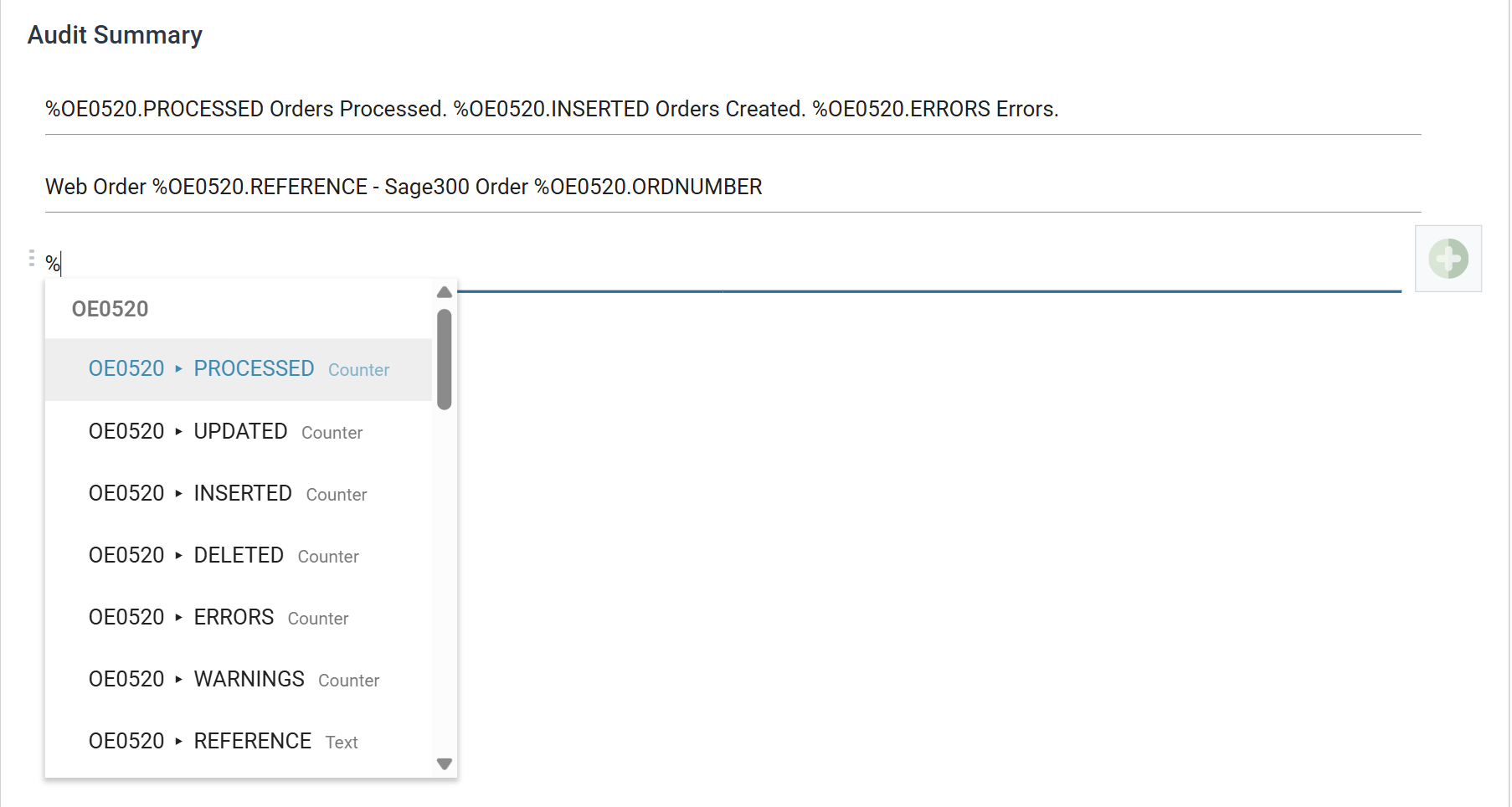
The counters are listed first, marked Counter. The transaction's own fields
follow, with their data types. The picker offers only the counters the
transform maintains, so it also shows which counters this transform supports.
Transform counters
A counter records how many records something happened to during the transform. Each transaction type keeps its own set. Reference a counter with the same syntax as any other replacement:
Where <COUNTERTYPE> is one of:
- PROCESSED
- The number of records processed.
- INSERTED
- The number of records inserted or created.
- UPDATED
- The number of records updated.
- DELETED
- The number of deleted records.
- ERRORS
- The number of transactions which generated errors.
- WARNINGS
- The number of transactions which generated warnings.
Not every transform maintains all six. A reader counts PROCESSED and INSERTED and nothing else. A Filter counts PROCESSED, DELETED and ERRORS. A connector counts all six. A counter the transform does not keep has no value. If you reference one, the line is wrong but IMan raises no error. Use the picker, which offers only the counters the transform maintains. Each transform's page lists its counters under Audit.
Example
To report the number of transactions processed, the number of successfully created transactions and the number of errors:
Against a run that read twelve orders and created eleven, it appears in the Audit Report as:
Each audit summary line can have several replacements, but it can reference only one transaction type. If a line references more than one transaction type, the references do not expand and report an empty value ‘0’.
See Audit Report, Auditing and Log Keys for more on how the report is assembled.
Writing Errors and Warnings Back to the Dataset
A transform can write its errors and warnings back to the dataset, so another application can read them.
To capture errors and warnings onto the dataset, define one or more fields in the Field Mapping Tab with one of the following names:
- SYS.ERROR
- To capture error messages.
- SYS.WARNING
- To capture warning messages.