Lookups Setup
A lookup has two halves: the definition set up here under Setup > Lookups, and the VBScript Lookup Function that calls it.
The Lookup Function works anywhere VBScript does
You can use the Lookup Function in any area of IMan that supports VBScript.
Setup > Lookups
IMan lists lookups under Lookups in the Setup tab, with Add, Edit and Delete above the list. Both Add and Edit open the same form.
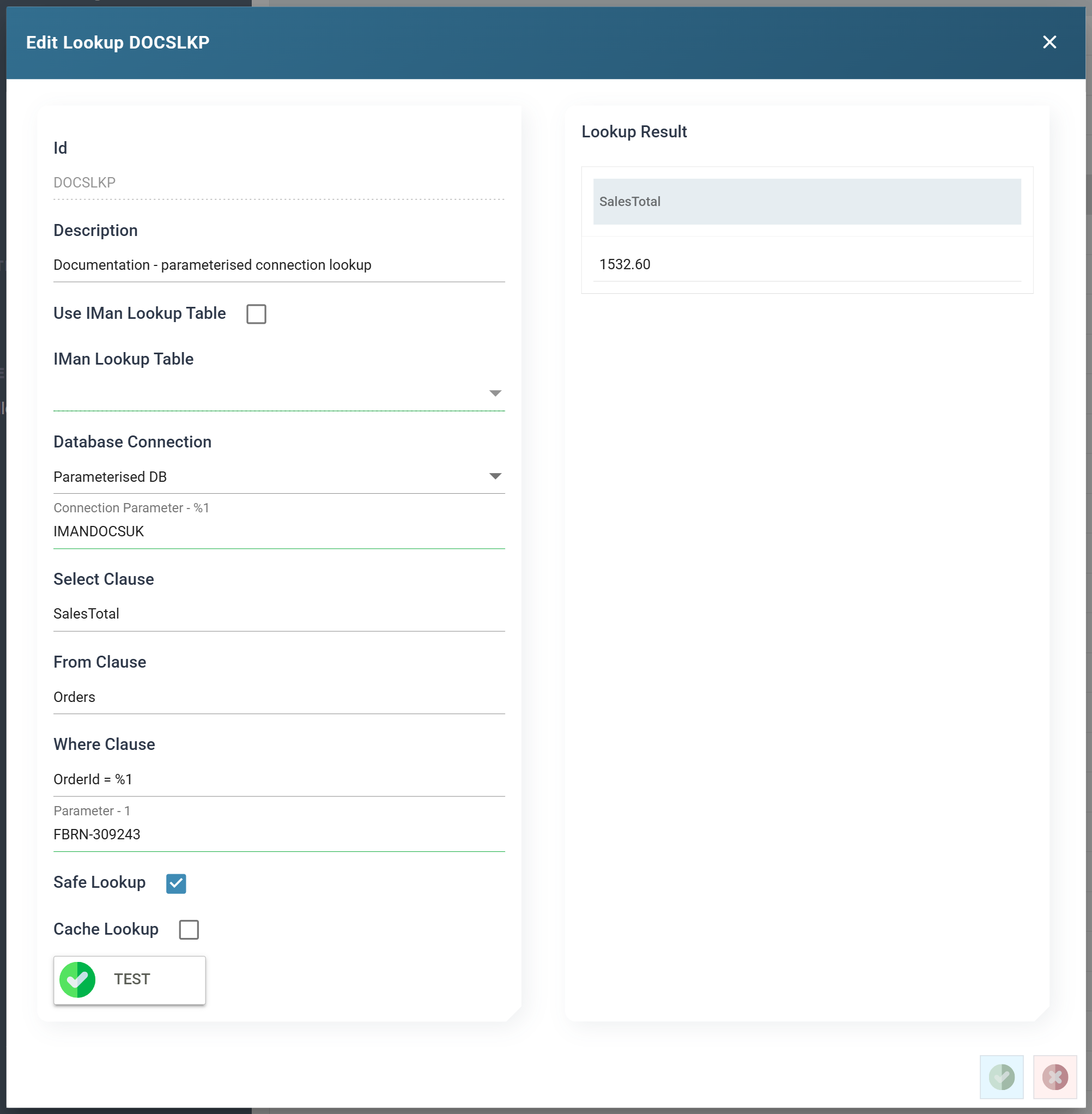
Id
The unique Id given to the lookup, up to 12 characters. The Lookup function names the lookup by this Id. You cannot change it after you create the lookup.
Description
A useful description of the lookup, up to 60 characters.
Use IMan Lookup Table
When ticked, the lookup reads one of the tables IMan maintains itself. IMan Lookup Table below chooses which.
When unticked, the lookup queries an external database. The connection and the three clauses below become available instead.
IMan Lookup Table
Internal lookups only.
The internal lookup table to read — see Lookup Tables.
Database Connection
External lookups only.
Either pick a saved connection from the drop-down — see Database Connections — or type a connection string directly into the same control.
The connection string must be in ODBC format. Native .NET connection strings are not valid. connectionstrings.com is a good reference for building one.
When the connection string you type holds a password, IMan masks it in the same way as a saved Database Connection, and a Show secrets button appears under the box. Press it to show the stored values, and press Hide secrets to mask them again. Showing them needs the Can reveal a stored secret in full permission.
Connection Parameter
Renders one box per parameter, only when the connection string carries them.
You can parameterise a connection string so that the same lookup points at a
different database on each call. The
Lookupdb
and
LookupWhere
functions' dbContext argument supplies that database at run time.
Here the parameters are numbered (%1, %2, %3) and must run
consecutively from %1. IMan counts both the bare and the bracketed spelling,
so Database=%1 and Database=%[1] are the same parameter. IMan does not count
a named parameter such as %[CompanyDb], and a lookup will not prompt for
one. Named parameters belong to the merge-field grammar that the
Database Reader
and
Database Writer
use.
Each parameter gets a Connection Parameter - %n box on this form.
These values are for testing only
What you type into a Connection Parameter box is not saved with the lookup. It gives Test a database to run against. The boxes are empty again the next time you open the lookup.
At run time the value comes from the calling function's dbContext
argument. If you leave the box empty and press Test, IMan connects with
the parameter unresolved. The test then fails against whatever the driver
falls back to. The failure typically shows as "Invalid object name" on
the table named in the From clause, not as a connection error.
Select Clause
External lookups only.
The select portion of the query — what to retrieve, such as a customer id.
From Clause
External lookups only.
The from portion of the query — the table or view to read.
Where Clause
External lookups only.
The where portion of the query. It says which record to find.
You can use several parameters: %1, %2, %3 and so on. %1 is the first
value in the list of parameters passed to the Lookup function, %2 the second,
and so on.
The where clause's numbering is its own
The %1 in a Where Clause and the %1 of a
Connection Parameter are unrelated. The where
clause's %1 selects a record and comes from the function's parameter
list. The connection's %1 selects a database and comes from the
function's dbContext argument.
Parameter Values
As you edit the Where Clause, IMan adds a Parameter - n box for each parameter in it.
Like the connection parameter boxes, these boxes are for Test only. IMan does not save them with the lookup.
Safe Lookup
When ticked, IMan passes the where clause's parameter values to the database as parameters. This prevents SQL injection.
When unticked, IMan substitutes the values into the where clause as text. This
allows more complex queries, such as IN clauses and dynamically generated
conditions, but removes the protection.
Enable Safe Lookup wherever possible, and especially in WebAPI scenarios or anywhere IMan may consume data from an unknown source.
Cache Lookup
When ticked, IMan keeps the result of each call. It answers a later call for the same values from the cache instead of querying the database.
Caching helps most on larger datasets where the same values are looked up repeatedly. Where the spread of requests resembles a normal distribution, performance improves by 50–65%.
Test Button
Runs the lookup as configured, using the values in the Parameter and Connection Parameter boxes, and shows what comes back in the Lookup Result panel beside the form.
If the lookup fails, IMan shows the database's own message in the same place.