Common Functions
Common functions let you set up a shared library of VBScript functions. You can call them from any transform or task that supports VBScript, such as the Map, Filter or Aggregate transforms.
Setup > common Functions
Common functions can:
- Hold common logic for use throughout an integration or across several integrations.
- Keep complex functions in one place, where they are easy to edit.
- Be used in areas that only support in-line VBScript, such as the File Name field on a File IO controller.
Common Functions have many properties
- Can be either a Sub or a Function.
- Must have a method header and footer.
- Can have arguments.
- Are called in the same way as any other Sub or Function.
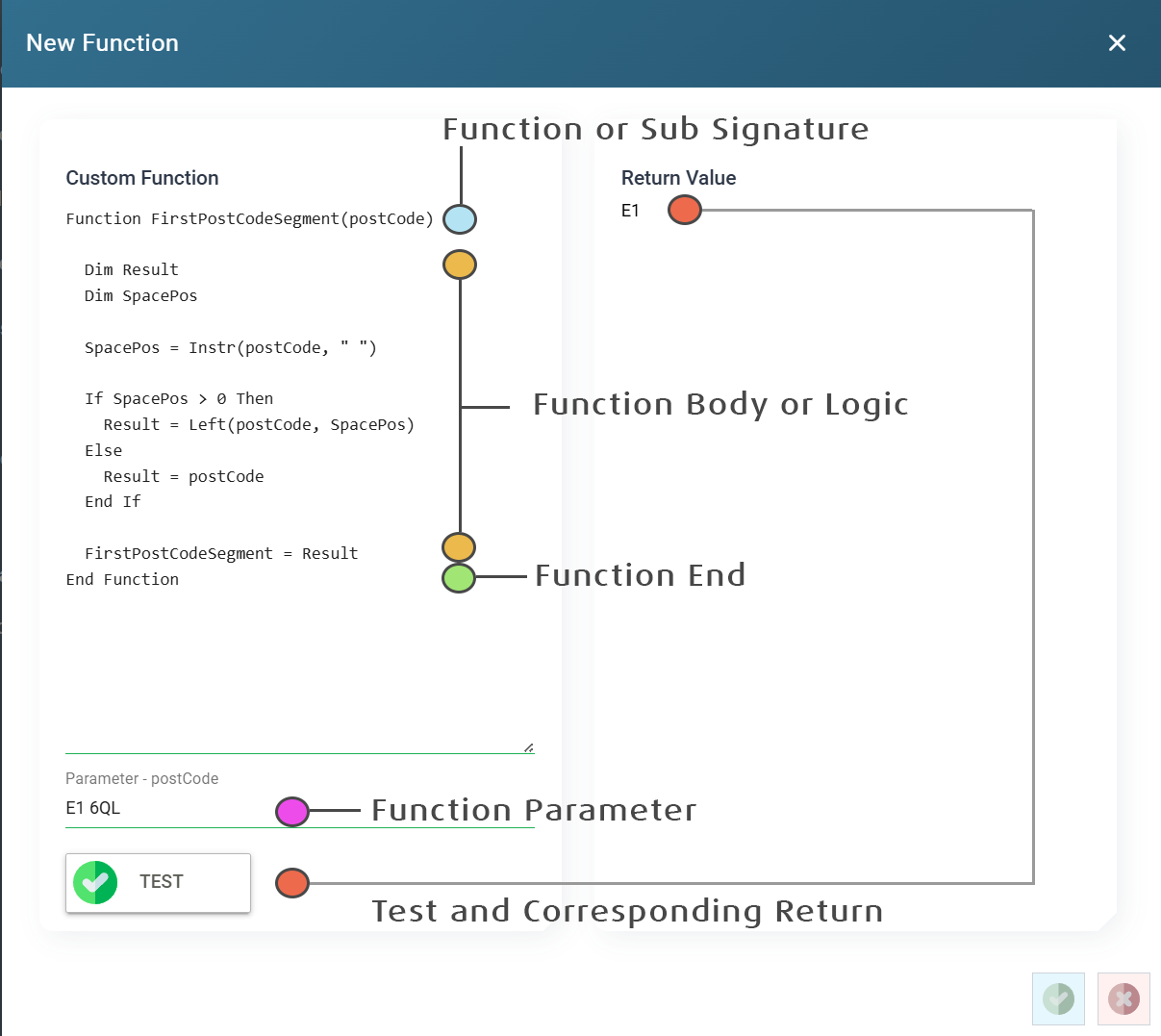
The example function below shows the parts of a common function.
Test Button
Press Test to run the function.
IMan checks the syntax and, if it is valid, runs the function.
Each parameter in the function signature has its own text field. IMan passes the values you enter in these fields to the function when it runs.
The function uses the values from the parameters, and IMan shows the result on the right-hand side.
IMan raises an error if the function uses a contextual function such as GetValue, Sum or Minimum. These functions need a transaction context to run.