Office 365 mailbox
The form for a mailbox on Office 365 that IMan reaches through an Azure app registration, with an Email Type of Office 365 (OAuth). The host and port are Microsoft's, so you do not enter them. Instead, you authorise the record once, and IMan refreshes its own tokens from then on.
Before creating one, register an application in the Azure Active Directory of the Office 365 tenant. See Azure App Configuration. The registration must hold the permission for the protocol chosen below.
Setup > POP3/IMAP Servers
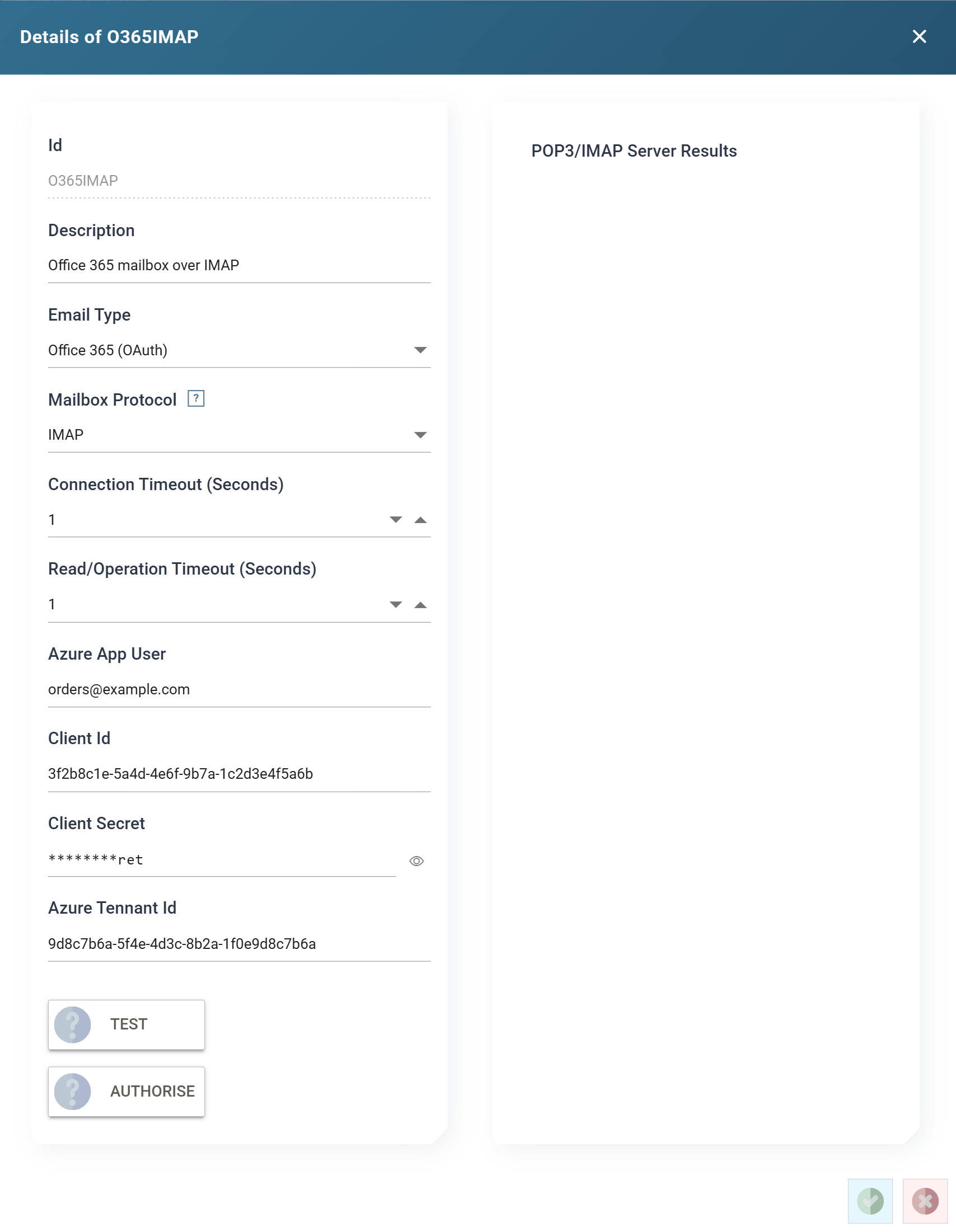
Id
The unique Id for the record, up to twelve characters. You cannot change it once saved.
Description
Up to sixty characters, shown by the Email Server and Email System drop-downs throughout the Designer.
Email Type
Office 365 (OAuth) for this form.
Mailbox Protocol
POP3 or IMAP. See Mailbox Protocol for what the choice means to an integration.
On an Office 365 account, the protocol also decides which consent
Microsoft asks the account for when you authorise it: POP.AccessAsUser.All
for POP3, IMAP.AccessAsUser.All for IMAP. If the consent is refused, the app
registration does not hold that permission. A tenant administrator must add it
under the registration's API permissions and grant admin consent before
AUTHORISE can succeed.
Changing the protocol on an authorised account
Consent is granted one protocol at a time, and a refresh token only renews what was granted. A token issued for POP3 cannot read the account over IMAP. So when you change the Mailbox Protocol of an authorised record, saving it clears the tokens the record holds, and the form warns you before you save. Press AUTHORISE again before the next run, or the run fails to connect.
Connection Timeout (Seconds)
How long IMan waits for Microsoft's server to accept the connection, from 1 to 120 seconds.
Read/Operation Timeout (Seconds)
How long IMan waits for the server to answer a command, from 1 to 1200 seconds.
Azure App User
The Office 365 account whose mailbox IMan reads. The app acts as this user.
Client Id
The application (client) id of the Azure app registration.
Client Secret
A client secret issued to the registration.
IMan masks the saved client secret. The box shows ********, followed by
the last three characters when the client secret is eight or more characters
long. Press the eye button beside the box to show the stored client secret,
and press it again to hide it. Showing a stored client secret needs the Can
reveal a stored secret in full permission. To change the client secret,
click in the box and type the new one. Leave the box empty to keep the
stored client secret.
Azure Tenant Id
The directory (tenant) id of the Office 365 tenant.
TEST
Connects and logs in with the settings on the form and the tokens the record holds, and reports the exchange in the POP3/IMAP Server Results pane. Until you authorise the record, it holds no tokens and the test fails at the login.
AUTHORISE
Starts the Authorisation with Office 365. You sign in to Microsoft as the Azure App User and consent to the protocol's scope. IMan stores the returned tokens on the record and refreshes them before they expire. Save the record first, then authorise, then TEST.