FTP Server
Before you can use the FTP task, you must configure the FTP connection.
You define FTP server connections on the FTP Server setup screen. A connection can be standard, SSL, implicit SSL or SSH (SFTP).
Setup > FTP Servers
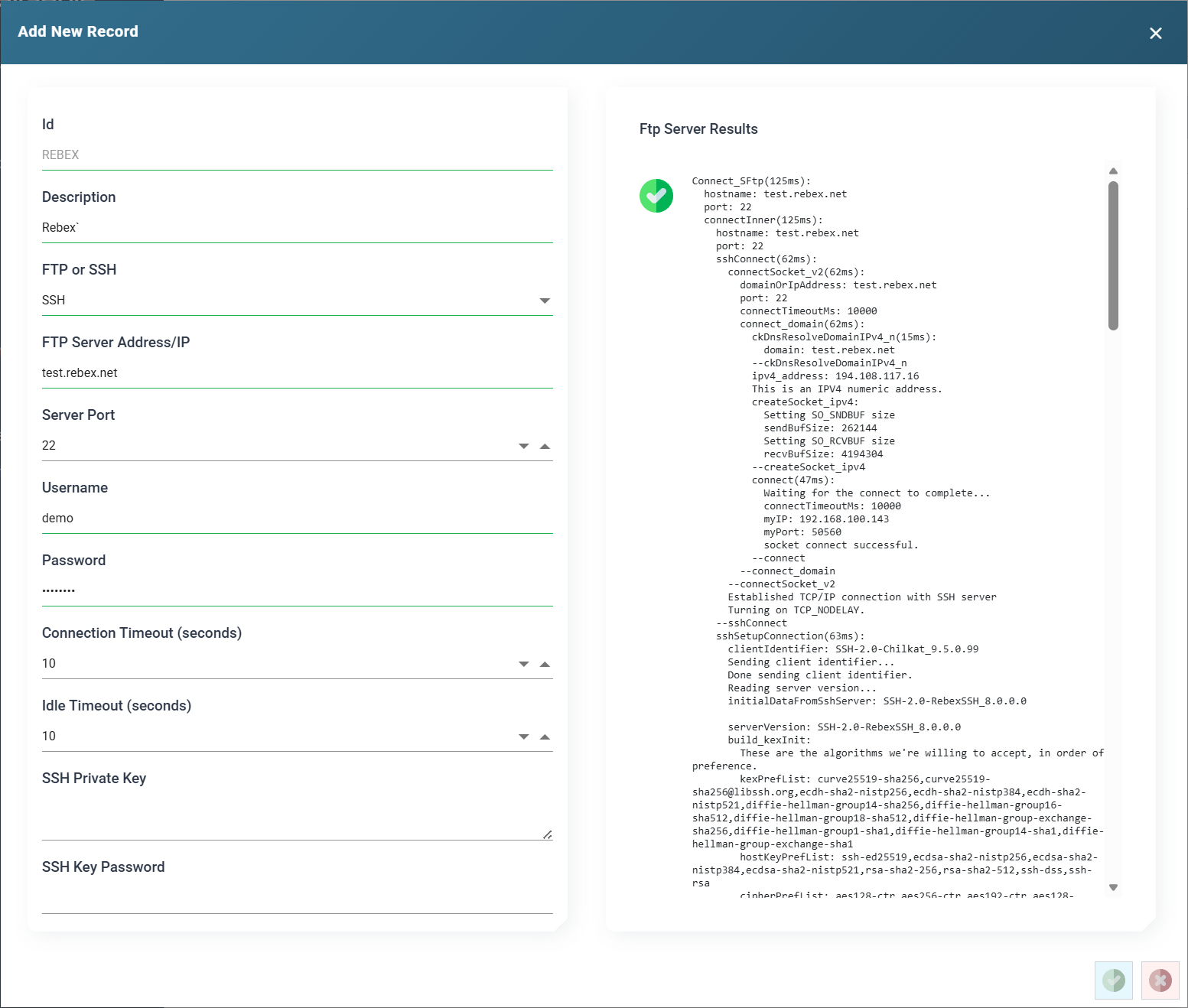
ID
The Id of the FTP Server connection.
Description
A useful description for the connection.
Ftp / SSH
Specifies whether the connection is FTP or SSH.
Selecting a type displays the entry fields for that connection type.
Server Address
The address of the FTP Server. The address can be an IP address or a DNS name.
Server Port
The port for the FTP connection.
You only need to specify the port when the FTP service runs on a port other than the default:
- Default port for standard FTP is: 21
- Default port for implicit SSL is: 990
- Default port for SSH is: 22
Username
The username for the server.
Password
The password for the server.
IMan masks the saved password. The box shows ********, followed by the last three characters when the password is eight or more characters long. Press the eye button beside the box to show the stored password, and press it again to hide it. Showing a stored password needs the Can reveal a stored secret in full permission. To change the password, click in the box and type the new one. Leave the box empty to keep the stored password.
Connection Timeout
The time in seconds IMan waits for a connection before it raises an error.
Idle Timeout
The time in seconds that a connection can be idle before IMan raises an error.
SSL (FTP Only)
Enables the FTP connection to use SSL.
Implicit SSL (FTP Only)
Enables the FTP connection to use implicit SSL.
SSH Private Key (SSH Only)
When populated, IMan attempts to authenticate with the SSH server using public-key authentication. The matching public key must be installed on the SSH server for the username.
Authentication will succeed if the matching private key is provided.
Key authentication usually replaces a password, but you can also use it together with a password.
The private key can be unencrypted, or encrypted in one of the following forms:
- PKCS8 (-----BEGIN ENCRYPTED PRIVATE KEY-----)
- Proc Type 4 (Proc-Type: 4,ENCRYPTED)
- OpenSSH (-----BEGIN OPENSSH PRIVATE KEY---- and openssh-key-v1)
SSH Key Password (SSH Only)
The password for the private key, if it is encrypted in one of the accepted forms.
IMan masks the saved key password in the same way as the Password, with the same eye button.
Test
Press Test to check that the connection is valid and working.
IMan displays the results and trace of the connection on the right-hand side. If the test fails, the trace should show the cause.