Email Groups
Email Groups define the recipients of the Audit report or sections of the Audit report.
You select the email group that receives the audit report from the Email Group drop-down on the Audit tab of the main design screen.
Give the default Email Group at least one recipient
IMan creates a default Email Group in a new database. Give the default Email Group at least one recipient.
Setup > Email Groups
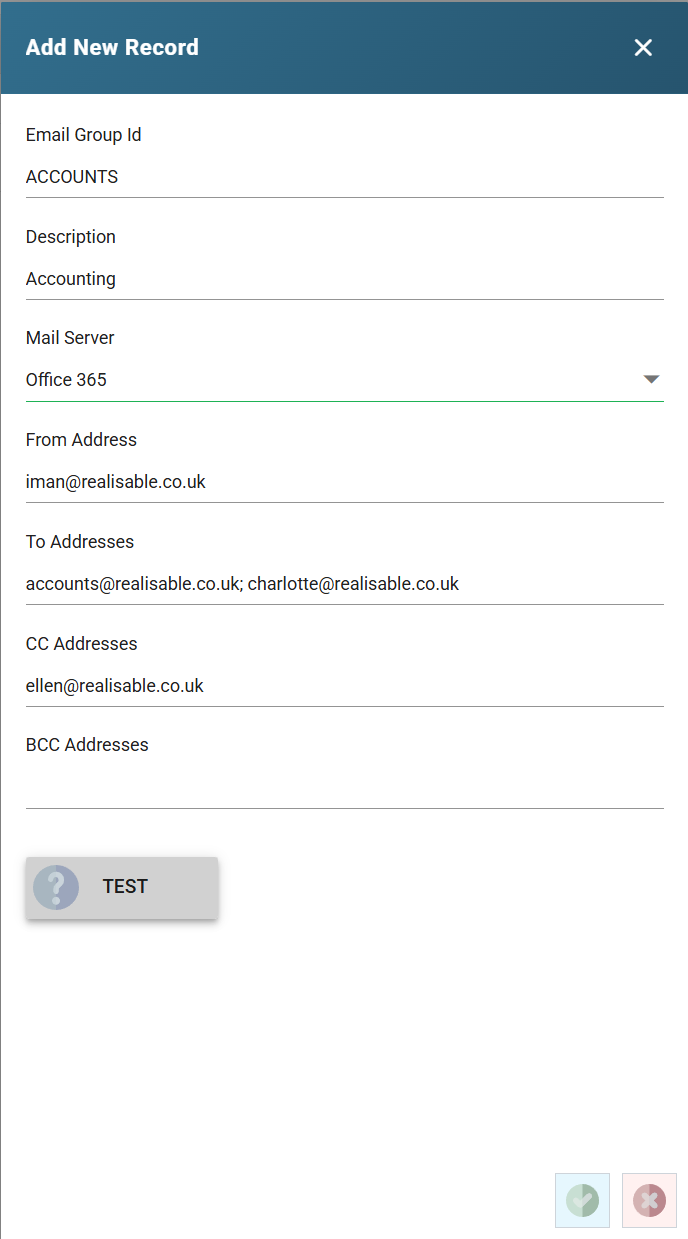
Group ID
The unique Id of the Email Group.
Description
A useful description for the Email Group.
Mail Server
The SMTP Server that sends the mail.
From Address
The address the emails are sent from.
The user that authenticates on the selected Mail Server must have the right to send mail from this address. If it does not, the emails fail to send, sometimes with an error and sometimes without one.
If the selected Mail Server sends email through the Realisable SMTP Service, IMan sends all emails from the displayed address.
Email To ; Email CC ; Email BCC
The email addresses to send the emails to.
Separate multiple addresses with a semicolon or comma. An email address may take the form:
John Smith [[email protected]]
or
John Smith <[email protected]>
The first part is the display name, and the second part, in square or angle brackets, is the email address.
Test Button
Press Test to send an email to the recipients of the Email Group through the selected Mail Server.