FTP Task
The FTP task moves files between IMan and an FTP or SSH/SFTP server as a step within an integration.
It can:
- download files from a remote server, and optionally delete them once downloaded;
- upload files to a server;
- delete a file or a folder on the remote server.
It does not read or write the dataset, so it has no Field Mapping tab. Everything is on the Setup tab.
Setup
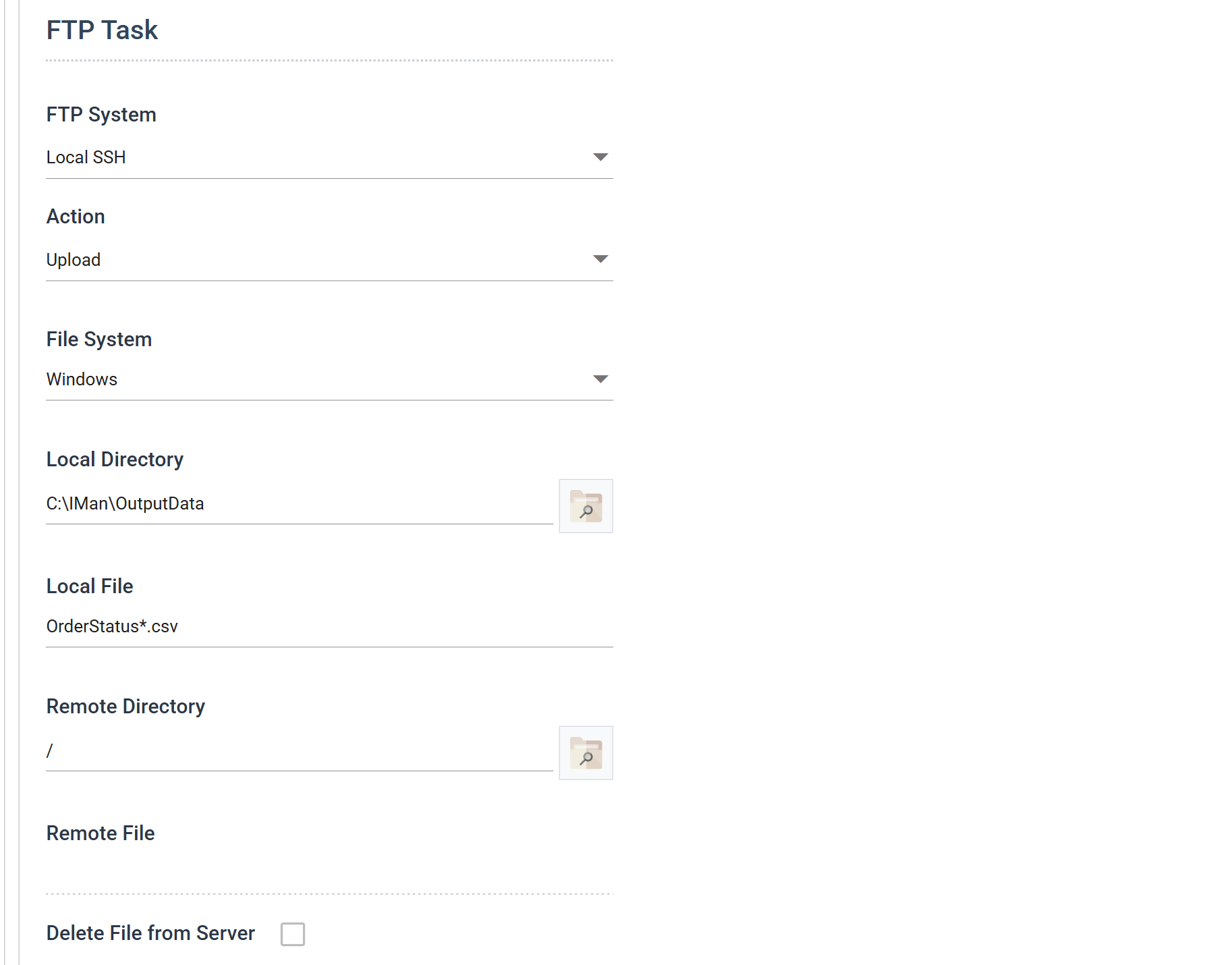
Transform Id, Description and Priority are the same on every transform and are described under Transform > Setup.
FTP System
The server to connect to, defined on the FTP Server setup screen. The drop-down lists servers by their Description.
Until you choose one, the Browse button beside Remote Directory is disabled.
Action
What to do on the server.
- Download — bring files down from the server.
- Upload — send files up to it.
- Delete Remote File — delete files on the server.
- Delete Remote Folder — delete a folder on the server.
The Action decides which of the fields below are available. IMan disables the ones that do not apply, so the screen shows only what the chosen action uses:
| Field | Download | Upload | Delete Remote File | Delete Remote Folder |
|---|---|---|---|---|
| Local Directory | ✓ | ✓ | ||
| Local File | ✓ | ✓ | ||
| Remote Directory | ✓ | ✓ | ✓ | ✓ |
| Remote File | ✓ | ✓ | ||
| Delete File from Server | ✓ |
File System
The file system the local side of the transfer is on.
Windows is the IMan server's own file system. The other entries are the cloud
file systems defined on the
File Systems
screen. A download can go straight to an S3 bucket or a OneDrive folder
without a local copy in between.
Local Directory
The directory on the selected file system to download into, or upload from.
Local File
The file or files to upload, or the name to give what is downloaded.
The name may use Wildcards
(* and ?) and reference fields of the dataset
(Expando Fields), so
you can name an uploaded file from the data that produced it.
Remote Directory
The directory on the FTP or SSH server to perform the action in.
Its Browse button opens the server as a file system. Use it to check that a path exists and is spelled the way the server spells it.
Remote File
The file or files on the server to download or delete.
The name may use Wildcards and Expando Fields, as Local File does.
Delete File from Server
Available with Download only.
When ticked, the task deletes each successfully downloaded file from the server.
Audit
Supported counters
None. IMan records no counter for any FTP operation, so an audit summary cannot report on one.
Action on Transform Error
Ignored. IMan logs any error and the transform aborts, whatever this is set to.
The rest of the tab — the report group and the audit summary — works as described on Transform > Audit.
Worked example
Step 10 of the Sage 300 and Sage 200 training manuals uploads the order status feedback file written in step 9.