Script Task
The Script task runs a VBScript as a step of an integration.
It is the general-purpose task. The File, FTP and Email tasks each do one thing. The Script task does whatever you can write in VBScript.
Typical uses are to:
- Pre-process a file that IMan cannot consume natively.
- Encrypt or decrypt a file, or compress one in a format the File task does not cover.
- Call out to something with no connector of its own.
The task has no Field Mapping tab. The script can still read the dataset, through the object described under Reading the dataset.
Setup
Transform Id, Description and Priority are the same on every transform and are described under Transform > Setup.
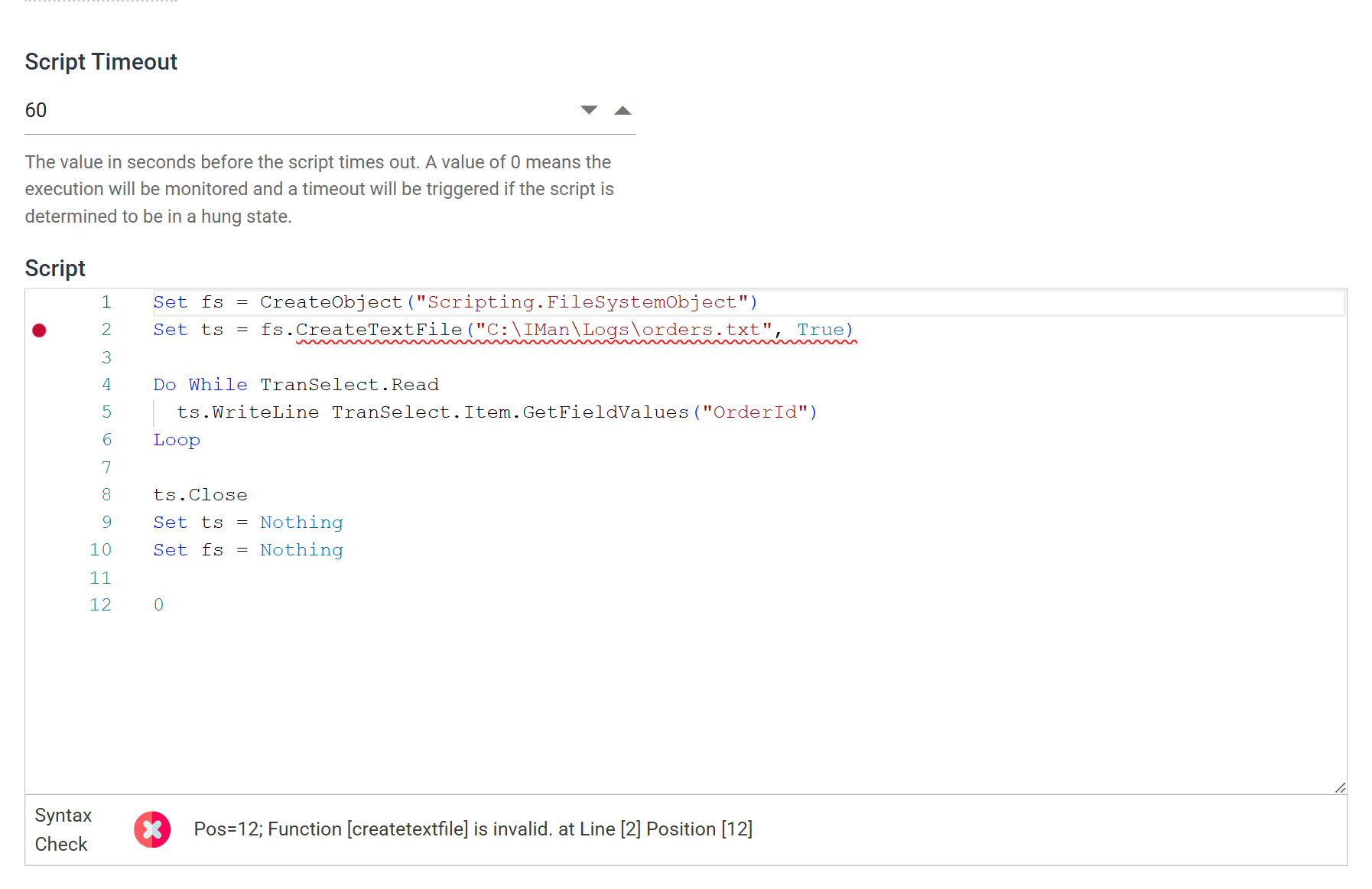
Script Timeout
How long, in seconds, the script can run before IMan treats it as timed out and raises an error. The default is 60, and the maximum is 9999.
0 does not mean no limit. It hands the decision to the VBScript runtime, which monitors the script and terminates it if it decides the script has hung. Use 0 for a script whose normal running time you cannot predict. It does not let a script run indefinitely.
A script that times out raises an error, and the integration aborts.
Script
The script itself.
The editor is full width. The Script task is the only task that uses the whole Setup body. The editor has VBScript syntax highlighting and a Syntax Check band beneath it that reports as you type.
The Syntax Check does not know about COM objects
The check validates every call against the functions IMan knows: VBScript's
own, and IMan's
VBScript Functions.
A method on an object obtained from CreateObject is in neither list, so
the check reports it as invalid. A script that uses the
Scripting.FileSystemObject shows a red mark and "Function
[createtextfile] is invalid." even though it runs correctly.
The warning reflects what the editor knows, not a fault in the script. It does not block saving, and IMan stores and runs the example below exactly as written. The check does catch a typo in a VBScript or IMan function name, and the wrong number of arguments. Expect the warning on any script that uses objects from outside VBScript.
A tick does not mean the script will run. The check tests names and argument counts, not what happens when the code executes.
The last line must evaluate to a result
The last line must evaluate to a result. IMan wraps the script in a VBScript function before it runs it, and the last line is the function's return value. A script that ends on an assignment or a statement has nothing to return.
If the script has no natural result, end it with a line holding a zero 0
or an empty string "". Every example below does.
There is no field-reference picker on this editor, and IMan does not
substitute the %[FieldName] syntax used elsewhere. Use TranSelect to reach
the data instead.
Reading the dataset
The script reaches the dataset through an object named TranSelect. It is
a cursor over the transactions that reach the task.
TranSelect.Read |
Moves to the next record and returns False when there are none left |
TranSelect.Item |
The record now under the cursor |
TranSelect.MoveChild("<TransactionId>") |
Descends into that child transaction, returning False if the record has none |
TranSelect.MoveParent |
Returns to the parent |
TranSelect.MoveFirst |
Returns to the first record at this level |
TranSelect.EOF, TranSelect.BOF |
Whether the cursor is past the end, or before the start |
TranSelect.Item gives the record. Read its fields with
GetFieldValues("<FieldName>") and write them with
SetFieldValue("<FieldName>", value). TransactionId gives the name of the
record's transaction, and HasField("<FieldName>") tests for a field before
you read it.
Example
Writing every order's reference to a text file:
Set fs = CreateObject("Scripting.FileSystemObject")
Set ts = fs.CreateTextFile("C:\IMan\Logs\orders.txt", True)

Do While TranSelect.Read
  ts.WriteLine TranSelect.Item.GetFieldValues("OrderId")
Loop

ts.Close
Set ts = Nothing
Set fs = Nothing

0
The final 0 is the result the task returns. Without it the script fails.
To walk a hierarchy, move down into each child transaction and back up again.
MoveChild returns False if the record has no children of that type, so test
its result:
Do While TranSelect.Read
  ts.WriteLine TranSelect.Item.GetFieldValues("OrderId")

  If TranSelect.MoveChild("OrderLine") Then
    Do While TranSelect.Read
      ts.WriteLine "  " & TranSelect.Item.GetFieldValues("Description")
    Loop
    TranSelect.MoveParent
  End If
Loop

0
Audit
Supported counters
None. The task keeps no counters of its own, and the Audit Summary field picker offers none.
Action on Transform Error
The setting has no effect here. IMan logs any failure and aborts the integration, whatever this is set to. A failure can be a script that will not parse, an error raised while it runs, or a timeout.
A script that has to carry on past its own errors must handle them itself, with
On Error Resume Next and a check of Err.Number.
The setting and the rest of the tab are described on Transform > Audit.