Expando Fields
An expanding field reference (expando field) lets you refer to each record in an IMan dataset. When IMan expands the reference, it generates a list of the referenced field's value in each record.
Example
In the example below, the expando field reference points to the Order Id column of the Transaction Type named Orders.
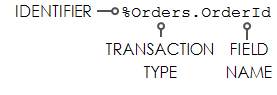
When expanded, it generates a list of the Order Id of each Order record.
Example
The statement:
Expands to:
Expando Statements
If a statement includes more than one Expando field, they must all reference the same transaction type.
Example
The Transaction types match, so the statement returns a result:
If the Expando fields in a statement reference different transaction types, only the first field expands. The rest show empty values.
Example
If the Transaction Types do not match, the statement returns an empty result:
Expando field Uses
Audit Summary
You can use them in the Audit Summary Setup to reference a particular field in the Audit Report.
Task transforms
Expando fields drive many of the tasks. The task runs its action once for each expanded entry.
Example
The Email task uses them widely for addresses, subject and email body. The File and Process tasks use them for file names.
Other Transforms
Example
The Writer transforms use them to define the name of the file they write.