Request Paging
When you ask a service for a large result, it rarely returns all of it at once. It replies with the first set of matching records (a page). IMan must ask again for the next page, and again, until there are no more records. Paging makes those repeated requests on behalf of a reader or lookup, so the integration sees one complete result.
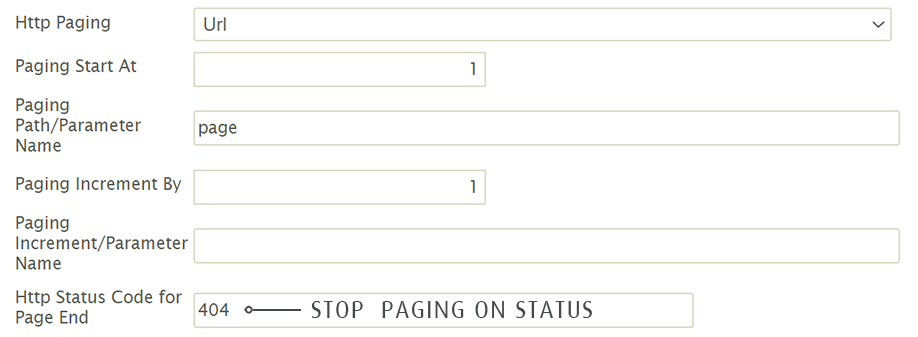
You configure paging on the Webservice Behaviour, under Throttling and Paging. The Request Paging drop-down offers None and six methods. The six methods are four mechanisms, two of which come in a JSON and an XML form. Choosing any method other than Header Link shows the fields beneath. Which fields apply depends on the method.
| Request Paging | Mechanism |
|---|---|
| Url | A parameter in the URL names the page, or the offset, and IMan increments it on each request until the service returns no records. |
| JSON Body, XML Body | The same, but the page number travels in the body of the request. |
| JSON Response, XML Response | Each response carries the URL of the next page in its body. IMan requests that URL until the value is absent or empty. |
| Header Link | Each response carries the URL of the next page in a Link response header, as described by RFC 5988. |
The paging fields
- Paging Start At: the value the page parameter takes on the first request. Typically
1, for the first page or record, but it can be0for a service whose offset counts from zero. - Paging Path/Parameter Name: for Url paging, the name of the URL parameter. For body paging, the JPath or XPath of the node in the body. For response paging, the path of the next-page value in the response.
- Paging Increment By: how much the page parameter increases by on each request. At least
1: a page number goes up by one, an offset by the page size. - Paging Increment/Parameter Name: optional. When set, IMan sends a second parameter or node of this name carrying the Paging Increment By value. This tells the service the page size. Leave it empty for a service with a fixed or default page size.
Response paging uses only the Paging Path. Header Link paging has no settings at all.
When paging stops
- Url and Body paging stop when a page comes back with no records.
- Response paging stops when the response has no next-page value, or it is empty.
- Header Link paging stops when the response has no
Linkheader, or the header has nonextlink.
Http Status Code for Page End
Some services answer a request for the page after the last one with an error, most often 404 Not Found, instead of an empty page. Http Status Code for Page End handles these services. When you enter a status code, IMan treats a response with that code as the end of the results, not as a failure. It applies to every method except Header Link. Leave it empty otherwise.
IMan finds the end by requesting the page after each one it receives. With a status code set, IMan requests every page after the first twice. Allow for this on a service with a rate limit.
A Webservice Lookup using a paged behaviour fetches every page before it looks for its value.