OAuth2 Authentication
What is OAuth 2.0
OAuth 2.0 is an authorisation framework that lets a third-party application, here IMan, access a webservice on somebody's behalf. The service can grant access in two broad ways. Either the application proves who it is and receives a token directly, or a user goes through a consent step at the service and the application receives a token that represents that user.
OAuth 1.0 is not supported
OAuth 2.0 is defined in RFC 6749 and replaces the OAuth 1.0 protocol. IMan does not support OAuth 1.0.
To use an OAuth setup, name it on a Webservice Behaviour whose Authentication Type is OAuth 2.0. The Webservices Cookbook walks through choosing a flow and setting one up against real services. This page is its field reference.
Authorisation flows
To reach the protected resources of a web API, IMan must first obtain an access token from the service and then send it with every request. There are several OAuth flows, but they fall into two forms, two-legged and three-legged. IMan supports both.
Two-legged: Client Credentials and Resource Owner Password
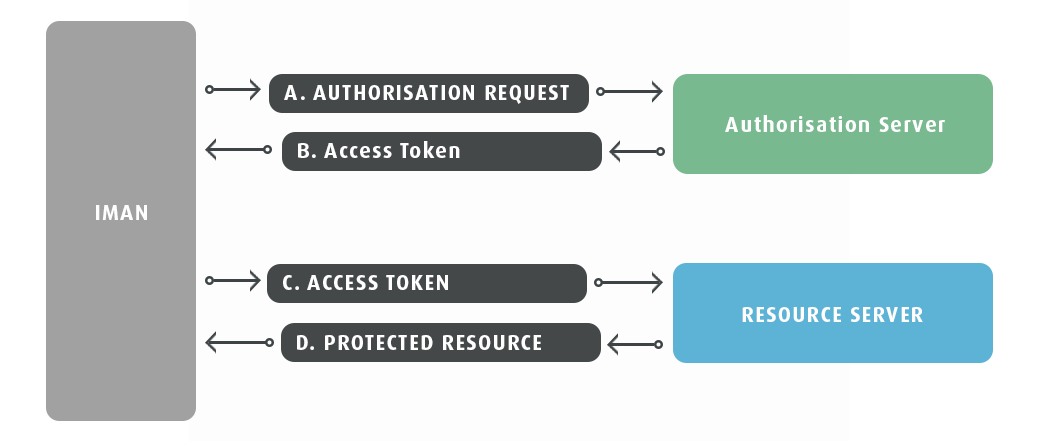
IMan presents a set of credentials to the service's authorisation server. The server returns a token, and IMan uses the token against the resource server.
- IMan makes a request (A) to the authorisation server of the service you want to connect to. Different services want different credentials: some a client id and secret, some a user name and password, some a Basic authentication header.
-
If the request succeeds, the server responds with an access token (B). A typical response looks like this:
-
IMan sends the access token with every request to the resource server (C), which responds with the data (D).
You configure both the Client Credentials grant (the application authenticates as itself) and the Resource Owner Password grant (the application sends a user's name and password) as the 2-Legged flow type. They differ only in the parameters sent in the token request.
Three-legged: Authorisation Code
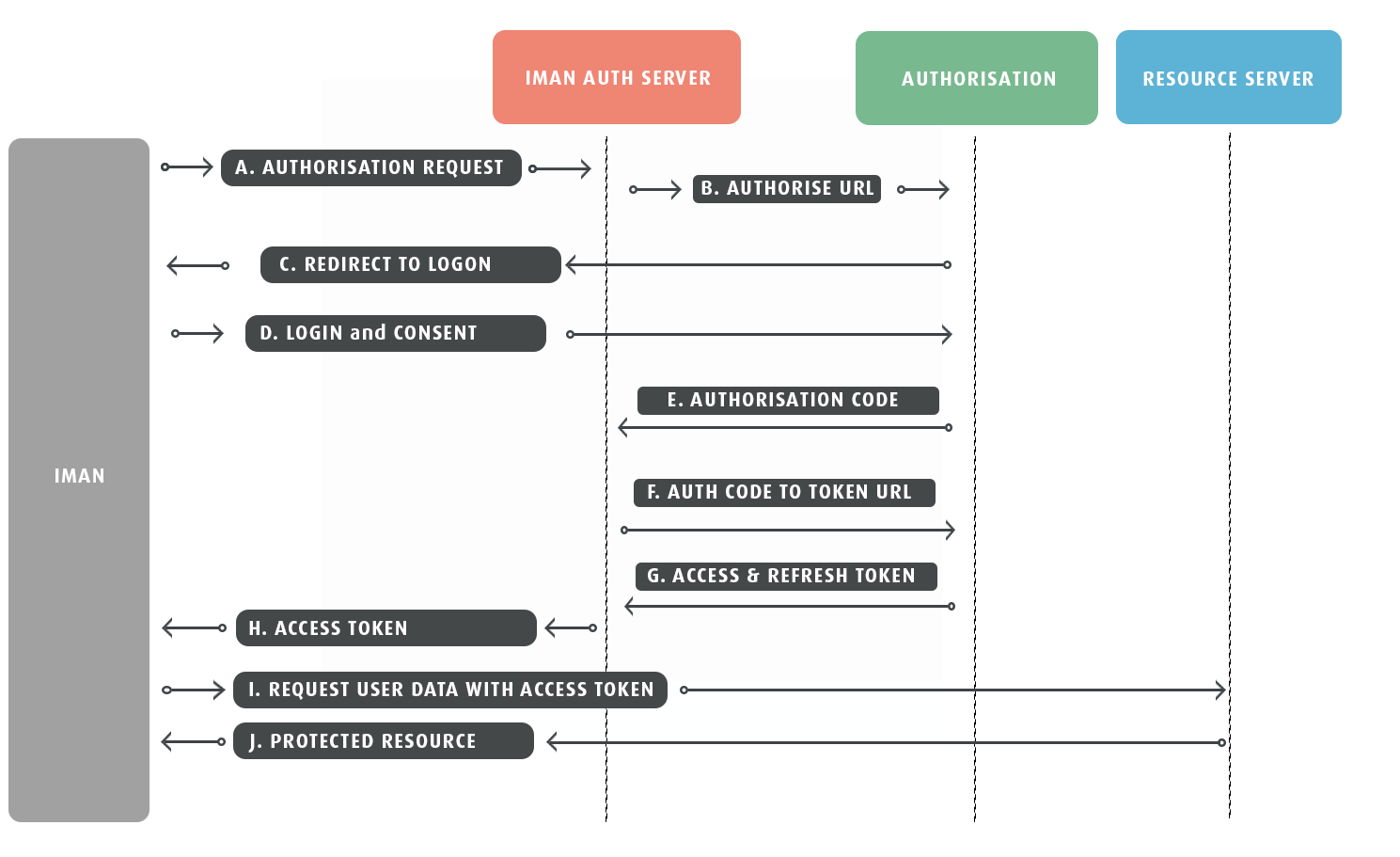
The third leg is a person. The service asks someone with an account there to consent, in a browser, to IMan acting for them. Only then does the service issue a token. The browser step happens once. The service also issues a refresh token, and IMan uses that to obtain new access tokens without anybody present.
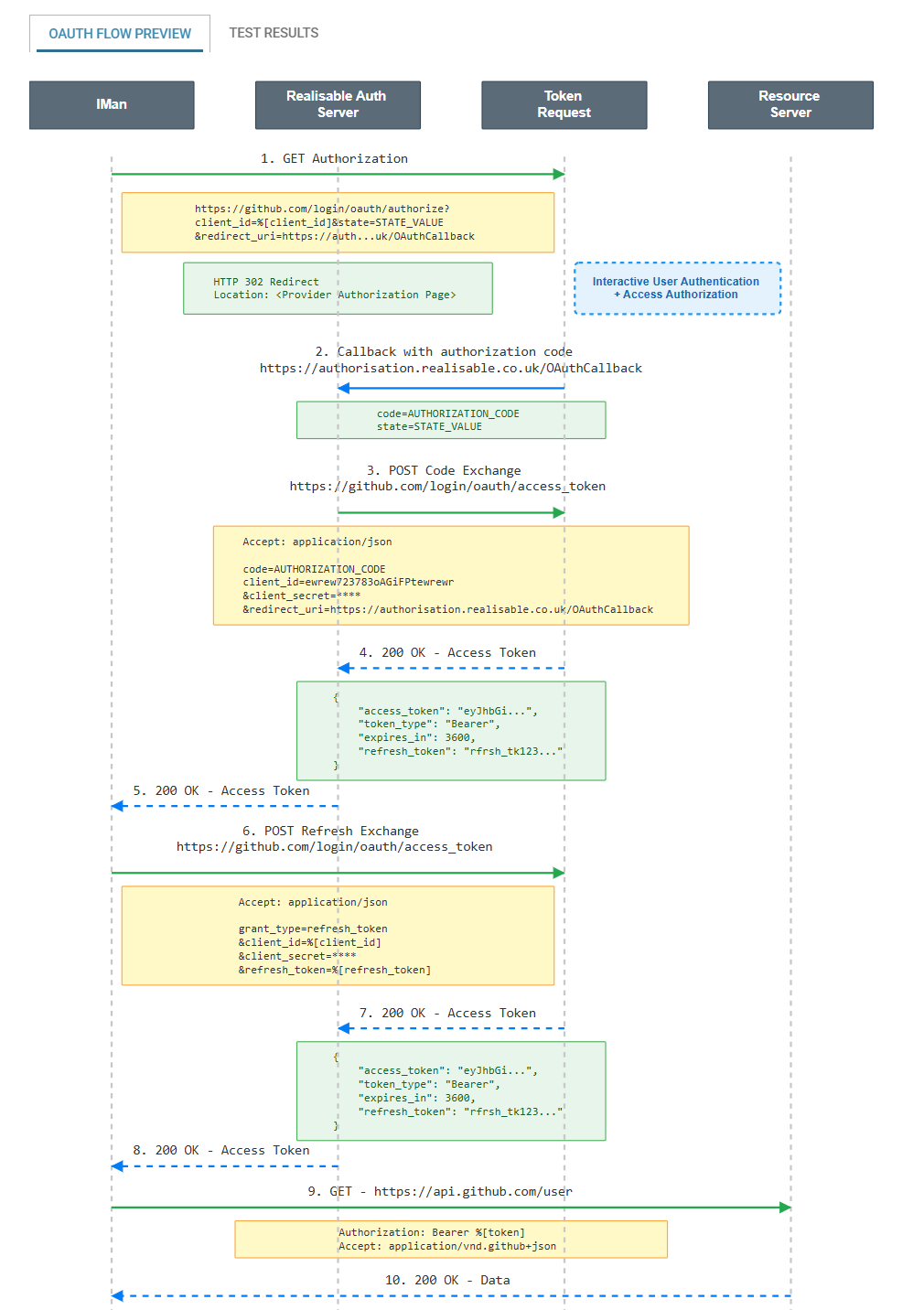
The callback in the middle of the flow needs a web address the service can reach. An IMan installation does not have one. The IMan Auth Server in the diagram is the Realisable authorisation service at https://authorisation.realisable.co.uk. It receives the callback, exchanges the code for tokens, and refreshes the tokens on IMan's behalf at the start of each run.
- IMan makes a request (A) to the authorisation service via the IMan Auth Server.
- The IMan Auth Server forwards the request (B) to the service's Authorise URL.
- The service redirects (C) to its own login page.
- The user logs in and consents (D) to IMan's access.
- The service calls back (E) to the IMan Auth Server with a short-lived authorisation code.
- The IMan Auth Server sends the code to the Token Request URL (F) to exchange it for an access token and, usually, a refresh token (G).
- IMan receives the access token (H).
- IMan requests the protected resource (I) with the access token.
- The resource server responds (J).
The OAuth setup screen
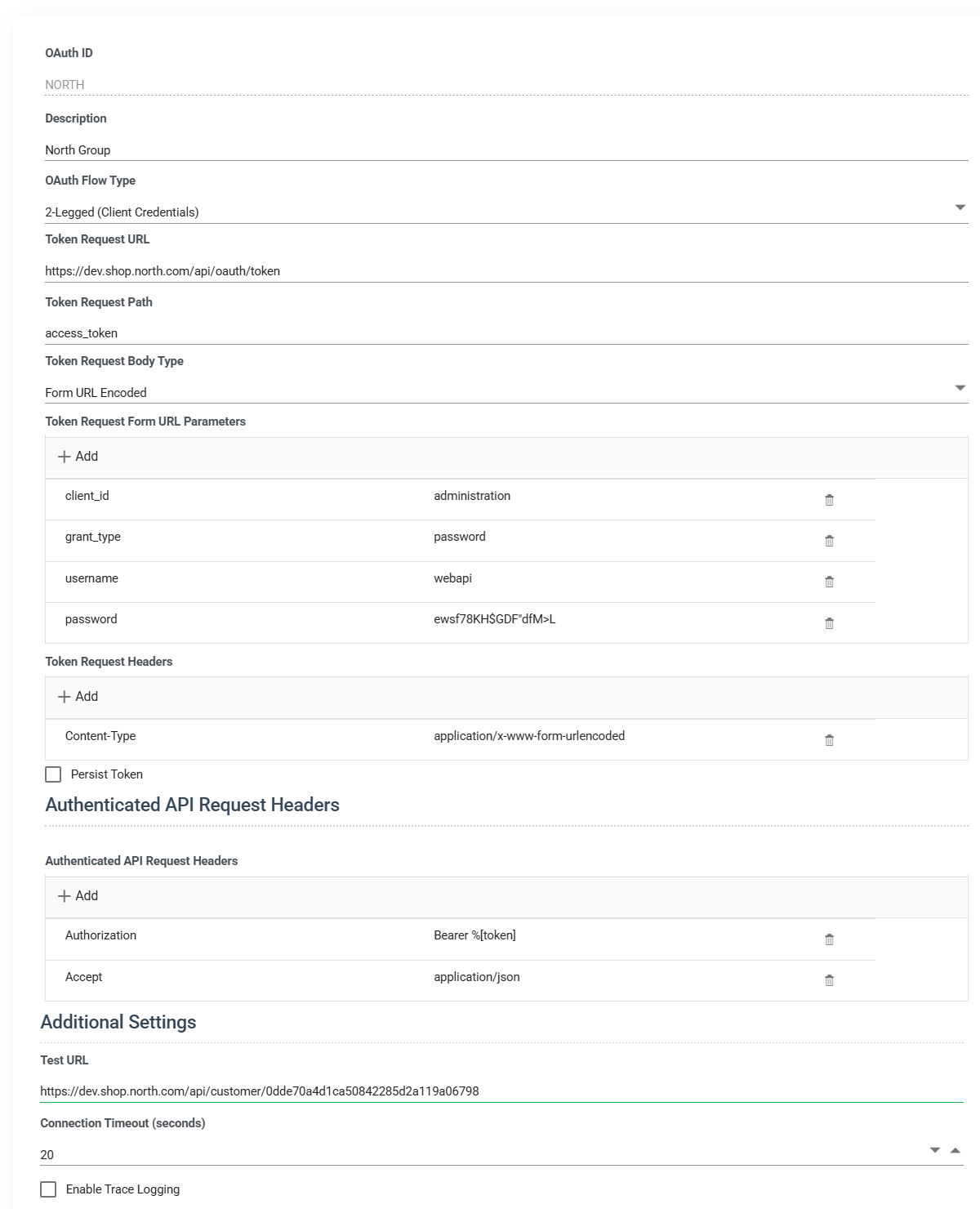
Open the screen from Setup > Webservices > OAuth 2.0 Authentication. It shows a grid of the existing records with Add, Edit and Delete. A record opens as a dialog in two panes: the configuration on the left and, on the right, the flow preview and test results.
A typical setup runs:
- Enter an OAuth ID and description.
- Choose the flow type, 2-Legged or 3-Legged.
- Enter the Token Request URL and adjust the body parameters to the provider's documentation.
- Add any headers the token request needs, such as a Basic
Authorizationheader. - Set the Authenticated API Request Headers, typically
Authorization: Bearer %[token]. - Check the sequence diagram in the right-hand pane against the provider's documentation.
- Enter a Test URL. For 3-Legged, press AUTHORISE and complete the consent in the browser.
- Press TEST.
OAuth ID
A unique id for the record, up to 12 characters. You cannot change it after you save the record.
Description
A description, up to 60 characters.
OAuth Flow Type
- 2-Legged (Client Credentials): IMan sends credentials to a server (the authorisation server or the resource server itself), which returns a token for ongoing access. Use this for the Resource Owner Password grant too, with
grant_typeset topassword. The preview switches its diagram when it sees that value. - 3-Legged (Authorization Code): the authorisation code flow, with a person consenting in a browser. Choosing it adds the Authorise URL, the PKCE option, the AUTHORISE button and the refresh settings.
Authorise URL
3-Legged only. The URL the browser opens so the user can log in and consent.
The URL can contain any of the substitution tokens, so you never type out the client id and the redirect URI. This URL uses both:
https://login.myservice.com/oauth2/authorize?response_type=code&client_id=%[client_id]&redirect_uri=%[redirect_uri]
Use PKCE (S256)
3-Legged only. When ticked, IMan sends a code_challenge with the authorisation request and the matching code_verifier with the code exchange, as RFC 7636 describes. The authorisation service generates both, so you do not need to add anything to the token request body. Tick it when the provider requires or offers PKCE. A provider that does not support it will refuse the extra parameter.
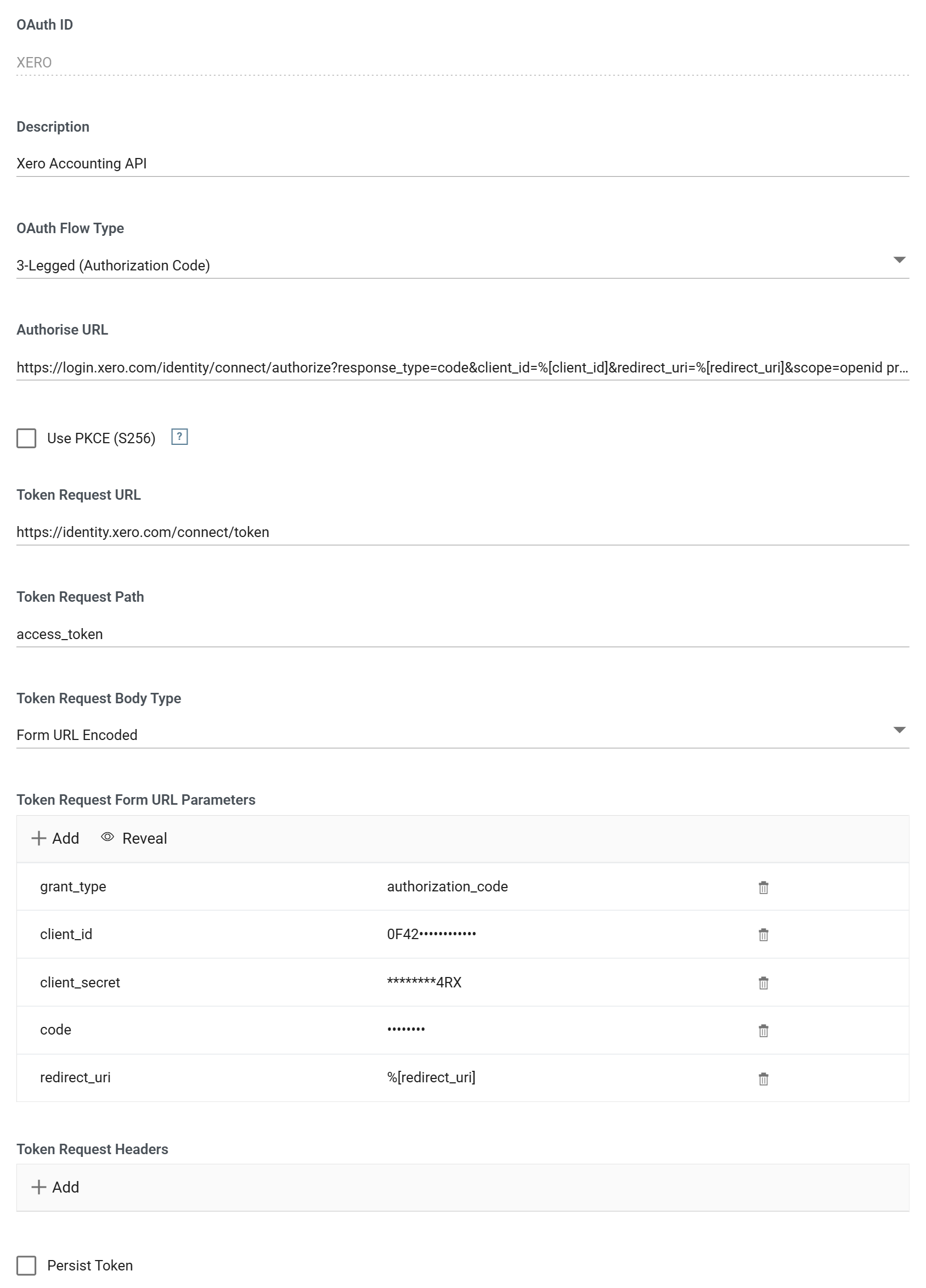
Token Request URL
The URL IMan requests the access token from.
Token Request Path
IMan expects token responses to be JSON. The value here is the JPath to the access token within that response. It is nearly always access_token, the property at the root of the object:
{ "access_token": "MTQ0NjJkZmQ5OTM2NDE1ZTZjNGZmZjI3", "token_type": "Bearer", "expires_in": 3600, "scope": "..." }
Token Request Body Type
How IMan sends the token request's parameters.
- Form URL Encoded: as an
application/x-www-form-urlencodedbody, the form most providers expect. - JSON Body: as a JSON object.
Changing the body type clears the parameters and seeds them again for the flow. It also updates the Content-Type header in the Token Request Headers to match.
Token Request Form URL Parameters, or JSON Body Parameters
The key-value pairs sent in the body of the token request. The heading follows the body type. IMan seeds a new record with the parameters the flow needs. Edit them to match the provider's documentation:
- 2-Legged:
grant_typeset toclient_credentials. - 3-Legged:
client_id,client_secret,codeset to%[code]andredirect_uriset to%[redirect_uri].
You add and edit parameters with the same dialog as an Http Header. The first drop-down offers the standard OAuth parameter names (grant_type, client_id, client_secret, code, redirect_uri, username, password, scope, refresh_token, state and the PKCE parameters). You can also type a name of the provider's own. The second drop-down offers the substitution tokens, or you can type a value.
IMan masks the value of a secret parameter once you save it: client_secret, password, refresh_token, code, code_verifier, code_challenge, and any name that is not a standard OAuth parameter. The list shows ********, followed by the last three characters when the value is eight or more characters long. Press Reveal above the list to show the stored values, and press Hide to mask them again. Revealing needs the Can reveal a stored secret in full permission. The Refresh Request parameters follow the same rule.
![The Add Header dialog used for a token request parameter, with the name redirect_uri and the value %[redirect_uri] chosen from the token list.](../../../../assets/Documentation/Resources/Images/UG/13.Setup_Admin/OAuth-TokenRequestValue.png)
Substitution tokens
IMan replaces a value written as %[name] when it makes the request. The tokens the drop-down offers are:
| Token | Replaced with |
|---|---|
%[client_id] |
The client_id parameter of the token request settings, or an empty string if there is none |
%[client_secret] |
The client_secret parameter, or an empty string |
%[code] |
The authorisation code returned in the callback of a 3-Legged flow |
%[guid] |
A newly generated GUID, useful as a one-off nonce |
%[password] |
The password parameter, or an empty string |
%[random_smallint] |
A random 16-bit integer |
%[random_int] |
A random 32-bit integer |
%[random_base64] |
A random string of twelve letters, Base64-encoded |
%[random_string] |
A random string of twelve lower-case letters |
%[redirect_uri] |
The callback address at the Realisable authorisation service, https://authorisation.realisable.co.uk/OAuthCallback |
%[refresh_token] |
The refresh token currently held |
%[token] |
The current access token. Used in the Authenticated API Request Headers |
%[timestamp] |
The server's local date and time in its configured format, for example 16/07/2015 17:08:10 |
%[timestamp_unix] |
The number of seconds since the Unix epoch, 1970-01-01 00:00:00 |
%[user_name] |
The user_name parameter, or an empty string |
%[utc] |
The current date and time in UTC, for example 2015-07-16T16:08:10.655Z. Where a provider wants a date, this is the more likely form |
IMan also replaces a few tokens that the list does not offer, because they only echo the record's own settings: %[token_url], %[token_path], %[token_headers], %[refresh_path], %[expiry_path] and %[error_path].
Example
With these parameters:
| Name | Value |
|---|---|
client_id |
myClientId |
client_secret |
theCorrespondingSecret |
grant_type |
client_credentials |
redirect_uri |
%[redirect_uri] |
a body type of JSON Body sends:
{
  "client_id": "myClientId",
  "client_secret": "theCorrespondingSecret",
  "grant_type": "client_credentials",
  "redirect_uri": "https://authorisation.realisable.co.uk/OAuthCallback"
}
and Form URL Encoded sends a Content-Type: application/x-www-form-urlencoded header with the body:
client_id=myClientId&client_secret=theCorrespondingSecret&grant_type=client_credentials&redirect_uri=https%3a%2f%2fauthorisation.realisable.co.uk%2fOAuthCallback
Token Request Headers
Headers sent with the token request, alongside the body. You edit them in the same way as the body parameters, and they accept the same substitution tokens. If a provider wants the client id and secret as a Basic Authorization header instead of in the body, set that up here. IMan sets the Content-Type header to match the body type. IMan masks a secret header here. Secret values explains which headers count as secret.
Persist Token
Some providers issue a token with a long life, such as a month or a year. When you tick Persist Token, IMan stores the token it receives. Every later run uses the stored token instead of requesting a new one. The stored token appears as Persistent Token, and you can paste a token in there. IMan masks the stored token. The box shows ********, followed by the token's last three characters, and the eye button beside the box shows the stored token. Revealing needs the Can reveal a stored secret in full permission.
Ticking it hides the refresh settings, because IMan does not refresh a persisted token. If the service refuses a stored token with a 401, IMan discards it, requests a new one and retries the request once.
Refresh Token Request Settings
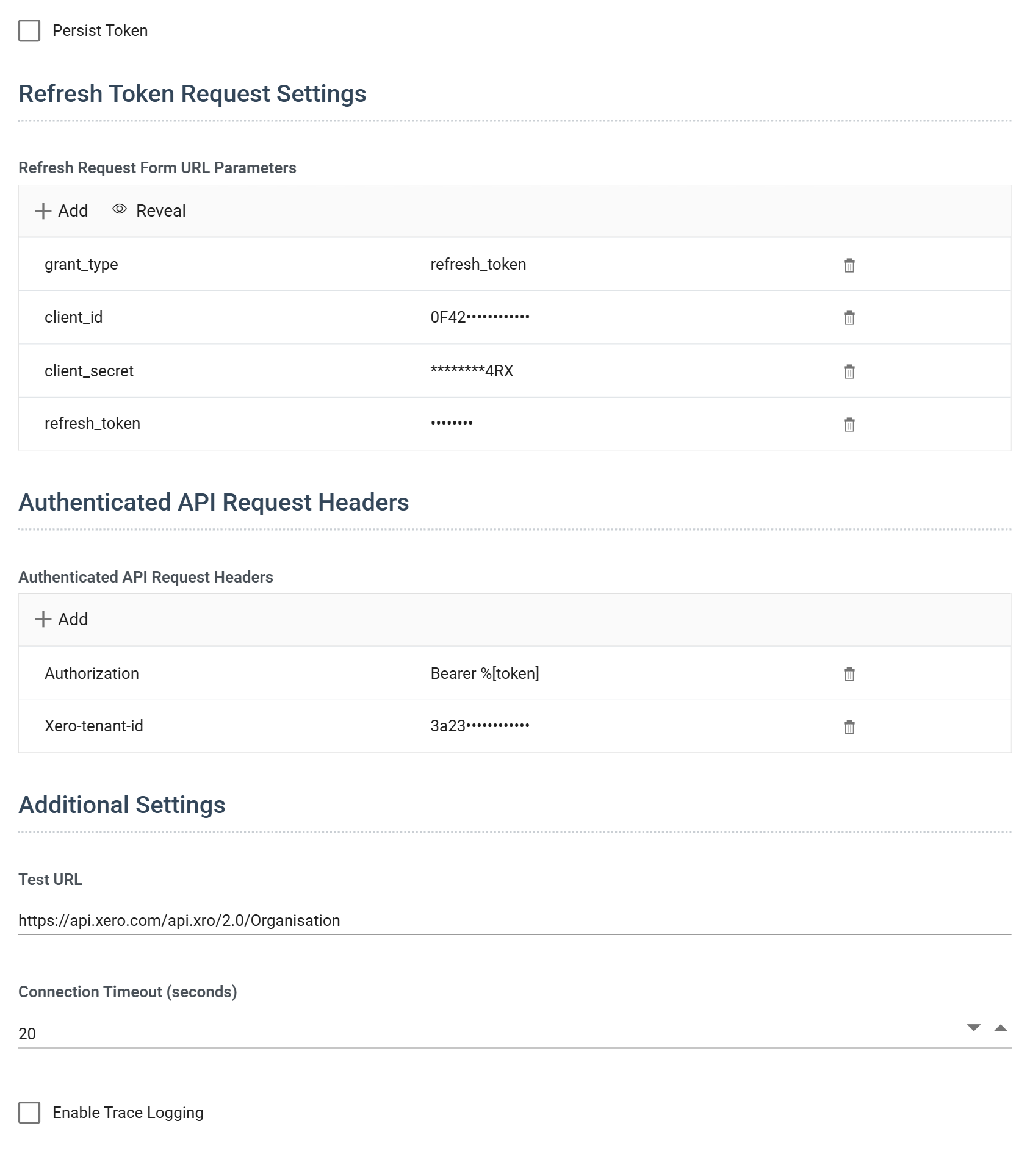
3-Legged only, and only while Persist Token is unticked. The parameters IMan sends to refresh the access token, in the same form as the token request body. IMan seeds a new record with grant_type set to refresh_token, client_id, client_secret and refresh_token set to %[refresh_token].
The refresh goes to the Token Request URL. The Realisable authorisation service makes it at the start of each run on IMan's behalf. The new access and refresh tokens replace the ones held.
Authenticated API Request Headers
The headers added to every request made to the API with this OAuth setup. A typical setup is one Authorization header with the value Bearer %[token]. If a provider needs a tenant or organisation id on each request, add that header here too.
IMan adds these headers only where the request does not already carry a header of the same name, so a header set on the reader, writer or lookup keeps its value. See precedence.
Test URL
The URL TEST requests once it holds a token. The request is a GET, so choose a URL that answers one.
Connection Timeout (seconds)
How long to wait for a response to a token request or a test, from 0 to 120 seconds in steps of 5. The default is 20.
Enable Trace Logging
When ticked, IMan traces the token request and its response. From this screen the trace appears in the Test Results. At run time IMan writes it to WSTRACE-OAuth2Behave.log in the IMan Debug folder, alongside the behaviour traces.
TEST and AUTHORISE
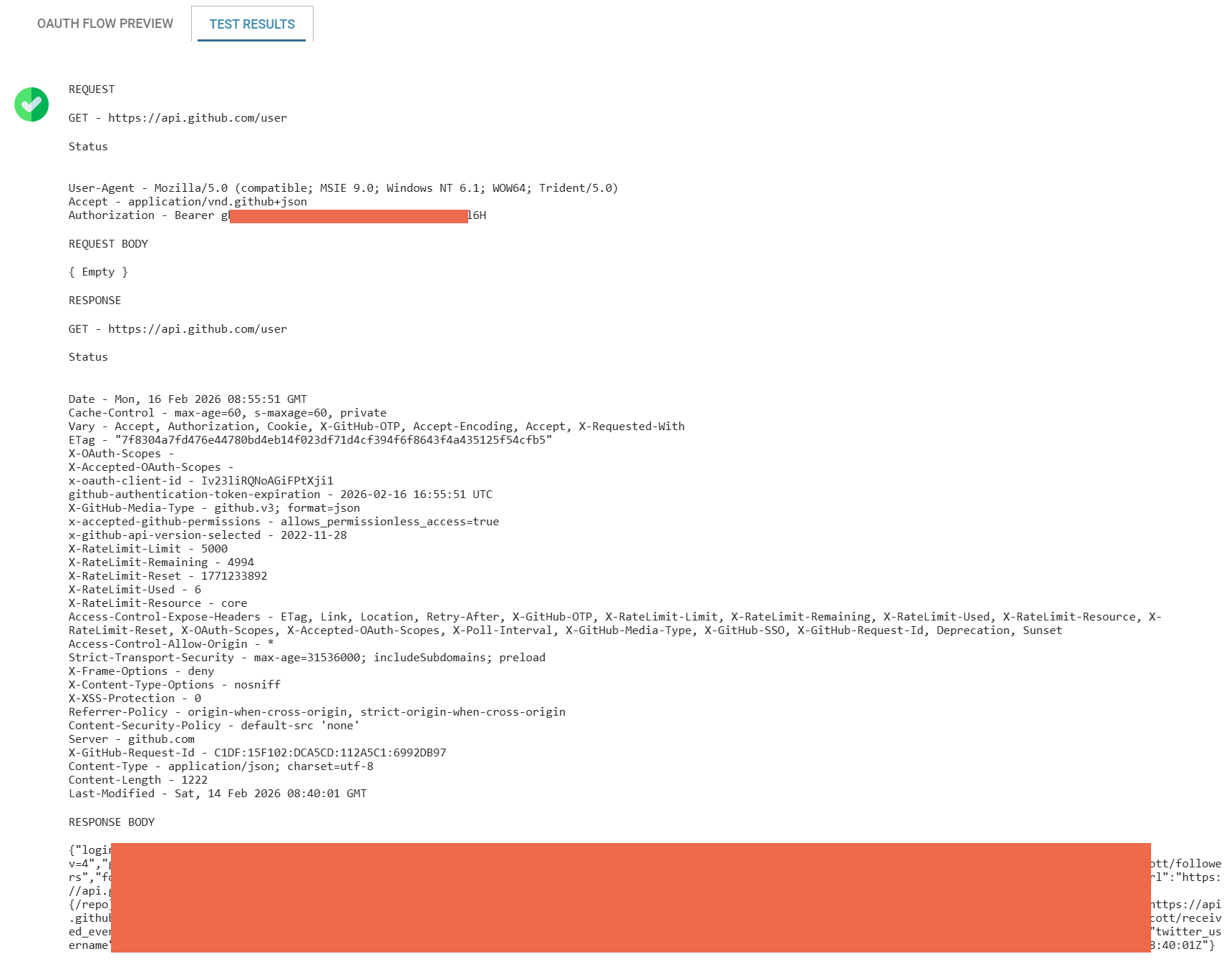
TEST requests a token as configured and then makes a GET to the Test URL with it. The Test Results tab on the right shows the outcome.
AUTHORISE appears for the 3-Legged flow and runs steps A to H of the flow: a browser window opens at the Authorise URL, the service asks the user to log in and consent, and the callback comes back through the Realisable authorisation service.
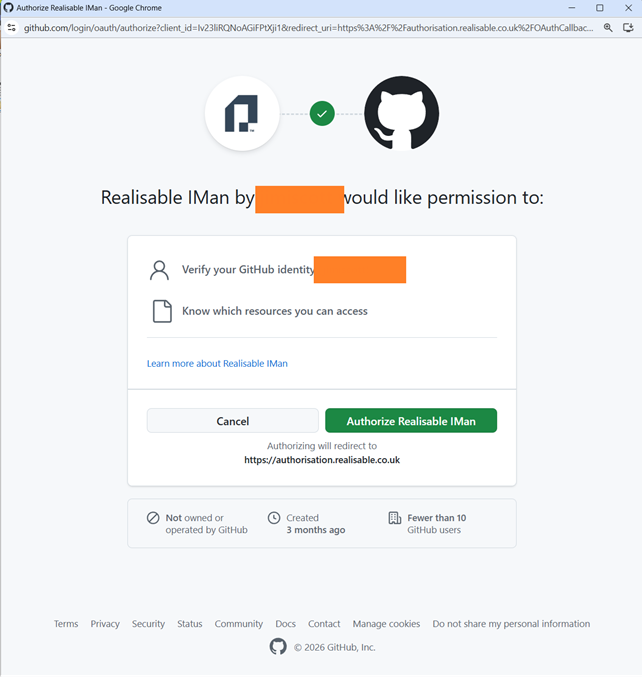
After the user consents and the tokens are exchanged, the browser shows a success or failure page. You can then test the record.
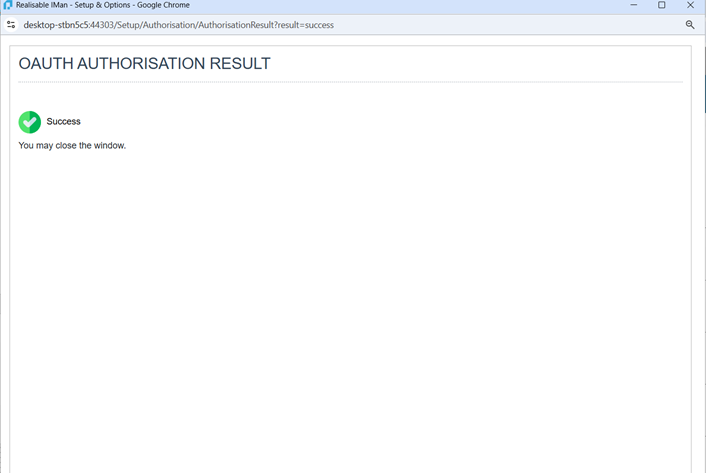
Authorise before saving the record for the first time, then save straight away. The tokens are held with the record.
Preview and results pane
The right-hand pane has two tabs.
OAuth Flow Preview
A sequence diagram of the flow as configured. It redraws as the settings change. It shows the participants (IMan, the token server and the API) and the URLs, headers and body parameters of each request. You can check the whole exchange against the provider's documentation before IMan sends anything.
Test Results
TEST fills this tab. It shows whether the test passed, the request and response of the token exchange, and the error if it failed. If a token request fails and the response carries the provider's own error message, IMan reports that message.