JPath
JPath is the language IMan uses to point into a JSON document, similar to XPath for XML. It appears wherever a screen asks for a path into JSON: the field paths of the JSON Reader and JSON Writer, a Webservice Lookup's return path, a behaviour's error message path and response paging path, and the token path of an OAuth setup.
If JSON itself is new to you, the Webservices page has a short primer, and this video is a clear introduction.
Syntax
Child elements
JSON nests data, either as an object inside an object or as an array of objects. You write each level of nesting as the property name followed by a slash, so /customer/first_name is the first_name property of the customer object. A leading slash is optional.
Where a path starts from depends on the screen. In the Reader and Writer a field's path is relative to its transaction, and a transaction's path is relative to its parent transaction. A Webservice Lookup's return path, and the paths on a Webservice Behaviour, are absolute from the root of the response.
Write a property name that contains a slash, a square bracket or a space in double quotes: /"order number"/id.
Arrays
To address an array, follow the property name with square brackets. What goes inside the brackets chooses the element.
In a transaction's path IMan assumes the node is an array, so you do not need the brackets there.
Index
An index picks one element by position. Indexes are 1-based: the first element is [1], the second [2], and [0] matches nothing. Empty brackets, [], are the default and pick the first element.
| Path | Result |
|---|---|
arrayProperty[1] |
The first object or value |
arrayProperty[2] |
The second object or value |
arrayProperty[] |
The first object or value, using the default syntax |
Query
You can instead choose an element by a condition on its properties, written inside the brackets. A query returns the first element that matches.
The form is [nodeName <operator> value], where the operator is = or !=. The value can be a string in single or double quotes, a number, true, false or null. The node name on the left can itself be a path, so a query can look inside a nested object.
| Path | Result |
|---|---|
arrayProperty[id=12345] |
The first object with an id property of 12345 |
arrayProperty[name != 'a value'] |
The first object whose name is not "a value" |
arrayProperty[customer/last_name='Orzolek'] |
The first object whose nested customer has that last name |
Combine two or more conditions with and. Every condition must be true:
There is no or, and no comparison other than equal and not equal.
Example 1: the outermost value is an object
{
  "document": {
    "orders": [
      {
        "order_number": "1028",
        "token": "3b26b5ecd992012ac7a5e609f2d3379e",
        "email": "[email protected]",
        "customer": { "first_name": "Karen", "last_name": "Orzolek" },
        "taxes": [
          { "type": "local", "jurisdiction": "brooklyn", "amount": 0.45 },
          { "type": "state", "jurisdiction": "NY", "amount": 2.23 },
          { "type": "federal", "jurisdiction": "NA", "amount": 1.10 }
        ],
        "line_items": [
          { "sku": "A1-103/0", "description": "Gold Leggings", "quantity": 1, "price": 10.22 },
          { "sku": "A1-401/0", "description": "1000 Shiny Sequins", "quantity": 2, "price": 20.44 }
        ]
      },
      {
        "order_number": "1022",
        "token": "c174903a6021d459308832185b93f9d3",
        "email": "[email protected]",
        "customer": { "first_name": "Ricardo", "last_name": "Villalobos" },
        "taxes": [
          { "type": "local", "jurisdiction": "berlin", "amount": 0.45 }
        ],
        "line_items": [
          { "description": "Assorted Microhouse", "quantity": 3, "price": 12.75 }
        ]
      }
    ]
  }
}
Reader JPaths
| Path | Returns |
|---|---|
/document/orders/order_number |
1028, the order_number of the first order |
/document/orders/customer/first_name |
Karen, from the first order's customer object |
/line_items[]/quantity |
1, the quantity of the first element of line_items |
/line_items[2]/quantity |
2, the quantity of the second element |
/document/orders/taxes[type='state']/amount |
2.23, the amount of the tax object whose type is state |
A path used as a field must end at a value. discount_codes[] on its own is invalid as a field because it expands to an object, not a value. Restrict it with a query and continue to a property, as in note_attributes[name='colour']/value or discount_codes[amount != '0.00']/value.
Writer JPaths
| Path | Writes |
|---|---|
/document/orders/order_number |
A document object containing an orders object containing an order_number property |
/line_items[]/quantity |
A line_items array containing an object with a quantity property |
/line_items[2]/quantity |
Invalid. An index cannot be used when writing |
/document/orders/taxes[type='state']/amount |
Invalid. A query cannot be used when writing |
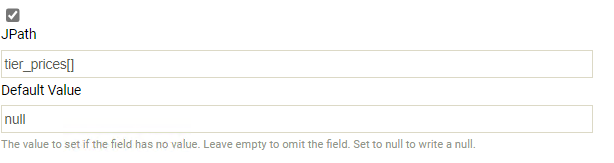
Forcing an empty array
Sometimes you need to write an empty array. Use the empty array syntax in the path and enter null as the field's default value.
Example 2: the outermost value is an array
Here the document is an array of three objects, so the path starts with the brackets and no property name.
[
  { "serviceName": "dpd", "serviceCode": "dpd_wallet_next_day", "shipmentCost": 6.59, "otherCost": 0.0 },
  { "serviceName": "dpd", "serviceCode": "dpd_wallet_parcel_saturday_1200", "shipmentCost": 13.80, "otherCost": 0.0 },
  { "serviceName": "dpd", "serviceCode": "dpd_wallet_parcel_saturday_1030", "shipmentCost": 20.70, "otherCost": 2.10 }
]
Reader JPaths
| Path | Returns |
|---|---|
[2]/shipmentCost |
13.80, the shipmentCost of the second object |
[serviceCode='dpd_wallet_parcel_saturday_1030']/otherCost |
2.10, the otherCost of the object with that serviceCode |
[]/serviceCode |
dpd_wallet_next_day, the serviceCode of the first object |