Basic Authentication
A Basic Authentication is a named set of HTTP headers that authenticate a request. The name comes from the Basic scheme of RFC 7617, but the record holds any header-based scheme: a Basic user name and password, a Bearer token or the vendor-specific headers a service issues in place of either.
To send the headers, associate the record with a Webservice Behaviour and set the behaviour's Authentication Type to Basic Authentication. Every reader, writer and lookup that uses that behaviour then sends them.
Open the screen from Setup > Webservices > Basic Authentication. It shows a grid of the existing records with Add, Edit and Delete. A record opens as a dialog in two panes: the settings on the left and, on the right, the request that TEST will send.
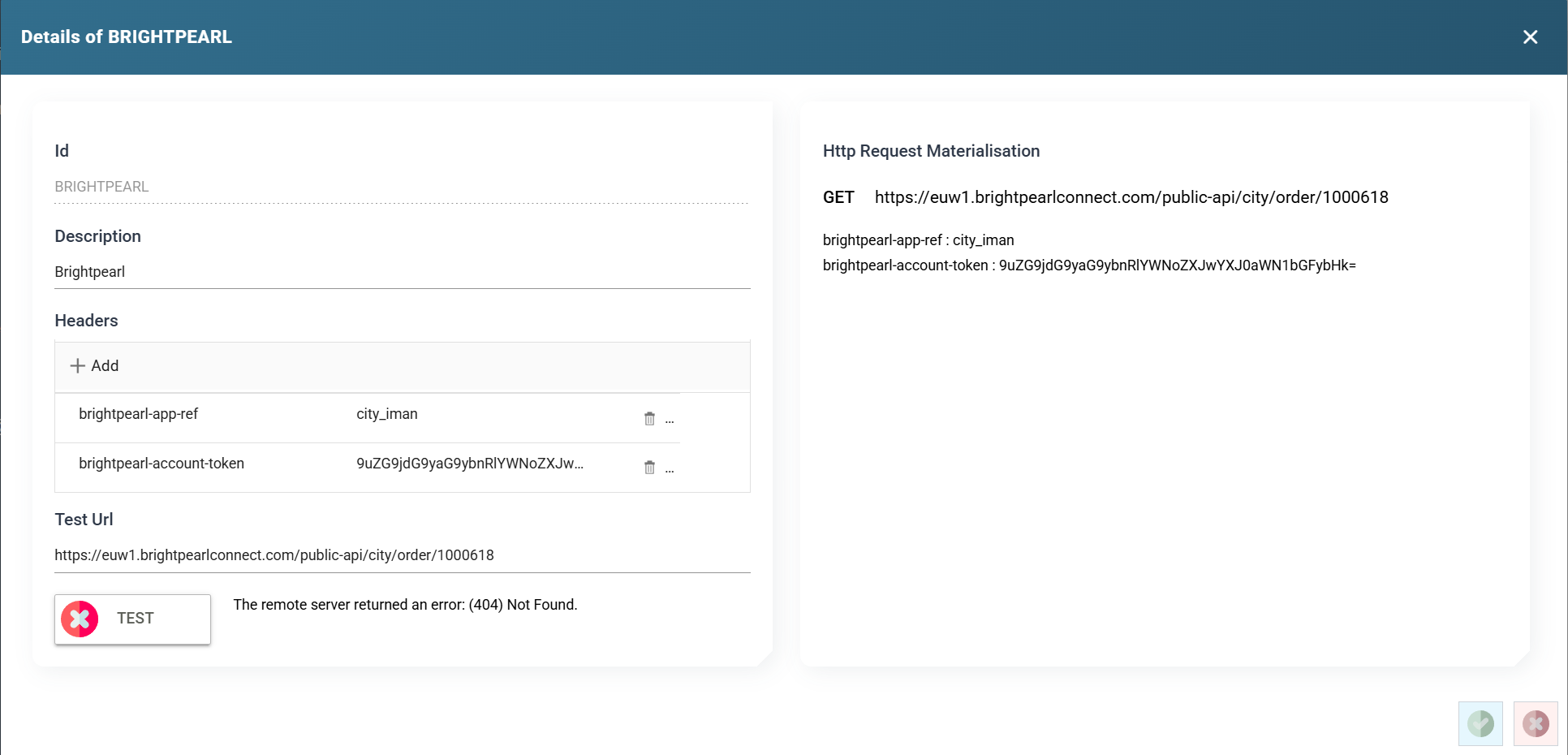
Id
The id of the record, up to 12 characters. You cannot change it after you save the record.
Description
A friendly description, up to 60 characters.
Headers
The headers to send, managed by the Http Headers control. Add opens a dialog for one header. Click a row to edit it, and press the bin icon to remove it.
IMan handles the Authorization header differently from other headers. When you choose that name, an Authorisation Type drop-down appears with three options, and the dialog's other fields change to match:
- Basic takes a user name and password and sends them Base64-encoded, as RFC 7617 requires.
- Bearer takes a token and sends it after a prefix, normally
Bearer. - Raw sends what you type, unchanged. Use it for a scheme the other two do not fit.
Any other header, such as an API key, is a name and a value. The Http Headers page describes the dialog field by field.
IMan masks the value of a secret header in the list. Secret values explains which headers count as secret. The list shows ********, followed by the last three characters when the value is eight or more characters long. Press Reveal above the list to show the stored values, and press Hide to mask them again. Revealing needs the Can reveal a stored secret in full permission.
A Basic header with no password
If the password is empty, IMan sends the user name on its own after the prefix. It is neither Base64-encoded nor followed by a colon. Some services accept an API key that way. A service that expects RFC 7617 will not.
Test Url
The URL that TEST requests. It is also the URL shown in the materialisation on the right. The request is a GET, so choose a URL that answers a GET. A URL that expects a POST reports an error even when the headers are correct. IMan applies the same URL checks to this box as to every URL on these screens.
TEST
Sends a GET to the Test Url with the headers above. IMan shows the outcome beside the button: a tick, or the error the service returned with its status code.
Http Request Materialisation
The right-hand pane shows the request exactly as IMan will send it: the method and URL, then each header with its final value. An Authorization header appears here already encoded. IMan masks the value of a secret header here in the same way as in the list. The pane updates as you type. It is the quickest way to confirm that what you entered produces the header the service documents.
How the headers are applied
You can define headers in three places: on the authentication, on the behaviour and on the reader, writer or lookup making the request. When two carry the same name, the authentication's header wins. The Http Headers page explains the order.