JSON Writer
The JSON Writer builds a JSON document from a dataset and writes it to a file or sends it as the body of an HTTP request.
JPath expressions set its structure: one for the document as a whole and one for each transaction, in the same way the XML writer uses XPath. For the expression language itself, see the JPath Reference.
Setup
Transform Id, Description and Priority are the same on every transform. See Transform > Setup.
Target
The Target section holds the IO controller, which sets where the document is written, and the controller's own fields.
The JSON Writer accepts four:
- File — File System, File Path, File Name, Encoding Method, Write Byte Order Mark (BOM), Evaluate FileName, Overwrite Existing File, Auto-Create Folder, Check Existing File For Contents
- http(s) Url — Encoding Method, Webservice Behaviour, Http Headers, Insert Url, Http Operation, Modify Field, Modify Url, Modify Operation
- Transaction — Field
- WebAPI — no fields
There is no Content Type here
The XML writer offers a Content Type on its
http(s) target and this one does not. An XML body can be application/xml
or application/soap+xml, but a JSON body has only one sensible type.
Options
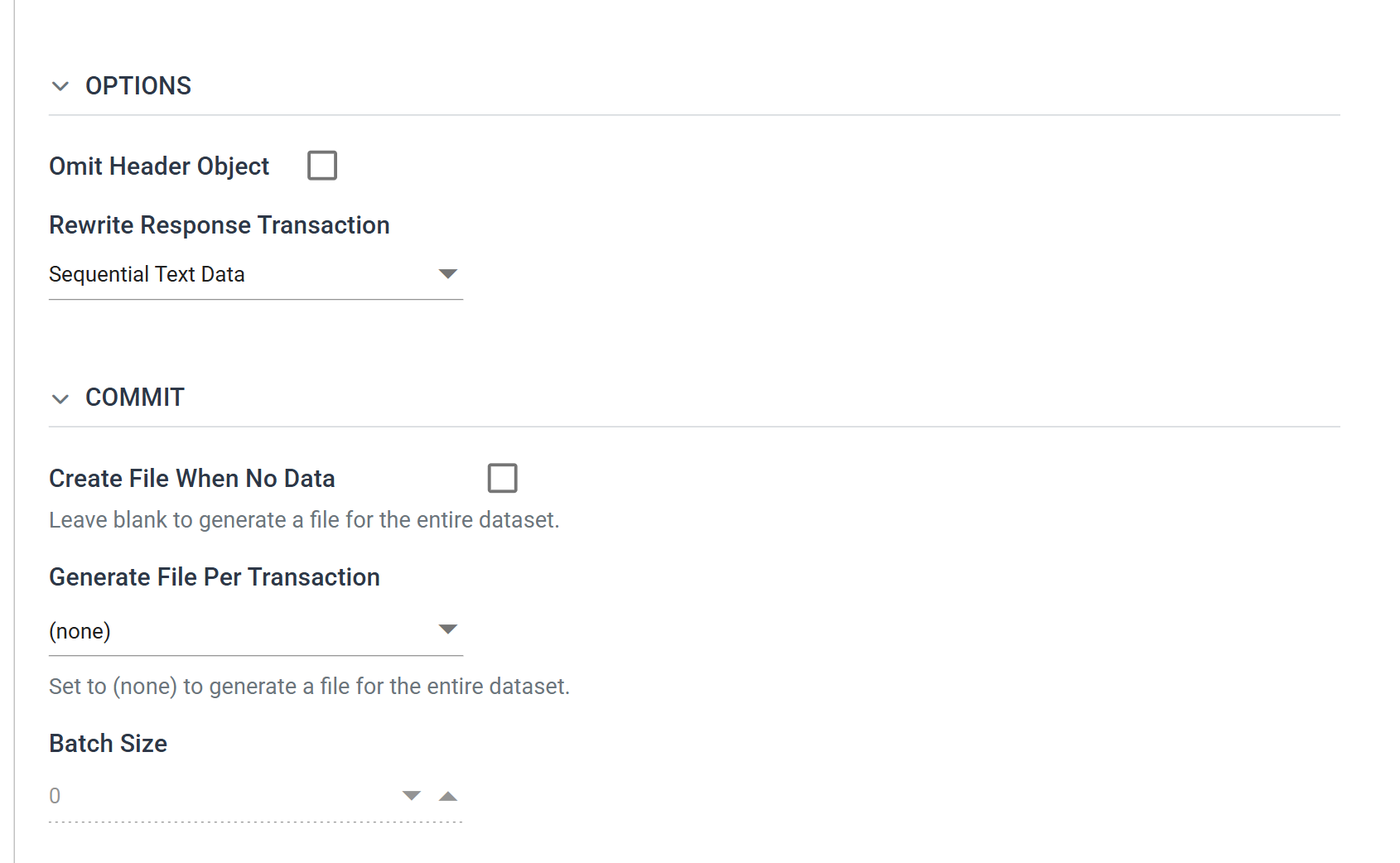
Omit Header Object
When ticked, the writer does not write the Initial JPath or the top transaction's JPath.
Combined with Generate File Per Transaction, it produces documents made of the transactional elements alone, with no outer wrapper. Each object that would have been an array element becomes a document of its own.
Example
For a document of document → orders → an array of orders, ticking this
drops the document and orders nodes, and the writer writes each order as
its own document.
Rewrite Response Transaction
What to do with the body the server sends back. Use it to write values the server allocates, such as ids, references and statuses, into the IMan dataset.
- None — the writer discards the response.
- Sequential Text Data — the writer parses the response and matches it to the records sent, in order.
- Keyed Text Data — the writer parses the response and matches it to the records sent, by key.
- Binary Data — the writer treats the response as binary and writes it to a field.
Each is described on Rewrite (HTTP) Write Response.
It appears only for an http(s) target, and the value is kept when it is hidden
The drop-down appears only when the Target is http(s) Url. There is no response to rewrite from a file.
But if a writer had a rewrite set and you then point it at a file, it keeps the setting, and there is no control on screen to show or clear it. Set it back to None before you change the Target.
Commit
Create File When No Data
When ticked, the writer writes a document even when the dataset is empty.
The help text belongs to the check box below
The help text under this check box, Leave blank to generate a file for the entire dataset, belongs to Generate File Per Transaction below it.
Generate File Per Transaction
Left at (none), the writer writes one document for the whole dataset. Set to
a transaction, it writes one per record of that transaction.
Not every transaction is offered
The drop-down lists the transactions down the unbranched top of the hierarchy and stops at the first transaction with more than one child.
Batch Size
How many records of that transaction go into each document. Enabled only once Generate File Per Transaction names one.
Field Mapping
Initial JPath
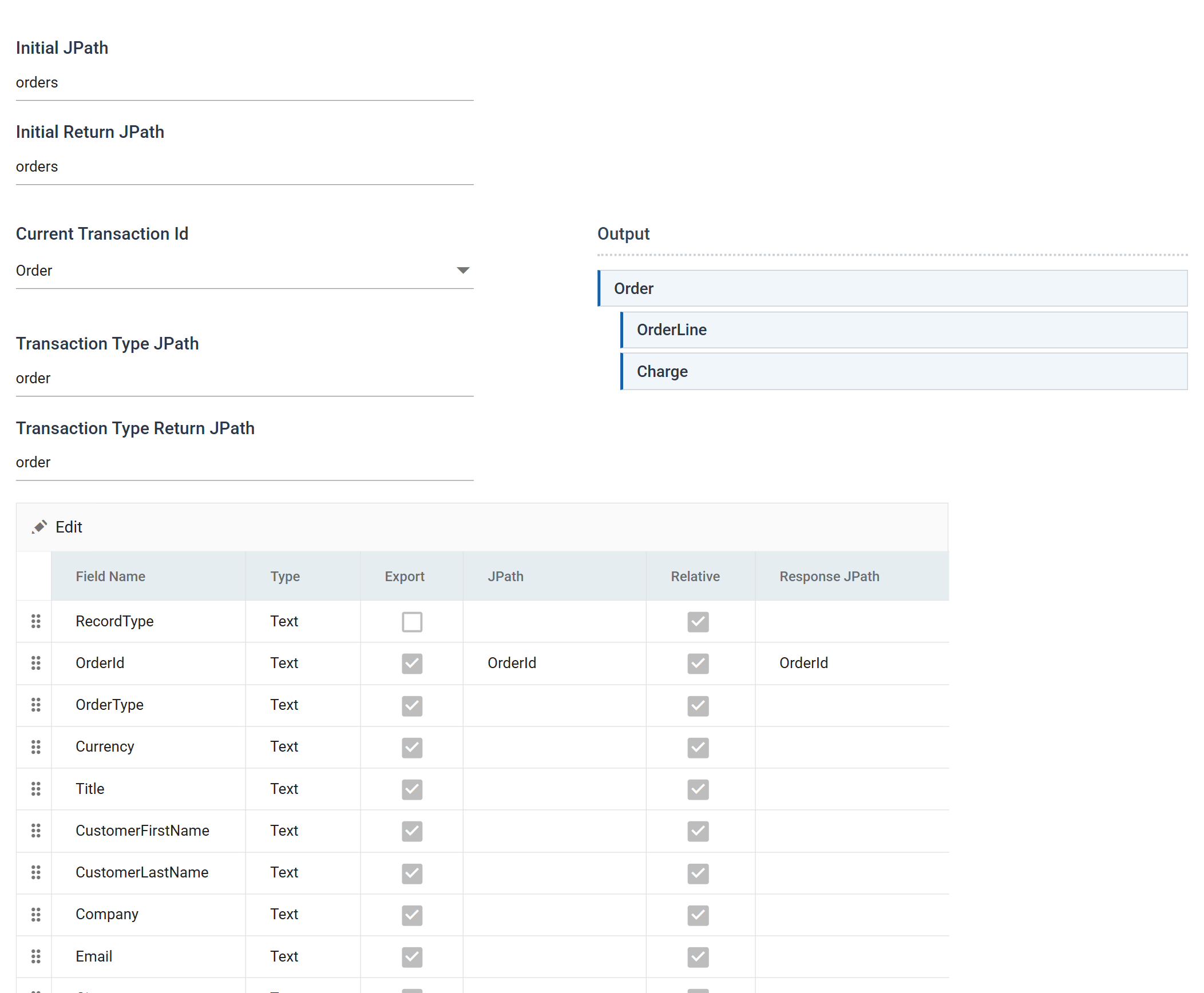
The node path written at the beginning of the document. It is the wrapper that holds everything else.
Transaction Type JPath
The node path written at the beginning of each record of the transaction selected in Current Transaction Id.
The Return paths
Initial Return JPath and Transaction Type Return JPath describe the response, not the document being sent. They say where in the returned body to start reading, and where to find each transaction's records within it.
They appear only for a text rewrite on an http(s) target
Both appear only when Rewrite Response Transaction is set to Sequential Text Data or Keyed Text Data, with an http(s) target. A Binary rewrite has no paths to follow, and neither has a file.
Unlike the rewrite setting itself, IMan clears these when the control is hidden.
Current Transaction Id
The transaction whose fields the grid is showing, and the one the two Transaction Type paths apply to.
Output
A tree of the transactions in the dataset, showing which this writer produces.
The field grid
The grid shows Field Name, Type, Export, JPath and Relative, plus Response JPath while a rewrite is in use.
That last column follows the same rule as the return paths. It appears only under a Sequential or Keyed rewrite on an http(s) target, and is removed from the grid entirely under None or Binary. If the grid has five columns instead of six, the writer has no text rewrite set.
This grid does not edit in batch
Like the XML writer and unlike the other writers, this one has no batch mode and no Select All Fields. You edit each field through its own dialog: select the row and press Edit.
Field Mapping — the field dialog
Field Name
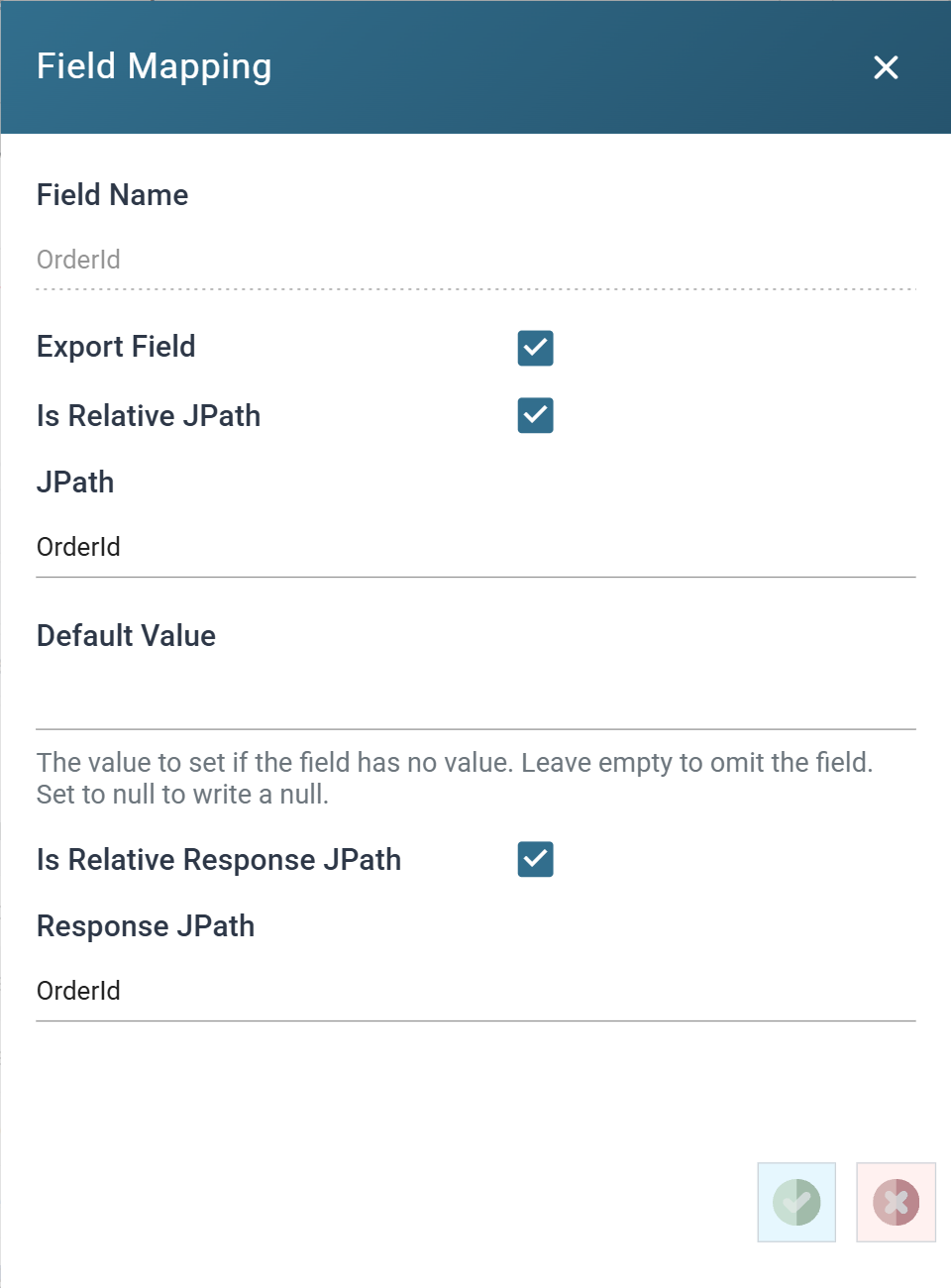
The field name within IMan. Shown, not editable.
Export Field
When ticked, the writer writes the field into the document.
Is Relative JPath
When ticked, the writer appends the JPath to the transaction's own path.
When unticked, it is an absolute path from the root of the document. Use this to write a value outside this transaction's part of the structure.
JPath
The path at which the writer writes this field's value. It is appended to the transaction's JPath when relative, and absolute when not.
Default Value
What to write when the field has no value.
Its help text gives the full rule: "The value to set if the field has no value. Leave empty to omit the field. Set to null to write a null."
There are three behaviours. The difference between the first and last matters to a receiving system that treats an absent property differently from a null one:
- Left empty — the writer does not write the property at all.
- A value — the writer writes that value.
null— the writer writes the property with a JSONnull.
Is Relative Response JPath
Whether IMan reads the Response JPath below relative to the Transaction Type Return JPath, or as an absolute path from the root of the response. Ticked by default.
Response JPath
Where in the response body IMan reads this field's value back from, when a rewrite is in use. IMan writes back only to fields that have one.
This and Is Relative Response JPath appear only for a Sequential or Keyed rewrite on an http(s) target. If you save while the control is hidden, IMan clears the path.
See Rewrite (HTTP) Write Response.
JPath handling
How the writer turns the paths into a document.
Transaction types
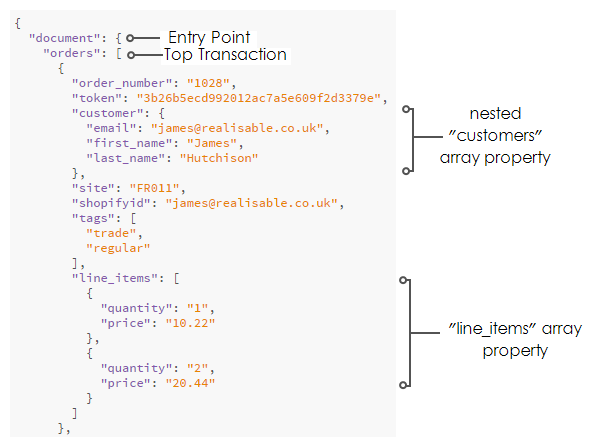
The writer always writes the top transaction. Otherwise, it writes only transactions with a non-empty JPath. Where a transaction has an empty JPath, the writer does not write any of its child transactions either, whatever their own JPaths. Its sibling transactions are unaffected.
A transaction's JPath can have one segment or several.
The last segment of a transaction's JPath generates an array. The writer inserts the child records into it as objects.
The array is created either way
The writer creates that array whether or not the segment carries an array indicator.
An array in an intermediate segment
Where you specify an array at an intermediate node of a JPath, on a field or a transaction, the writer creates an array there. The next node of the path becomes a property within an object inside it.
Fields
A field's JPath can also have one segment or several. The writer merges fields with similar node paths into the same object.
The last segment generates either a property or an array, according to whether it carries an array indicator.
Only fields that have a value generate a property, unless a Default Value says otherwise.
Array fields
Where an array is the last segment of a field's JPath, the writer writes the
field's value as an array. To set several values, separate them with a pipe
character |.
You can enclose text values in double quotes. A value with an unterminated quote makes the field's entire value the single element of the array. If an array arrives with one long string in it, look for this.
Field types
The writer converts a value to its field's underlying type. A value that cannot be converted raises a conversion or parse error.
Dates
The writer writes dates in ISO 8601: yyyy-mm-ddThh:mm:ss.nnnZ.
For example, 21st January 2015 9:52:12AM becomes
2015-01-21T09:52:12.000Z.
Example
Audit
Supported counters
- PROCESSED — incremented for each record processed.
- INSERTED — incremented for each record written.
- UPDATED — incremented for each record written. INSERTED and UPDATED are normally equal.
- ERRORS — incremented for each unhandled error.
Action on Transform Error
The setting and the rest of the tab are described on Transform > Audit.