Fixed Width Text Writer
The Fixed Width Text Writer writes a dataset out as lines of text in which every field occupies a fixed range of character positions.
A CSV file separates its fields with a delimiter. This format separates them by character position. The writer pads a field shorter than its allotted length, so the next field still begins in the same column on every line. Most mainframe and banking interfaces expect this format.
An IO controller sets where it writes to.
Setup
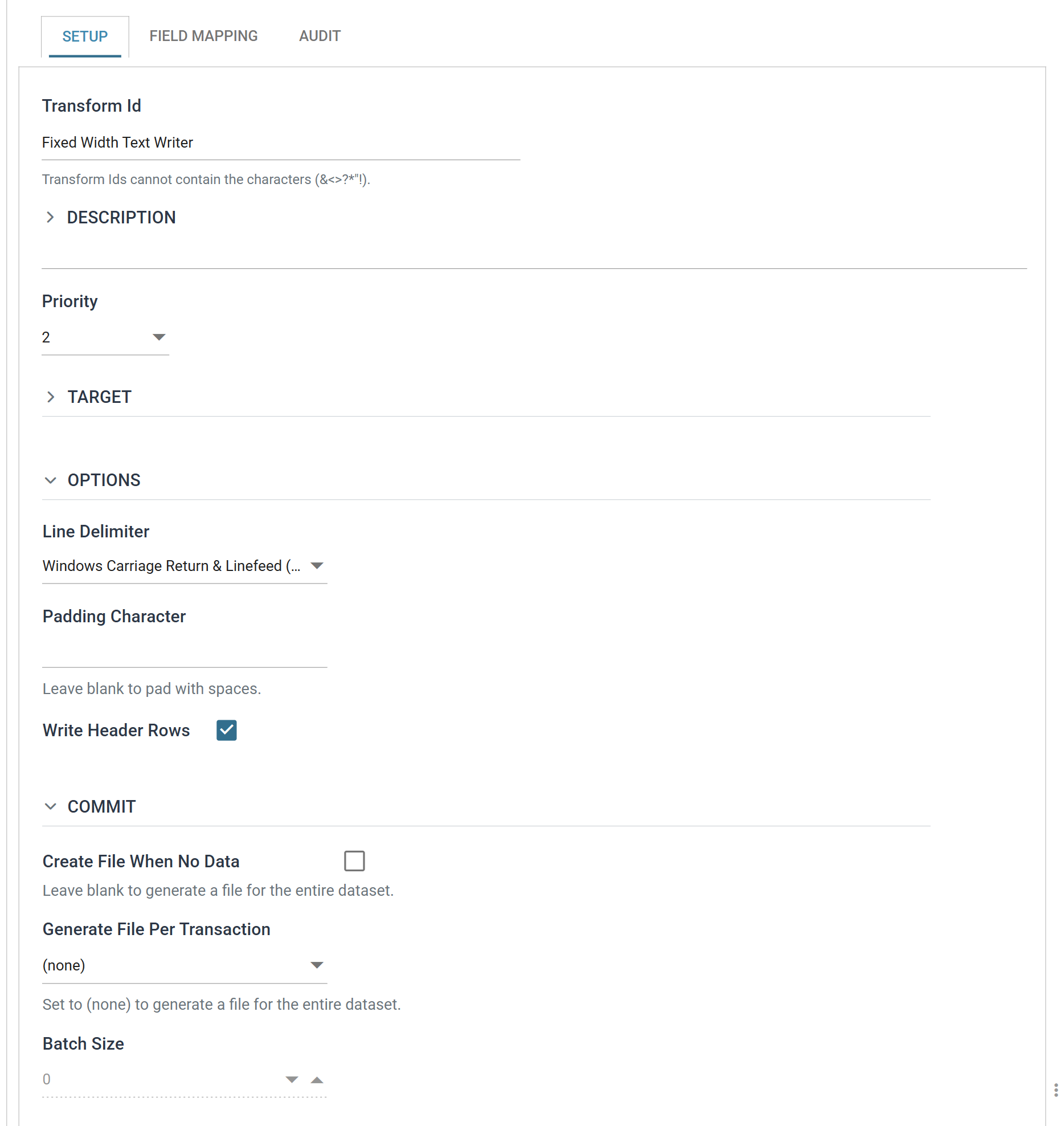
Transform Id, Description and Priority are the same on every transform. See Transform > Setup.
Target
The Target section holds the IO controller, which sets where the file is written, and the controller's own fields.
The Fixed Width Text Writer accepts two:
- File — File System, File Path, File Name, Encoding Method, Write Byte Order Mark (BOM), Evaluate FileName, Overwrite Existing File, Auto-Create Folder, Check Existing File For Contents
- http(s) Url — Encoding Method, Webservice Behaviour, Http Headers, Insert Url, Http Operation, Modify Field, Modify Url, Modify Operation
Those fields belong to the controller, not to the writer. The controller's own page describes them.
Transaction and WebAPI are not offered here
The Transaction and WebAPI controllers are not offered here, though the CSV, XML and JSON writers all accept them. This writer and the Excel writer declare the shorter list.
Changing the Target prompts "Changing the target will reset its settings." If you accept, IMan clears the fields belonging to the old controller. So set the controller first and fill in its fields afterwards.
Options
Line Delimiter
The character or characters separating one record line from the next.
| On screen | Characters | Unicode |
|---|---|---|
| Windows Carriage Return & Linefeed (CRLF) | CRLF | U+000D U+000A |
| Carriage Return (CR) | CR | U+000D |
| Line Feed (LF) | LF | U+000A |
| Next Line (NEL) | NEL | U+0085 |
| Form Feed (FF) | FF | U+000C |
| Paragraph Separator (PS) | PS | U+2029 |
| Line Separator (LS) | LS | U+2028 |
Padding Character
The single character used to pad a value out to its field's Length.
Left blank, the writer pads fields with spaces, as almost every fixed width format expects. Zero is the usual alternative, for numeric fields in formats that want them zero-filled.
The character applies to every field in the file. You cannot set it per field. If a format needs spaces for its text and zeroes for its numbers, format the values upstream instead.
Write Header Rows
When ticked, the writer writes a line of field headings at the start of the file. It uses each field's Field Heading and lays the headings out at the same positions and lengths as the data.
A hierarchical dataset produces one heading line per transaction.
A check box here, a three-valued drop-down on the Excel writer
This is a check box here, but a three-valued drop-down on the Excel writer, despite the identical label. There is no "at the start of each group" option for this format.
Commit
The Commit section decides how many files the writer writes, and when.
Create File When No Data
When ticked, the writer writes a file even when the dataset is empty. With Write Header Rows also ticked, that file contains the headings and nothing else.
When unticked, an empty dataset writes no file at all.
The help text belongs to the check box below
The help text under this check box, Leave blank to generate a file for the entire dataset, belongs to Generate File Per Transaction below it. It does not describe this setting.
Generate File Per Transaction
Left at (none), the writer writes one file for the whole dataset.
Set to a transaction, the writer writes a file for each record of that transaction.
Without a field reference in the File Name, each file overwrites the last
Give the File Name a field reference when this is in use, or every file after the first overwrites the one before it. See Evaluate FileName on the File controller.
Not every transaction is offered
The drop-down lists the transactions down the unbranched top of the hierarchy and stops at the first transaction that has more than one child. A dataset of Order → OrderLine offers both; a dataset of Order → OrderLine and Charge offers Order alone, because "a file per OrderLine" would not say which file the Charges belong in.
Batch Size
How many records of that transaction go into each file. 0 writes one file per
record.
The field is enabled only once Generate File Per Transaction names a transaction.
Field Mapping
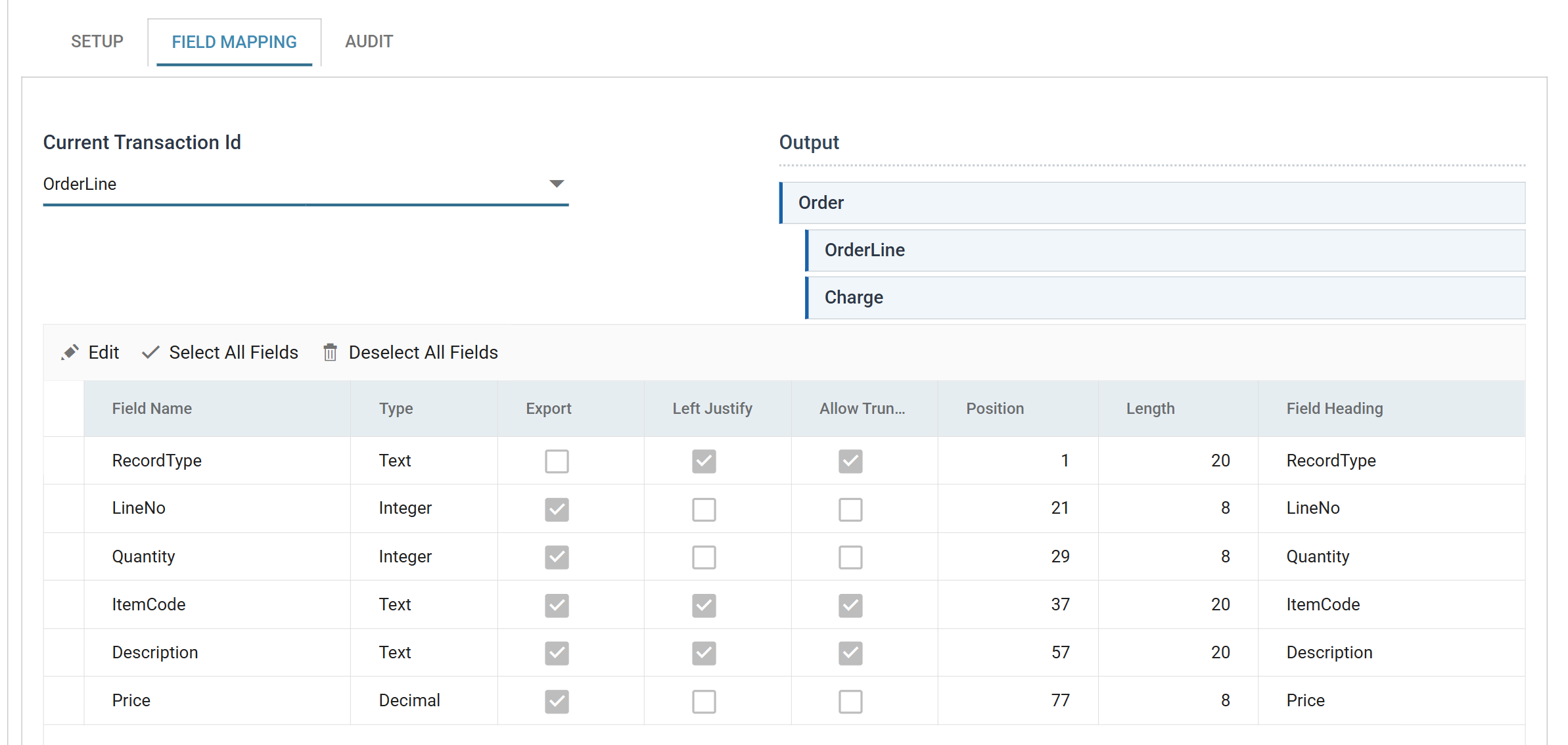
This grid defines the whole layout of the file. Every field's position and width is a value in this grid.
Current Transaction Id
The transaction whose fields the grid is showing.
Output
A tree of the transactions in the dataset, showing which of them this writer produces. A transaction with at least one exported field is highlighted. One with none is marked Not mapped and contributes nothing to the file.
The field grid
The grid edits in batch: Edit puts the whole grid into edit mode, Save commits it and Cancel discards it.
The reader and the writer disagree about batch editing
The Fixed Width reader does not have a batch grid. It edits one field at a time through a dialog. This writer edits the whole grid at once.
Field Name
The name of the field within IMan. Fixed here. Rename it upstream, in the reader or in a Translate.
Type
The data Type of the field.
Check it before adjusting anything else in the row. The writer takes its defaults for Left Justify, Allow Truncation and Length from it.
Export
When ticked, the writer writes the field. When unticked, it does not.
Unticking Export does not leave a gap — it breaks the layout
The writer lays out only exported fields, and they must be contiguous from position 1 (see Position). If you untick Export on a field in the middle of a record, its columns are not left blank. They are removed, and the next field no longer starts where the layout expects.
The run fails with "No matching field could be found in position [n] in transaction [id]. Field start-end positions must be contiguous."
So if you untick Export, renumber the Positions of every field after it. To leave blank columns in the file, keep a field exported and give it the width instead.
Left Justify
When ticked, the writer places the value at the left of its field and pads it on the right. When unticked, it places the value at the right and pads it on the left.
The default follows the Type: a field of type Decimal or Integer is right justified, and everything else is left justified. Almost every fixed width format follows this convention: names on the left, amounts on the right so their digits line up.
Allow Truncation
When ticked, the writer cuts a value longer than its Length to fit. When unticked, a value that does not fit fails the record.
The default again follows the Type: off for Decimal and Integer, on for everything else. A truncated name is untidy, but a truncated number is a different number. It is safer to fail the record than to write a wrong amount.
The failure reads "The value [v] is too large for field [f], length [n]."
Position
The character position at which the field starts. Positions are 1-based, so
the first field on a line starts at 1.
The writer gives new fields positions in grid order, each starting where the one before it ends.
Positions must be contiguous, not just in order
The writer sorts the exported fields of a transaction by Position and then
checks them. The first must start at 1, and each one after it must start
exactly where the previous field ended. A gap fails the check, as does an
overlap.
The message is "No matching field could be found in position [n] in transaction [id]. Field start-end positions must be contiguous." The writer raises it before it writes any line.
If a format has unused columns, give a field the extra Length or export a spare field to fill them. Do not leave a hole in the numbering.
Length
How many characters the field occupies. A shorter value is padded to this width; a longer one is truncated or fails, according to Allow Truncation.
The default comes from the Type: 8 for Decimal and Integer, 20 for everything else. Each new field starts immediately after the one before it. So a new writer starts with a contiguous layout, which you then adjust to what the receiving system specifies.
Date/Time is not a numeric type here
Only Decimal and Integer count as numeric for these three defaults. The writer treats a Date/Time field like text: left justified, truncation allowed, 20 characters. A format with dates rarely wants that. Set its justification and length yourself.
Field Heading
The heading written for the field when Write Header Rows is ticked. It defaults to the field name.
The writer writes it at the field's own Position and Length like any other value. So Allow Truncation applies to a heading longer than its field, as it does to the data.
Audit
Supported counters
- PROCESSED — incremented for each record processed.
- INSERTED — incremented for each record written.
- UPDATED — incremented for each record written. INSERTED and UPDATED are normally equal.
- ERRORS — incremented for each unhandled error.
Action on Transform Error
The setting and the rest of the tab are described on Transform > Audit.