Flatten
The Flatten transform takes levels out of a hierarchy.
It is the opposite of Hierarchy. Hierarchy gives structure to flat data; Flatten takes structure away. You choose a transaction, and everything beneath it folds into it. The descendants' fields become its fields, and it keeps one record for each combination of the records that fed it.
Understand that last point before you use it. The result is a Cartesian product of the records taking part. A parent with three children comes out as three records, each carrying the parent's fields alongside one child's. If you flatten a transaction whose children have children of their own, the counts multiply, not add.
Example
A flatten can run at the top of a dataset or part way down it.
Run at the topmost parent, the whole structure collapses to a single level. Run at a child, only that child and its descendants collapse, and everything above it stays as it was.
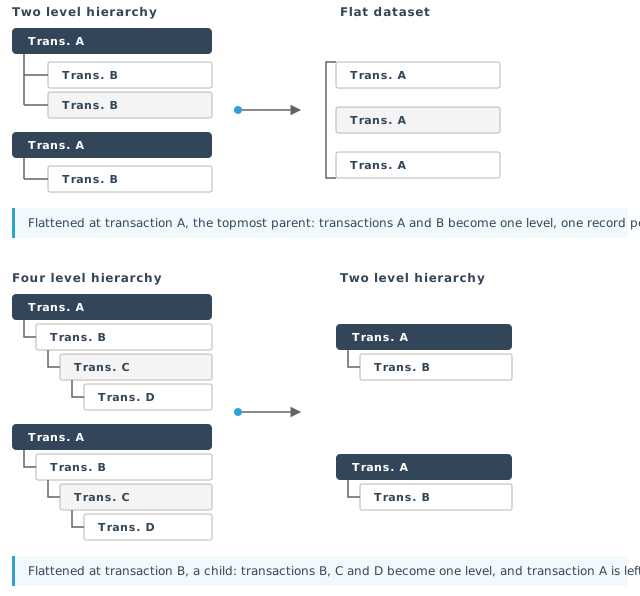
You configure the transform on its Field Mapping tab. The Setup tab holds only the controls every transform has. See Transform > Setup.
Field Mapping
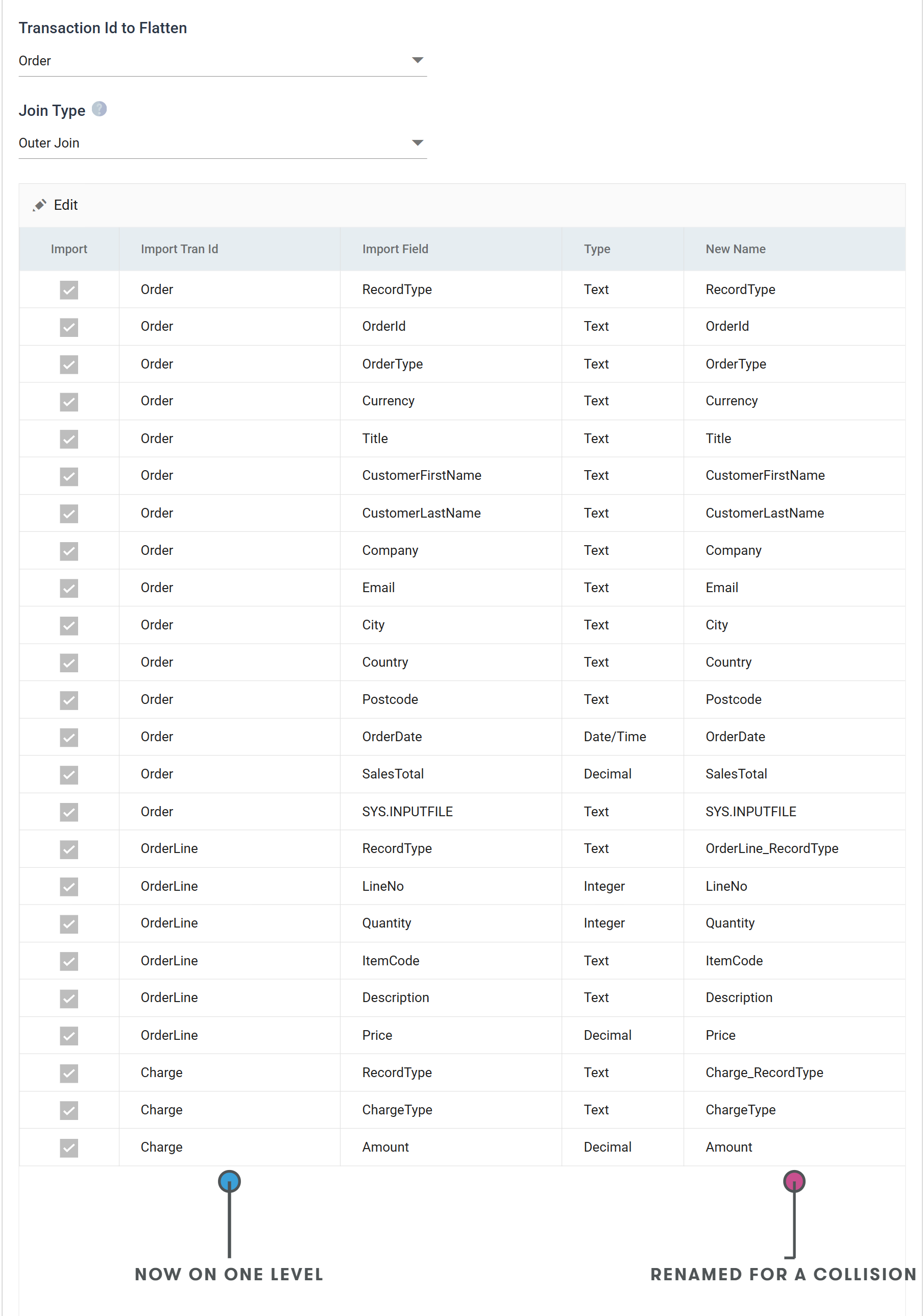
Transaction Id to Flatten
The transaction to flatten into. Everything beneath it in the hierarchy folds into it; everything above it is untouched.
The drop-down offers every transaction arriving from the transform upstream. Flattening the topmost one flattens the whole dataset; flattening a child leaves its parents in place.
Changing this rebuilds the field map from scratch
Changing this rebuilds the field map from scratch, and you lose every rename and every cleared Import box. The transform asks first, under the heading Change Flatten Record. If you cancel, the drop-down stays as it was.
Once the transform has other transforms downstream, the drop-down is fixed, because each of them was built against the shape this one produces.
Use V3 Logic
Shown when the transform is running the flatten logic of version 3.2 and earlier.
It appears only on an integration upgraded from 3.2 or below, and never on one built since. Where it does appear it is read-only. It reports which logic the transform is using, and you cannot change it here.
The Flatten Transform Change Notice describes the behaviour it preserves and why it was replaced.
While it is set, the transform runs the old logic throughout, so the Join Type drop-down is disabled.
Join Type
How the transform treats a parent whose child transaction has no records.
Where every transaction taking part has records, this setting makes no difference and the result is the Cartesian product described above. It decides only the empty case.
- Outer Join — the default, and what a transform is created with. The flatten behaves like an SQL outer join: the parent is kept, and the missing child's fields are left empty.
- Cartesian (Strict) Join — the flatten behaves like an SQL inner join. A child transaction with no records drops the parent as well, and neither reaches the result.
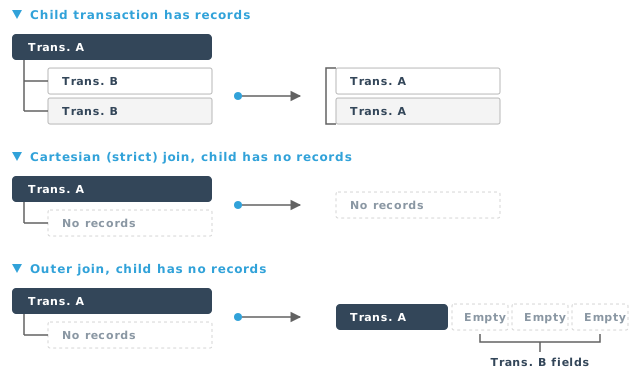
The usual way to end up with an empty child is a Filter transform in front of the Flatten. If the filter removes every record of a child transaction, this setting decides whether its parents survive.
The field grid
Every field the flatten produces: the chosen transaction's own fields first, then the fields of each transaction beneath it, in the order the structure walks down.
It is a batch edit. The toolbar carries only Edit. Pressing it puts the whole grid into edit at once and swaps the toolbar for Save and Cancel. There is no per-row dialog, and you cannot add or delete rows. The fields are the ones arriving from upstream; Flatten only chooses among them and renames them.
Import
Whether the field is kept.
When ticked, it appears in the flattened transaction. When unticked, IMan drops it and nothing downstream sees it.
Import Tran Id
The transaction the field belonged to before the flatten. Read-only.
This column shows where a field came from once everything is on one level. New Name below depends on it: IMan names a field renamed for a collision after this transaction.
Import Field
The name the field arrived with. Read-only. To change it, change it upstream.
Type
The field's data Type. Read-only. Flattening moves fields between levels and does not convert them.
New Name
The name the field carries out of the transform. It defaults to the name it arrived with, and you can change it to anything not already in use.
Where two levels contribute a field of the same name, IMan renames the second one. The new name is its own transaction id, an underscore and its field name.
In the screenshot above all three transactions carry a RecordType. The one
from Order keeps the plain name, and the other two become
OrderLine_RecordType and Charge_RecordType.
The plain name goes to the first field in the walk order: the flattened transaction's own fields first, then its children in turn. So the shallower field keeps it.
Audit
Supported counters
- PROCESSED — incremented for each record the flatten generates.
It is the only counter the transform keeps. A flatten produces records; it does not insert, update or delete them. So the other counters have nothing to report, and the Audit Summary field picker does not offer them.
Action on Transform Error
The setting has no effect here. Any error fails the transform, whatever this is set to. The integration then stops, unless its Action on Transform Failure is Continue.
The setting and the rest of the tab are described on Transform > Audit.
What flattening costs
A flatten multiplies records, and the multiplication compounds down the levels.
A flatten multiplies records at every level
Flattening a parent with 10 children, each of which has 10 children of its own, produces 100 records. Each one carries every field from all three levels. The same shape one level deeper produces 1,000.
So:
- Flatten as late as possible. Every transform after it works on the multiplied dataset.
- Untick the Import box on fields nothing downstream reads. IMan copies every field you keep onto every record of the product, and on a wide dataset that uses most of the memory.