WebAPI Endpoint
An endpoint is a route the WebAPI answers. It is the first thing to define for a WebAPI integration, because the WebAPI Reader at the top of an integration names an endpoint. The WebAPI answers a request that matches no endpoint with 404. Setup > API Endpoint lists the endpoints.
Read the anatomy of an HTTP request and response first. The screen uses its terms: the route, its parameters and the method.
The endpoints list
The list shows each endpoint's id, description, method and route, the integration it answers and a pencil under Assign Web Users. You do not set Integration ID here. IMan fills it when a WebAPI Reader selects the endpoint, and does not offer an endpoint that has an integration to another reader.
Additions, changes and deletions reach the WebAPI as soon as you save them. You do not need to restart anything.
The endpoint
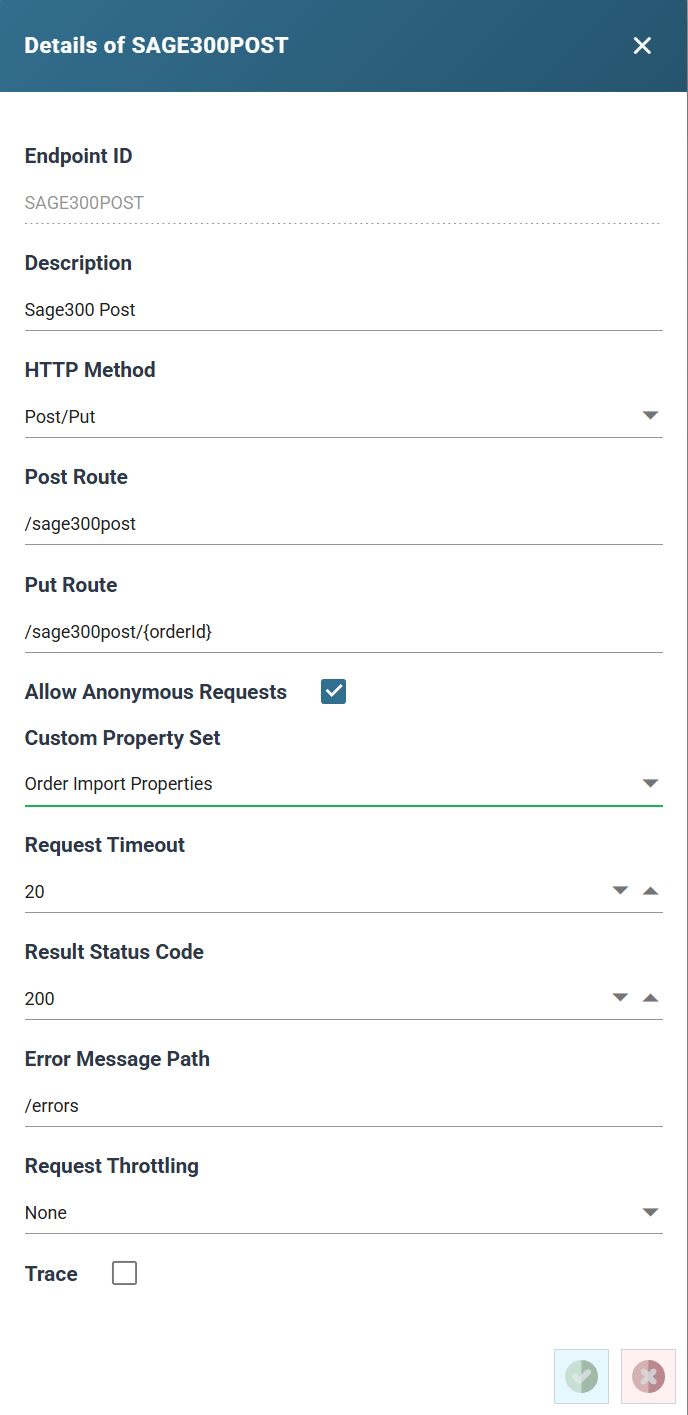
Endpoint ID
Up to 12 characters. You cannot change it after you save the endpoint. It names the endpoint on the reader's Target line, in the audit log and in the OpenAPI description.
Description
Up to 60 characters. The reader's Endpoint drop-down lists endpoints by description.
HTTP Method
The method the endpoint answers. The WebAPI answers a request with any other method on the route with 404.
- Get: a query for a resource or a set of them, such as a customer, the open orders or a document. A GET has no body. The route's parameters say what to return.
- Post: creates a resource, such as an order or an invoice, from the request's body. You can also use a POST just to trigger an integration.
- Put: replaces or updates a resource. The body carries the new state, and the route usually carries a token naming the resource.
- Post/Put: one endpoint, and one integration, answering both, with a route for each.
Route
The part of the URL after the WebAPI's application path, up to 300 characters, with or without a leading slash. A route must be unique for its method.
A route can be fixed, or carry parameters that the request supplies. Each
named parameter, from the path or the query string, becomes a field
Http.Param.<name> on the WebAPI Reader.
- Path tokens, such as
orders/{customer}or{customer}/addresses/{addressId}, name the resource. They are the usual form on a PUT. - Query parameters, such as
orders?startDate={startDate}&endDate={endDate}, qualify a query. They are the usual form on a GET. The query string is part of the route, and IMan captures only the parameters it names.
Under Post/Put the box is labelled Post Route and a Put Route
appears beneath it. IMan seeds the Put Route from the Post route plus
/{uniquifier}. Rename the token to the resource's key, as in
/sage300post/{orderId} above.
Allow Anonymous Requests
When ticked, a request needs no credentials. A request that still carries a
valid X-User-Token runs as that user, with its property values.
When unticked, a request must authenticate as a web user
assigned to the endpoint. The WebAPI answers a request that does not with 401
and a WWW-Authenticate header naming the Basic and Bearer schemes.
Custom Property Set
The property set whose values the endpoint's web users carry into their requests. IMan preselects the first set on a new endpoint.
Request Timeout
The number of seconds the integration has to answer, 20 on a new endpoint. If the integration has not answered in time, the WebAPI answers the caller with 408 Request Timeout and a JSON body naming the timeout. IMan does not stop the integration. It runs to its end and its outcome goes to the audit log, but the caller never receives its response.
The same timeout applies to a debug request. While designing, allow enough time to press Refresh on the reader and the writer. WebAPI Integration Setup describes the sequence.
Result Status Code
The status code of a successful response, 200 on a new endpoint. A writer can override it. The Http Redirect Writer sends its own. An error returns 500, or the code a Check function raised.
Error Message Path
The path for any error message.
Request Throttling and Throttling Request Per Second
Set to Leaky Bucket to limit the endpoint to a number of requests per
second across all callers. The WebAPI refuses a request over the limit with
429 Too Many Requests, a Retry-After: 1 header, and RateLimit-Limit,
RateLimit-Remaining and RateLimit-Reset headers saying how much of the
second is left. A web user
can have its own limit. Where both apply, IMan uses the user's limit.
Without a WebAPI licence every endpoint is limited to two requests a second.
Trace
Traces the output.
Assign Web Users
The pencil under Assign Web Users opens the endpoint's users. Unassigned users are on the left and permitted users on the right, with buttons to move one or all between them. Press Save Users to keep the change.
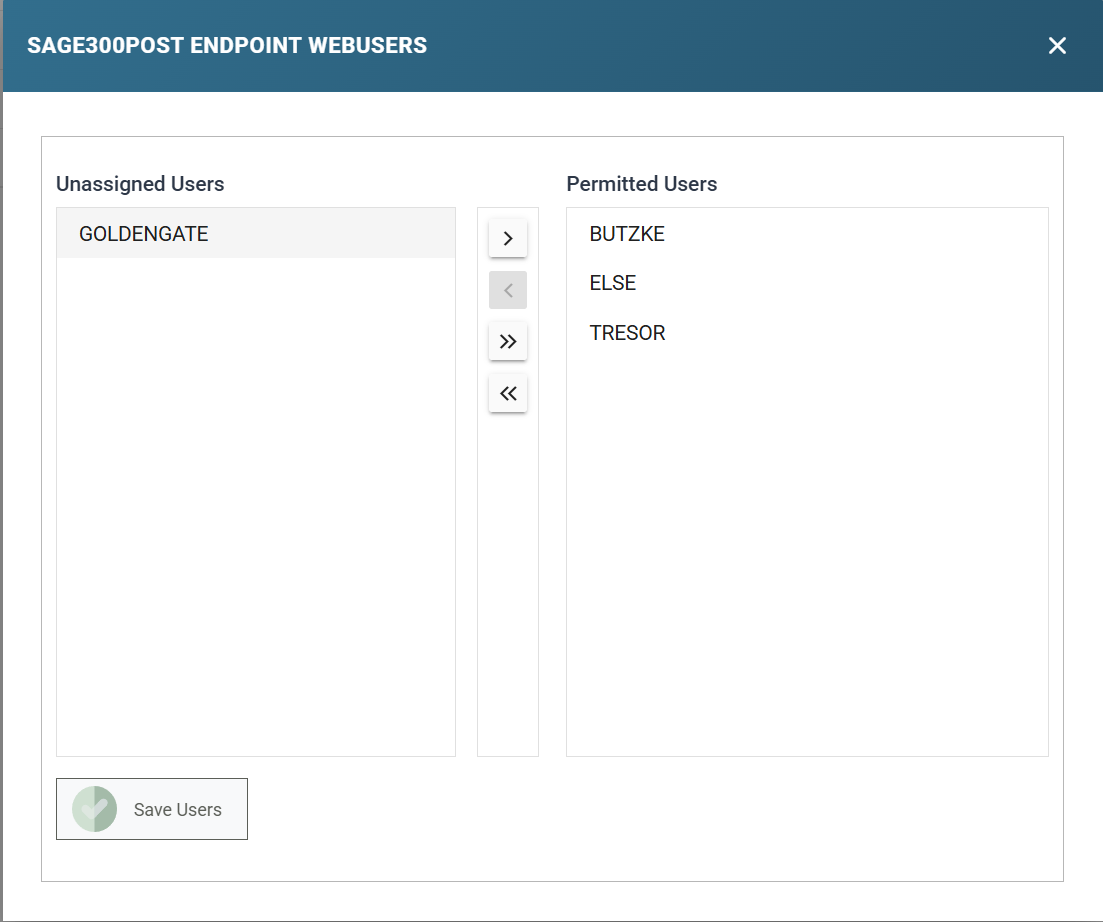
Only a permitted user's token matches a request to this endpoint, whatever its authentication type. The WebAPI refuses an unassigned user's token on an endpoint that requires authentication. On an endpoint that does not, it treats the request as having no user.
Endpoint property set and user properties
Assigning a user gives it a value for every property in the endpoint's property set. The value is empty until you set it on the Web Users screen. Removing the user takes those values away, unless another endpoint that uses the same set still lists the user.