Anatomy of an HTTP Request & Response
HTTP is the most common protocol for exchanging data with another computer on the internet.
Every exchange has two parties:
- Client
- Initiates communication through a request.
- Server
- Receives and processes the request and sends back a response.
IMan can act as a client, through the Webservices functionality, and as a server, through the WebAPI module.
To use either the Webservices functionality or the WebAPI module, you need a good understanding of HTTP requests and responses.
This page explains the basics of the request and response and how they are commonly used.
Http Request
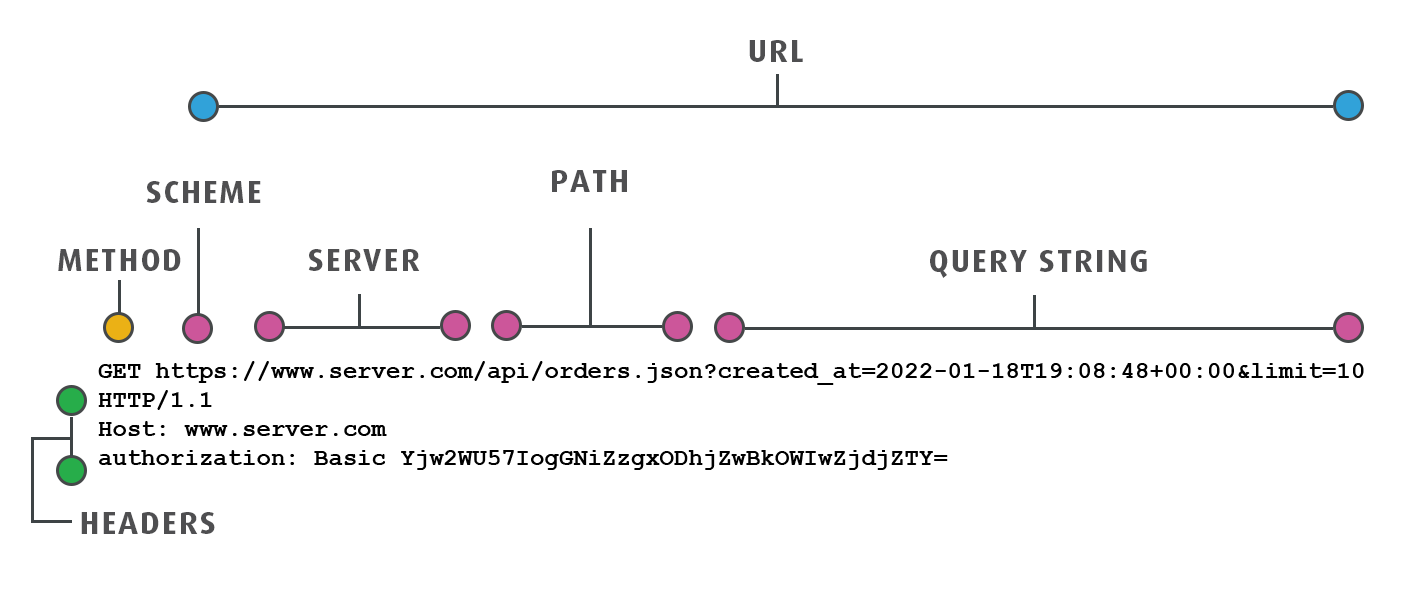
A request is made up of several parts: the URL, the HTTP method, any headers and the body.
The URL
The URL is the address of the resource. It is probably the most important part of any request.
A URL is made of multiple parts:
- Scheme
- The first part of the URL, either http or https (other schemes exist).
- Server
- The server or host is the computer or service that receives the request.
- Path
- A series of segments separated by slashes. The path points to the logical resource on the server.
- Query
- An optional part at the end of the URL, after a question mark (?). The query passes one or more parameters. Each parameter is a key/value pair (key=value). An ampersand or semicolon separates the parameters.
Request Methods
HTTP defines methods (sometimes called verbs) that indicate the action to perform on the resource.
IMan supports only GET, POST & PUT type requests.
GET
- GET requests ask the server for a resource. With a webservice this is usually data, but it could also be an image, a file or HTML.
- GET requests can include a query to restrict the data or resource returned.
- GET requests typically do not include a body.
- If the request is valid, the service should respond with the resource. The response may be text (data, HTML) or binary (PDF, image or another file type).
POST
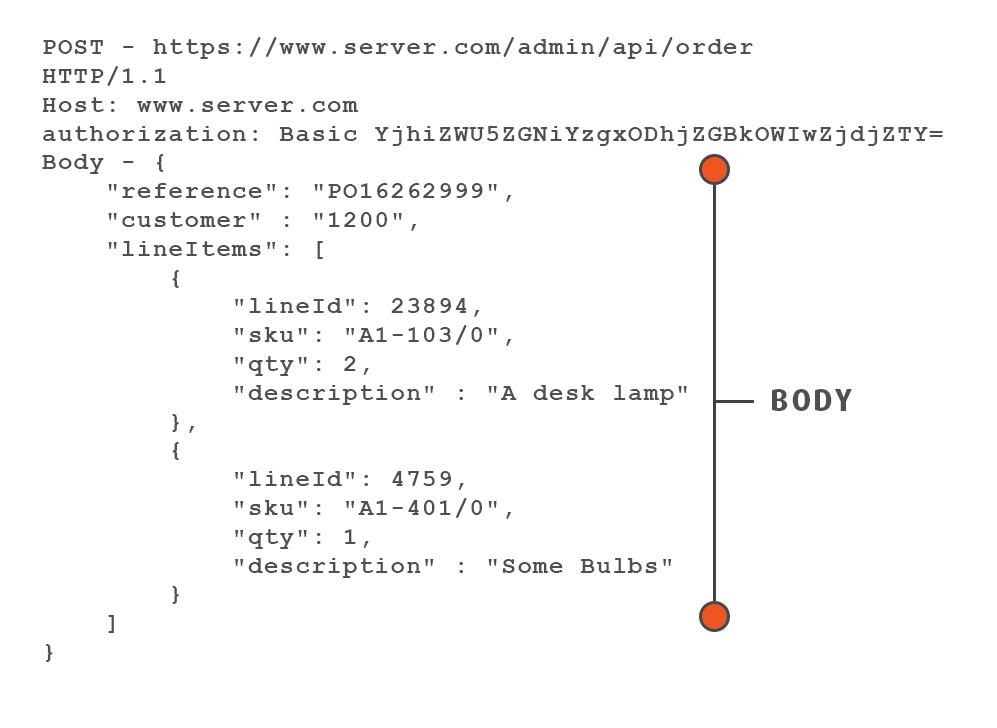
- POST requests typically send the service data such as an order, an invoice or a customer.
- POST requests do not have a query string.
- POST requests typically have a body, which is the data (image, text, file) sent to the server.
- The response to a POST request depends on the request. The service may respond with only an acknowledgement, or a data service may respond with the fully populated data record.
PUT
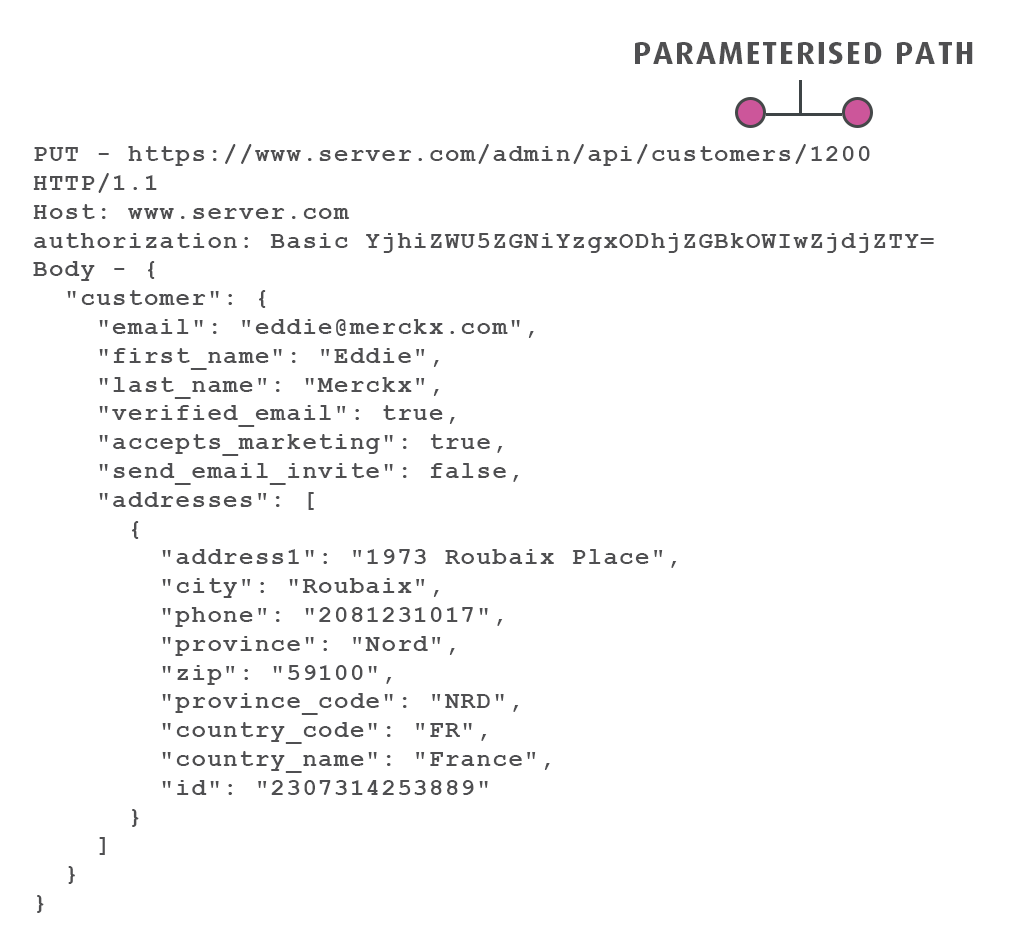
- PUT requests are similar to POST requests. They contain a body and typically have a response. A PUT request usually means that a resource on the server should be updated or replaced.
- PUT requests typically use a parameterised path to identify the resource to update. In the example below, the value 1200 in the path identifies the customer to update.
PATCH, DELETE, HEAD, MERGE (Not Supported)
HTTP supports many other methods, which perform other tasks at the service. Each service implements each method in its own way.
- PATCH is similar to PUT, but usually means to merge the request into the existing resource instead of replacing it.
- DELETE means an existing resource should be deleted.
Http Headers
HTTP headers let the client and the server pass additional information with a request or response. Headers typically carry authentication values, the content type of the request, the content type wanted in the response and other custom values.
An HTTP header consists of its case-insensitive name, a colon (:) and its value. Whitespace before the value is ignored.
Example Headers
User-Agent: Mozilla/5.0 (compatible; MSIE 9.0; WOW64; Trident/5.0)
Authorization: Basic YjhiZWU5ZGNiYzgxODhjNlZjE4YjBkOWIwZjdjZTY=
Accept : application/json
Request Body
The body contains the data sent to the server. The body may be text or binary.
Typically only PUT and POST requests contain a body. GET requests do not.
HTTP Response
After processing the request, the server sends a response.
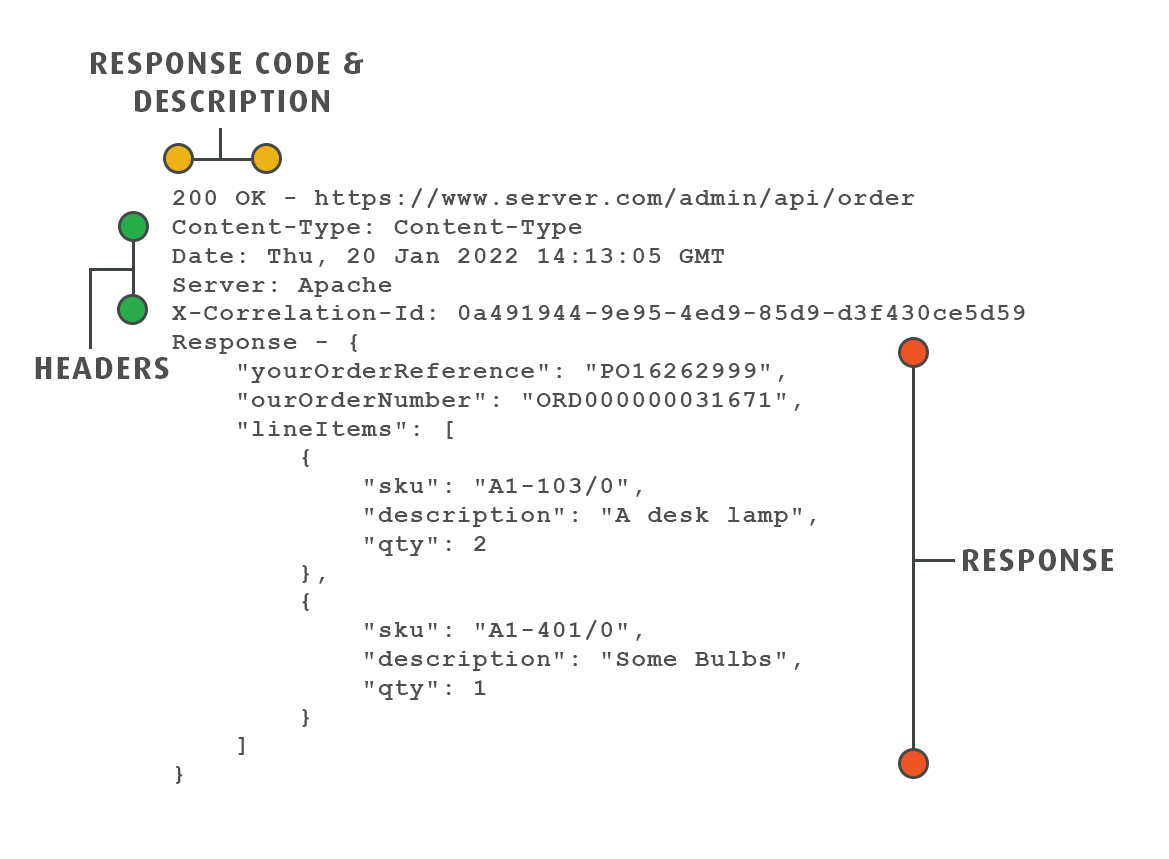
A response contains a response code, which indicates whether the request succeeded, a set of headers and a body.
A GET request returns the requested resources. A POST request may return only a success indicator, or the fully populated resource that was posted.
Responses may be text or binary.
Http Status Codes
Status codes indicate the success or failure of a request. Each is a 3-digit number whose first digit gives the class of response.
- 1xx informational response – the request was received, continuing processing.
- 2xx successful – the request was successfully received, understood and accepted.
- 3xx redirection – further action needs to be taken in order to complete the request.
- 4xx client error – the request contains bad syntax or cannot be fulfilled.
- 5xx server error – the server failed to fulfil an apparently valid request.
Each service implements this specification in its own way. For example, services differ on when to send a 404 (not found) response.
Http Headers
Response headers typically tell the client the type and encoding of the returned data, and anything else relevant, such as throttling data or whether the data came from a cache.
Response Body
The body contains the data returned from the server. The body may be text or binary.