Destination Defined Data Structure
Think first about the shape the destination expects: its hierarchy and how many levels it has. That decides the shape your data needs to be in.
Data can be flat (one level) or hierarchical (several levels).
The target application dictates the structure
An external application can read data correctly only if the data is in the structure the application expects.
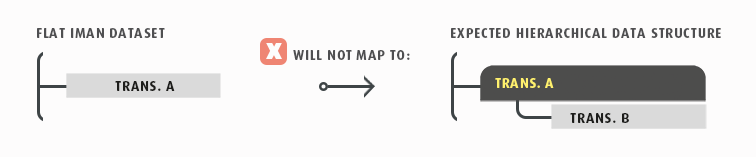
One Level
The simplest data structure. It has only one level, so you do not have to consider hierarchy.
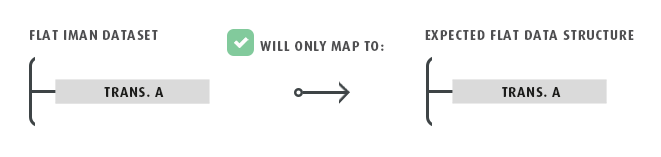
Example
The top level of customer information, such as customer Id and email address.
Connectors
You map only one transaction type.
Writers
You can select which fields to include.
There is only one level, so the drop-down offers only one transaction type.
Tasks
The expando field that references the data includes the Transaction Id of the relevant transaction type.
At this level there is only one transaction type to choose.
Two Levels
A more complex arrangement that uses a hierarchical data structure.

Example
Information in the header record, such as Customer Id and Order Number, is mapped to the top level through the connector. Order details, such as Item number and Shipping Address, must be mapped to the detail level in the external application.
Connectors
The application the connector exports to decides how the data must be structured. You must map each transaction type at the right level in that structure.
Writers
The drop-down in the field mapping tab offers two transaction types. Map the header and details to the correct fields, and define the detail's relationship to the header.
Tasks
The expando field must reference the correct transaction type, and so the correct level.
Three or More Levels
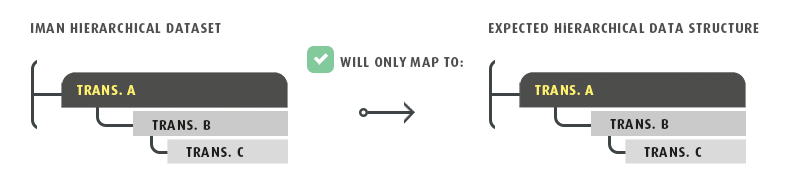
The most complex hierarchical structure. It can have any number of levels.
Example
If an application needs the children to have child attributes, such as available suppliers, pack sizes or units of measure, you must map these records with their parent transaction identified. Otherwise, the connector does not create them.
Connectors
The application you export the data to decides the structure the data must be in.
Writers
The drop-down at the top of the field mapping tab offers three or more transaction types.
Map the records so that each transaction is connected to the correct parent. Order details need the header as their parent Id, and Item details need Order details as their parent Id.
If you do not define these relationships correctly, an error occurs.
Tasks
The expando fields must reference the correct Transaction Type, and so the correct level.