Item & Price Export / Extract
Sage 300 Item & Price Export (SAMACCEXTRCT)
This exports item and pricing data from Sage 300 to an XML file. An e-commerce store needs this master data to know what it can sell and at what price. There is a Sage 200 equivalent built the same way.
The extract reads the Sage 300 database directly, with the database reader, because IMan has no native read from Sage 300.
- Database Read
- Map
- Write
Database Reader
The database connection has to exist before the extract can run
The database connection must exist before the extract can run. You set it up once, under Setup > Database Connections, and every integration that uses it shares it. See Database Settings.
The reader names that shared connection instead of holding its own connection string. It also holds the SELECT statement it runs:
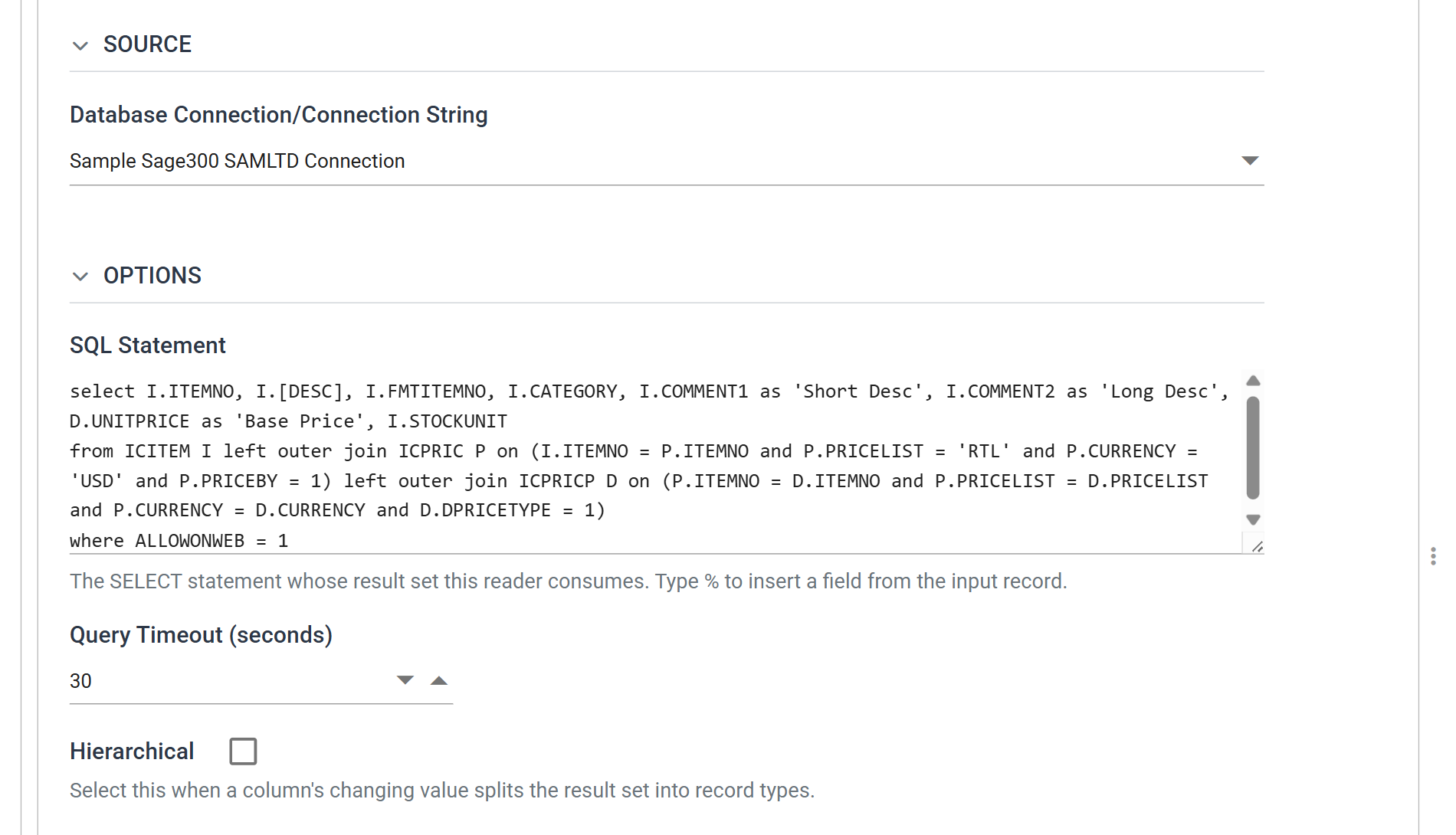
Two parts of the query decide what the extract returns. ALLOWONWEB = 1 limits
it to items flagged for the web, so the result is a web catalogue and not the
whole item master. The query reaches the price through two outer joins, to the
RTL price list in USD, so an item with no retail price still appears in the
file, with an empty price.
Press Refresh to test it. The rows appear in the Preview area. If an error appears instead, check the connection first, under Setup > Database Connections.
The first open can take ten seconds or more
Opening a database reader for the first time can take ten seconds or more, while IMan finds the server named in the connection.
Map
The Map transform adds one field,
RunDateTime, which records when the file was produced:
Format(Now, "yyyyMMddThh:mm:ss") & ".000Z". A system that imports the file
nightly can use it to tell one extract from the next.
Write (XML Writer)
The writer turns the flat result set into XML. You give each field its path in the document and, optionally, the name of an attribute to write it as instead of an element:
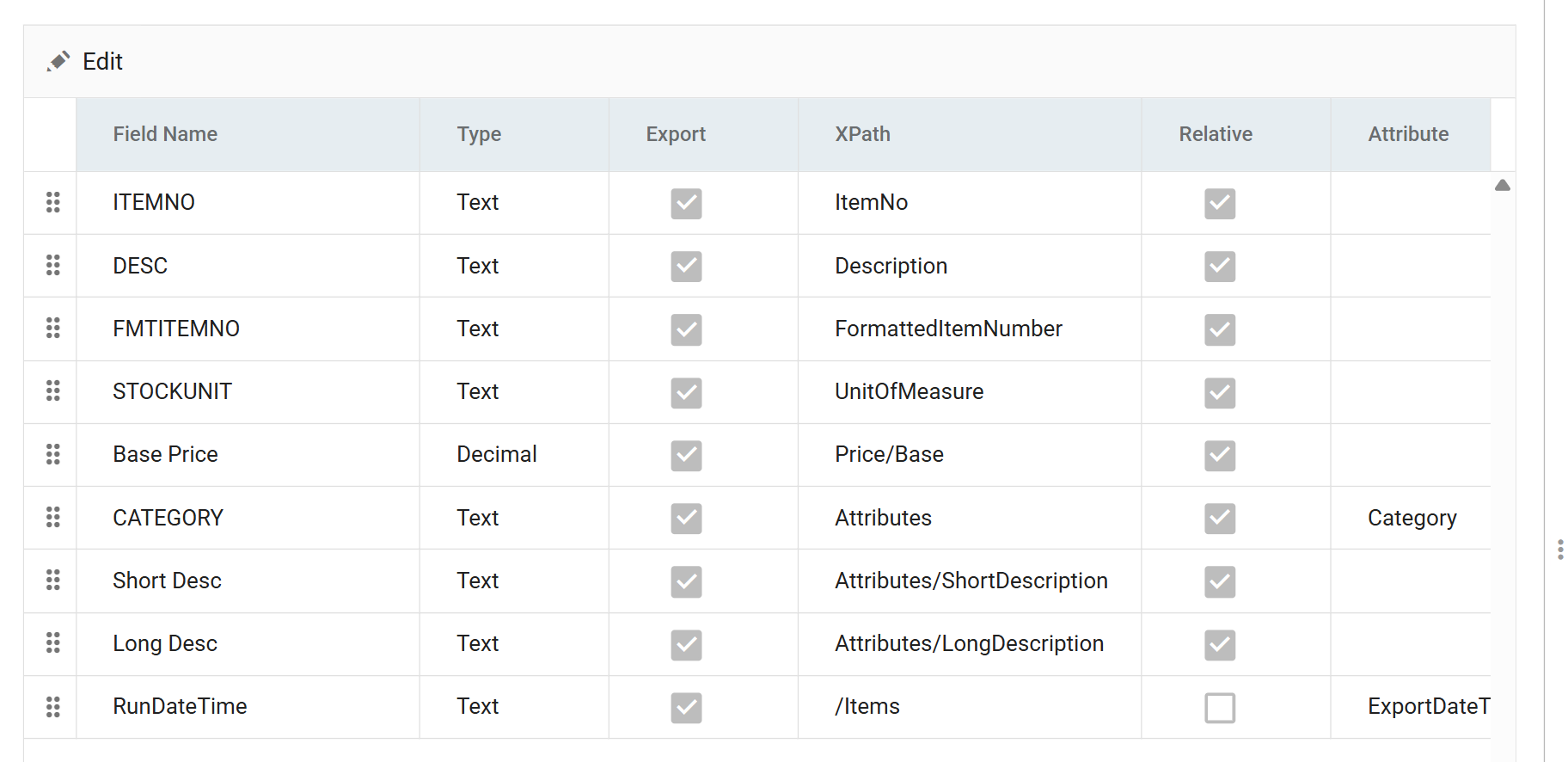
Three columns control the output:
- XPath is the path within the record. A plain name like
ItemNois an element directly beneath the item.Price/Basealso creates the intermediatePriceelement. - Attribute, where it is filled in, writes the value as an attribute of the
element the XPath names, not as the element's content.
CATEGORYbecomes<Attributes Category="A1">. - Relative separates a field of the record from a field of the
document.
RunDateTimeis the only row with it unticked, so IMan writes itsExportDateTimeattribute once, on the rootItemselement, and not on every item.
Press Refresh to generate the file in the folder named by File Path on the Setup tab:
<?xml version="1.0" encoding="utf-8"?>
<Items ExportDateTime="20260901T12:18:50.000Z">
  <Item>
    <ItemNo>277832406601</ItemNo>
    <Description>PISTON</Description>
    <FormattedItemNumber>#277832406601</FormattedItemNumber>
    <UnitOfMeasure>Ea.</UnitOfMeasure>
    <Price>
      <Base>0</Base>
    </Price>
    <Attributes Category="A1">
      <ShortDescription><![CDATA[]]></ShortDescription>
      <LongDescription><![CDATA[]]></LongDescription>
    </Attributes>
  </Item>
</Items>
To understand XPath mapping, compare the file with the grid. Every element name
in the file appears in the XPath column, and the attribute on Items comes from
the one row whose Relative box is unticked.