Opportunity & Quote Import
Sage CRM Opportunity Quote Import (SAMSAGECRMIM)
The SageCRM import integration creates and updates Opportunities and Quotes in SageCRM. It reads data from an Excel spreadsheet, gives it a multi-level hierarchy, transforms some fields with expressions and then imports the data into SageCRM.
Set up SageCRM first, as described in the IMan Setup and CRM Setup sections of the CRM User Guide.
The flow of the integration:
- Read
- Hierarchy
- Map
- Connector
Read Transform
The read transform extracts data from the Excel spreadsheet.
Hierarchy Transform
SageCRM needs the data in a structure that matches the type of data you are importing. Here the data is an Opportunity, with a Quote and QuoteItems.
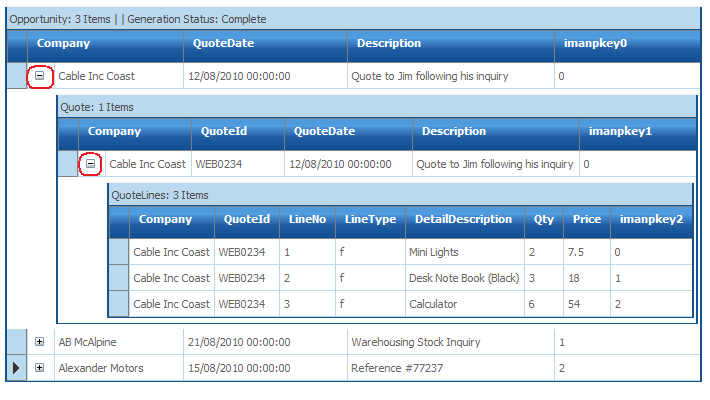
The Hierarchy transform gives the data a three-level structure, one level for each entity.
- To view the result of the Hierarchy transform, press Refresh on the Field Mapping tab, then click + to expand the record.
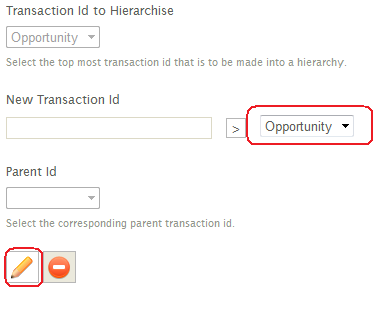
- To see how the Hierarchy transform is set up, press the Edit button (the pencil).
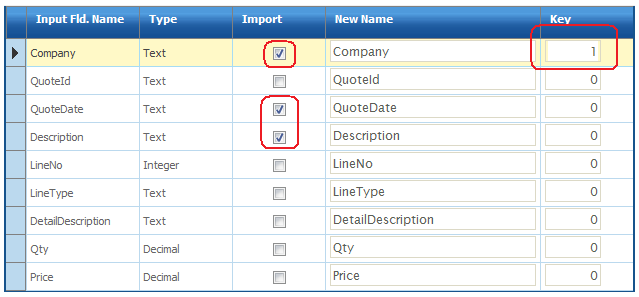
- The selected fields make up the resulting Opportunity transaction.
- The Key column specifies the fields that define the relationship between the transaction types. In this example the
Companyfield uniquely identifies each Opportunity transaction.
- To return to the previous screen, press the green tick or the red cross below the grid.
- To view the Quote record, change the drop-down from Opportunity to Quote and press Edit.
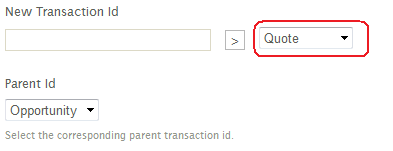
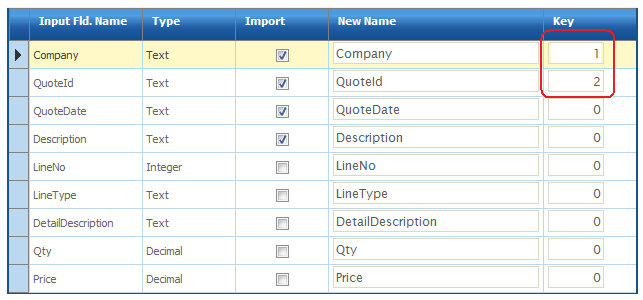
- The
CompanyandQuoteIdfields uniquely identify the Quote record. - Press the green tick or the red cross to return to the previous screen.
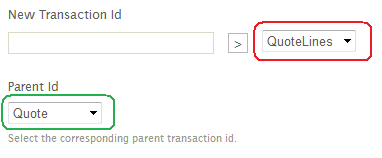
- Change the drop-down from Quote to QuoteLines. The Parent Id is set to Quote. Press Edit to view the setup.
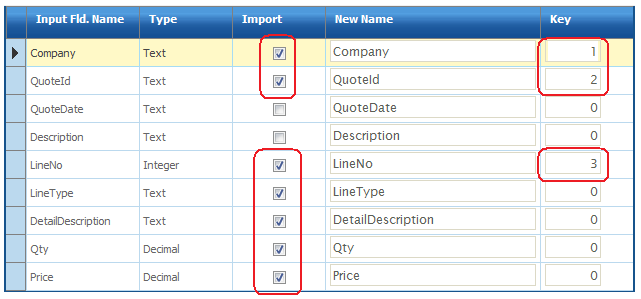
- The two previous key fields,
CompanyandQuoteId, together with theLineNofield uniquely identify each QuoteLines record.
Map Transform
The Map transform uses expressions and formulas to transform field values.
Here it performs two lookups against SageCRM to get the values of key fields.
CompanyId Field
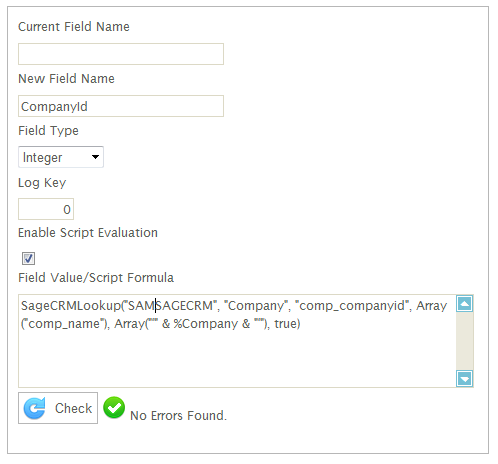
To link the imported opportunity to a company, the integration needs the ID of the company record that matches the company name. The SageCRMLookup function gets it.
- Double-click the
CompanyIdfield to show the formula.
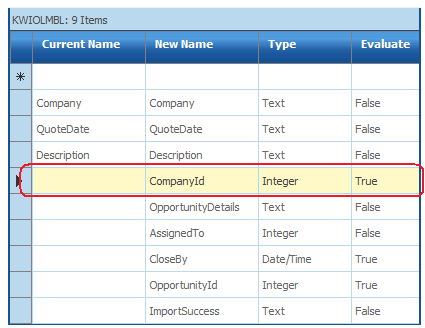
- The formula below queries the Company table for the company ID, using the
Companyfield in the dataset. - The SageCRM Guide and the User Guide both explain the lookup formulas in more detail.
- When you have finished, press the green tick or the red cross.
The following table describes the other fields with expressions:
| Field | Notes |
|---|---|
| OpportunityDetails | A static text value set to ‘Web Site Inquiry’ |
| AssignedTo | A static integer value for a specific user. You could use a lookup instead, to translate the user's name to its ID. |
| CloseBy | A formula to calculate the CloseBy date. The formula adds 21 days to the current date. |
| OpportunityId | A lookup to get the ID of an opportunity in SageCRM. The lookup queries the Opportunity table using the Description field. If nothing matches, the function returns no value and the field stays empty. When IMan imports into SageCRM, an empty or 0 ID field creates a new record, and a valid ID updates the matching record. The first time you run the import, this lookup returns nothing. On later runs it returns a value, and the import updates the existing record. |
| ImportSuccess | An empty field that stores text showing whether the record imported successfully. |
SageCRM Connector Transform
The connector transform defines how the dataset fields map to SageCRM.
For this import, the connector maps fields in all three dataset records to SageCRM entities.
- The SageCRM connector can take up to 20 seconds to open while it connects to SageCRM.
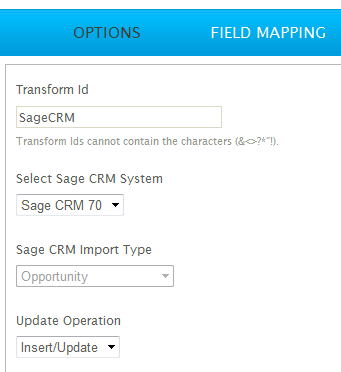
- The Options tab defines some keys for the import.
- SageCRM System selects the SageCRM instance to connect to. Its settings are in the System Connectors setup, in IMan's Setup area.
- SageCRM Import Type selects the top-level entity to import. It is set to Opportunity, the top-level entity in the dataset.
- Update Operation defines how the connector inserts or updates records in SageCRM.
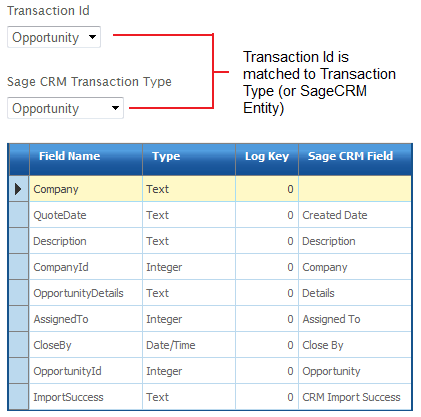
- The Field Mapping tab defines how the entities and fields map to the import type selected on the Options tab.
- To map the fields, press Edit and select each field from the field drop-down.
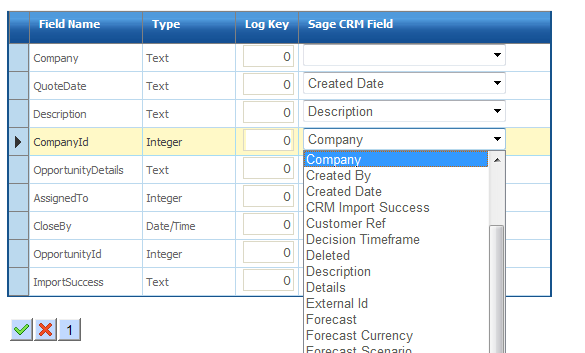
- When you have finished, press the green tick or the red cross at the bottom of the grid.
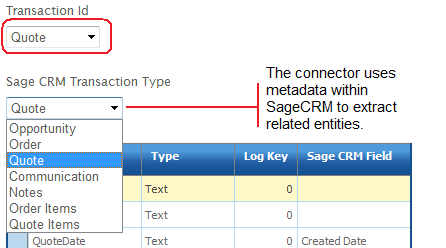
- Change the Transaction Id drop-down at the top of the page from Opportunity to Quote. The Quote transaction maps to the Quote entity, so the SageCRM Transaction Type drop-down changes to match:
- Change the Transaction Id to QuoteLines. The Transaction Type changes to Quote Items.
- Press Refresh to import the transactions into SageCRM.
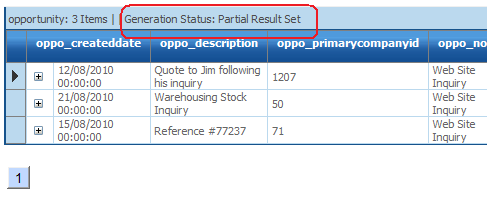
- At the top of the preview grid, look at the Generation Status. It starts as Partial Result Set. Press Refresh until it changes to Complete. This can take 20 seconds or more, because SageCRM may need to start up.
- When the import is complete, scroll the preview area to the right. The
OpportunityIdfield holds the auto-generated ID, and theImportSuccessfield holds either Success or Failure.
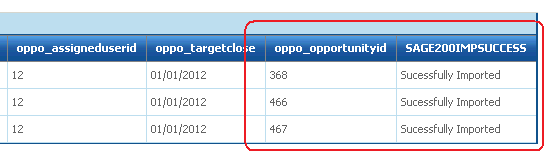
- If the import succeeded, all the Opportunity records and their quotes are now in SageCRM.