Version 6.1 Product Update 3
PU3 brings a slew of new features and a bucket full of bug fixes including: asynchronous Web API requests, automatic retries on connections, cancelling jobs from the Monitor and a Ctrl+K command palette, plus a large set of Sage 300 enhancements and fixes.
- See what’s new in the 6.1 Release
- Fixes in PU1 and PU2.
Enhancements
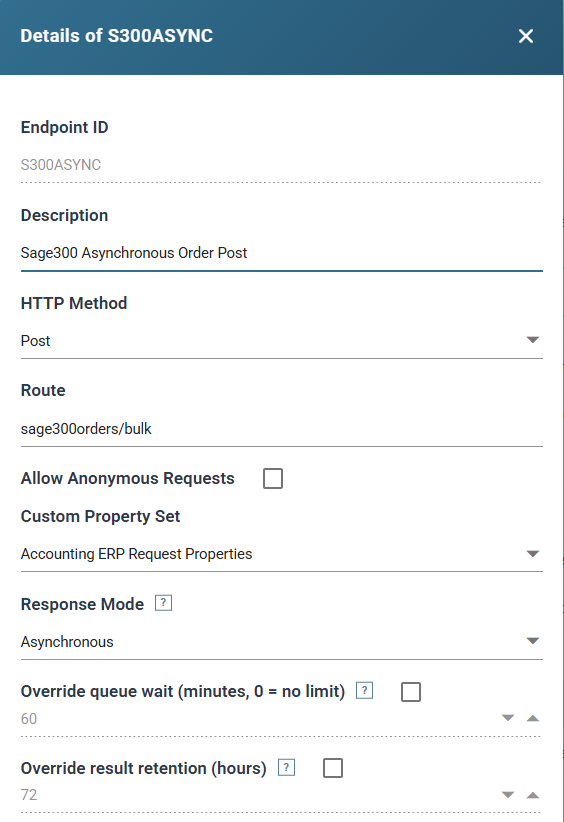
- IMAN-6112, IMAN-6113, IMAN-6115, BLAZ-1069 – Web API – Asynchronous Requests – An endpoint’s new Response Mode can answer at once with 202 Accepted and a job id, run the integration in the background, and let the caller poll for its status and collect the result. The limits, queue wait and result retention are on Setup > Asynchronous Jobs.
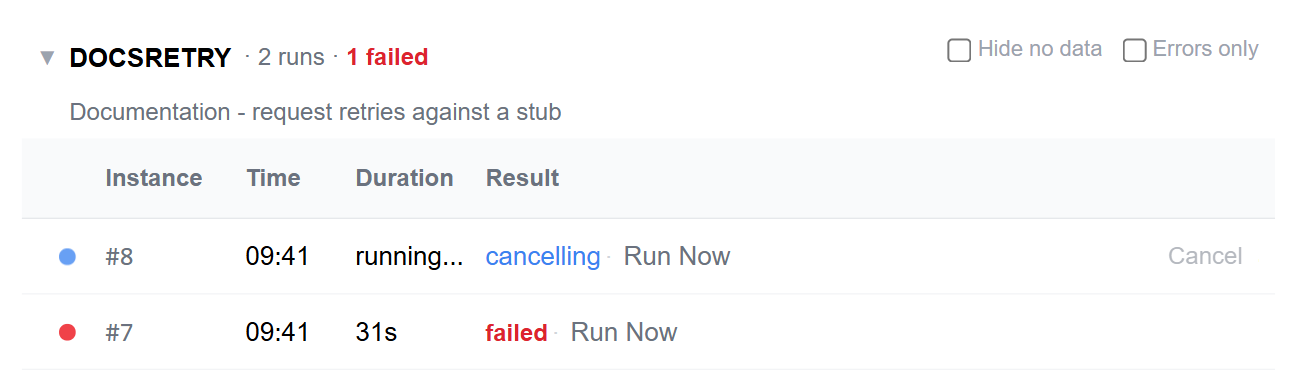
- IMAN-6186, BLAZ-1073, BLAZ-1097 – Monitor – Queued and running integrations now show together with what started them, and an administrator can cancel either. A run whose engine ended without recording an outcome shows as interrupted, with its error.
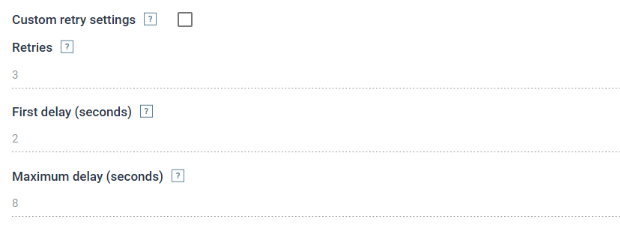
- IMAN-6382, BLAZ-1088 – Retries – Email, FTP & SFTP, Database, OneDrive, S3, Azure Blob and Webservice Connections now retry temporary failures, such as a dropped connection. Retries are on after upgrading, 3 for most connections, so a call that keeps failing takes longer to report its error. Custom retry settings on each connection changes the values, and 0 turns them off.
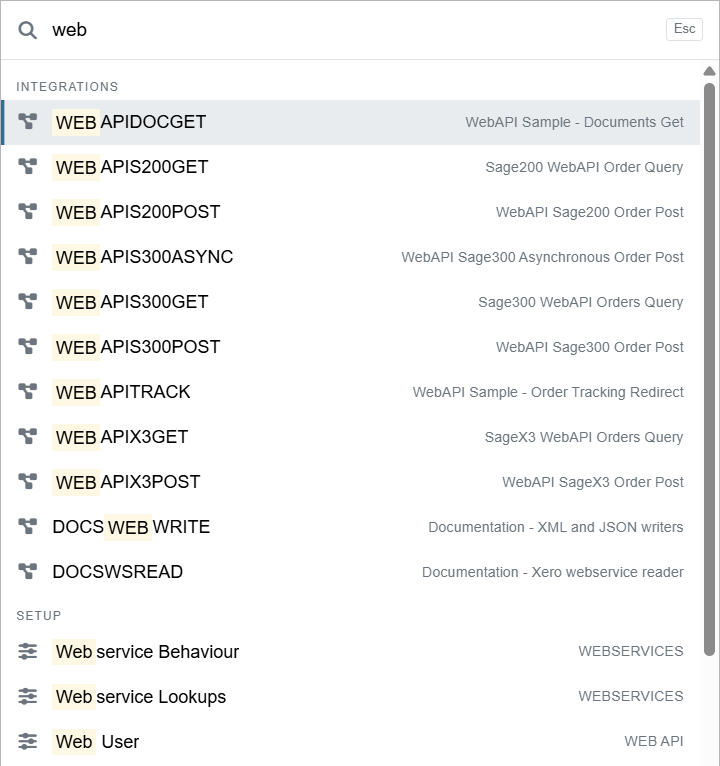
- BLAZ-1081 – Web UI – Command Palette – Ctrl+K opens a search over the pages, Setup screens, integrations, the open diagram’s transforms, and actions such as save.
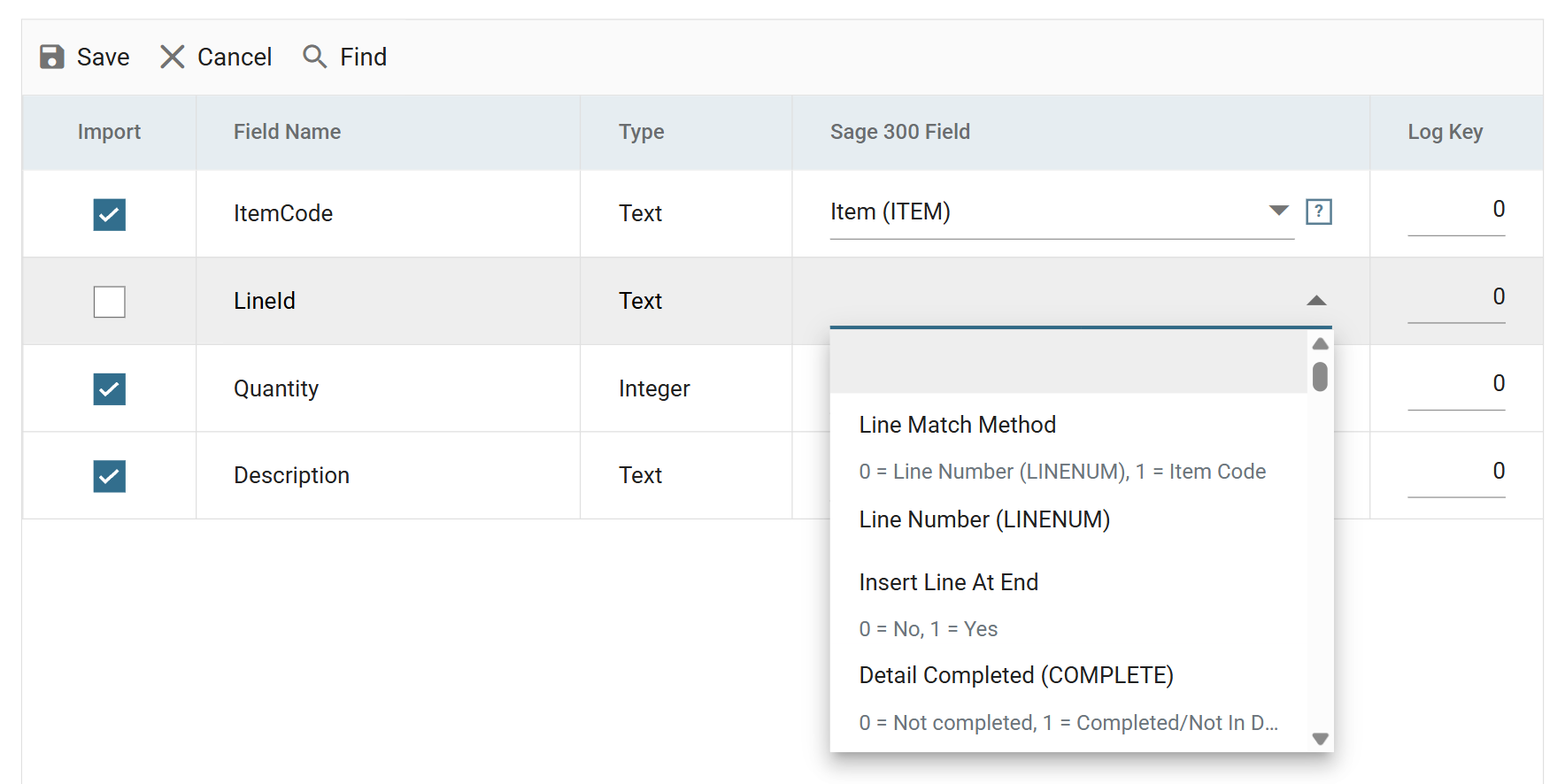
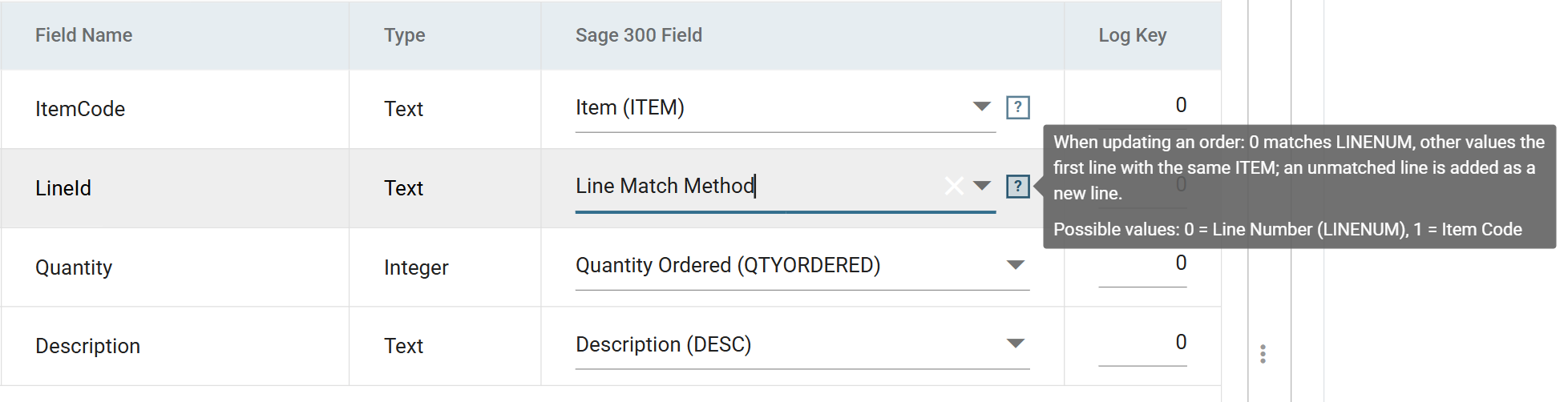
- IMAN-6425, BLAZ-1104, BLAZ-1105 – Sage300 – Field Mapping – The connector’s map-to list shows the values a field can take, and a help tip on a mapped field gives those values with a note on how IMan uses the field.
- IMAN-6598, 6615, 6617 – Sage300 – P/O Returns – P/O Returns can now be imported, standalone or from a receipt, with comments, serials and lots.
- IMAN-6614, 6616, 6621, 6623, 6624 – Sage300 – Comments and Instructions – Every O/E and P/O line import now takes a comment and an instruction on the line itself, wrapped at 80 characters. New options replace a line’s existing child comment or instruction rows, and added rows keep the order of the data.
- IMAN-6645, 6650 – Sage300 – Kits and Bills of Materials – I/C Kitting Items and Bills of Materials can now be updated and synchronised, as well as inserted.
- IMAN-6663, 6665 – Sage300 – A/P Payments – Applied lines now take a payment schedule number, write-offs and a job split, and prepayments and misc payments can be job-related.
- IMAN-6647, 6656, 6662, 6666 – Sage300 – A/R Receipts and Batches – A receipt’s amount can be totalled from its lines, a line takes a write-off description, and a line applied to a job-related document is allocated by Sage when no jobs are given. The status of G/L, A/R Invoice, A/P Payment and Cashbook batches can be mapped.
- IMAN-6504 – Intacct – A/R Invoice Reversal – New import that reverses an invoice already in Intacct, found by its invoice number or RECORDNO. The record number of the invoice reversed is written back.
- IMAN-6505 – Intacct – A/R Payment Reversal – New import that reverses a customer’s payment already in Intacct, such as a cheque returned unpaid, found by its document number or RECORDNO. The invoices it paid are due again, and the record number of the payment reversed is written back.
- IMAN-6249, BLAZ-1076 – FTP Task – Upload has a Create Folder option, which creates each missing level of the remote directory.
- IMAN-6682 – VBScript – FormatMessage – New function that replaces the numbered placeholders in a message with a value or an array of values.
- IMAN-6300, 6301, 6306, 6314, 6315, 6379, 6410, 6479 – Security – Hardens session cookies, live connections, preview permissions, Forgot Password and the Web API. New OAuth proxy keys are 2048 bits; existing keys keep working. If IMan is behind a front end that rewrites the Host header, the front end must send forwarded headers, as sign-in already requires.
- IMAN-6106, IMAN-6107 – Installer – Upgrades now keep the IMan services’ logon accounts and the IManWebAPI application pool’s identity. This takes effect from the next upgrade: installing PU3 still resets them, so they need to be entered once more.
Fixes
- IMAN-6629, 6631 – Sage300 – Item Numbers – P/O documents, I/C Transfers and Customer Pricing find a line by its item from either a formatted or an unformatted item number.
- IMAN-6244 – File and FTP – The file reader, and the File, Email attachment and FTP upload tasks, now take the files a wildcard matches in name order.
- IMAN-6480, IMAN-6483 – Designer – Refresh Schema on a reader beneath another reader now uses the parent’s existing results, and re-runs the parent only when it or a transform above it has changed.
- IMAN-6318 – Integration Engine – Branched integrations now hold the data of one branch at a time, rather than of every branch, so they use less memory.
- BLAZ-1083, BLAZ-1084 – File Explorer – Paste on a folder’s menu now pastes into that folder, and a name clash asks whether to replace the file or merge the folder.
- IMAN-6298 – Forgot Password – A user who has not set a password, such as one whose invitation link has expired, can now request a new link.
- IMAN-6388 – Audit Report – A failed audit report email after a successful job is now logged as an error, rather than failing the job and sending every report again.
- IMAN-6312, IMAN-6418 – Integration Engine – The job’s own error is no longer replaced by a later error sending its audit, and a timeout inside a transform is recorded as a failure rather than a cancel.
- IMAN-6317 – Integration Engine – On a branched integration, values made only of spaces were emptied, line endings were changed, and control characters failed the job.
- IMAN-6526 – Lookups – A Safe Lookup that uses the same parameter more than once no longer fails with ‘COUNT field incorrect’.
- IMAN-6681, IMAN-6705, IMAN-6716 – VBScript – The syntax check no longer refuses the second name in a Dim list, an array element as a function’s argument, or Escape and Unescape. It now reports a Right without its second argument.
- IMAN-6508 – Field Mapping – Adding a field to a Map that had been reconnected to its parent could be refused with a false ‘Duplicate field names’.
- IMAN-6511 – Lookup Tables – A lookup entry description over 100 characters is now refused with a message, rather than with a server error.
- IMAN-6086 – Database Reader – Refresh Schema with no connection selected now says so.
- IMAN-6216 – File and Email Readers – Automatic encoding detection now prefers valid UTF-8 and skips encodings the content is not valid in.
- IMAN-6253, 6254, 6255, 6262, 6263 – SFTP – Fixes running out of server handles when changing directory or downloading, a second file listing coming back empty, relative paths, and deleting a folder that has sub folders.
- IMAN-6256, 6257, 6258, 6264 – FTP Task – Fixes deleting a relative folder with its contents, relative folders with more than one file pattern, a backslash in the remote directory, and a download or delete failing on a job saved by an older version.
- IMAN-6383, 6384, 6385, 6387, 6389 – Email – IMAP and POP3 connections the server has dropped are reopened, connections are released after a failure, an error on closing SMTP no longer hides the send’s own error, and Office 365 token errors give their cause.
- IMAN-6295 – File Systems – A failed upload to S3 or OneDrive is now reported, rather than looking like a success.
- IMAN-6232 – Webservices – Throttling – Requests made at the same time are now released a full interval apart.
- IMAN-6477, IMAN-6481 – Web API – A property added to a Custom Property Set reaches the web users already permitted on its endpoints without saving them again, and a request captured for one integration at design time is no longer seen by another.
- IMAN-6233, IMAN-6386 – Connectors – A connector, reader or transform that cannot be created now reports the underlying error.
- BLAZ-1080 – Job Viewer – The viewer rejoins its job after a lost connection, so it no longer stops showing errors.
- BLAZ-1082 – Transform Preview – Find now counts the column headers it highlights, and scrolls to them.
- BLAZ-1089 – Web UI – The sidebar no longer scrolls when its menu fits, and the signed-in user’s full email address shows on hover.
- BLAZ-1115, IMAN-6304 – Web UI – Logging out could start a new sign-in, and What’s New could be blocked for some browsers on the server’s own network.
- IMAN-6599, 6611, 6612, 6669 – Sage300 – Error Reporting – Connector errors are now logged with their own text. They could be lost, logged with an earlier record’s message, or logged more than once.
- IMAN-6549, 6550, 6551, 6560, 6569, 6571, 6580, 6602, 6670 – Sage300 – Batches – Fixes the error count that decides whether a created batch is posted, so a batch with errors is not posted and a clean batch after it is. A batch that is not posted keeps its status, and batch errors are logged against the batch.
- IMAN-6539, 6540, 6563, 6619 – Sage300 – Update – The Update operation now updates existing records on A/P Vendors, Remit-To Locations, A/R Ship-To Locations, comments, I/C Pricing, Contract Pricing, Manufacturer Numbers and Location Details, G/L Budget Sets and P/O Vendor Contract Costs.
- IMAN-6538, 6546, 6603 – Sage300 – G/L – Without a batch record, the first journal entry was dropped and the batch had no description. An account with control ledgers or rollups is now counted once.
- IMAN-6542, 6566, 6567, 6600, 6620, 6672 – Sage300 – O/E Orders – Lines on a quote or standing order being converted match those Sage copies. Comments go to their own line without blank rows, a line added by an update takes its job fields, the receipt batch number is written back, and a failed prepayment or credit check rejects the order.
- IMAN-6533, 6579, 6586, 6622, 6653, 6673 – Sage300 – O/E Shipments – Line discounts are applied, updates match lines on shipments with or without an order, a misc charge can be added to a job-related shipment, and an unmatched kit component is named in its error.
- IMAN-6544, 6553, 6591 – Sage300 – O/E Invoices and Credit Notes – Line numbers are written back to the right lines, misc charges on credit notes are handled, and a manual document tax is distributed over the lines only when asked for, on shipments too.
- IMAN-6576, 6585, 6587 – Sage300 – P/O Orders and Requisitions – A line added to an existing document takes its job fields, a new order line can be inserted at the end, and requisition line numbers are written back to the right lines.
- IMAN-6543, 6564, 6565, 6575, 6577, 6588, 6601, 6632 – Sage300 – P/O Receipts and Invoices – Fixes updating a line with no receipt line reference, spaces in a list of order numbers, the tax, optional fields, vendor address and errors of additional costs, and line numbers written back.
- IMAN-6535, 6589, 6590 – Sage300 – P/O Credit Notes – A mapped total is now checked by Sage, credit notes can be created from a return, and optional fields set up only for invoices no longer reject the credit note.
- IMAN-6534, 6541, 6552, 6554, 6561, 6574, 6626 – Sage300 – A/R – Prepayments join the open receipt batch, item prices in a new currency or unit are inserted, Salesperson 2 is imported on ship-to locations, taxes on misc receipts are distributed only when asked for, and job fields on an invoice that is not job-related no longer fail it.
- IMAN-6562, 6573, 6581, 6584, 6597, 6605 – Sage300 – A/P and Recurring Entries – Payment batches take a mapped currency and rate, recurring lines can be matched by distribution code and are added after the last line, and adjustment and recurring line numbers are written back.
- IMAN-6555, 6583, 6606, 6607, 6608, 6639 – Sage300 – I/C – Fractional quantities and conversions are no longer rounded, stock counts adjust missing lots at average cost, save optional fields and report an unknown unit, receipts take a line unit, and posted shipments allocate serials and lots.
- IMAN-6556, 6568, 6570, 6593, 6594, 6609, 6610, 6613, 6652 – Sage300 – P/M – A header without lines no longer swallows the headers after it, approved charges are posted, timecard and contract resource optional fields are saved, and the counts and line numbers reported back are corrected.
- IMAN-6628, 6648 – Sage300 – Common Services and Optional Fields – Insert now skips an exchange rate or optional field value that already exists, and Yes/No optional fields accept Yes, True and similar words, which all saved as No.
- IMAN-6625, 6633, 6640, 6641, 6644, 6675 – Sage300 – Printing – A document is flagged as printed only when it was printed or exported, printed debit notes are flagged, labels are corrected, and every import now offers the company field.