We have just completed some work to add the ability to create/update Employee records (both Canadian & US) in Sage300 (to be released formally shortly).
One of the gotchas we ran across is the updating of the Employee Tax screen.
 Recording a macro didn’t really help as the mechanism the UI uses to identify each row is the PARMSEQ field, which is an incrementing value representing the row number of the table.
For an automated import this is quite brittle as an additional entry could potentially reorder the rows causing the incorrect row to be updated.
When viewing the table we found an integer value (PARMNBR) was being stored, which we could only assume was some sort of reference to the record.
The PARMNMBR would be fine to use as the key to update, but you would need to know it’s value and this is a little concealed, ideally we’re looking to use the description as the key to update these values.
Investigation 1 (Fail)
Hunting around the tables….no tables would be found with this info.
Investigation 2 (RVPSPY)
We opened our friend, RVSPY with nesting turned on and found the screen was calling CT0002.
We then tried to querying the table, per the Object Model, but the table doesn’t exist.
So we tried querying the views. Success, it returned the values, but no unfortunately no description field.
This makes sense since all descriptions are stored in resource files, so the PARMNBR was actually the Resource ID.
To get the description we needed to using the RscGetString method to retrieve them (note that we’re querying the CT module and not the CP application.
Recording a macro didn’t really help as the mechanism the UI uses to identify each row is the PARMSEQ field, which is an incrementing value representing the row number of the table.
For an automated import this is quite brittle as an additional entry could potentially reorder the rows causing the incorrect row to be updated.
When viewing the table we found an integer value (PARMNBR) was being stored, which we could only assume was some sort of reference to the record.
The PARMNMBR would be fine to use as the key to update, but you would need to know it’s value and this is a little concealed, ideally we’re looking to use the description as the key to update these values.
Investigation 1 (Fail)
Hunting around the tables….no tables would be found with this info.
Investigation 2 (RVPSPY)
We opened our friend, RVSPY with nesting turned on and found the screen was calling CT0002.
We then tried to querying the table, per the Object Model, but the table doesn’t exist.
So we tried querying the views. Success, it returned the values, but no unfortunately no description field.
This makes sense since all descriptions are stored in resource files, so the PARMNBR was actually the Resource ID.
To get the description we needed to using the RscGetString method to retrieve them (note that we’re querying the CT module and not the CP application.
I hope this helps out others out there!
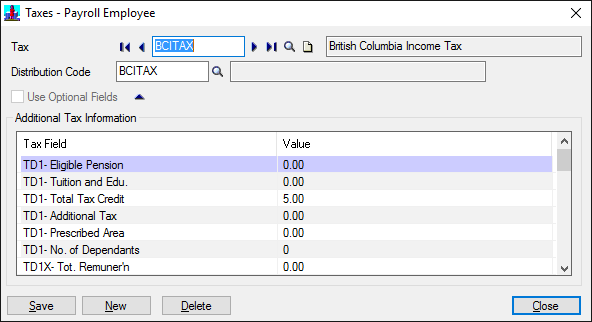 Recording a macro didn’t really help as the mechanism the UI uses to identify each row is the PARMSEQ field, which is an incrementing value representing the row number of the table.
For an automated import this is quite brittle as an additional entry could potentially reorder the rows causing the incorrect row to be updated.
When viewing the table we found an integer value (PARMNBR) was being stored, which we could only assume was some sort of reference to the record.
Recording a macro didn’t really help as the mechanism the UI uses to identify each row is the PARMSEQ field, which is an incrementing value representing the row number of the table.
For an automated import this is quite brittle as an additional entry could potentially reorder the rows causing the incorrect row to be updated.
When viewing the table we found an integer value (PARMNBR) was being stored, which we could only assume was some sort of reference to the record.
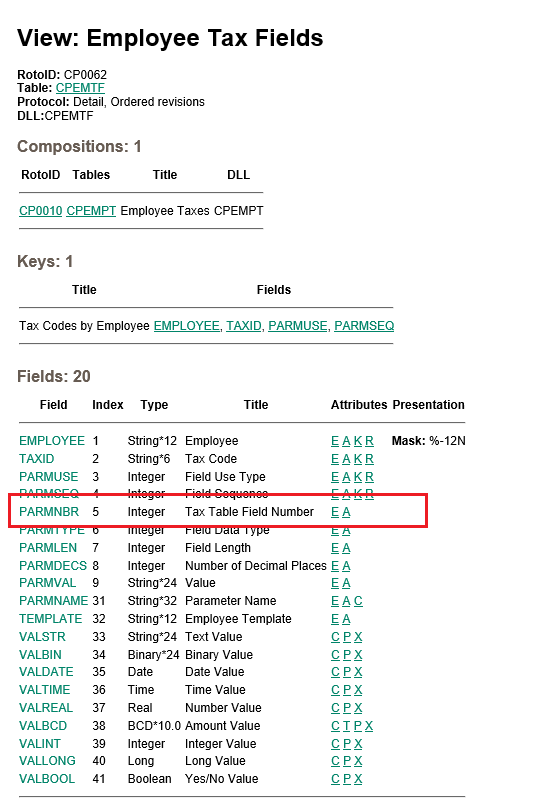 The PARMNMBR would be fine to use as the key to update, but you would need to know it’s value and this is a little concealed, ideally we’re looking to use the description as the key to update these values.
Investigation 1 (Fail)
Hunting around the tables….no tables would be found with this info.
Investigation 2 (RVPSPY)
We opened our friend, RVSPY with nesting turned on and found the screen was calling CT0002.
The PARMNMBR would be fine to use as the key to update, but you would need to know it’s value and this is a little concealed, ideally we’re looking to use the description as the key to update these values.
Investigation 1 (Fail)
Hunting around the tables….no tables would be found with this info.
Investigation 2 (RVPSPY)
We opened our friend, RVSPY with nesting turned on and found the screen was calling CT0002.
 We then tried to querying the table, per the Object Model, but the table doesn’t exist.
So we tried querying the views. Success, it returned the values, but no unfortunately no description field.
We then tried to querying the table, per the Object Model, but the table doesn’t exist.
So we tried querying the views. Success, it returned the values, but no unfortunately no description field.
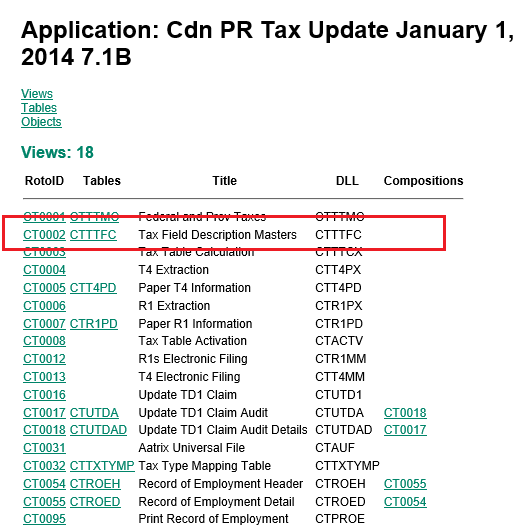 This makes sense since all descriptions are stored in resource files, so the PARMNBR was actually the Resource ID.
To get the description we needed to using the RscGetString method to retrieve them (note that we’re querying the CT module and not the CP application.
This makes sense since all descriptions are stored in resource files, so the PARMNBR was actually the Resource ID.
To get the description we needed to using the RscGetString method to retrieve them (note that we’re querying the CT module and not the CP application.
|
1 |
mDBLinkCmpRW.Session.RscGetString("CT", CT.Fields("PARMNBR").Value) |