Multipart Form URL Handling
With Post Type set to Multipart Form URL Encoded the
Form URL Writer sends
a multipart/form-data request. A browser uses this format to upload a file
from a form, and most services expect a file in it. What the writer does with
the request depends on the target.
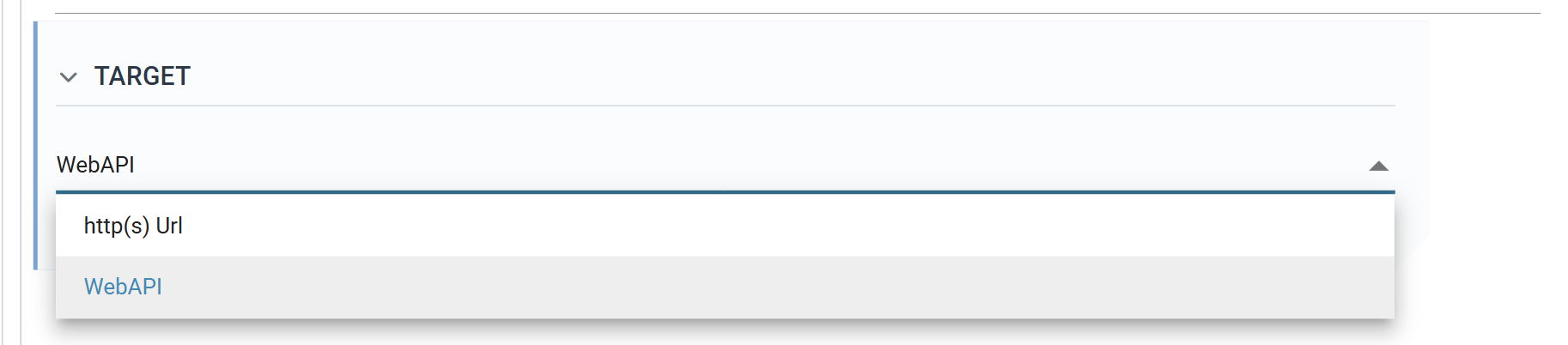
- On http(s) Url the writer sends the request to the service: form fields and one or more files, in as many sections as the fields describe.
- On WebAPI the request is the response to the caller. This is how an integration returns a file, such as a PDF it has rendered or a document it has fetched. A browser does not read a multipart response the way a server reads a multipart request. It hands the body to its viewer, which looks for a single file, so return only one. Tick Make File as Attachment to have that file offered as a download, and set at least one field's Parameter Type to File Type.
Multipart requests
A multipart request is a sequence of sections, each holding one file with the form fields that belong to it. The writer produces one section by default, and more where a Boundary field ends one and starts the next.
The writer writes each section as two parts: the section's form fields,
URL-encoded into one key=value&key=value part, followed by the file. A request
with two sections looks like this. The boundary string is the writer's own and
never changes.
Content-Type: multipart/form-data; boundary=-----RealisableIMan-977206634256144926150311

-------RealisableIMan-977206634256144926150311
Content-Type: application/x-www-form-urlencoded

InvoiceNo=INV-1001&FormName=Invoice
-------RealisableIMan-977206634256144926150311
Content-Type: application/pdf
Content-Disposition: form-data; name="file1"; filename="INV-1001.pdf"

<the bytes of INV-1001.pdf>
-------RealisableIMan-977206634256144926150311
Content-Type: application/x-www-form-urlencoded

InvoiceNo=INV-1002&FormName=Invoice
-------RealisableIMan-977206634256144926150311
Content-Type: application/pdf
Content-Disposition: form-data; name="file2"; filename="INV-1002.pdf"

<the bytes of INV-1002.pdf>
-------RealisableIMan-977206634256144926150311--
Building the request
You describe the request on the Field Mapping tab, one row per field, with three columns:
- Export Field — whether the field is in the request at all.
- Parameter — the name a form field is sent under.
- Parameter Type — what kind of part the field contributes.
Parameter Type
Field/Parameter Field
The default. The field goes into the section's form part as Parameter=value,
URL-encoded, with the other Field/Parameter fields of the section. The writer
leaves out a field with no value on the record.
File Type
The field names the file for the section. Its value must be the path of
a file that exists. Otherwise the writer stops with "cannot read file". The
path gives the part its filename, and the file's extension gives its
Content-Type: .pdf is application/pdf, and an extension the writer does
not know is application/octet-stream. The bytes come from the file or, where
the field's own type is Binary, from the field.
Every section needs one File Type field. The writer always writes a file part at the end of a section, so a section with no File Type field fails.
Content Disposition Name Field
The field's value becomes the name in the file part's Content-Disposition
header, in place of the default: file1 for the first section's file,
file2 for the second, and so on. Some services require a particular name
here.
Boundary Field
Ends the section. The fields above it, back to the previous Boundary field or the top of the grid, form one section with its file; the fields below start the next. The Boundary field itself sends nothing.
With no Boundary field the whole grid is one section. This is the usual case: one file, with its form fields.
Ordering the fields
A section is the fields between two boundaries, so the order of the rows sets the layout of the request. Put each section's form fields, its File Type field and its Content Disposition Name field together, and its Boundary field last. To reorder rows, put the grid into edit mode and drag the handle at the left of each row.