JSON Writer — Flat Data
This article creates and updates contacts in Xero from a flat CSV file, using a JSON Writer on the http(s) Url controller.
Two things are going on, and they are independent of each other:
- Choosing the request. The controller can make two different requests — an insert and a modify — and a field on the data decides which one each record gets.
- Building the body. The source is flat and the service wants nested objects and arrays. JPath is what bridges that, without hierarchising the data first.
It uses the XERO behaviour from Webservice Behaviour and the XEROCONT lookup from Webservice Lookup.
Every Refresh on this integration writes to Xero
A preview is a real run. Unlike the reader articles, there is no safe way to try this out — each Refresh really creates or really updates contacts in the organisation the behaviour is authorised against.
Use the Xero Demo Company. It can be reset from Xero's own settings, and nothing in it is anyone's accounting record.
The source data
sample-data/csv/xero-contacts.csv, six contacts, one row each:
Name,FirstName,LastName,EmailAddress,AccountNumber,AddressLine1,City,Region,
PostalCode,Country,PhoneAreaCode,PhoneNumber,IsCustomer,IsSupplier
Kestrel Coffee Roasters,Anna,Petrov,[email protected],KCR-001,
14 Mill Lane,Bristol,Avon,BS1 4TR,United Kingdom,0117,496 0181,TRUE,FALSE
Flat, one line per contact, with the address and phone columns alongside the rest. Nothing in it knows about Xero.
Step a — Reader and Map
Two transforms before the writer, neither of which is the subject of this article.
A CSV Reader over the file, with Header Rows set to 1 and its transaction renamed Contact. On the Field Mapping tab, set IsCustomer and IsSupplier to Boolean, which makes them come out of the writer as JSON true and false rather than as the strings "TRUE" and "FALSE".
A Map transform with three calculated fields:
| Field | Evaluate | Formula | |
|---|---|---|---|
ContactID |
✔ | WebserviceLookup("XEROCONT", %Name, False) |
Empty when the contact is new |
AddressType |
✔ | "POBOX" |
|
PhoneType |
✔ | "DEFAULT" |
The last two are constants because Xero requires them and the source does not carry them. A contact's address is one of two types, POBOX or STREET, and a phone is one of DEFAULT, DDI, MOBILE, FAX or OFFICE. The source system has never heard of either, so the mapping to Xero's vocabulary is the Map's job rather than the reader's — which is where that kind of translation belongs generally.
A fourth field, XeroStatus, is added by the next article and appears in the screenshots here because they were taken from the finished integration.
Step b — The two requests
The http(s) Url controller in write mode holds two URLs and two operations. Which pair a record uses is decided by the Modify Field: where that field has a value, the modify pair is used; where it is empty, the insert pair is.
That mechanism is why the Map does the lookup. An empty ContactID means Xero has never heard of this contact, so create it. A populated one means it exists, so update it.
What Xero calls them
Read the vendor's documentation for this and not the convention, because Xero inverts it:
| Endpoint | Xero's own operation name | |
|---|---|---|
PUT /Contacts |
the collection | createContacts — creates, and fails on a duplicate name |
POST /Contacts |
the collection | updateOrCreateContacts — an upsert |
POST /Contacts/{ContactID} |
one contact | updateContact |
Most APIs use POST to create and PUT to update. Xero's PUT is the create, its POST is the upsert, and there is no DELETE for a contact at all — a contact is archived by setting its ContactStatus, not removed.
Taking that at face value gives:
| Insert | PUT Contacts — create only, so a name collision is reported rather than silently absorbed |
| Modify | POST Contacts/{ContactID} — update the one record the lookup found |
The Target section
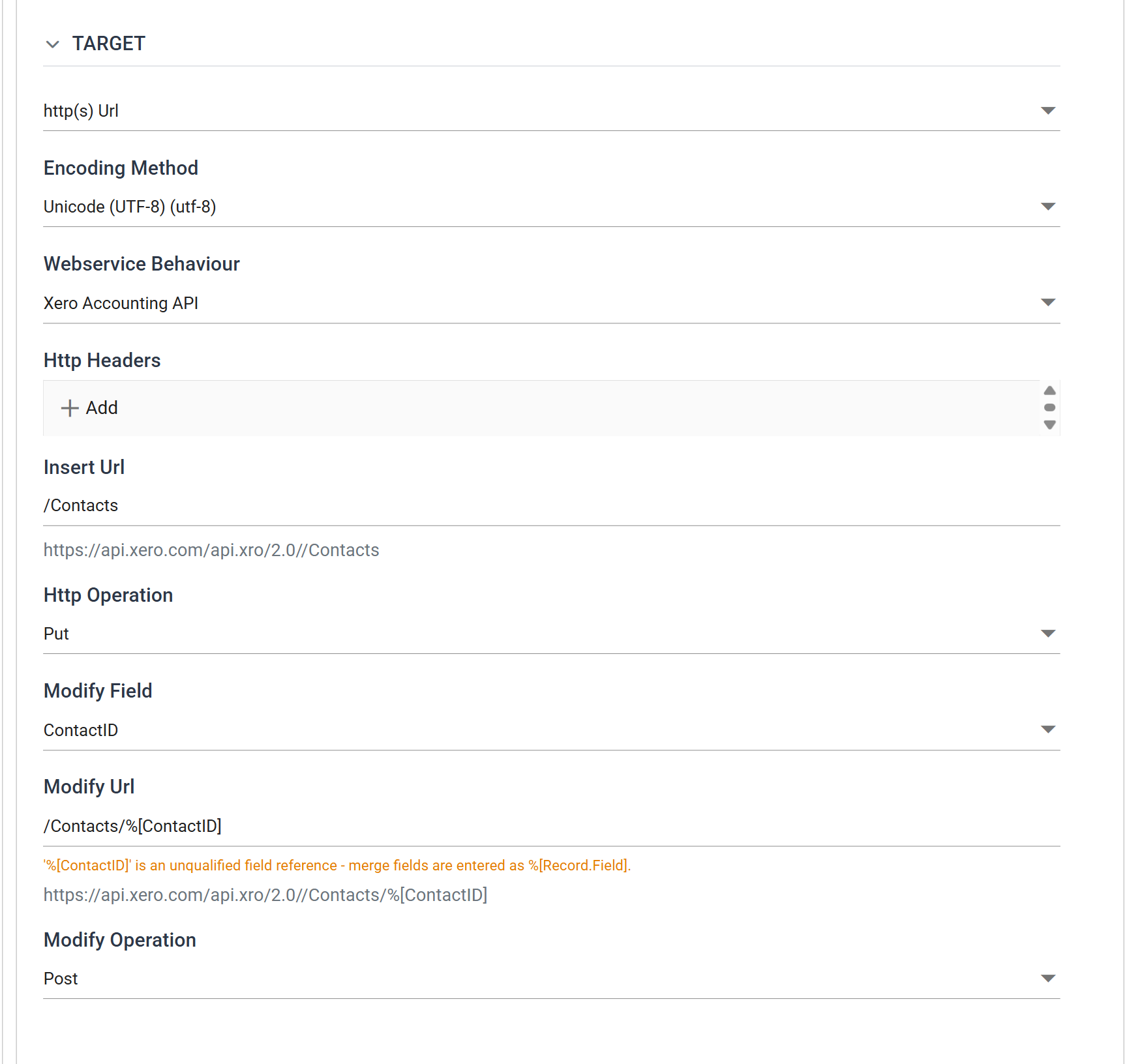
| Field | Value | |
|---|---|---|
| Target | http(s) Url | |
| Encoding Method | Unicode (UTF-8) | |
| Webservice Behaviour | Xero Accounting API | Base url, authentication, throttling, tracing |
| Http Headers | (empty) | On the behaviour, since every Xero request needs the same ones |
| Insert Url | Contacts |
|
| Http Operation | Put | Xero's create |
| Modify Field | ContactID |
Non-empty selects the modify pair |
| Modify Url | Contacts/%[Contact.ContactID] |
|
| Modify Operation | Post | Xero's update |
Two details on this screen are the screen telling you something, and both are easy to miss.
The grey line under each URL is the resolved request, base url and path joined. It is the fastest check that the two halves fit together — and it is where a leading slash shows up as .../api.xro/2.0//Contacts, with the doubled separator, because the behaviour's Base Url already ends at 2.0. Write the path without one.
A merge field is qualified by its transaction. %[ContactID] draws a warning — "'%[ContactID]' is an unqualified field reference — merge fields are entered as %[Record.Field]" — and %[Contact.ContactID] does not. The transaction is the one named in Generate File Per Transaction below.
DELETE is a special case
Set the Http Operation to DELETE and the Modify Field and Modify Operation are disabled: there is nothing to choose between. A DELETE may carry a body or none, and leaving the writer's field mapping empty is how you send none. See the controller's write mode.
One request per record
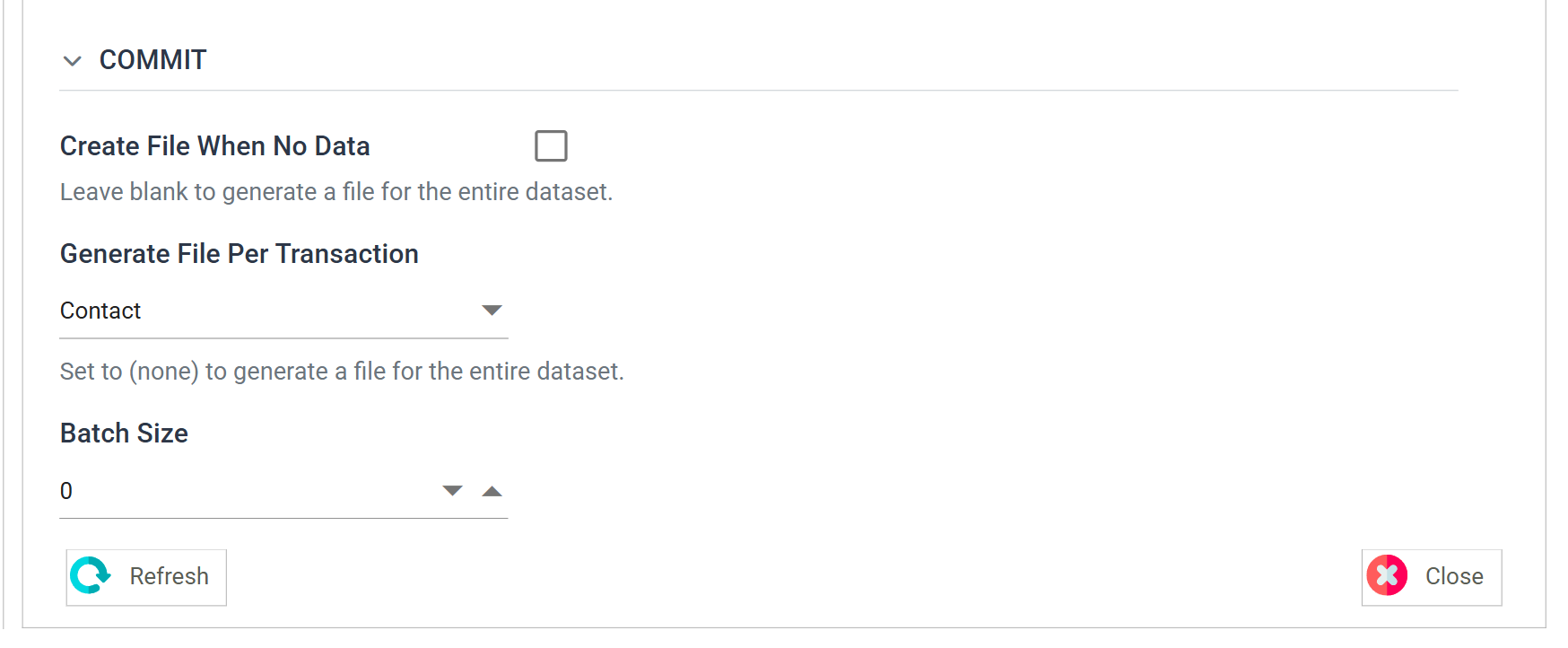
Generate File Per Transaction must name the transaction — Contact — and not be left at (none).
Left at (none), the writer builds one document from the whole dataset and sends one request. That is the efficient shape, and Xero's PUT /Contacts will happily take all six contacts in a single call. But one request cannot be both an insert and an update, and one URL cannot carry six different ContactIDs — so the Modify Field mechanism and the %[Contact.ContactID] parameter both require one document per record.
Six contacts, six requests. That is the price of deciding per record: at Xero's 60 requests a minute, a file of a thousand contacts is a sixteen-minute run before the lookups are counted.
Step c — Building the document
Xero wants this, per contact:
{
  "Contacts": [
    {
      "Name": "Kestrel Coffee Roasters",
      "FirstName": "Anna",
      "LastName": "Petrov",
      "EmailAddress": "[email protected]",
      "AccountNumber": "KCR-001",
      "Addresses": [
        { "AddressLine1": "14 Mill Lane", "City": "Bristol", "Region": "Avon",
          "PostalCode": "BS1 4TR", "Country": "United Kingdom",
          "AddressType": "POBOX" }
      ],
      "Phones": [
        { "PhoneAreaCode": "0117", "PhoneNumber": "496 0181",
          "PhoneType": "DEFAULT" }
      ],
      "IsCustomer": true,
      "IsSupplier": false
    }
  ]
}
Two levels of nesting and two arrays, out of one flat row. No transform builds that structure — the field paths do.
The Initial JPath
On the Field Mapping tab, Initial JPath is the wrapper the whole document is built inside:
The trailing [] makes it an array, and the transaction's records become objects in it. With one record per document there is exactly one object, which is the shape Xero's collection endpoints take.
The field paths
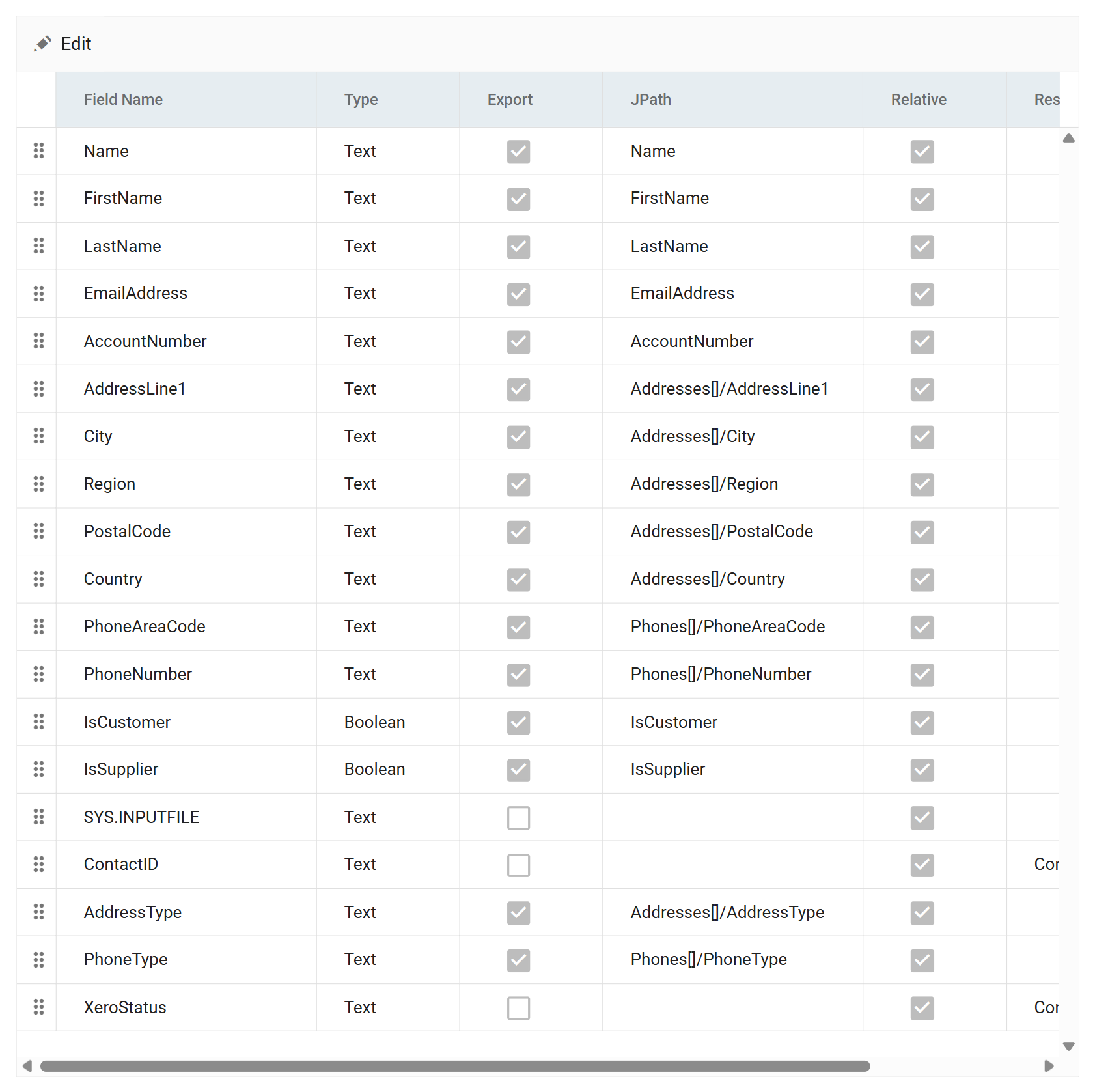
| Field | Export | JPath |
|---|---|---|
Name |
✔ | Name |
FirstName |
✔ | FirstName |
LastName |
✔ | LastName |
EmailAddress |
✔ | EmailAddress |
AccountNumber |
✔ | AccountNumber |
AddressLine1 |
✔ | Addresses[]/AddressLine1 |
City |
✔ | Addresses[]/City |
Region |
✔ | Addresses[]/Region |
PostalCode |
✔ | Addresses[]/PostalCode |
Country |
✔ | Addresses[]/Country |
AddressType |
✔ | Addresses[]/AddressType |
PhoneAreaCode |
✔ | Phones[]/PhoneAreaCode |
PhoneNumber |
✔ | Phones[]/PhoneNumber |
PhoneType |
✔ | Phones[]/PhoneType |
IsCustomer |
✔ | IsCustomer |
IsSupplier |
✔ | IsSupplier |
SYS.INPUTFILE |
||
ContactID |
Addresses[] in the middle of a path is the whole trick. An array indicator on an intermediate segment creates the array and puts the rest of the path inside its first object — so six fields that all begin Addresses[]/ merge into one object in one array. Flat data goes in, a nested document comes out, and no Hierarchy transform was needed.
ContactID is not exported. It goes out in the Modify Url, not in the body. Exporting it as well would do no harm here, but the URL is where Xero's updateContact expects it.
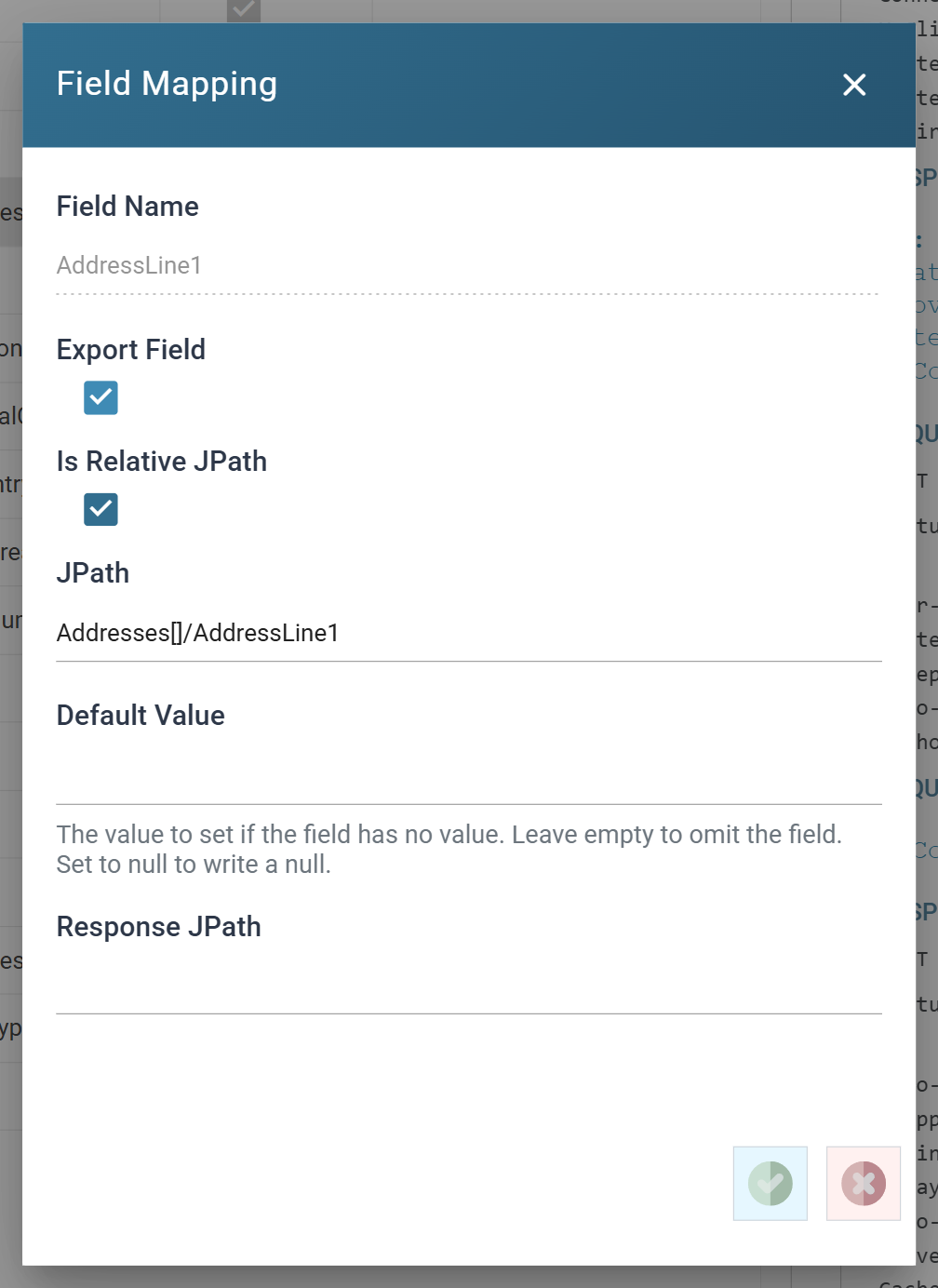
Is Relative JPath is ticked, so the path is appended to the transaction's. Clear it and the path runs absolute from the document root. Use that to write a value outside this transaction's part of the structure.
Default Value decides what happens when a field is empty, and the three cases are genuinely different: left empty the property is not written at all, a value writes that value, and the literal null writes a JSON null. A service that distinguishes "absent" from "explicitly cleared" cares about the difference — Xero does not, but plenty do.
Step d — Run it
Refresh from the reader down, not from the writer. A Refresh replays whatever its parent last produced, so refreshing the writer after changing the file, or after the contacts have come into existence, sends the previous run's data. Refresh the reader, then the Map, then the writer.
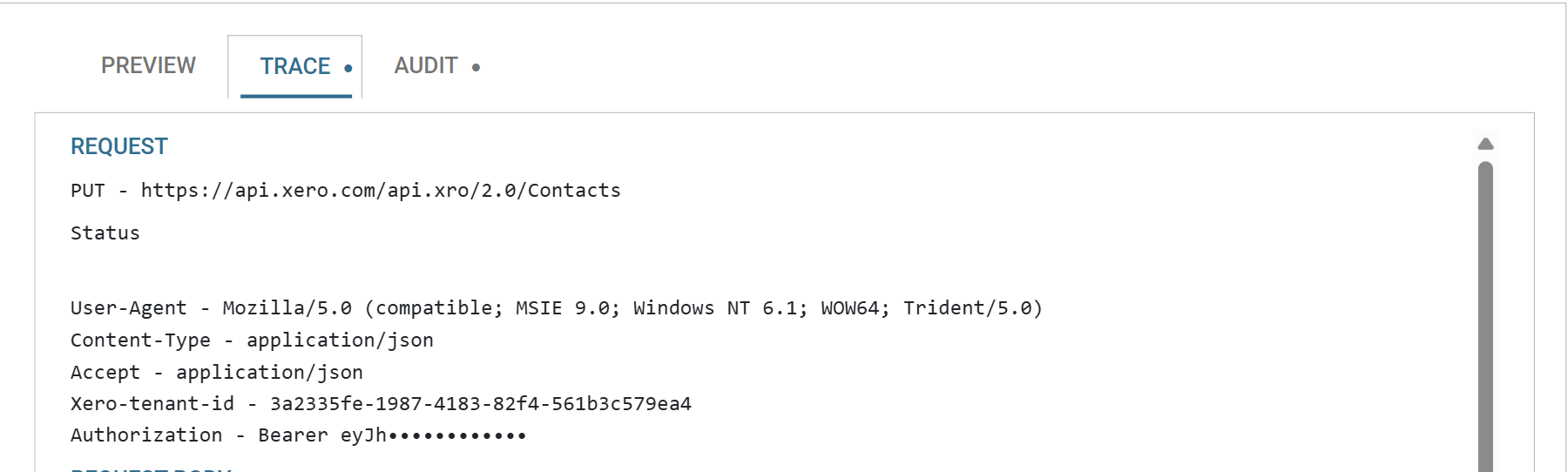
The first run finds nothing in Xero, so every ContactID is empty and every record takes the insert path:
Run it a second time and the lookup finds the six contacts it just created, so every record takes the modify path instead — the same writer, a different URL and verb, decided per record:
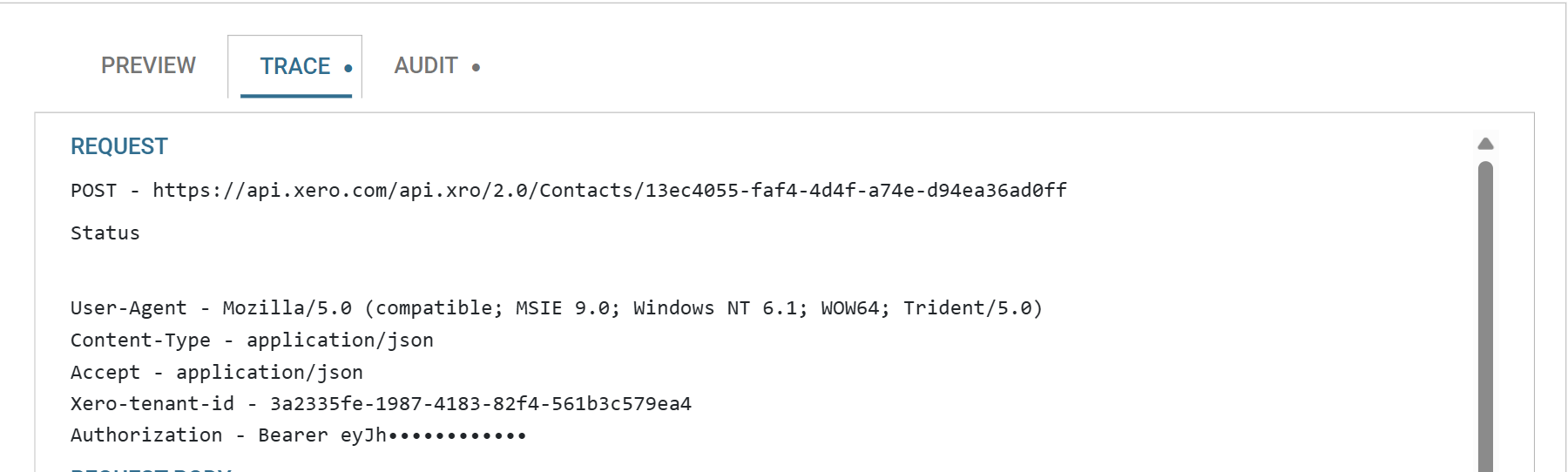
The Trace tab carries the request line, the assembled headers, the request body and the full response, for every request the run made. It is the first place to look when a write does something other than what you expected, and it is the only place the request body can be seen.
Two fields Xero quietly ignores
The run succeeds. Six contacts are created. And IsCustomer and IsSupplier are not set — Xero echoes both back as false whatever was sent.
The API reference says so, in the field description rather than anywhere prominent:
true or false — Boolean that describes if a contact has any AR invoices entered against them. Cannot be set via PUT or POST — it is automatically set when an accounts receivable invoice is generated against this contact.
Nothing errors, nothing warns, and the two fields are perfectly valid JSON in a request the service accepts. In a real integration you would untick Export on both; they are left mapped here because they make the Boolean field types visible in the request body, and because this is the failure mode worth recognising:
A request that succeeds is not the same as a service that did what you asked. The only way to know the difference is to read what came back. The next article covers that.
When it does not work
400, a validation exception. Xero's, and the reason is in the response body in the Trace tab — the summary line says only "A validation exception occurred". On the insert path the commonest is "The contact name … must be unique across all active contacts", which means the lookup returned empty for a contact that does exist.- Every record takes the insert path on a run where it should not. The Modify Field is empty because the Map's lookup ran against a cached upstream dataset. Refresh from the reader down.
- The URL has a doubled slash in it. A leading
/on a path whose Base Url already ends in one. The grey hint under the box shows it. - A field is missing from the body. Only fields with a value generate a property. If it should be written when empty, give it a Default Value.
- An array arrives with one long string in it. An array-valued field whose value has an unterminated double quote in it — the whole value becomes the single element. See the JSON writer's array fields.
Verified against IMan 6.1 and the Xero Accounting API, on 2 September 2026.