Two-Legged OAuth 2.0
Two-legged OAuth is the simpler of the two flows IMan supports, and the one to reach for whenever a service will let you. There is no browser, no consent screen and nobody to ask: your integration presents a client id and a client secret, the service returns an access token, and IMan puts that token on every subsequent request.
The two legs are the two parties — your integration and the service. Nothing represents an end user, so the flow suits an unattended integration.
Do you have a two-legged service?
Vendors rarely use the phrase. Match on what they describe:
| What the vendor's documentation says | What it means |
|---|---|
"client credentials"; grant_type=client_credentials; "machine to machine"; "server to server" |
Two-legged. This page |
| "authorization code"; "redirect URI"; "the user will be asked to approve"; a consent screen in the screenshots | Three-legged. See Three-Legged OAuth 2.0 |
| A single long-lived key with no token exchange at all | Not OAuth. See Basic Authentication |
The reliable tell is the redirect URI. If registering the application asked you for one, the vendor expects a user to be sent somewhere and sent back, and you are looking at a three-legged flow.
The two halves
This is the part worth understanding before touching the screen, because getting it wrong produces an error that points somewhere else entirely.
An OAuth setup describes two different requests:
- The token request. IMan presents the client credentials to the service and receives an access token. Configured by Token Request URL, Token Request Path, Token Request Body Type, Token Request Form URL Parameters and Token Request Headers.
- The authenticated API request. Every subsequent call to the service, carrying that token. Configured by Authenticated API Request Headers, and by nothing else.
Both must be set up. Configure only the first and the token exchange succeeds, then IMan calls the API with an Authorization header carrying no token — the trace reads Authorization - Bearer and nothing after it — and the service answers with a credentials error, because from where it is standing an unauthenticated request is indistinguishable from a badly authenticated one. PayPal's wording for this is "Authentication failed due to invalid authentication credentials or a missing Authorization header", which sends you to check the client id and secret. They are fine. The second half is missing.
There are no Client ID and Client Secret fields here
There are no Client ID and Client Secret fields on this screen, and that is deliberate. You enter the credentials wherever the vendor's documentation puts them — a Basic Authorization header, or client_id and client_secret form parameters — and IMan reads them back out of whichever you used. %[client_id] and %[client_secret] then work either way.
PayPal
PayPal documents the token request as a curl command, which is the most common way to find one:
Key facts
Three things are in that command, and each maps to one part of the screen:
-u "CLIENT_ID:CLIENT_SECRET"is HTTP Basic authentication. That is a Token Request Header, not a body parameter.-d "grant_type=client_credentials"is a form-encoded body. That is a Token Request Form URL Parameter, and IMan pre-seeds it for you.- The URL is the Token Request URL, in full.
The command does not say how to present the token afterwards. Look at any other page of the API reference for that: every example carries Authorization: Bearer <Access-Token>, which is the Authenticated API Request Header.
Sandbox and live are different hosts — api-m.sandbox.paypal.com and api-m.paypal.com — and sandbox credentials are rejected by live with the same message as a bad key. Create the app under Apps & Credentials in the PayPal developer dashboard, and note which tab you were on.
IMan setup
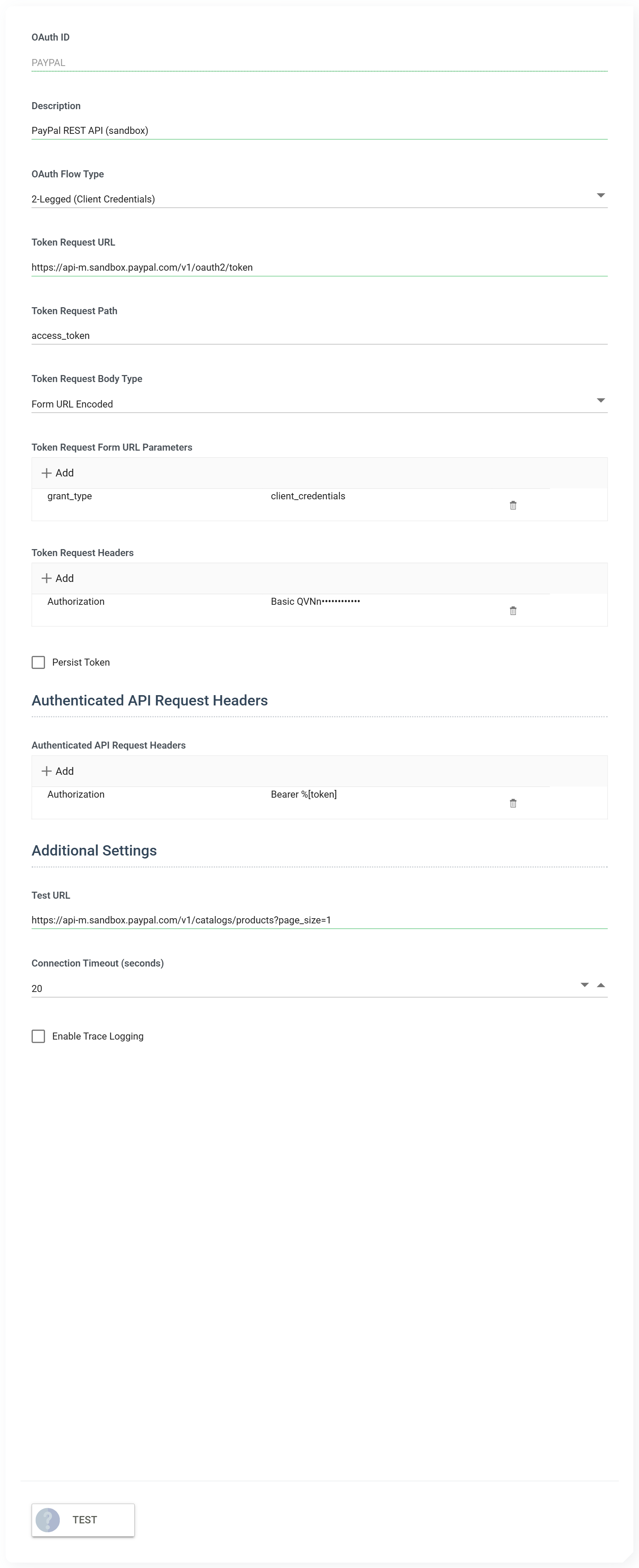
| Field | Value |
|---|---|
| OAuth Flow Type | 2-Legged (Client Credentials) |
| Token Request URL | https://api-m.sandbox.paypal.com/v1/oauth2/token |
| Token Request Path | access_token |
| Token Request Body Type | Form URL Encoded |
| Token Request Form URL Parameters | grant_type = client_credentials |
| Test URL | https://api-m.sandbox.paypal.com/v1/catalogs/products?page_size=1 |
Token Request Path is not a URL path. It is where the token sits in the response — the JPath into the JSON that comes back. PayPal returns {"access_token": "...", "token_type": "Bearer", ...}, so the path is access_token, which is also the default. A service that nests it deeper needs the full path.
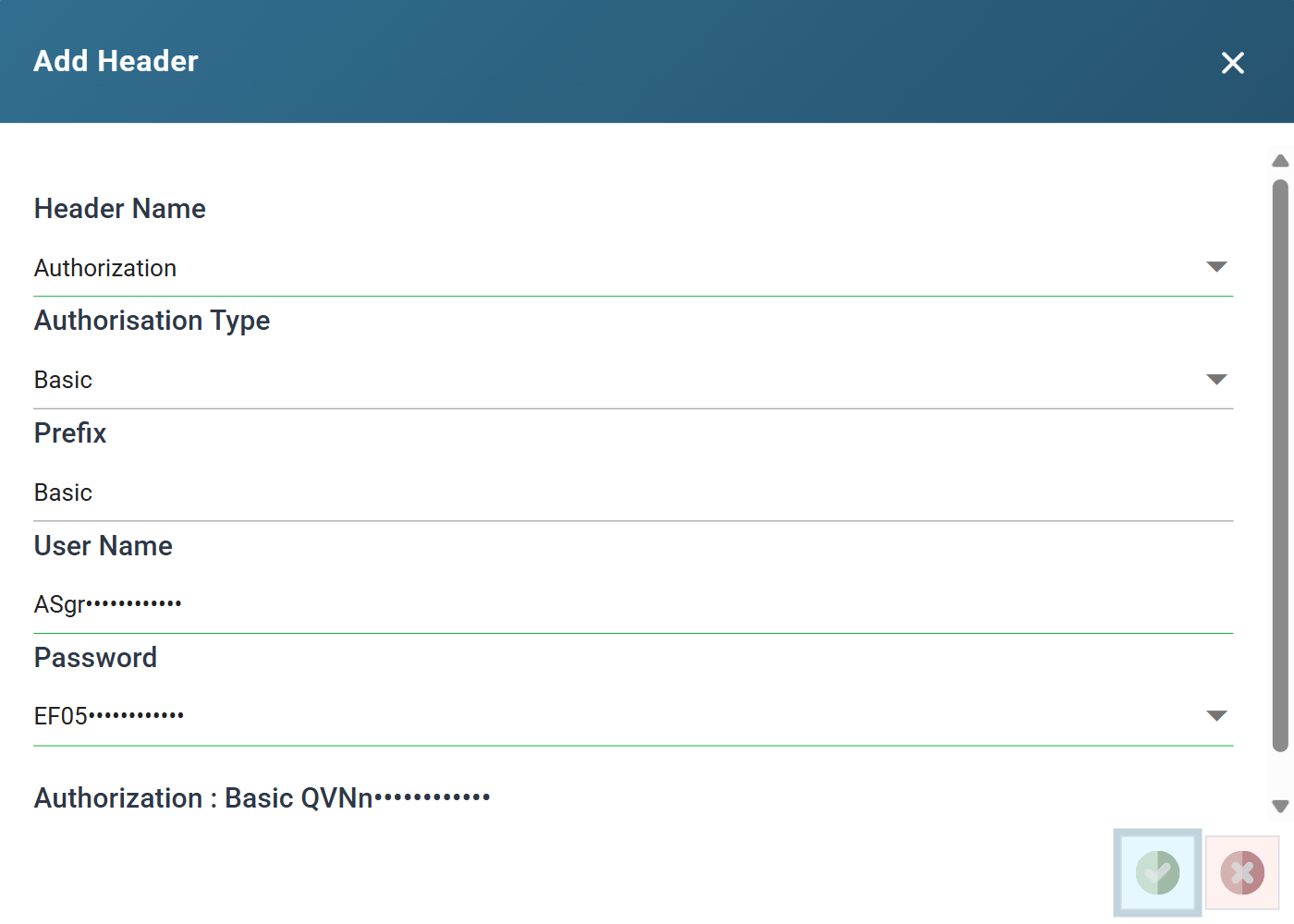
The token request header
-u means Basic, so this is the same header control, and the same Authorisation Type, as the Basic Authentication page. The client id goes in as the user name and the secret as the password.
The authenticated API request header
Add this to the Authenticated API Request Headers list, not the token one.
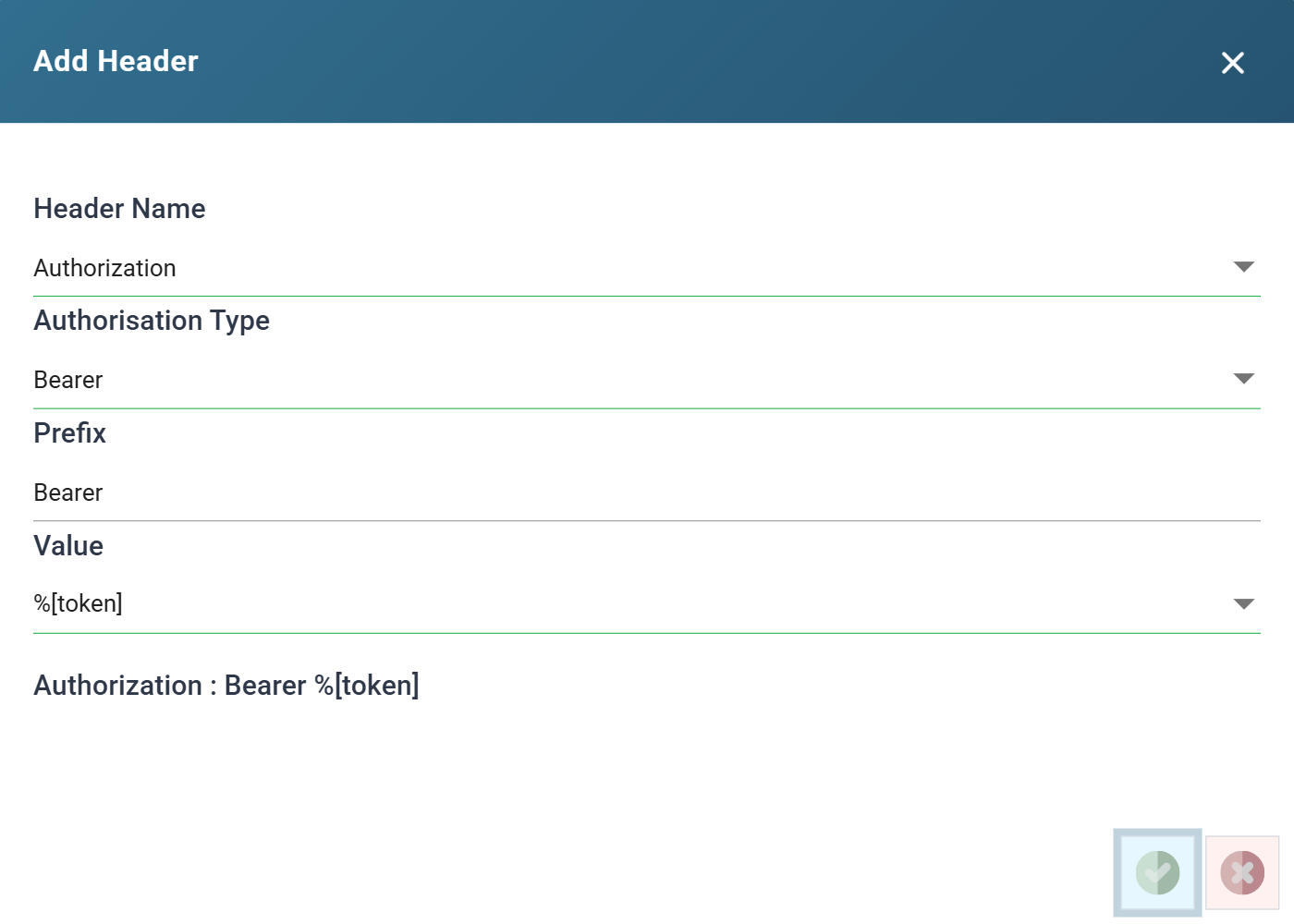
%[token] is a placeholder that IMan replaces with whatever the token request returned. You give IMan the shape of the header, and IMan fills in the value it does not hold until run time.
The flow preview
The right-hand pane draws the flow you have configured, from the values you have typed, and updates as you change them.
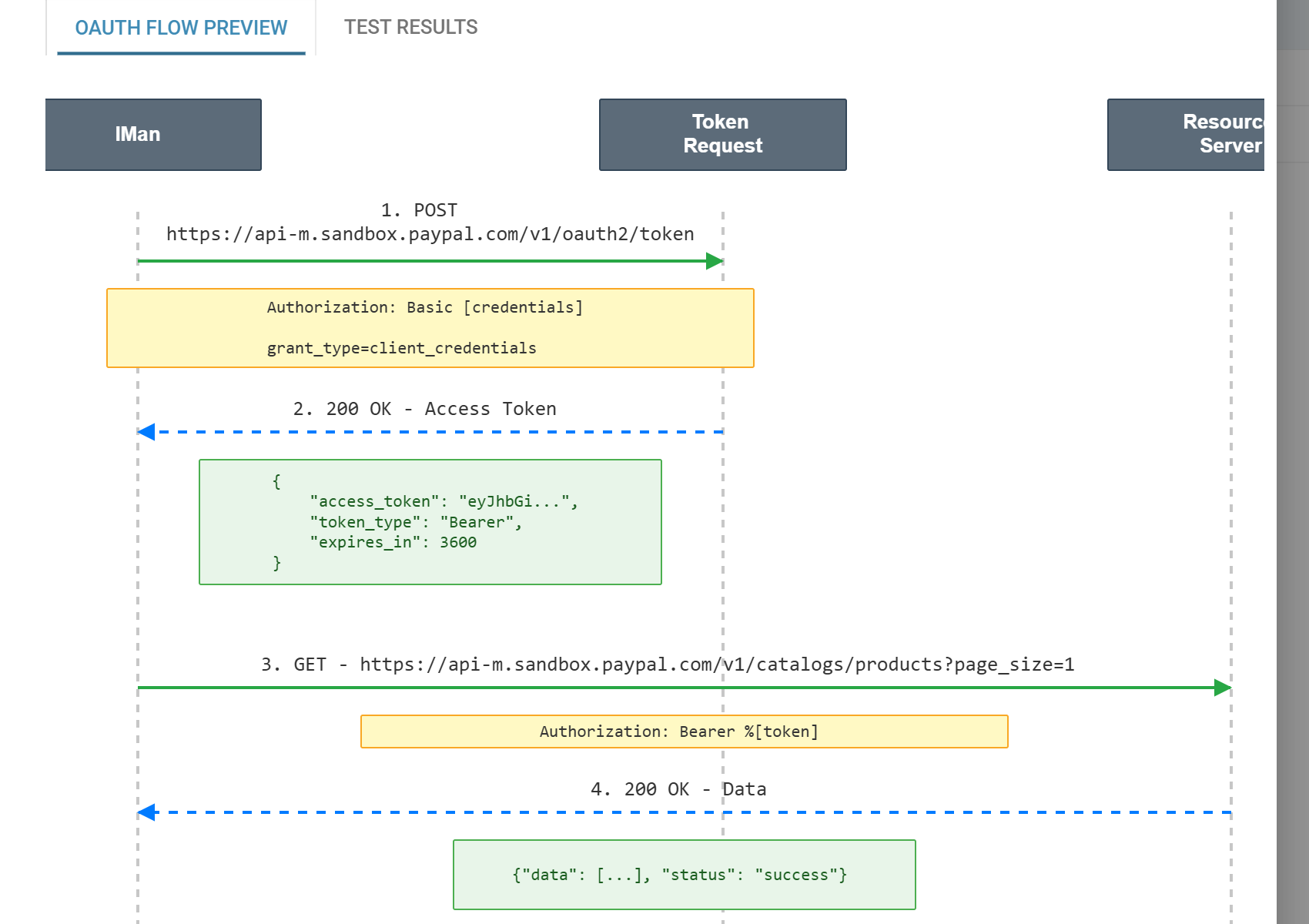
Read it before pressing Test. It is the fastest way to see the mistake described above: if step 3 has no yellow header box against it, the Authenticated API Request Headers list is empty and the API call will go out unauthenticated.
It is also honest about what it does not know. [credentials] and %[token] appear as placeholders rather than as values, because at design time the token does not exist yet.
Testing it
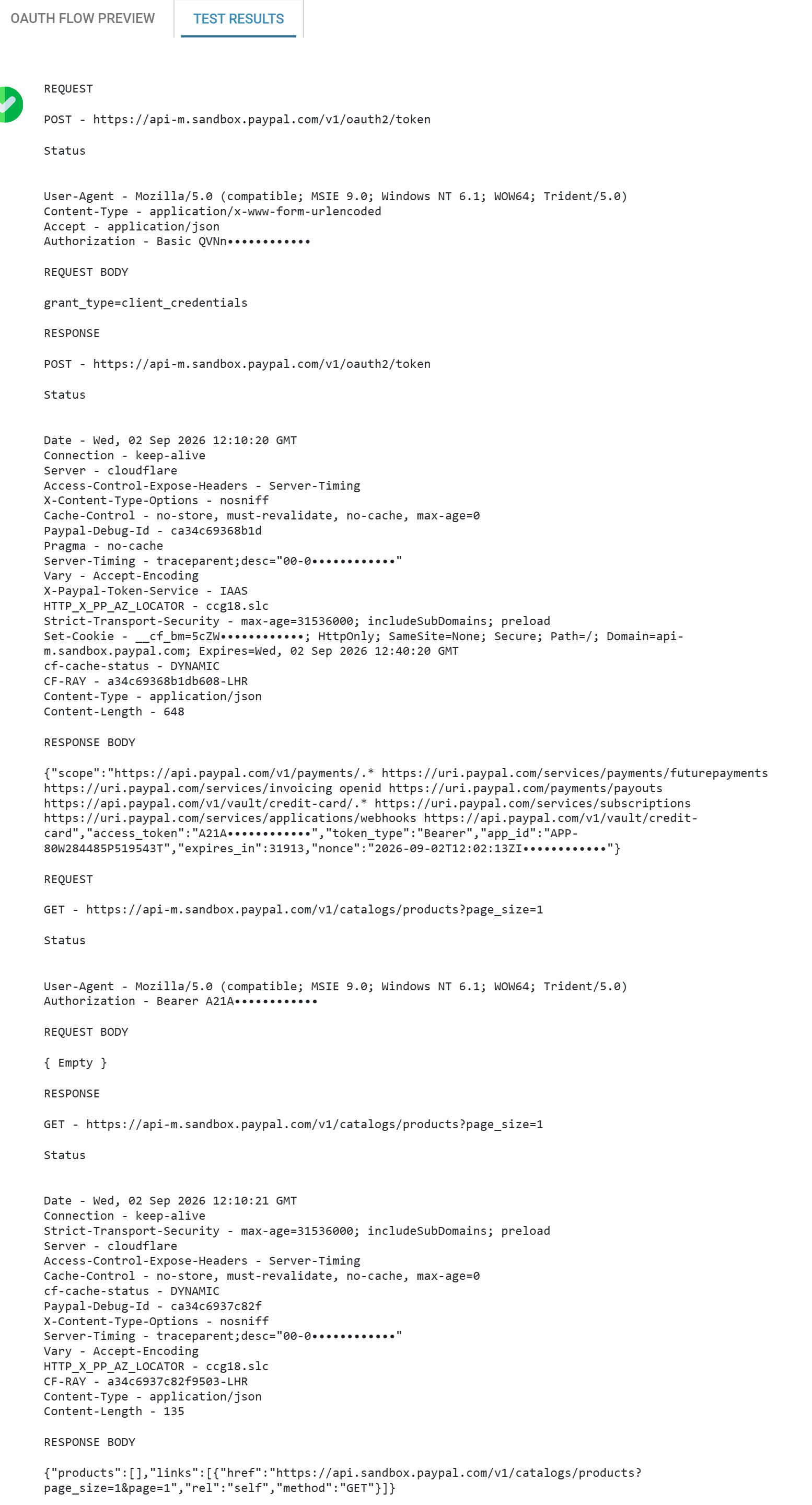
Test URL is any endpoint of the service that answers a GET, and the Test performs the whole flow: the token request, then a real API call with the token. A pass therefore means both halves work, which is more than a token exchange on its own would tell you.
The Test Results tab carries the exchange itself.
When the Test fails
- A credentials error on the API call, not the token call. The Authenticated API Request Headers list is empty or wrong. Check the flow preview: step 3 should carry an
Authorizationheader. invalid_clienton the token request. The client id and secret are wrong for this host — most often sandbox credentials against the live host, or the reverse.- A token is returned and the API call still fails. The token is real but the application lacks permission for that endpoint. This is a scope problem at the vendor, not an IMan problem.
- Nothing at all in Test Results. Tick Enable Trace Logging and run it again.
Once the Test passes, the authentication is ready to be attached to a service by a Webservice Behaviour.
Verified against IMan 6.1 and the PayPal REST API sandbox on 2 September 2026.