Basic Authentication
A Basic Authentication in IMan is a named set of HTTP headers, saved once and then attached to a Webservice Behaviour so that every request made through that behaviour carries them.
The name is historical and narrower than what the object does. HTTP Basic authentication — a base64-encoded user:password pair — is only one of the things it sets up. Anything a service authenticates with that is not OAuth 2.0 is configured here: a bearer token, an API key on a vendor-specific header, or several headers together.
This article works through four services. Each is a different shape of the same problem, and each starts from the vendor's own documentation, because deciding what to enter is almost entirely a reading exercise.
- Mailchimp
- Textbook Basic — any string as the user, the API key as the password.
- JIRA / Atlassian
- Basic again, but an email address and an API token in place of a password.
- Todoist
- A static token on
Authorization: Bearer, the arrangement most modern APIs use.
- A static token on
- Klaviyo
- A non-standard prefix on the standard header, plus a second header the API rejects requests without.
The screen
A Basic Authentication is created from Setup > Basic Authorisation.
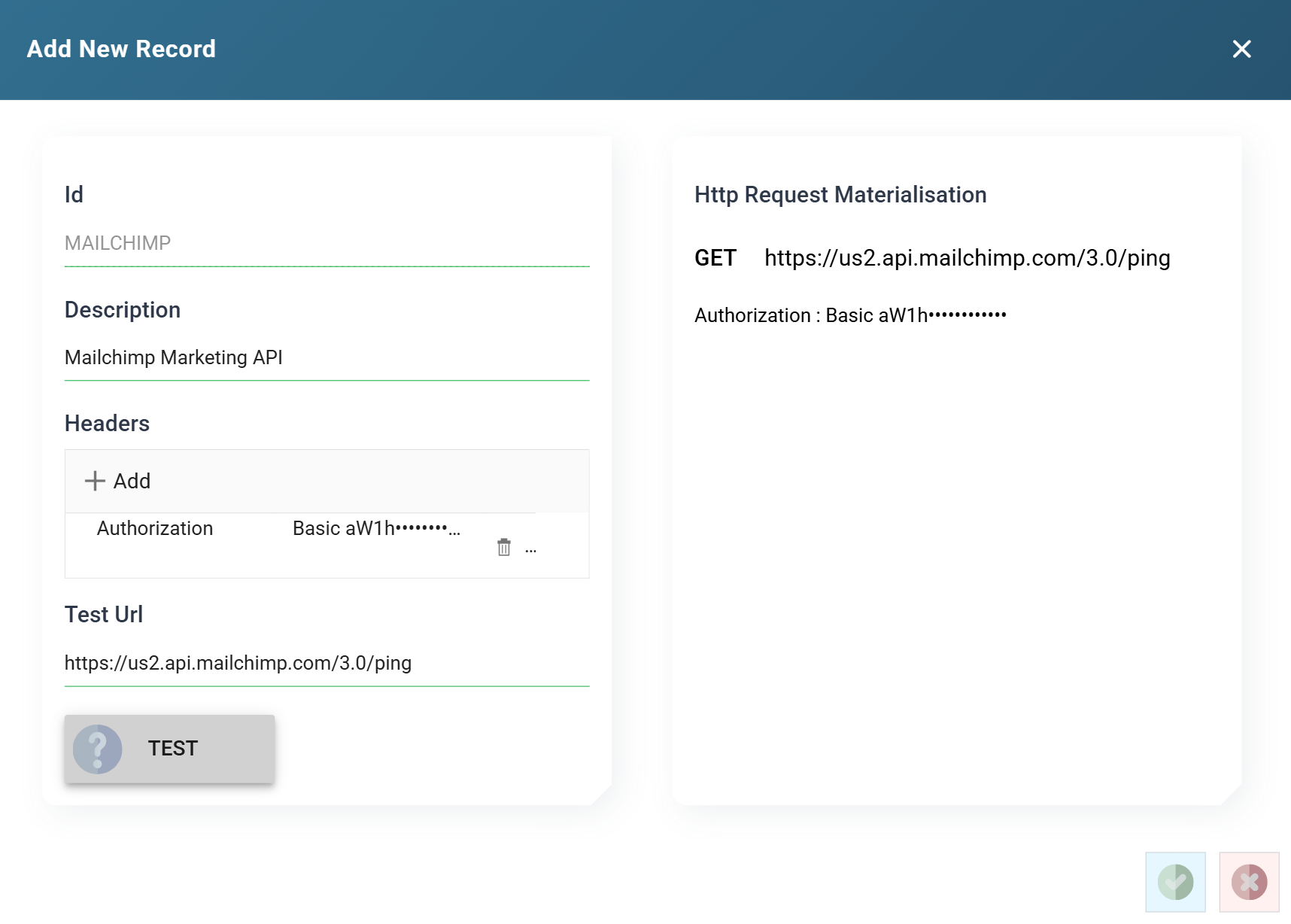
Id and Description
The Id is how the authentication is referenced elsewhere and cannot be changed once saved. Twelve characters, so keep it short and obvious — the recipes below use MAILCHIMP, JIRA, TODOIST and KLAVIYO.
Suffix the Id rather than editing the sample
IMan ships sample data that includes objects with some of these names. If an Id is already taken, suffix it — MAILCHIMP2 — rather than editing the sample, so that you can compare the two.
Headers
The list of headers to send. Add opens the header dialog; clicking an existing row reopens it; the bin icon deletes it.
The Value column shows the header as it will be assembled rather than as you typed it, so a Basic entry reads as base64 here.
Test Url and Test
An address to try the headers against. It must be a URL that answers a GET, because that is all the Test does — it does not know anything about the service beyond the headers you have given it, so an endpoint that expects a POST will report an error even when the credentials are perfectly good.
Pick the cheapest authenticated GET the API has. Each recipe below names one.
Http Request Materialisation
The right-hand pane, showing the method, the URL and every header exactly as the request will carry them.
This is the fastest way to find a broken setup, and the time to read it is before pressing Test. A missing prefix, a header name with a typo, a value that has picked up a trailing space — all of them are visible here, and all of them produce the same unhelpful 401 from the service.
The pane shows the credential — base64 is not encryption
The materialisation pane is not redacted, and neither is the Value column in the header list. A Basic password is shown base64-encoded, which is an encoding and not encryption — anyone who can see the screen can read the credential.
Treat access to the Setup screens as access to every credential in them, and do not paste screenshots of this pane into tickets.
Reading a vendor's authentication page
The Authorization header gets special handling. When you name a header Authorization the dialog grows an Authorisation Type drop-down, and what you fill in below it changes with the selection.
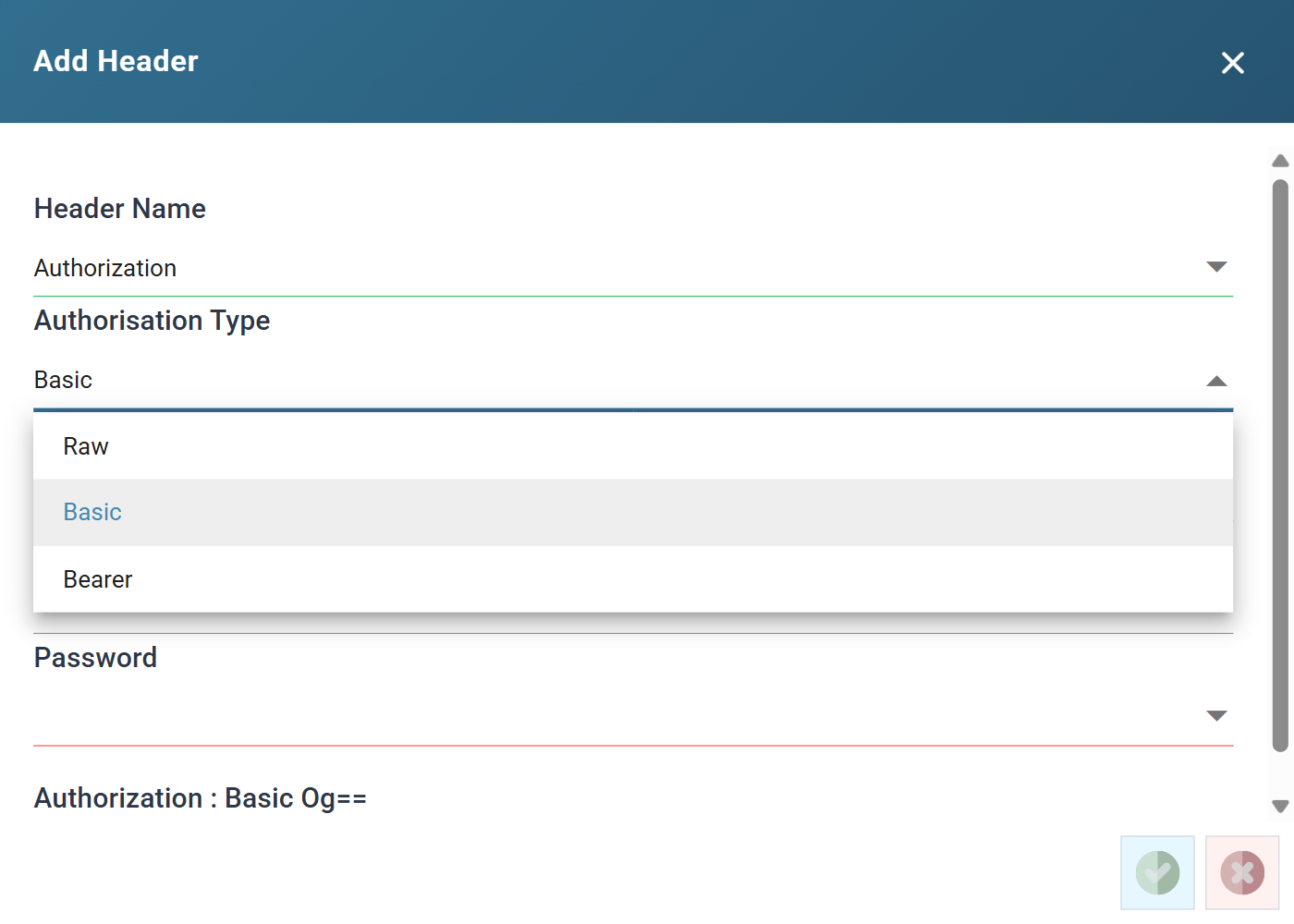
Almost all of the work is deciding which of the three you are looking at. The vendor will not use IMan's words, so match on what they describe rather than what they call it:
| What the vendor's documentation says | Authorisation Type |
|---|---|
"basic authentication"; "base64-encode username:password"; "supply your API key as the password"; a curl example using --user or -u |
Basic |
"Authorization: Bearer <token>"; "bearer token"; "pass the token in the Authorization header" |
Bearer |
An Authorization header with any other prefix — Klaviyo-API-Key, token, SSWS, GenieKey |
Raw |
A header that is not Authorization at all — X-API-Key, apikey, revision |
None of them. Add it as an ordinary header |
The three types differ only in what IMan does to the value before sending it:
- Basic takes a Prefix, a User Name and a Password, joins the last two with a colon and base64-encodes them. The prefix defaults to
Basicand there is rarely a reason to change it. - Bearer takes a Prefix and a Value and sends them separated by a space, unencoded. The prefix defaults to
Bearer. - Raw sends the value exactly as typed, with no prefix and no encoding. If a scheme does not fit the other two, it fits this one.
A Basic header with no password
A service that uses Basic but has no password — some accept an API key as the username with nothing after the colon — is a documented special case. Leave the Password empty and IMan sends the User Name unencoded and with no colon, in the form those services expect. See Http Headers in the User Guide.
Mailchimp
Mailchimp is the simplest case, and its documentation says so plainly.
"To authenticate with an API key, use
--user 'anystring:TOKEN'... The username can be any string; the password is your token."
Key facts
- Standard
Authorizationheader, Basic scheme. - The username is ignored. Any non-empty string will do.
- The API key is the password.
- The base URL is data-centre specific:
https://<dc>.api.mailchimp.com/3.0/, where<dc>is the suffix of your own API key — the characters after the last hyphen, such asus14. Getting this wrong produces a401, which looks exactly like a bad key.
Mailchimp also documents an Authorization: Bearer <TOKEN> form using the same API key. Either works; Basic is used here because it is the form the documentation leads with.
IMan setup
Create the API key in Mailchimp from Account & Billing > Extras > API keys.
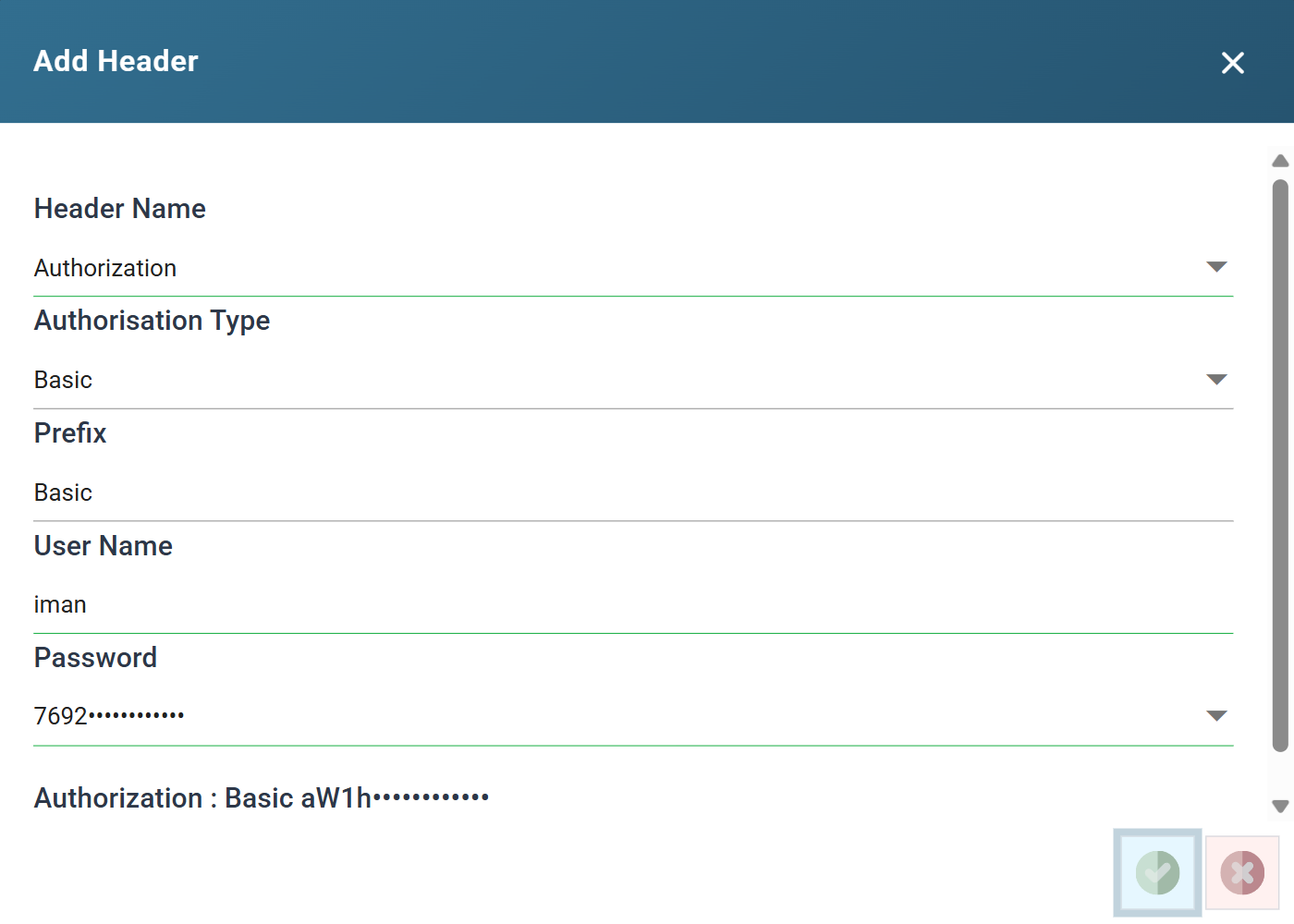
| Field | Value |
|---|---|
| Header Name | Authorization |
| Authorisation Type | Basic |
| Prefix | Basic |
| User Name | iman, or any other non-empty string |
| Password | The API key |
Test Url: https://<dc>.api.mailchimp.com/3.0/ping — Mailchimp's health check, which answers a GET with a two-field JSON body and needs no permissions beyond a valid key.
The API root at /3.0/ authenticates just as well, but it returns the entire account record — including the account owner's name and email address — which is not what you want on screen while you are working through this with someone watching.
JIRA / Atlassian
Atlassian still uses Basic, but an API token has replaced the password, and supplying a password is the commonest way to get a 401 here.
"Authentication using passwords has been deprecated. Build a string of the form
useremail:api_token... Supply anAuthorizationheader with contentBasicfollowed by the encoded string."
Key facts
- Standard
Authorizationheader, Basic scheme, exactly as Mailchimp. - The username is not ignored here — it must be the Atlassian account email address that owns the token.
- The password is an API token created at
id.atlassian.com. An account password will be rejected. - The base URL is your own site:
https://<your-site>.atlassian.net.
The whole difference from Mailchimp is that both halves of the pair matter. A good token paired with the wrong email fails, and it fails with the same 401 as a bad token.
IMan setup
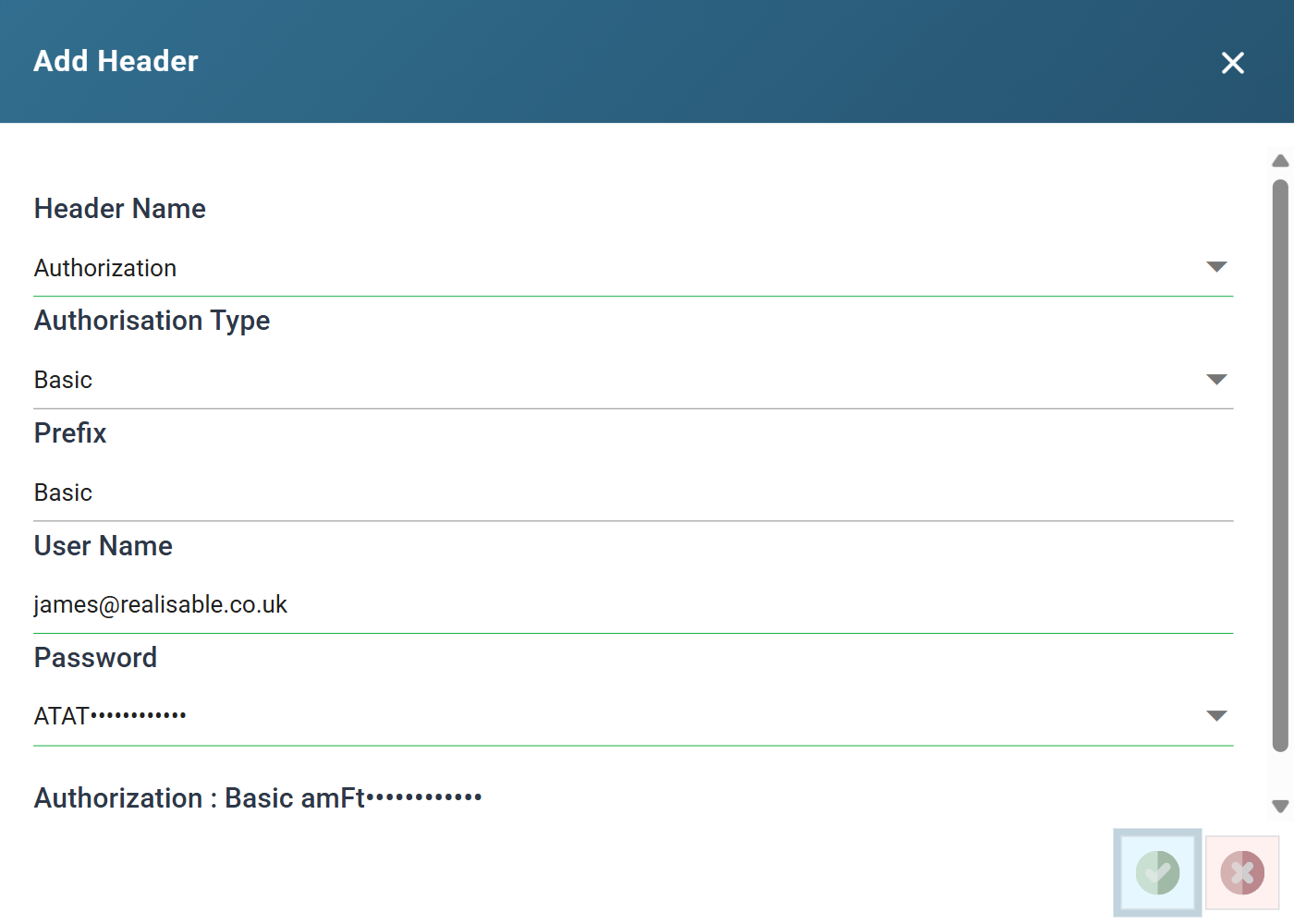
| Field | Value |
|---|---|
| Header Name | Authorization |
| Authorisation Type | Basic |
| Prefix | Basic |
| User Name | The Atlassian account email address |
| Password | The API token |
Test Url: https://<your-site>.atlassian.net/rest/api/3/myself — returns the authenticated user, so it confirms not just that the credentials work but which account they belong to.
Todoist
Todoist is the pattern most modern APIs use: one long-lived token, sent as a bearer credential. Stripe, SendGrid, Airtable and Notion all work the same way.
"your application must provide an authorization header with the appropriate
Bearer $token"
Authorization: Bearer 0123456789abcdef0123456789abcdef01234567
Key facts
- Standard
Authorizationheader, Bearer scheme. - There is no username. The token stands alone.
- The token is not encoded. IMan sends what you paste, after the prefix.
- Base URL
https://api.todoist.com/api/v1/.
The tell is the literal string Bearer in the vendor's example header. Where a Basic example shows you a base64 blob, a Bearer example shows the token itself — if the example header looks like a credential you could read, it is Bearer.
IMan setup
The personal API token is in Todoist under Settings > Integrations > Developer.
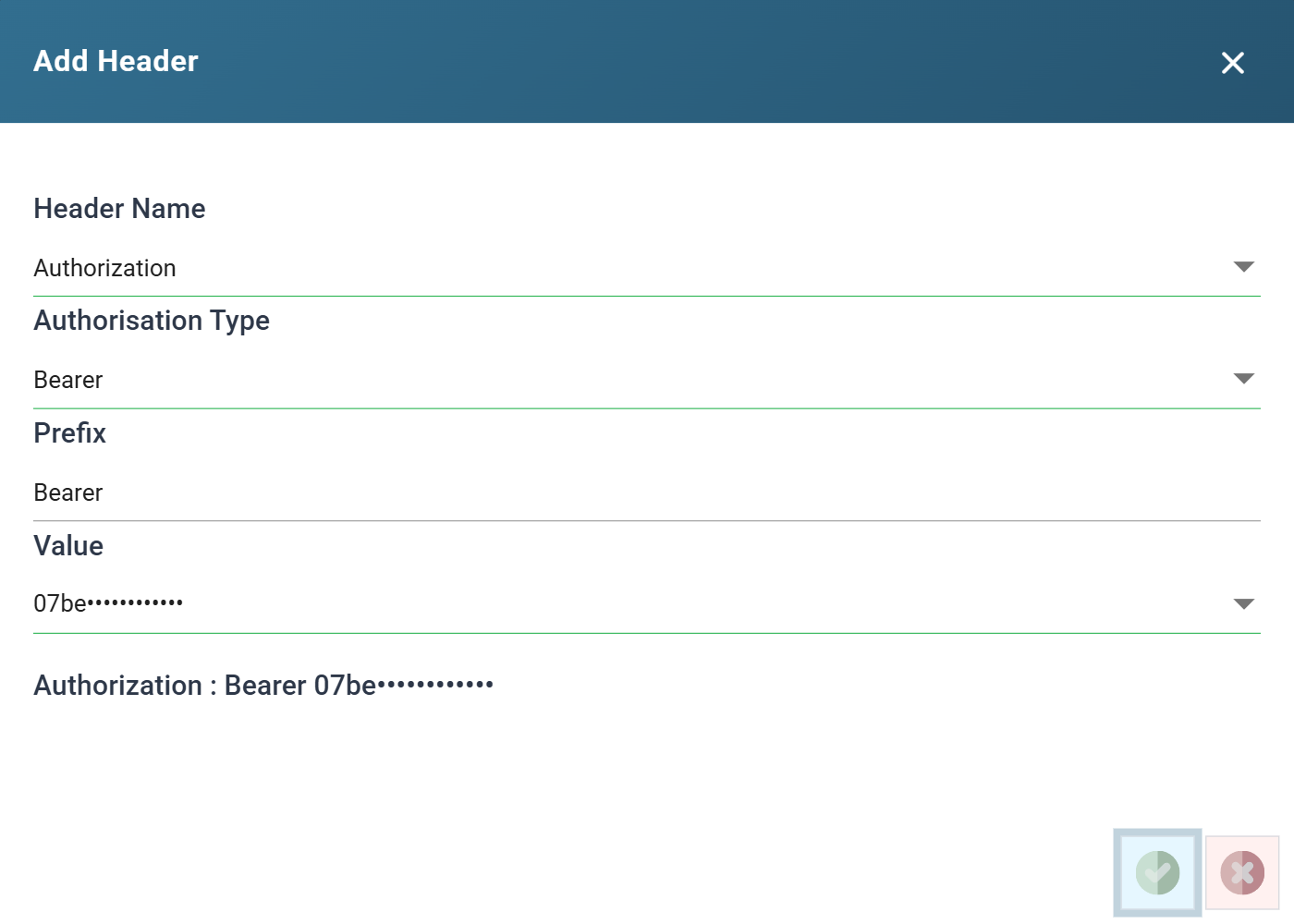
| Field | Value |
|---|---|
| Header Name | Authorization |
| Authorisation Type | Bearer |
| Prefix | Bearer |
| Value | The personal API token |
Selecting Bearer removes the User Name field and relabels Password to Value, because there is only one thing left to enter.
Test Url: https://api.todoist.com/api/v1/projects.
Klaviyo
Klaviyo does two things neither of the others do, and both are common enough to be worth a section: a non-standard prefix on the standard header, and a second header that is not optional.
"Private key authentication for
/apiendpoints is performed by setting the following request header:"
Authorization: Klaviyo-API-Key your-private-api-key
Key facts
- Standard
Authorizationheader — but the prefix isKlaviyo-API-Key, notBasicand notBearer. - The key is sent as-is. Nothing is encoded and there is no username.
- Every request must also carry a
revisionheader, an ISO 8601 date identifying the API version you are coding against. Requests without it are rejected. - Base URL
https://a.klaviyo.com/api/.
Neither Basic nor Bearer can express this. Basic would base64-encode the key; Bearer would send it under the wrong prefix. Raw exists for exactly this, and the way to spot it is that the vendor's example header carries a prefix that is not one of the two standard ones.
With Raw the Prefix field disappears, because there is nothing to prefix — the whole value, including Klaviyo-API-Key and the space after it, is typed into Value.
IMan setup
Create a private API key in Klaviyo under Settings > API keys, and take the current revision date from Klaviyo's API versioning page.
Two headers are needed:
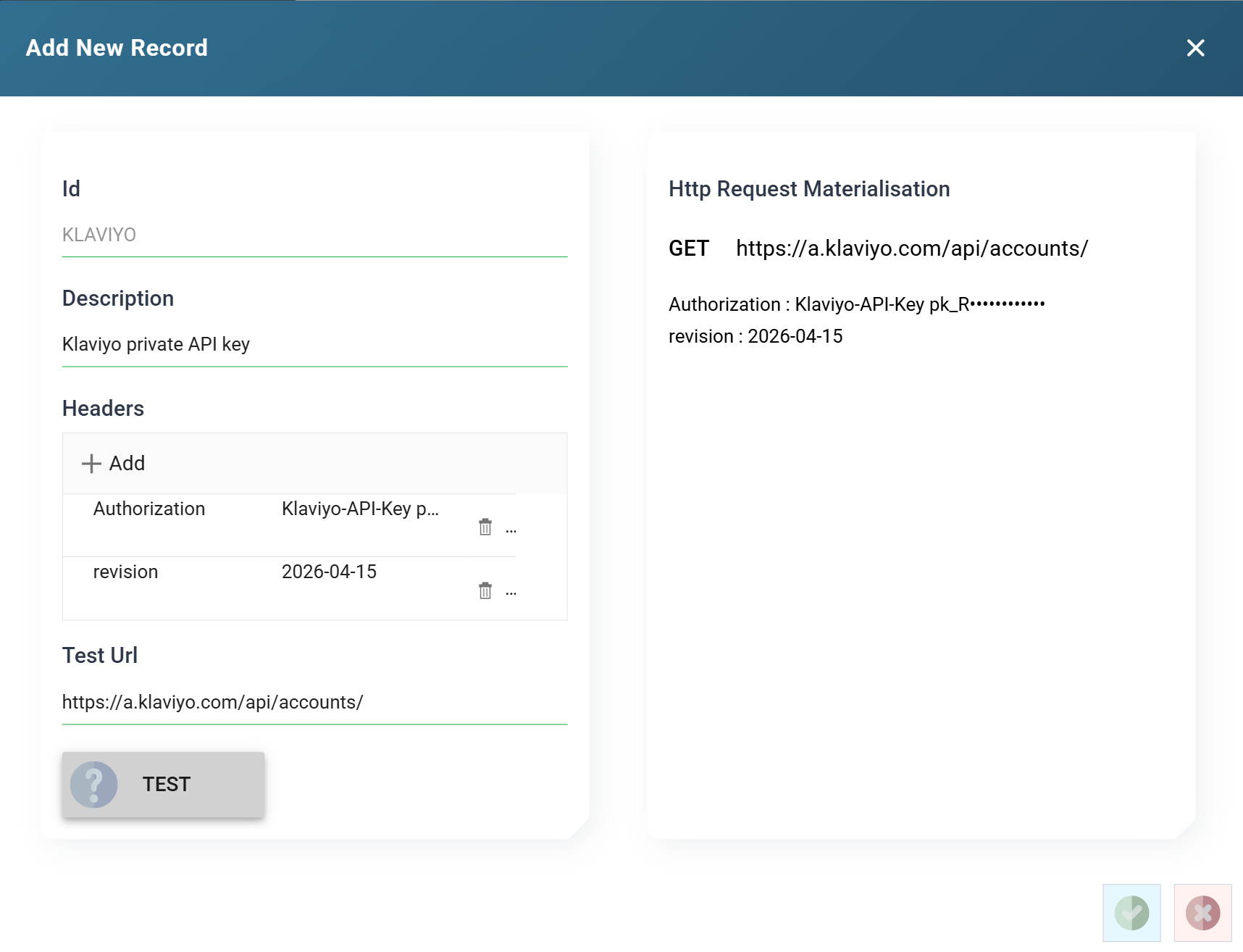
| Header Name | Authorisation Type | Value |
|---|---|---|
Authorization |
Raw | Klaviyo-API-Key <your private key> |
revision |
none — not an Authorization header | The revision date |
The revision header has no Authorisation Type and no prefix, because the special handling applies only to Authorization. It is an ordinary name and value, and this is how any additional header a service demands is added — an X-API-Key, a tenant id, an account number.
Test Url: https://a.klaviyo.com/api/accounts/ — returns the account the key belongs to.
When the Test fails
The Test reports the service's own response, so the message you see is the vendor's rather than IMan's. In order of likelihood:
- The materialisation does not say what you expected. Check it before anything else. Everything below assumes the header is being assembled correctly.
401on a setup that looks right. For Mailchimp, the data centre in the base URL. For JIRA, the email address rather than the token. For Klaviyo, a missingrevision.405, or an error mentioning a method. The Test Url does not answer a GET. That is a bad Test Url, not a bad credential.- An error about JSON tokens — the input does not contain any JSON tokens — rather than a status code. The Test reached the service and could not parse what came back, so this says nothing about the credential either way. Point it at the smallest JSON-returning endpoint the API has and try again.
- A
404, or HTML rather than JSON. The Test Url is wrong, or the service is redirecting to a sign-in page, which some APIs do instead of returning401. - The screen stops responding after a failed Test — buttons and the grid do nothing, with no error message. Open IMan in a new browser tab; reloading will not clear it.
Once the Test passes the authentication is finished. Attaching it to a service is the subject of the Webservice Behaviour article.
Verified against IMan 6.1, and against the Mailchimp, Atlassian, Todoist and Klaviyo APIs, on 2 September 2026.