Decisions
A decision picks one course of action over another by testing a condition. A field expression uses one to set a field differently depending on the record.
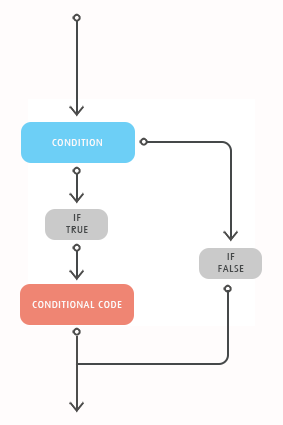
A condition is anything that evaluates to True or False. In practice that means a
comparison,
or several of them joined by And or Or.
If treats anything that is not True as False. That matters for a value that may be
Null, such as a database lookup result. A comparison against Null is Null, and
the Else branch runs. Test such a value with
IsNull
before comparing it. A field reference is never Null.
If
If runs its statements when the condition is True and skips them when it is False.
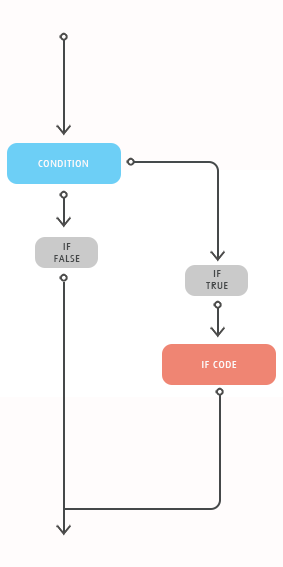
Flagging a back order
With %Qty of 10 and %QtyOnHand of 4, the expression returns BACKORDER.
A short If fits on one line, and needs no End If when it is written that way:
If…Else
Else gives the False case somewhere to go. Exactly one of the two branches runs.
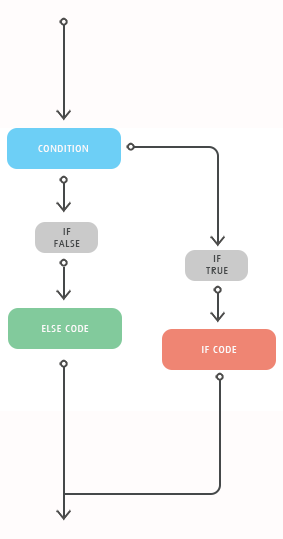
Choosing between two values
If…ElseIf…Else
ElseIf adds further conditions. VBScript tests them in order, runs the first branch
whose condition is True, and skips the rest. Else catches everything that matched
nothing.
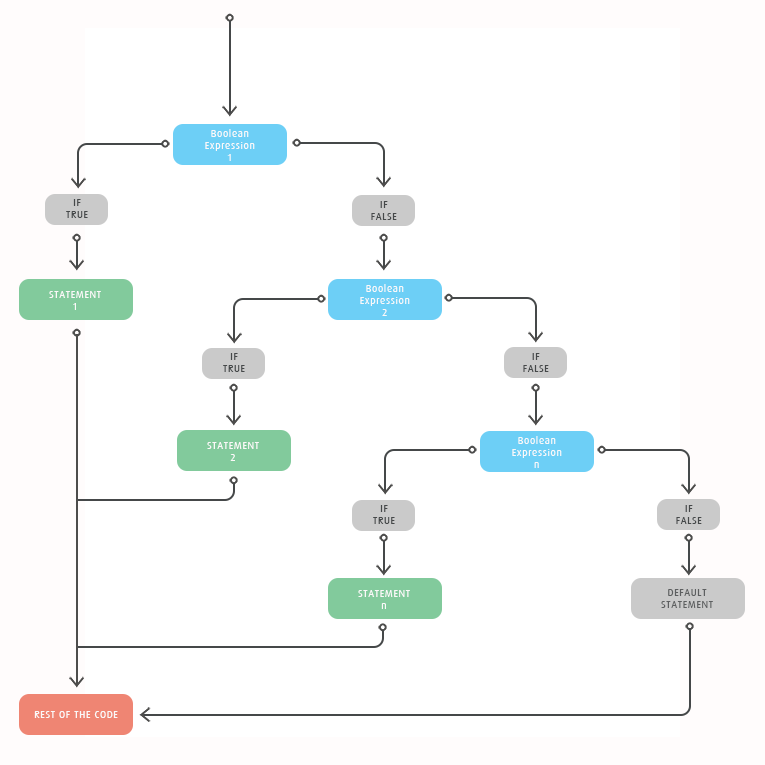
Banding an order by value
Dim Band

If %OrderTotal >= 10000 Then
  Band = "A"
ElseIf %OrderTotal >= 1000 Then
  Band = "B"
Else
  Band = "C"
End If

Band
Order matters. An order of 15000 satisfies both tests, and the expression returns
A because that test comes first. Writing the two the other way round would put
every large order in band B.
Nested If
An If inside another If tests something only when the outer condition has already
held.
A second test that only applies to stocked items
Dim Status

Status = "OK"

If %ItemType = "STOCK" Then
  If %Qty > %QtyOnHand Then
    Status = "BACKORDER"
  End If
End If

Status
A service line never reaches the quantity test.
Each If needs its own End If. If you find yourself nesting more than two or three
deep, a Select Case is usually simpler.
Select Case
Select Case compares one value against a list of possibilities. It reads better than
a long ElseIf chain when every branch tests the same thing.
Select Case expression
  Case value1
    [statements]
  Case value2
    [statements]
  Case Else
    [statements]
End Select
VBScript runs the first Case that matches and skips the rest. Case Else catches
anything that matched nothing.
Mapping a warehouse code
One Case takes several values, separated by commas:
Testing a range
VBScript has no Case Is and no Case 1 To 5
Both are Visual Basic rather than VBScript, and both fail to compile.
Case Is > 5 reports "Syntax error" and Case 1 To 5 reports
"Expected statement".
If you have written Excel macros, you are likely to try one of them first.
Write Select Case True instead and put the comparison in each Case. It
reads as well as the ElseIf chain and keeps the branches in a column:
Dim Band

Select Case True
  Case %OrderTotal >= 10000
    Band = "A"
  Case %OrderTotal >= 1000
    Band = "B"
  Case Else
    Band = "C"
End Select

Band
The first matching Case wins here too. Put the tests in descending order.
Always write a Case Else
Without one, a value matching no Case leaves the variable exactly as it was. In
a field expression that usually means Empty, and an empty field reaching the
target system is harder to trace back here than a value of Unknown.