User Property & Request Relationship
A custom property set belongs to an endpoint, a value for each of its properties belongs to a web user, and a request from that user to that endpoint carries the values in. The diagram follows one property set through setup and into a request.
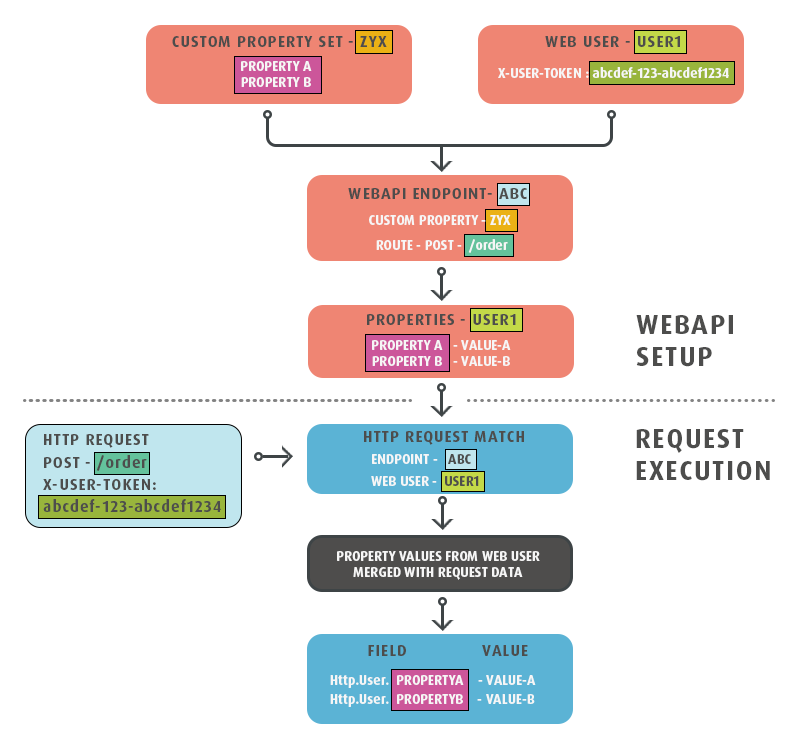
Setup
- Create a custom property set with the properties.
- Create the endpoint with that set selected.
- Assign the web users to the endpoint, then set each user's values.
Request handling
- The request is matched to an endpoint by its route and method.
- The web user is found from the request's
X-User-Tokenheader, or from the client id inside its bearer token. The user must be enabled and assigned to the endpoint; otherwise the request has no user. - The endpoint's property set names the properties, and the user's values fill them.
- They arrive on the WebAPI Reader's
record as one
Http.User.<property>field per property, besideHttp.User.UserId, which holds the user's id.
Without a user
A request with no user still carries every property of the endpoint's set,
with empty values, and an empty Http.User.UserId. That is how an anonymous
request looks like on an endpoint that allows one, and what a request from an
unknown, disabled or unassigned token looks like there too; on an endpoint
that requires authentication such a request is refused before the integration
runs. An integration that must treat anonymous callers differently tests
Http.User.UserId for an empty value in a Map.