Sage 300 (Accpac) — Setting Security
The rest of this guide assumes the sample jobs exist
The rest of this guide assumes you created the sample jobs.
If you integrate with Sage 300, set the file security on the Sage 300 shared data directory so that IMan can access it.
This section describes the simplest way to set security.
This assumes the Sage 300 shared data is on the IMan machine
These steps assume the Sage 300 shared data is on the same workstation or server as IMan.
If it is not, see the Sage 300 IMan User Guide for a full explanation of how to set up security.
- If the Sage 300 shared data is on the same workstation or server as IMan:
- Open the properties for the Sage 300 shared data directory:
- Right-click the directory in File Explorer and select Properties.
- Select the Security tab.
- Click Edit.
- Open the properties for the Sage 300 shared data directory:
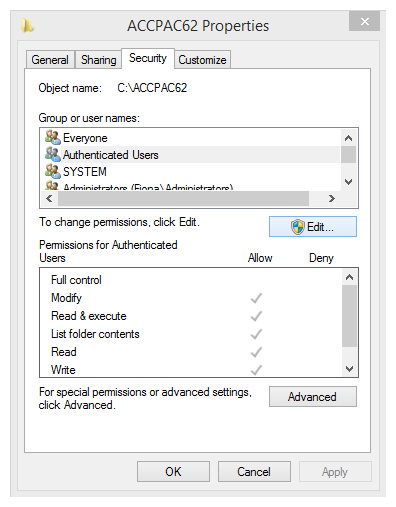
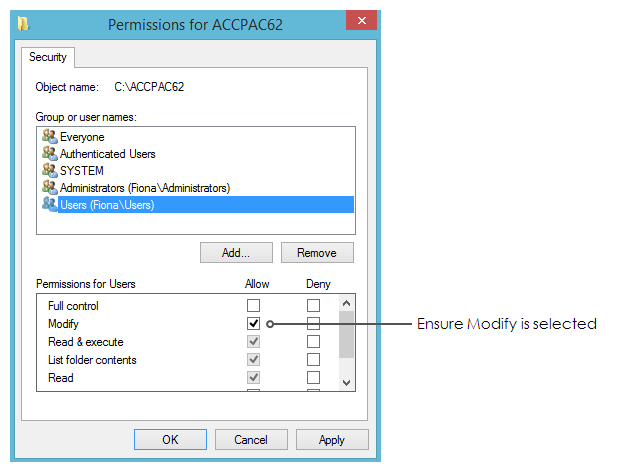
- In the Group or user names box, look for the Users group.
- If the Users group is not listed:
- Click Add to add the Users group.
-
After you add or select the group, make sure it has the Modify permission.
-
Click Apply.
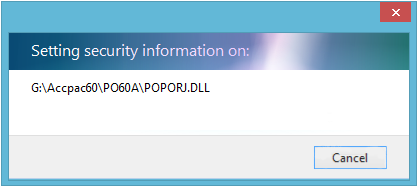
- Close the Properties dialog.