Moving & Recovering
The key certificate that opens IMan's secrets lives on the IMan server, not in the database. When the database arrives on a server without that certificate, IMan is locked until you give it the keys again. The recovery code does that.
Moving IMan to Another Server
- On the old server, open Secrets in the Admin Console and check that the state is Ready. If you are not sure you hold the current recovery code, press Reissue recovery code and record the new one.
- Deactivate the IMan licence on the old server, then stop its IMan services. See Deactivating.
- Back up the IMan database and the IMan folder, and restore them where the new server can reach them. See Backing up IMan.
- Install IMan on the new server. The installer sets up the Message Broker for this server. If you restore the IMan folder after this step, run the installer again and choose Repair.
- In the Admin Console on the new server, enter the database settings, press Test and then Save. The connection saved on the old server does not work here. Windows encrypts it for the server that saved it.
- Press Secrets. The state is Locked. Enter the recovery code and press Recover.
- Record the new recovery code that the Admin Console shows. The old code no longer works.
- Close the window. The Admin Console restarts the services.
- If DB Created shows Requires Update, press Update.
- Activate the licence on the new server. See Registering & Activation.
The old server's certificate no longer opens the keys. If the old server starts again against the same database, it is locked.
Copying the certificate instead
While the old server still exists, you can move the certificate itself in place of step 6. Export IMan KEK <database> with its private key from the old server's Local Machine Personal store, and import it into the new server's. Then open Secrets on the new server and press Replace certificate. That grants the IMan service accounts access to the key and issues a new recovery code.
Restoring a Backup
On the same server, a restored database opens with the certificate that is already there. There is one exception. Replace certificate and Recover replace the certificate. A backup taken before either of them is locked when you restore it. Recover it with the recovery code that was current when the backup was taken.
On another server, follow Moving IMan to Another Server from step 4.
When IMan Is Locked
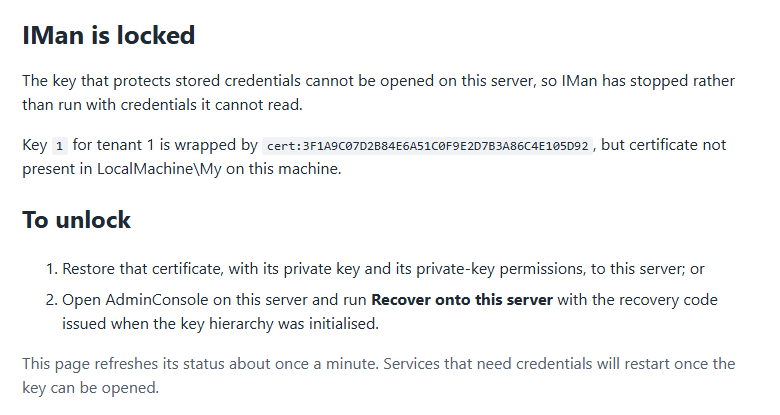
When IMan cannot open its keys, its services do not start, and the browser shows IMan is locked in place of IMan:
Secrets in the Admin Console shows the same state and reason:
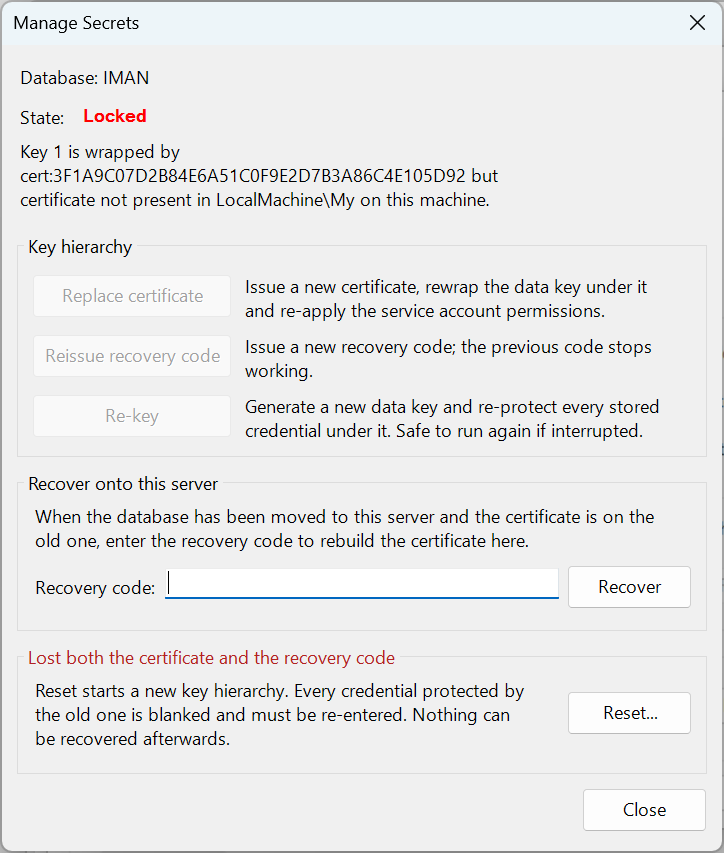
IMan is locked when:
- the database has moved to this server, or a backup from another server has been restored here;
- the key certificate has been deleted, or the server has been rebuilt;
- a backup taken before Replace certificate or Recover has been restored.
To unlock it, use the first of these that you can:
- Recover with the recovery code. See step 6 of Moving IMan to Another Server.
- Import the key certificate from the old server, as in Copying the certificate instead.
- Reset..., when you have neither the certificate nor the code. Every stored secret is lost and must be entered again. See Reset.
A service account that cannot read the key
When you change the account the IMan services run as, the IMan Permissions Function grants the new account access to the key. A service whose account cannot read the key stops, and the reason names the key's permissions. Run the Permissions function for that account again.
Losing the Recovery Code
- IMan is working. Open Secrets and press Reissue recovery code straight away. Record the new code.
- IMan is locked. Import the key certificate from the old server if it still exists. If it does not, the only way forward is Reset....
Integrations From Elsewhere
Secrets in an integration file are bound to the IMan installation's keys and to the integration they belong to. They do not open when you copy an integration from another IMan installation, or copy a transform into another integration. When you open such an integration, IMan asks you to enter its connection strings and passwords again.
Integration files from IMan 6.0 or earlier hold their passwords in the older format. Copy them into the Job Config. path and run Update in the Admin Console to convert them.
A run that fails with The stored value is not a secret envelope. Run Update Database in the IMan Administration Console to convert legacy credentials. has met a credential still in the older format. Run Update to convert it.