Backing up IMan
To back up IMan, back up its database and its files, and keep its recovery code safe. You need all three to restore IMan on another server.
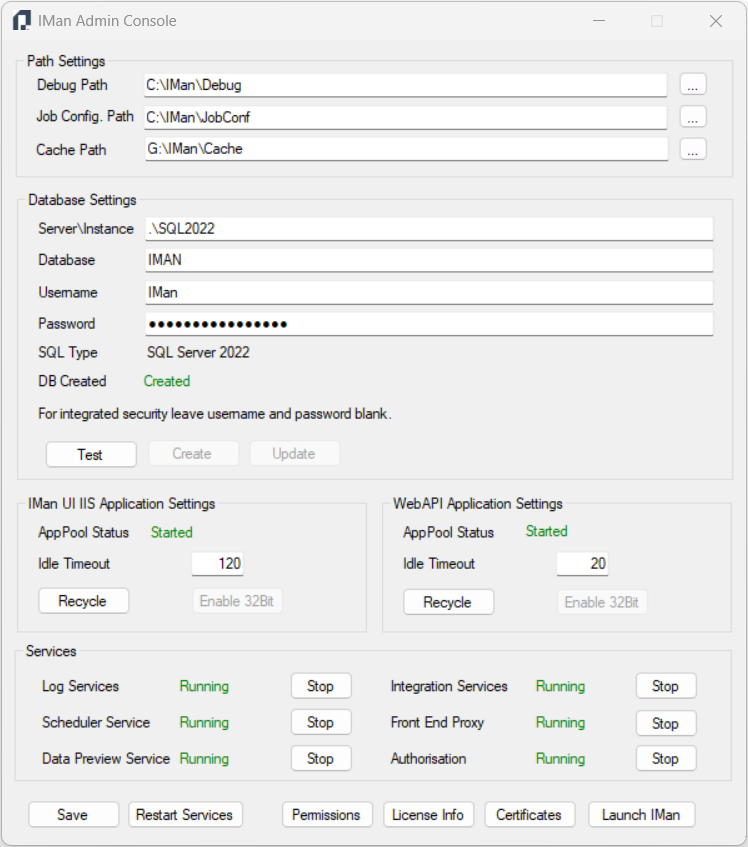
Database Component
Back up the database named in Server\Instance and Database under Database Settings in the Admin Console.
File Component
The IMan folder is typically <drive>:\IMan. The drive can be C or a data drive, depending on the folder chosen during installation. Realisable recommends backing up the entire folder, including its subfolders and contents.
Important
At a minimum, you MUST back up two folders:
- The Job Config. Path in the Admin Console's Path Settings.
It is critical, because it contains the integration files. - <drive>:\IMan\Config
Contains IMan's core settings and the licence file.
The database connection saved in Config\appconfig.xml opens only on the
server that saved it. On another server, enter the database settings again in
the Admin Console. The Message Broker's password in the same file is also bound
to the server. If you restore the Config folder after installing IMan on
another server, run the IMan installer again and choose Repair. It sets the
broker up for that server.
You do not need to back up the Message Broker's own folder,
C:\ProgramData\Realisable\MessageBroker. It holds only messages on their way
between IMan's processes.
Recovery Code
IMan encrypts the passwords, keys and tokens it stores. The key that opens them is on the IMan server, and the recovery code is the only other way to open them. A backup is only useful on another server together with the recovery code that was current when the backup was taken.
- Keep the recovery code with your backup records, away from the IMan server.
- Each time the Admin Console issues a new code, the previous one stops working. Record each code with its date.
See Secrets and Moving & Recovering.