IMan Architecture
An IMan server runs six IMan Windows services, the Message Broker service, one IIS application and the integration engine, and they all share one SQL Server database. You use IMan in a web browser. The browser talks to two of the services, and the rest work behind them.
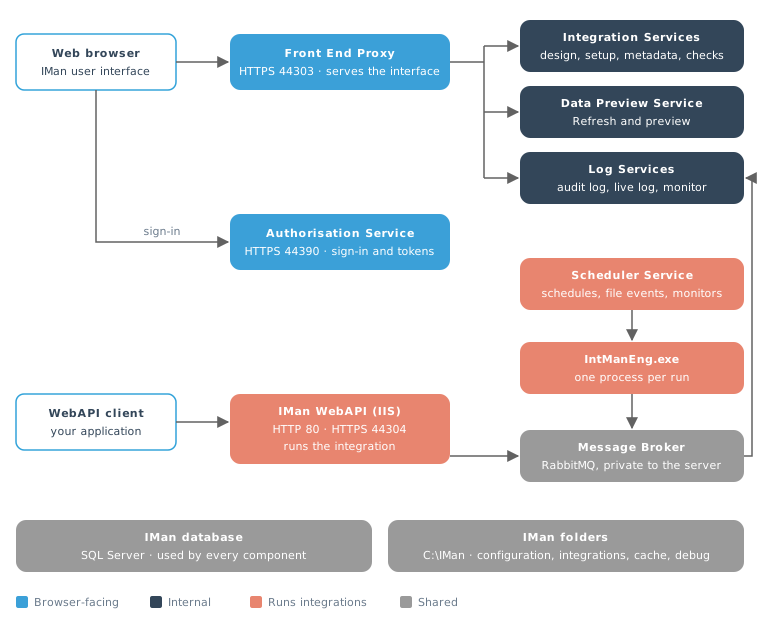
The components
Services the browser talks to
Front End Proxy
Windows service Realisable Front End Proxy, HTTPS port 44303.
This is the address you open IMan at, https://<server>:44303. The Front End
Proxy sends the browser the IMan user interface, a web application that then
runs in the browser. It holds your signed-in session. It passes each request the
interface makes to the internal service that handles it, and adds your access
token to the request.
Authorisation Service
Windows service Realisable Authorisation Service, HTTPS port 44390.
The Authorisation Service shows the sign-in pages and issues access tokens. When you sign in, the Front End Proxy sends the browser to it. Every other service checks each request's token against it. It also holds IMan's users and roles.
Internal services
Integration Services
Windows service Realisable Integration Services.
The design-time back end. It hosts several web services, each on its own HTTPS port:
| Service | What it does | Port |
|---|---|---|
| MetaData | Supplies the import types, transactions and fields on the connector and reader screens | 5031 |
| EntityCheck | Answers the Test and Check buttons on the setup screens | 7119 |
| EntityPersistence | Saves setup items, schedules, file events and WebAPI endpoints | 7044 |
| Integration | Loads, edits and saves integrations, and reads a reader's schema | 7167 |
| OAuthBff | Runs OAuth authorisation for connectors and mail servers | 7093 |
| FileOperations | Serves the File Explorer | 7053 |
Data Preview Service
Windows service Realisable Data Preview Service, HTTPS port 7297.
When you press Refresh in the Designer, the Data Preview Service runs the transforms in its own process. It streams the rows, the trace and the audit back to the browser. It keeps the datasets it produces in the Cache path, and a later refresh reuses them.
Log Services
Windows service Realisable Log Services, HTTPS ports 7086 and 7250.
Log Services writes the audit log. An integration run sends each audit entry to the Message Broker. Log Services takes the entry from the broker and writes it to the database. It also answers the Audit Log screen and feeds the live Job Viewer and the Integration Monitor.
Log Services must be running for IMan to produce audit reports correctly.
Running integrations
Scheduler Service
Windows service RealisableSchedulerService.
The Scheduler Service starts integrations. It has three parts:
- Schedules. It reads the schedules from the database every few seconds and starts each one when it falls due. Run Now adds a one-off schedule, and the Scheduler starts that run in the same way.
- File Events. It watches the folders and cloud file systems that the File Events name, and starts the integration when a watched event occurs.
- Monitors. It checks the mailbox of each Email reader that has a monitor every 60 seconds, and starts the integration when a matching email is there.
IntManEng.exe
The integration engine. The Scheduler Service starts one IntManEng.exe
process for each run. The process runs the integration and ends. It runs under
the Scheduler Service's account, unless the schedule or File Event names a
Windows user to run as.
The same engine also runs inside the Data Preview Service for a preview, and inside the WebAPI application for a WebAPI request.
IMan WebAPI
IIS application IManWebAPI on the Default Web Site, in the application pool IManWebAPI. It answers on HTTP port 80, and on HTTPS port 44304 once Certificates in the Admin Console has bound a certificate.
The WebAPI hosts the endpoints you define in Setup. When a request arrives, it
runs the endpoint's integration inside the application pool and returns the
response. The OpenAPI description of the endpoints is at
/IManWebAPI/openapi/webapi.html. Request metrics for a monitoring system such
as Prometheus are at /IManWebAPI/metrics.
Shared by every component
The IMan database
One SQL Server database holds IMan's configuration, the integrations' setup,
the schedules, the users and the audit log. Every service, the engine, the
WebAPI and the Admin Console connect to it. You set the connection in the
Admin Console,
and IMan keeps it in Config\appconfig.xml under the IMan folder.
The Message Broker
Windows service RealisableMessageBroker.
IMan passes audit entries and a few signals between its processes through the
Message Broker, a private RabbitMQ instance that the installer sets up. It has
its own Erlang runtime and its own ports, and it listens only on the server's
loopback address, 127.0.0.1. It runs beside any other RabbitMQ installation
on the server without sharing anything with it.
- The broker's programs are in the
MessageBrokerfolder of the IMan program folder. Its configuration, message store and logs are inC:\ProgramData\Realisable\MessageBroker. - IMan connects with its own broker user. The installer generates the
password and saves it in
Config\appconfig.xml, encrypted for the server. - Log Services, the Scheduler Service, the Data Preview Service and Integration Services depend on the broker. Windows starts the broker before them, and stopping the broker stops them.
See The Message Broker's queues.
The IMan folders
The folder you choose when you install IMan, C:\IMan by default. It holds:
| Folder | Contents |
|---|---|
Addins |
Connector assemblies |
Cache |
The Data Preview Service's datasets (the Admin Console's Cache Path) |
Config |
appconfig.xml, the licence file and the email template |
Debug |
Traces, error logs and debug output (the Admin Console's Debug Path) |
JobConf |
The integration files (the Admin Console's Job Config. Path) |
InputData, OutputData, Training |
Sample and training data |
The programs themselves are in C:\Program Files (x86)\Realisable Software\IMan,
one folder for each service.
The HTTPS certificate
Every service and the WebAPI's HTTPS binding use one certificate. You manage it with Certificates in the Admin Console. The services also address each other by the name on the certificate. The certificate's name must resolve to the IMan server.
The key certificate
A second certificate, IMan KEK <database>, opens the passwords, keys and tokens IMan stores. Every service that uses them reads its private key. See Secrets.
The Admin Console
A Windows application on the server for the database connection, the folders, the services, the WebAPI application pool, the certificates, the secrets and the licence. See Administering IMan.
How the parts communicate
- The browser connects to the Front End Proxy over HTTPS on port 44303. To sign in, it connects to the Authorisation Service on port 44390. Live updates, such as preview rows, the Job Viewer, the Audit Log and the Integration Monitor, reach the browser over SignalR connections through the Front End Proxy.
- The services call each other over HTTPS. Each request carries an access token, and the service that receives it checks the token with the Authorisation Service.
- A run sends its audit entries to the Message Broker, and Log Services writes them to the database.
- Every component reads and writes the IMan database.
The Message Broker's queues
The engine, the Scheduler and the WebAPI publish each audit entry once, to the
iman.log topic. The broker copies it to two queues.
| Queue | Carries |
|---|---|
iman.log.persist |
Audit entries, for Log Services to write to the database. The broker keeps them on disk until Log Services has written them. |
iman.log.view |
The same entries, for the live Job Viewer. An entry is dropped after 30 seconds. |
iman.transform-events |
Transform progress, for the Integration Monitor |
iman.httplistener.control |
A signal telling the WebAPI to reload its endpoints after a change in Setup |
iman.httplistener.request.<JobId>, iman.httplistener.reply.<JobId> |
A WebAPI request and its response, passed to and from the Designer while you debug an endpoint. The broker removes them after 10 minutes unused. |
Ports
| Port | Component | Who connects |
|---|---|---|
| 44303 | Front End Proxy | Browsers |
| 44390 | Authorisation Service | Browsers, to sign in, and the other services |
| 80, 44304 | IMan WebAPI (IIS) | WebAPI clients |
| 5031, 7044, 7053, 7093, 7119, 7167 | Integration Services | The Front End Proxy |
| 7297 | Data Preview Service | The Front End Proxy |
| 7086, 7250 | Log Services | The Front End Proxy |
| 5673, 15673, 4370, 25673 | Message Broker | The IMan services, on the server's loopback address only |
Open ports 44303 and 44390 in the server's firewall to the computers that use IMan, and ports 80 or 44304 to the systems that call the WebAPI. Only the server itself needs the other ports. Leave them closed to other computers.
What happens when…
You design an integration
- You open
https://<server>:44303. The Front End Proxy sends the browser the IMan user interface. - The Front End Proxy sends you to the Authorisation Service to sign in. When you have signed in, it keeps your session.
- The Designer loads and saves integrations through Integration Services. Integration Services also answers the connector screens and the Test and Check buttons.
- Refresh runs the transforms in the Data Preview Service, which streams the results back to the Designer.
A schedule runs
- The Scheduler Service finds a schedule that is due.
- It starts
IntManEng.exefor the integration. - The engine runs the integration and sends its audit entries to the Message Broker.
- Log Services writes the entries to the audit log, and the Integration Monitor shows the run.
A WebAPI request arrives
- The client calls
http://<server>/IManWebAPI/<endpoint>, or HTTPS on port 44304. - The WebAPI checks the caller's credentials against the endpoint.
- It runs the endpoint's integration inside its application pool and returns the response.
- Its audit entries go through the Message Broker to Log Services.
A File Event or monitor fires
The Scheduler Service watches the File Events' folders and polls the monitored
mailboxes. When one fires, it starts IntManEng.exe for the integration, as it
does for a schedule.
Scheduler & Log Service Database Connection Loss
Log Services and the Scheduler Service keep open connections to the IMan database. If a connection drops, the service tries again after 15 seconds, then 30 seconds later, then every 60 seconds until the connection is back. Meanwhile, the audit entries wait on the Message Broker, and Log Services writes them when the connection is back.
When the connection is lost, the service writes an error to the Windows Application log. When it reconnects, it writes an information event. Both have source Realisable.IMan and Event ID 100. IMan uses Event ID 100 for all of its events. Look for the source and the message instead.
| Service | When the connection is lost | When it is restored |
|---|---|---|
| Log Services | The connection to the IMan database has been lost. Any log messages will not be written until the connection is restored. | The connection to the IMan database has been restored. All pending messages have now been written. |
| Scheduler Service | The connection to the IMan database has been lost. Any scheduled jobs will not be run. | The connection to the IMan database has been restored. |
When the other services start before the database is available, they wait for it. They try again after 1, 5, 10, 15 and 60 seconds, and then every 60 seconds.