Webservice Lookup
A Webservice Lookup is a single GET request that returns a single value, callable from anywhere an expression can be written. It is how an integration answers a question it cannot answer from its own data — does this contact already exist, and if so what is its id?
This article builds two of them:
- A simple lookup against Xero, returning a contact's
ContactIDgiven its name. The writer article depends on it. - A parameterised return path against Mailchimp, for the case where the service cannot filter for you and the matching has to happen in the return path instead.
Both need a Webservice Behaviour already in place — the Xero one and the Mailchimp one built in that article. A lookup does not carry a base url or an authentication of its own; it borrows the behaviour's.
What a lookup is for, and what it is not for
A lookup runs before the request it informs. That is its whole value and its whole cost.
Use one when the answer has to be known in advance: to decide whether a record is an insert or an update, to translate a code into the id the service uses, or to check that something exists before writing against it.
Do not use one to collect a value the service is about to hand you anyway. When you create a record, the response carries the id it allocated, and reading it there costs nothing — see Replaying Response Data. A lookup for the same value is a second round trip, a second slice of a rate limit, and one more thing to go wrong.
The two are complements rather than alternatives. The response tells you what the service just did. The lookup tells you what the service already holds.
Simple lookup — Xero
Xero identifies a contact by a ContactID GUID that it allocates. Nothing in a source system knows that GUID, so an integration that maintains contacts in Xero has to find it from something it does know — here, the contact's name, which Xero requires to be unique.
Choosing the request
Xero's /Contacts endpoint takes an optional where parameter, described in the API reference simply as:
Filter by an any element
ContactStatus=="ACTIVE"
That terse entry is the whole feature. The filter is an expression over the fields of the record, == is its equality operator, and string values are enclosed in double quotes — so filtering by name is:
Replace the literal with a placeholder and it becomes the lookup's Query Url.
The lookup
Setup → Webservices → Webservice Lookups → Add.
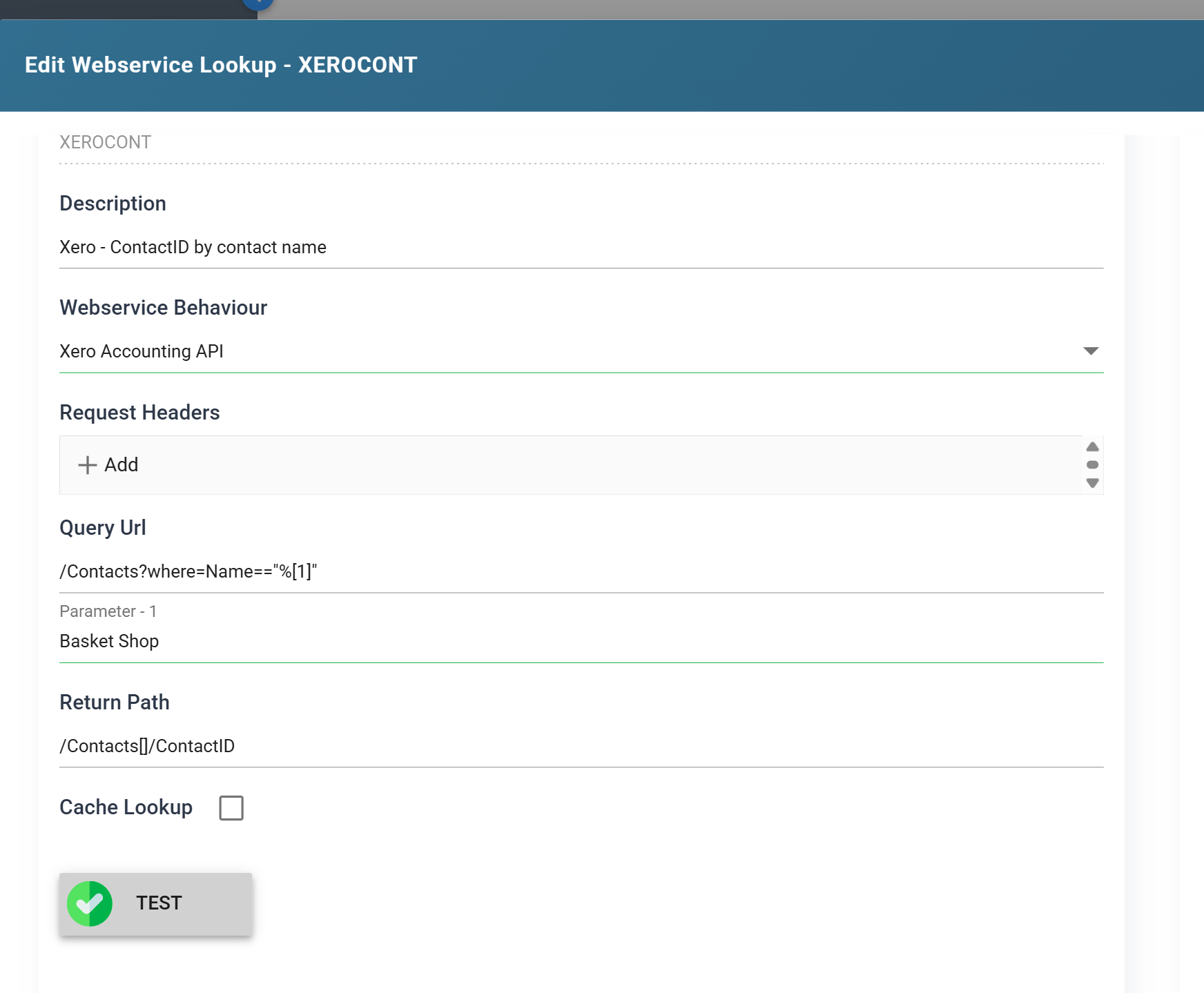
| Field | Value | |
|---|---|---|
| Id | XEROCONT |
The first argument to WebserviceLookup |
| Description | Xero — ContactID by contact name | |
| Webservice Behaviour | Xero Accounting API | Selected by its Description, not its id |
| Request Headers | (empty) | Everything true of every Xero request is on the behaviour |
| Query Url | /Contacts?where=Name=="%[1]" |
|
| Return Path | /Contacts[]/ContactID |
|
| Cache Lookup | unticked | See Caching |
%[1] is the first argument passed from the function. The placeholders are positional — %[1], %[2], and so on — and each one makes a Parameter box appear underneath the Query Url as you type. Those boxes are used by the Test button and nowhere else; they are not saved with the lookup and an edit reopens them empty.
The Return Path is JPath. /Contacts[]/ContactID reads the ContactID property of the first object in the Contacts array. A lookup returns one value, so a filter that matches several records returns the first of them and says nothing about the rest.
Testing it
Fill the Parameter box with a contact you know exists — the Xero demo organisation ships plenty — and press Test.

Http Request Materialisation is the Base Url from the behaviour joined to the Query Url, with the parameter substituted. Return Value is what the Return Path picked out of the response. A green Test with an empty Return Value means the request worked and the path found nothing, which is the more common failure and the quieter one.
What actually goes out
The materialisation is a readable summary. The Request Trace below it is the request itself, and the two do not read the same:

Two differences:
- The substituted value is encoded.
==became%3d%3dand the space became+. That is correct and it is why the filter still works, but it means awhereclause you copy out of the trace and paste into a browser will not be the one you wrote. &page=1was added. TheXERObehaviour pages, and a lookup inherits the behaviour's pager along with everything else. For a filter that returns one record this costs nothing. For a query that returns many it does not: the User Guide's warning is that a paged lookup paginates the whole result set before returning a single value. Narrow the query, or point the lookup at a behaviour with paging switched off.
Calling it
WebserviceLookup is available anywhere an expression is — a Map transform's calculated field, a Filter, a Translate. In the writer integration it is a field on the Map:
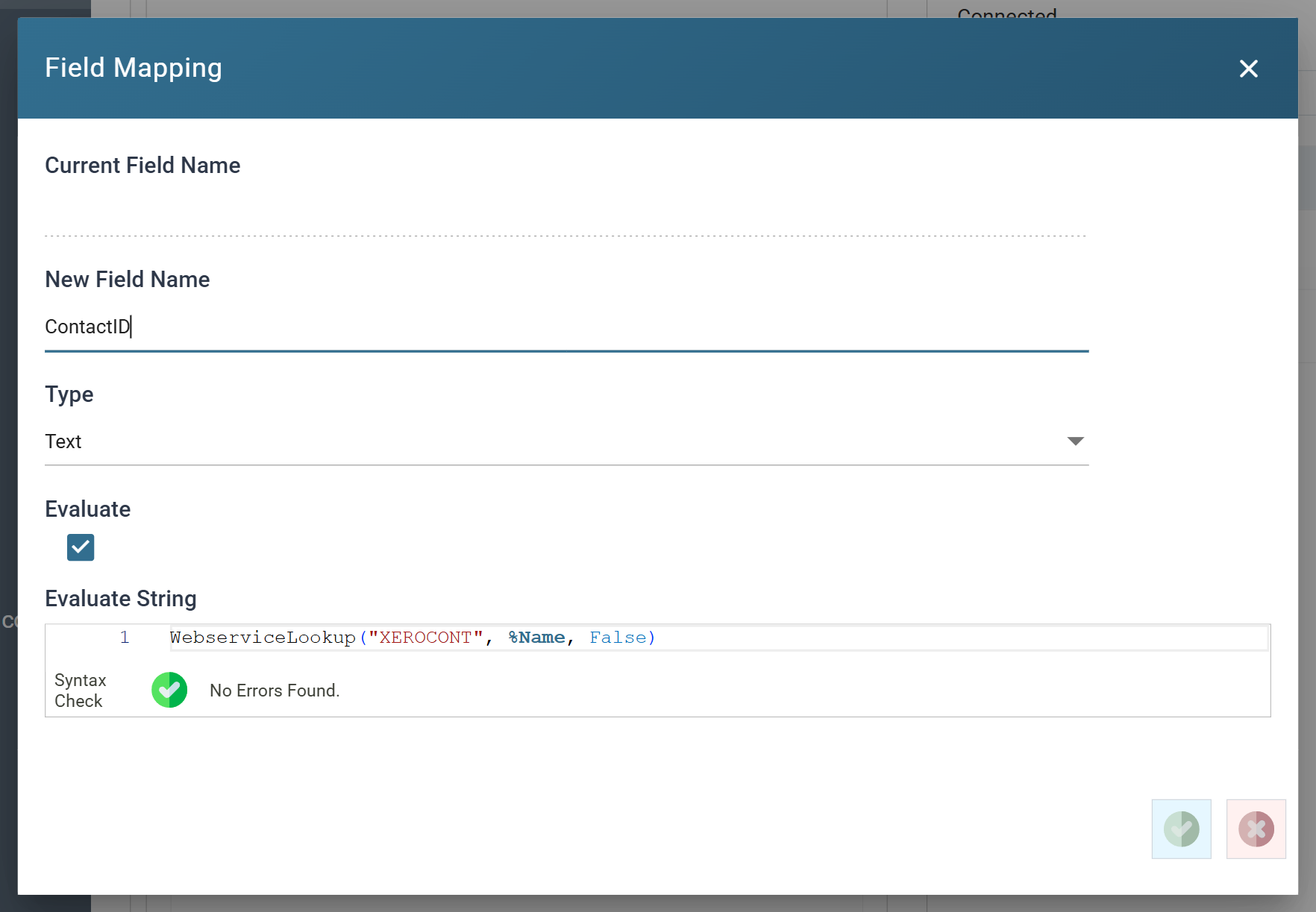
The third argument is mustreturnvalue, and which way round you want it is a design decision, not a detail:
Trueraises an error when the lookup finds nothing. Right when a missing match means the data is wrong — an order for a customer who does not exist.Falsereturns an empty string. Right when a missing match is a legitimate state and something downstream acts on it. That is this case: an emptyContactIDis how the writer knows the contact is new.
A fourth, optional argument overrides the Return Path, which lets one lookup return different properties of the same response at different call sites.
The result
Refresh the Map. Every row now carries the ContactID its name resolved to:
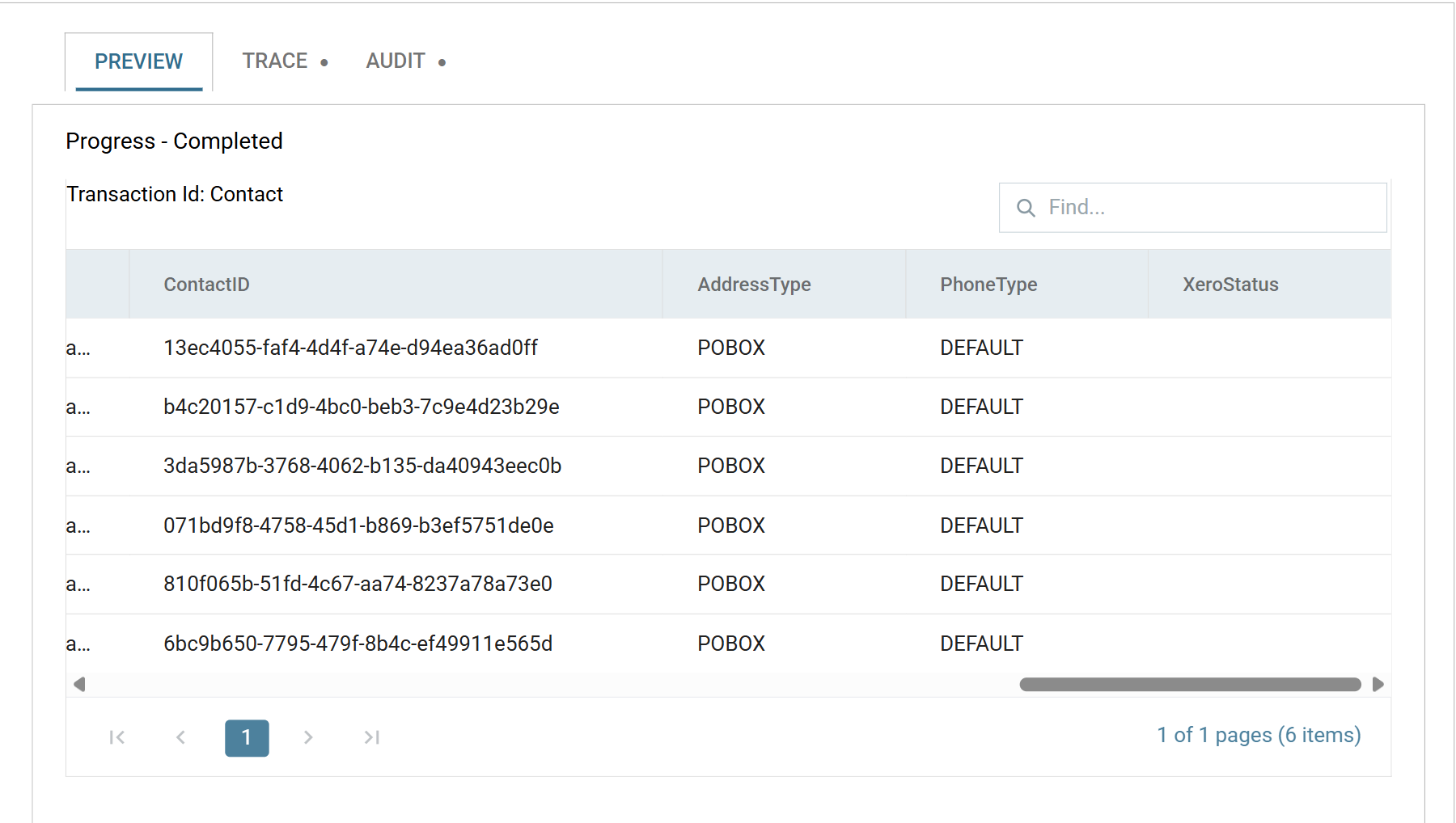
This is the second run of that integration. On the first run — before the contacts existed — every one of these was empty, and the writer created the contacts.
One lookup call per record. Six rows here, six requests. That is fine at six and it is not fine at six thousand: at Xero's 60 requests a minute, a lookup on every row of a large file is the whole rate limit before the writer has sent anything. Where the same value recurs, cache it.
Parameterised return path — Mailchimp
Not every service will filter for you. Mailchimp's /lists endpoint returns every audience on the account and offers no way to ask for one by name, so the matching has to happen after the response arrives — in the Return Path.
The lookup
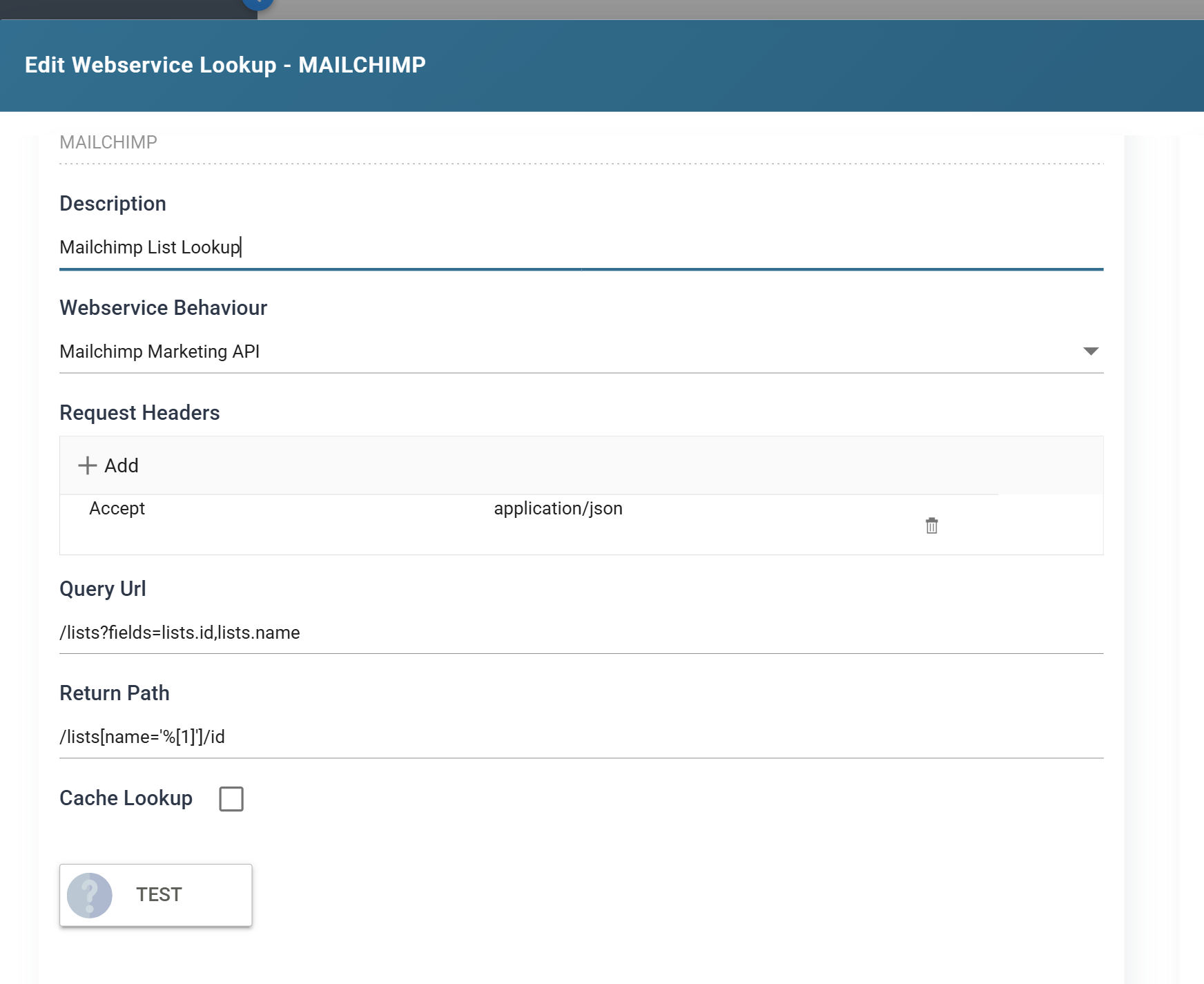
| Field | Value |
|---|---|
| Id | MAILCHIMP |
| Description | Mailchimp List Lookup |
| Webservice Behaviour | Mailchimp Marketing API |
| Query Url | /lists?fields=lists.id,lists.name |
| Return Path | /lists[name='%[1]']/id |
fields is Mailchimp's own projection parameter, and its syntax is unusual enough to be worth quoting: sub-object properties are named with dot notation, so the two properties of the objects in the lists array are lists.id and lists.name, not id and name. Dropping the parameter altogether works and returns a great deal more data.
The Return Path carries the filter. /lists[name='%[1]']/id reads: in the lists array, take the object whose name property matches the parameter, and return its id.
{"lists":[
  {"id":"6e08ee6262","name":"Realisable Software Ltd List"},
  {"id":"7562b6ac8a","name":"Realisable IMan - Sage Integration Made Simple"},
  {"id":"8521af409d","name":"South African Dealers"},
  {"id":"d859f2a187","name":"Realisable Newsletter"}
]}
WebserviceLookup("MAILCHIMP", "South African Dealers", True) returns 8521af409d.
Placeholder numbering continues from the Query Url. This Query Url has no placeholders, so the return path's is %[1]. Had the query taken two, the return path's first would be %[3].
Test cannot exercise a parameterised return path
There is no Parameter box for a placeholder that appears only in the Return Path, and the Test button does not substitute one. A green Test here proves the request and the authentication, and proves nothing at all about the path. Check it from a real call instead — a calculated field on a Map, previewed.
This is also why the return path filter is the more expensive of the two designs to get wrong: a service-side filter fails loudly, and a return-path filter that matches nothing returns an empty string.
Http Headers on a lookup
The lookup form has its own Request Headers list, on top of the behaviour's and the authorisation's, with the usual precedence — request over behaviour over authorisation.
These can be parameterised and a reader's cannot. A lookup's header value may contain an expando field — %[LastOrderDate], referring to a field of the transaction the call is made from — and the same syntax in a JSON Reader's headers does nothing. Writers can parameterise theirs too. Readers cannot, and nothing on the reader's screen says so.
If a service needs a per-record header — an idempotency key, a tenant selector, a caller-supplied correlation id — that asymmetry decides where the request can live.
Caching
Cache Lookup stores each result against its parameters and answers a repeat call from memory instead of the network.
Turn it on when the same few values recur — a country code, a tax rate, a price list id. Leave it off when the answer can change during the run, which includes the case in this article: the writer creates contacts as it goes, and a cached "not found" from the top of the file would still be a "not found" after the contact exists.
Cache what the run cannot change; do not cache what the run is changing.
When it does not work
- Green Test, empty Return Value. The request succeeded and the Return Path found nothing. Read the response in the Request Trace and check the path against it — a wrapper element is the usual culprit.
- A 400 mentioning the vendor's query syntax. The
whereclause reached the service and the service rejected it. Compare the Request Trace line with the vendor's own example; quoting and operators are where these differ. - The lookup returns the wrong record. A filter that matches several returns the first. Tighten it, or use a field the service guarantees to be unique.
- The run is slower than it should be and the day limit is falling. One call per record, uncached, is the usual cause. Check
X-DayLimit-Remainingin the trace. - The lookup is right and the value is empty anyway. Check
mustreturnvalue. WithFalse, a lookup that finds nothing is indistinguishable from one that was never called.
Verified against IMan 6.1, the Xero Accounting API and the Mailchimp Marketing API, on 2 September 2026.