Using the Stepped Reader
A stepped reader makes more than one request to build a single dataset: a first request for a list, then a request per item for the detail behind it, assembled into one hierarchy.
The mechanism is described in Stepped JSON Reader in the User Guide. This article uses it against a real API, starting with whether to use it at all.
It follows on from Reading Data from a Webservice and assumes that reader is working.
When you need to step, and when you do not
Stepping costs one request per record. Against a service with a rate limit — which is all of them — that is the most expensive thing an integration can do, so the first job is to establish that a single request genuinely cannot answer the question.
For Xero invoices, it looks at first as though it cannot:
"When you retrieve multiple invoices, only a summary of the contact is returned and no line details are returned — this is to keep the response more compact."
That sentence sends people to the stepped reader. Read the next two.
"The line item details will be returned when you retrieve an individual invoice, either by specifying Invoice ID, Invoice Number, querying by Statuses or by using the optional paging parameter."
"Paging invoices (recommended). By using paging all the line item details for each invoice are returned which may avoid the need to retrieve each individual invoice."
Invoices and their lines need one paged request, not one request per invoice. The previous article does exactly that, and the vendor's own documentation recommends it. Building a stepped reader for that job would make 51 requests where 1 will do, against an account limited to 5,000 a day.
Before you step, check three things in the vendor's documentation:
- Does a paging or expansion parameter fetch the detail with the list?
?page=,?expand=,?include=,?fields=— all of them exist to avoid the N+1 you are about to build. - Is there a bulk endpoint for the child? A
/payments?invoice_id=a,b,cis one request where stepping is fifty. - Can you filter harder instead? Often the detail is only wanted for a handful of records, and the right fix is a narrower list.
You need to step when the answer to all three is no. That happens in two shapes, and Xero has one of each.
| The shape | The Xero case | |
|---|---|---|
| Seed list | The list response does not contain a field at all, at any page size, and the detail response does | The customer's address and email. Contact on a list response is ContactID and Name and nothing else |
| Parent to child | A sub-resource has its own endpoint and no bulk equivalent | History. /Invoices/{id}/History exists; there is no /History |
This article builds one reader that does both.
Turn paging off first
A stepped reader must use a behaviour whose Request Paging is None, and this is not a nicety.
Every stepped request gets its own pager, so a stepped request to /Invoices/{id} through the paged XERO behaviour goes out as /Invoices/{id}?page=1, and URL paging stops only when a page comes back empty. Xero ignores page on a single-resource GET and returns the same invoice again for page=2, and for page=3, and so on. The reader never reaches the end and the run does not stop.
Create a second behaviour — XERONP here, Xero Accounting API — no paging — identical to the first with Request Paging set to None. A reader names one behaviour and uses it for both the seed and the steps, so the seed request has to be bounded by hand instead: &page=1&pageSize=5 is an ordinary URL parameter once IMan is not managing it.
Step a — The source
Add a second JSON Reader to the integration, and set it up as before with two differences: the no-paging behaviour, and a seed query.
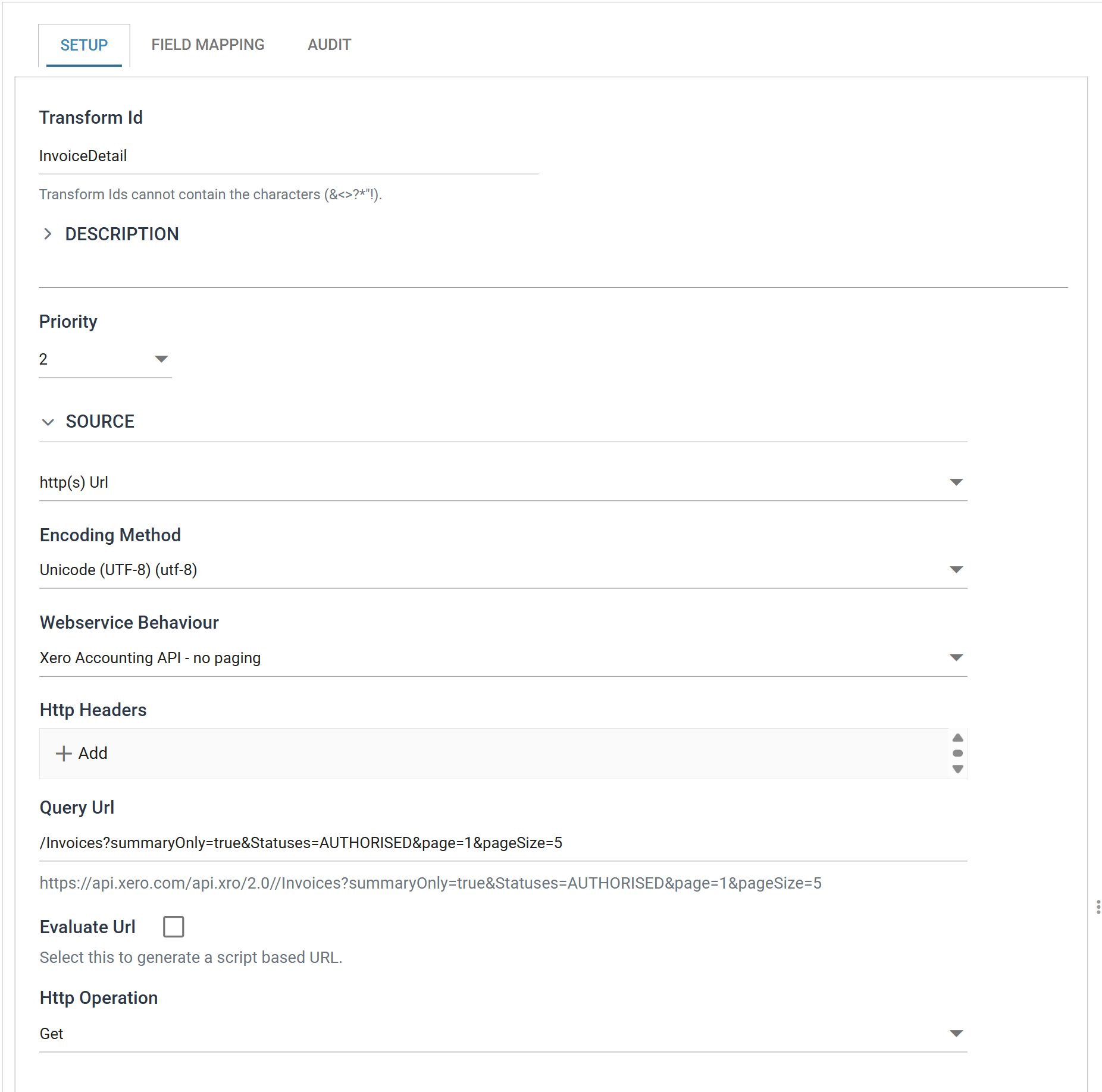
| Field | Value |
|---|---|
| Transform Id | InvoiceDetail |
| Source | http(s) Url |
| Webservice Behaviour | Xero Accounting API — no paging |
| Query Url | /Invoices?summaryOnly=true&Statuses=AUTHORISED&page=1&pageSize=5 |
summaryOnly=true is Xero's own lightweight list:
"Use
summaryOnly=truein GET Invoices endpoint to retrieve a smaller version of the response object ... The following fields will be excluded from the response: Payments, HasAttachments, LineItems, CISDeduction."
which is exactly right for a seed: you are about to fetch the whole document anyway, so paying for line items twice is waste. pageSize=5 keeps this example to eleven requests; drop it when the reader is working.
Step b — The seed list
Move to Field Mapping.
The entry point picks values, not records
On an ordinary reader the JSON Entry Point is the path to each record. On a seed-list stepped reader it is the path to the one value per record that identifies it:
The seed response is a list of invoices; that path yields a list of invoice ids.
Schema detection cannot help here, and the message says why
Pressing Refresh Schema on a reader whose entry point resolves to values gives
Detection describes records, and a seed entry point produces strings, so the fields on a stepped reader are defined by hand.
A good way to find out what you are working with first: build an ordinary reader pointed at a single detail URL — /Invoices/{some id}, entry point /Invoices — and press Refresh Schema on it. Detection maps the whole detail response, and you can read off the field names and the shape before deleting it and building the stepped one for real.
The stepping URL
Select the top transaction — create it from the tree's ADD if the hierarchy is empty — and fill in Url For Steppable Reader:
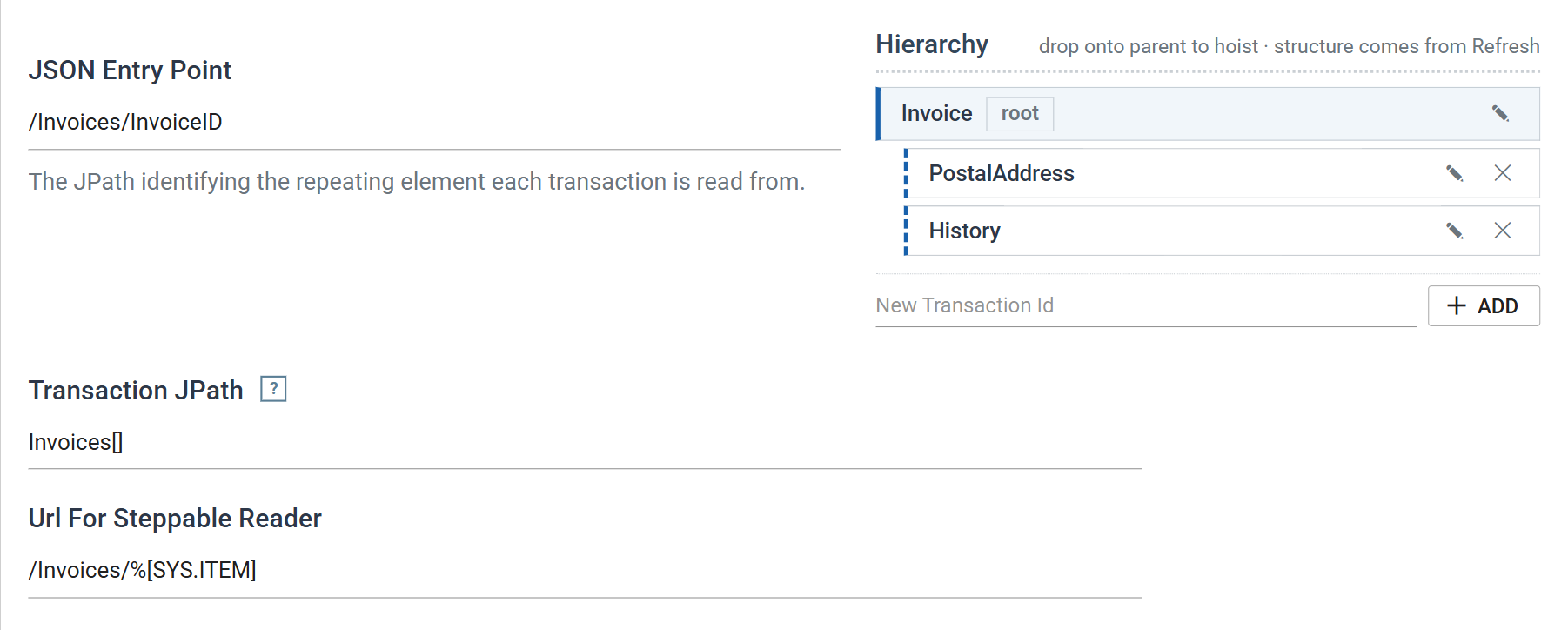
SYS.ITEM is the seed value, and it exists only in seed-list stepping.
Write the token with brackets
%[SYS.ITEM], not %SYS.ITEM. Both spellings are accepted, but a bare token ends at the next space and only at a space — and URLs do not contain spaces. So /Invoices/%SYS.ITEM/History takes the field name to be SYS.ITEM/History, finds no such field, and substitutes nothing.
The bracketed form is unambiguous everywhere. Use it always and the question never arises.
Where the record starts in the stepped response
The Transaction JPath on the top transaction says where a record begins inside each stepped response, exactly as it does on a child. It is a separate question from the JSON Entry Point, which by now has been spent on the seed.
It is needed because a detail endpoint rarely hands back a bare record. Xero wraps a single invoice the same way it wraps a list:
{
  "Id": "…",
  "Status": "OK",
  "Invoices": [
    { "InvoiceID": "…", "InvoiceNumber": "INV-0017", "Contact": { … } }
  ]
}
so the Transaction JPath is Invoices[], and from there the fields are ordinary paths against an invoice:
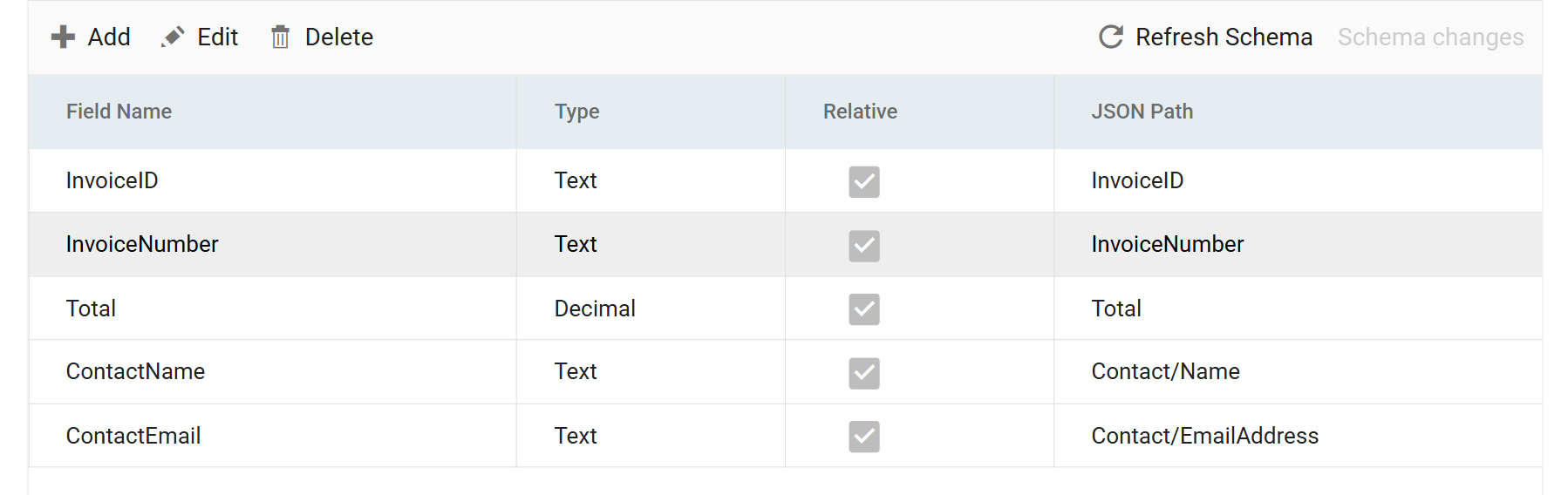
| Field Name | Type | JSON Path |
|---|---|---|
InvoiceID |
Text | InvoiceID |
InvoiceNumber |
Text | InvoiceNumber |
Total |
Decimal | Total |
ContactName |
Text | Contact/Name |
ContactEmail |
Text | Contact/EmailAddress |
Leave the Transaction JPath empty and each response is read from its own document root instead, so InvoiceID finds nothing and the column comes back blank — no error, on a reader that is otherwise working, which is the most expensive kind of mistake to find. If a whole transaction is empty, this is the first field to look at.
The quickest way to settle where a record starts is to add one throwaway field, preview, and look: a path that resolves shows values immediately, and one that does not shows blanks.
ContactEmail is the whole reason for this reader. It is not in a list response at any page size. Neither is the postal address, which comes next.
Step c — A child read out of the stepped response
Not every child needs stepping. A transaction steps only when its own Url For Steppable Reader has a value; left empty, it is read out of the response its parent already fetched.
The customer's addresses are in the detail response IMan has just retrieved, so this child costs no requests at all. Add PostalAddress under Invoice:
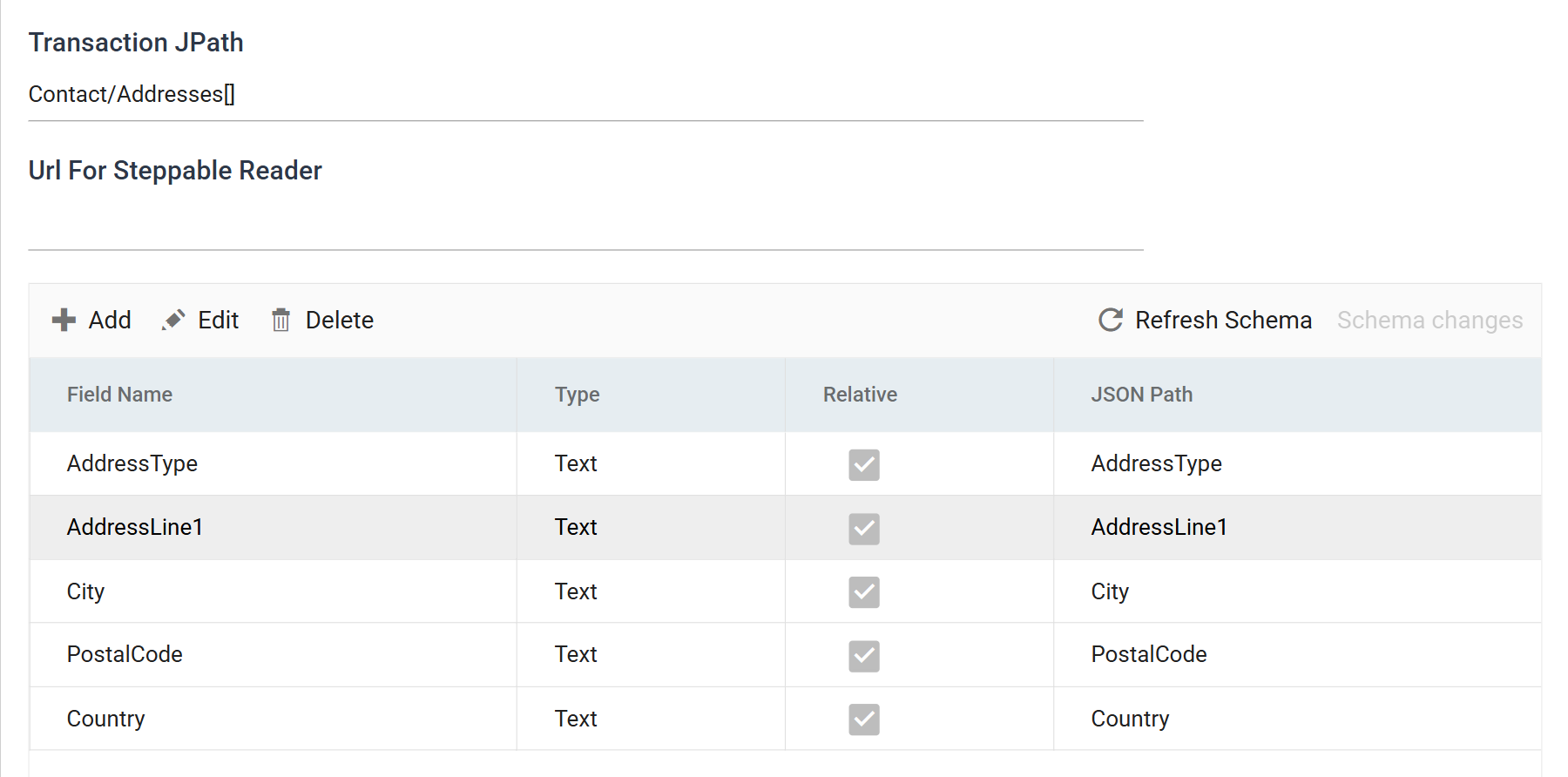
| Field | Value |
|---|---|
| Transaction JPath | Contact/Addresses[] |
| Url For Steppable Reader | (empty) |
Its path is relative to its parent — the invoice, not the response — so it is Contact/Addresses[] and not the whole way down from the top. Its fields are then relative to an address, so AddressType, AddressLine1, City, PostalCode and Country are all plain names.
Every level works this way: each transaction's JPath starts where its parent's record ended. Get the top one right and the rest read naturally.
Step d — Parent to child
The invoice's history has an endpoint of its own and no bulk equivalent, so it can only be fetched per invoice. This is the second stepping mode, and the only difference is where the value in the URL comes from.
Add History under Invoice:
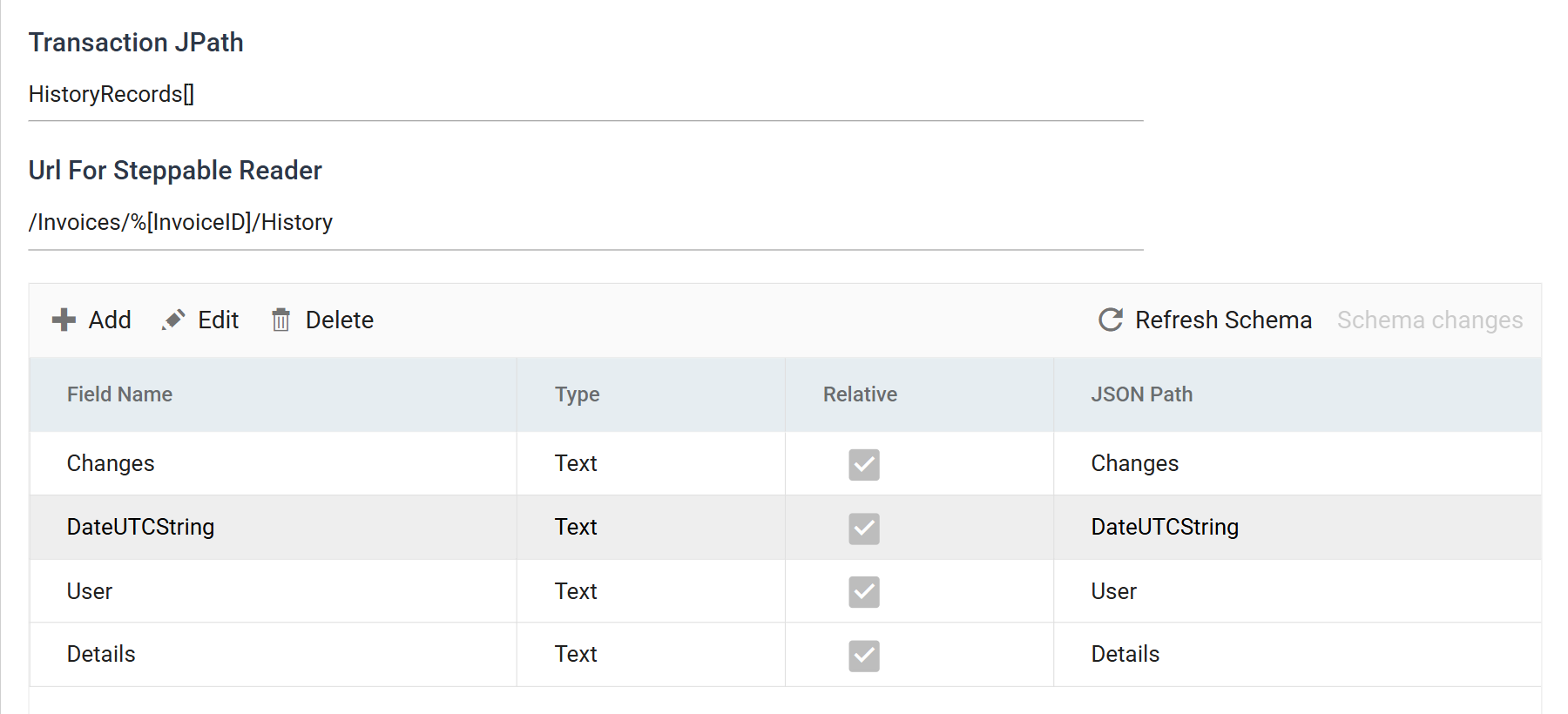
| Field | Value |
|---|---|
| Transaction JPath | HistoryRecords[] |
| Url For Steppable Reader | /Invoices/%[InvoiceID]/History |
Two things differ from the seed list, and both follow from the same fact:
- The token is a field of the parent, by name. Seed-list stepping has only
SYS.ITEM; parent-to-child can use any field of the parent record, so a URL can be built from an id and a date and a currency together.%[InvoiceID]here is the field defined in step b, which exists for this. - The Transaction JPath is measured against this transaction's own response.
/Invoices/{id}/Historyreturns{"HistoryRecords": [ … ]}, so the path isHistoryRecords[]with no prefix. A child gets to say where its records start, so it does.
| Field Name | JSON Path |
|---|---|
Changes |
Changes |
DateUTCString |
DateUTCString |
User |
User |
Details |
Details |
Step e — Preview
Press Refresh.
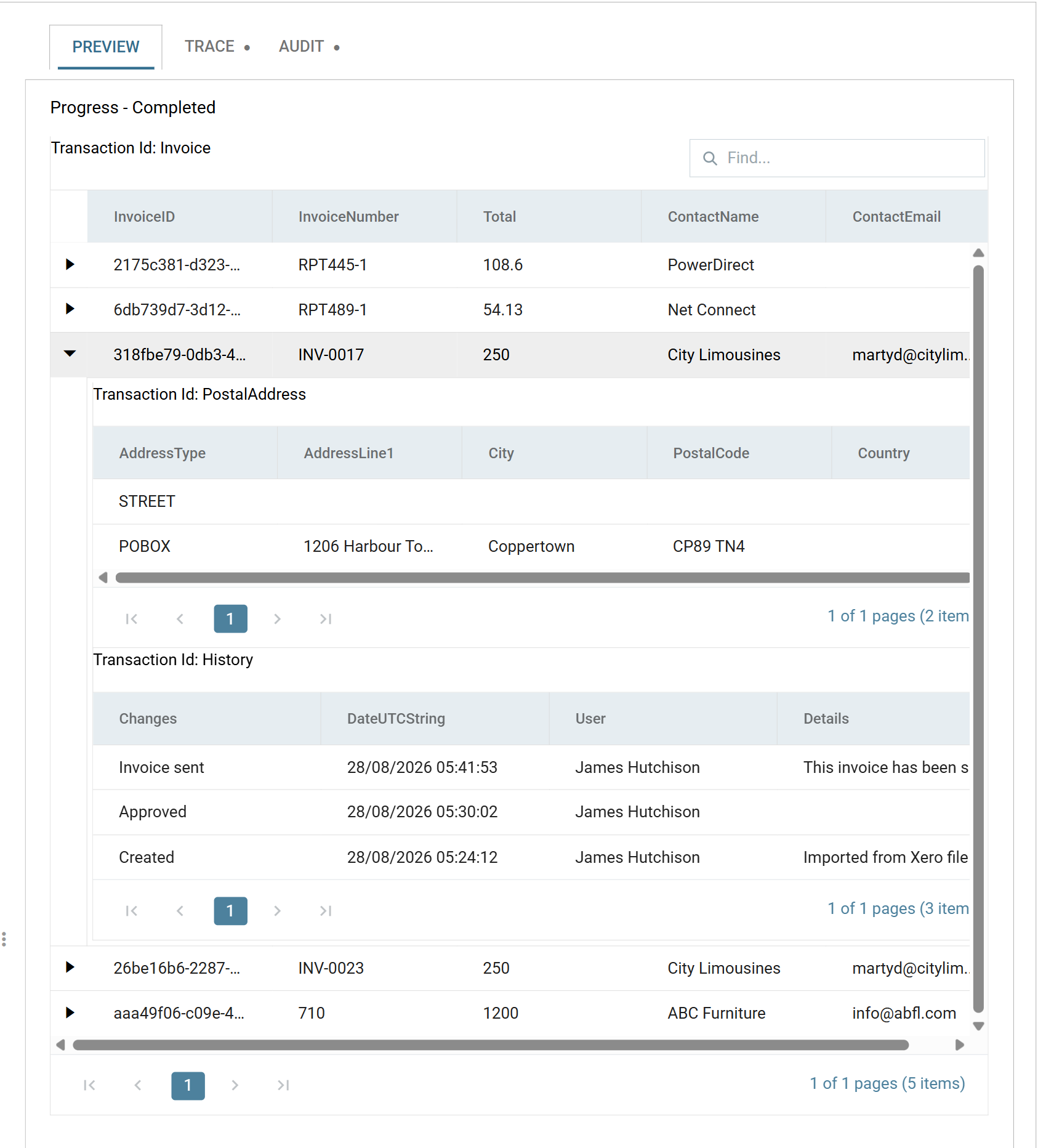
Five invoices, each with a postal address it was impossible to get from a list response, and a history that has no bulk endpoint.
Then read the Trace tab, because on a stepped reader it is the only place the cost is visible:
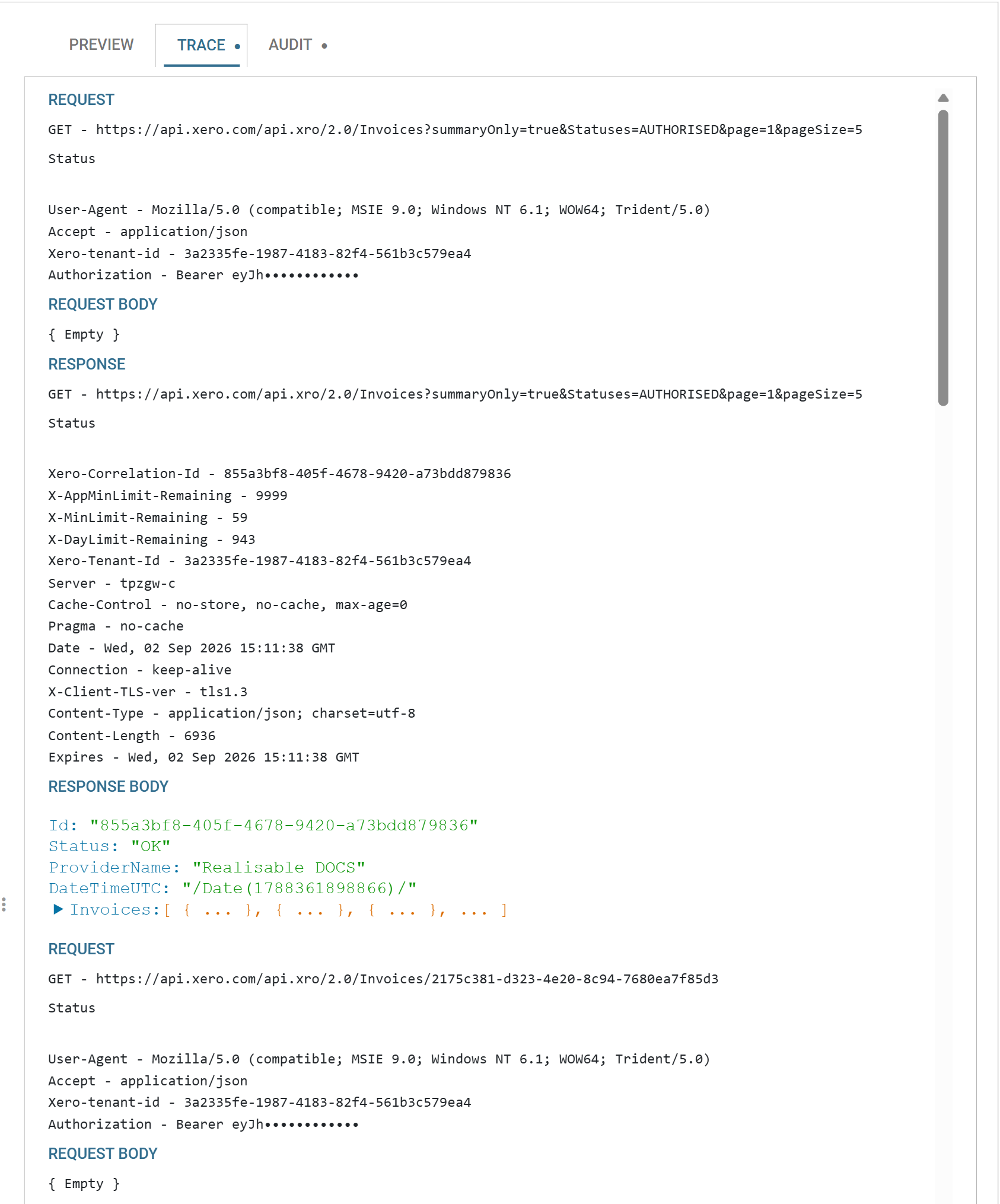
/Invoices?summaryOnly=true&Statuses=AUTHORISED&page=1&pageSize=5
/Invoices/2175c381-…
/Invoices/2175c381-…/History
/Invoices/6db739d7-…
/Invoices/6db739d7-…/History
…
Eleven requests for five invoices: one seed, then two per record. That is the arithmetic to do before you run it against a real organisation — five hundred invoices is 1,001 requests, which is a fifth of a Xero day and, at the one-per-second the behaviour throttles to after a refusal, the better part of twenty minutes.
That number is the argument for the section at the top of this page. Step when you must; when the vendor offers a way not to, take it.
When it does not work
- The run never finishes, and the trace shows the same URL again and again with a rising
page. Paging is on. See the warning at the top. - A whole transaction comes back with every field empty. Its Transaction JPath — the top transaction's especially, which is easy to leave blank because the JSON Entry Point looks as though it has already answered the question.
- The seed is fine and nothing steps. Url For Steppable Reader is empty on the transaction you expected to step. That is not an error — a transaction with no stepping URL is read out of its parent's response, and
PostalAddressabove does that deliberately. - The URL comes out with the token still in it, or truncated at a slash. The bare
%SYS.ITEMform. Add the brackets. %[InvoiceID]substitutes nothing on a child. The field must exist on the parent transaction and be spelled exactly. A field defined on the child, or on a grandparent, is not in scope.- The first stepped request 404s. Look at it in the trace. A seed value that is not what you think it is — an index rather than an id, or a whole URL where you expected a fragment — shows up immediately there.
- Detection refuses with "did not resolve against the supplied document". Expected on a stepped reader; the fields are defined by hand.
Verified against IMan 6.1 and the Xero Accounting API, on 2 September 2026.