Diagnosing an OAuth Setup
OAuth failures are unusually misleading. A missing header on the API call is reported as bad credentials; a retired scope is reported as a server error; a refresh request that was never right is reported as nothing at all until the day the first access token expires.
The error is generated by the party that received the request, and that party can only describe what it saw. It has no idea what you meant, so the message describes the request that arrived and the fault is nearly always upstream of it.
This page assumes a setup built by the Two-Legged or Three-Legged recipes.
Three things to do before diagnosing anything
Read the flow preview. The right-hand pane draws the requests IMan is going to make, from the values you have typed. Most misconfigurations are visible in it — an empty header list, a placeholder that was never filled in, a parameter on the wrong request — and seeing one there costs seconds rather than a round trip through a vendor's error page.
Tick Enable Trace Logging. It is at the bottom of the configuration pane, and without it a failure that happens below the HTTP layer leaves nothing behind.
Press Test, and read both halves. Test performs the whole flow: the token request, then a real call to the Test URL. The first question is always which half failed, and the Test Results tab answers it directly. A great many hours have been spent adjusting a token request that was already working.
The failures
The token request fails with invalid_client
The client id and secret are not valid for that host. Overwhelmingly the cause is a sandbox credential against the live endpoint or the reverse — the two hosts are different (api-m.sandbox.paypal.com and api-m.paypal.com, for instance) and both reject the other's keys with exactly this message.
Otherwise, check where the vendor wants them. A client id and secret sent as form parameters when the vendor expects an HTTP Basic header will fail the same way, and so will the reverse.
The token request succeeds and the API call fails with a credentials error
This is the most common failure of all, and the most misleading.
The token is real, and the API call carried no token. The service cannot tell an unauthenticated request from a badly authenticated one, so it reports the only thing it can: bad credentials. PayPal's wording is "Authentication failed due to invalid authentication credentials or a missing Authorization header" — and it is the second half of that sentence that is true.
The trace below is the whole story in one frame. The token request succeeds and the response body plainly contains an access_token; the request underneath it then goes out with
and nothing after Bearer. Compare it with a working setup, where the same line reads Authorization - Bearer eyJh….
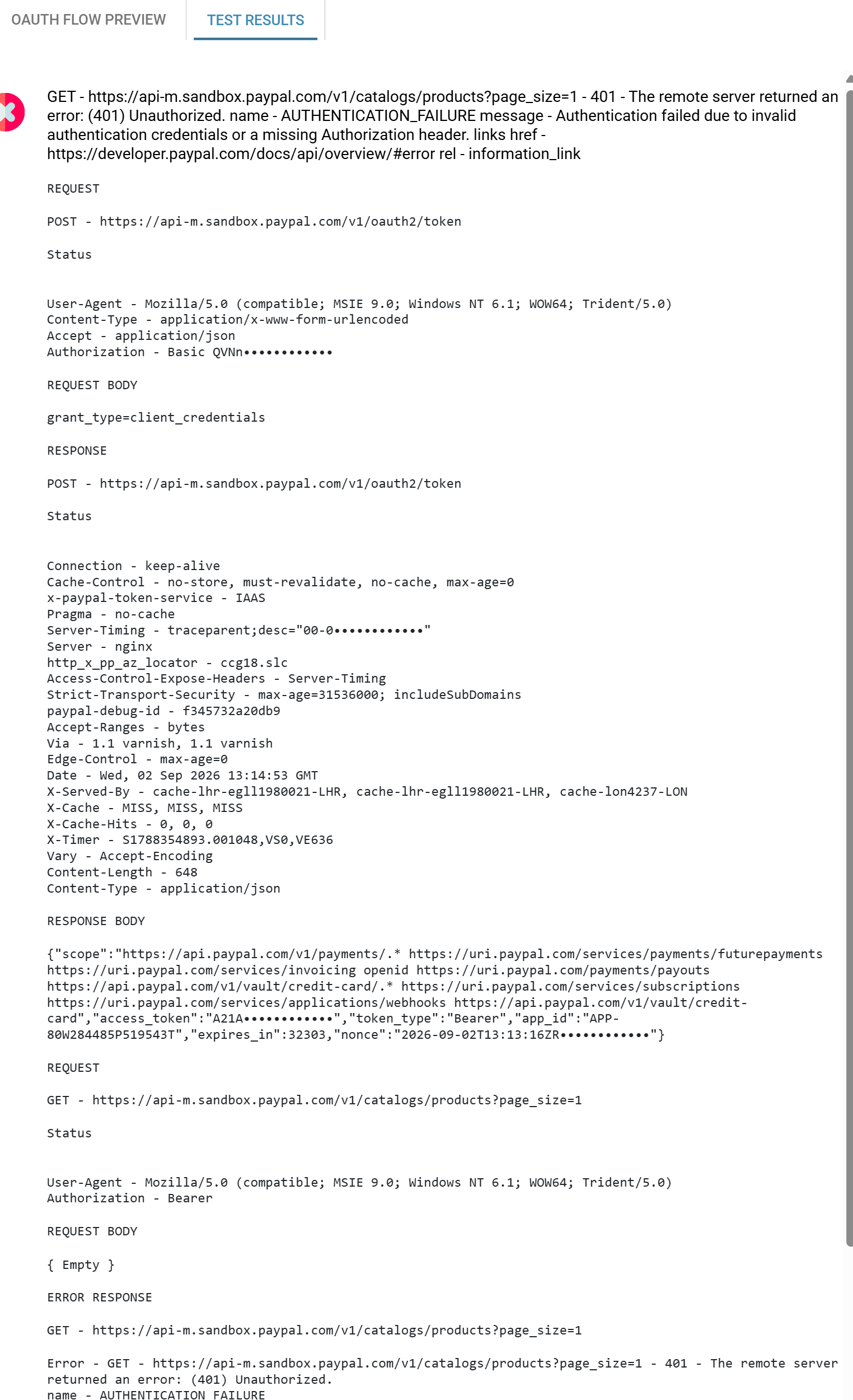
The fix is to add Authorization to the Authenticated API Request Headers, with the value %[token]. That list is a different list from the Token Request Headers, and it is the only thing that configures the API call.
You can see it coming without running the Test at all: in the flow preview, the request to the resource server has no header box against it.
The token comes back but IMan reports no token
Symptoms are a Test that fails immediately with a parsing complaint, or an empty token in the trace, while the same request in curl plainly returns one.
Token Request Path is a JPath into the response body, not a path in a URL. The default access_token matches the usual {"access_token": "…"}, but a service that nests the token deeper needs the full path to it. If the response is not JSON at all — some services still answer form-encoded — there is no path that will work.
The browser lands on the service's own error page
Nothing has reached IMan, and no user has been asked anything: the authorise request was rejected on sight. It is the Authorise URL, not the credentials.
The reason is in the redirect that produced the page, even when the page itself is generic. Xero, for instance, renders "Sorry, something went wrong" with an opaque error id and nothing else — but the URL that got there carries error=invalid_scope. Read the address bar, or the browser's network trace, before assuming anything.
The authorise endpoint is a free oracle
An authorisation endpoint answers a plain GET, and answers it before anybody signs in — so you can test what an application is allowed to ask for without an account, a browser or a consent. Request one scope: a redirect to the sign-in page means the scope is valid, a redirect to the error page means it is not. Bisecting a scope list this way takes a couple of minutes and is exact.
invalid_scope
One name in the scope list is wrong, retired, or needs a level of certification the application does not have.
Scope names change more often than anything else in an OAuth setup, and they change in a way that hides: a vendor retiring a scope generally lets existing connections keep it and refuses only new ones. The integration therefore goes on working everywhere it is already installed and fails for every new customer — which reads as an environment problem and sends you looking at the customer's account.
Xero's move to granular scopes is a current example, and is described on the three-legged page.
redirect_uri mismatch, or unauthorized_client
What is registered at the vendor is not character for character:
Most services compare it exactly — a trailing slash, http for https, or a different case is a mismatch. unauthorized_client usually means the same thing said differently, or that the application is registered as a type that is not allowed the flow you are asking for.
It authorises, the token is valid, and the API still returns 401 or 403
Something that identifies the account is missing, rather than something that identifies the caller.
Where a service scopes a token to an organisation, a workspace, a tenant or a subdomain, the token alone does not say which — and the call is refused even though the credentials are perfect. Xero wants Xero-tenant-id; other services want an account id in the path, or a subdomain in the host.
These belong in the Authenticated API Request Headers, because they describe the consent rather than the request. There is normally one endpoint that will tell you the value, and it is normally the one endpoint that needs only the bearer token — https://api.xero.com/connections is Xero's.
If the value is right and the call is still refused, it is a permissions problem at the vendor: the token is genuinely not allowed that endpoint. That is a scope, a plan, or an app-approval question, and nothing in IMan will fix it.
It worked yesterday and fails today, with nothing changed
The access token has expired and the refresh request is wrong. This is a three-legged failure and it is delayed by design: everything works for as long as the first access token lasts — thirty minutes, for Xero — so the mistake and the symptom can be a day apart.
The two usual causes are both in Refresh Request Form URL Parameters:
grant_typestill saysauthorization_code, having been copied from the token request;- the request presents
%[code]where it should present%[refresh_token].
The other possibility is that the refresh token itself has expired, which happens when an integration has not run for longer than the refresh token's life. Then it needs authorising again by hand, and there is no way around that.
Nothing at all in Test Results
Tick Enable Trace Logging and run it again. If it is still empty, the failure is below HTTP — a name that does not resolve, or a TLS handshake that fails — and the trace will say so.
The technique that works
When a request fails and the message does not fit, change one thing and keep everything else identical.
The productive version of that is to take IMan out of the picture: issue the same request with curl or another HTTP client, using the same credentials against the same URL. If it succeeds there and fails here, the difference is in what IMan is sending, and the flow preview will show you what that is. If it fails there too, the problem is the request itself, or the credentials, or the vendor — and no amount of adjusting the setup screen will help.
It sounds obvious. It is worth writing down because the temptation under a misleading error message is always to change several things at once, and that turns a five-minute answer into an afternoon.
Verified against IMan 6.1 on 2 September 2026.