Three-Legged OAuth 2.0
The third leg is a person.
In a two-legged flow your integration proves who it is and gets a token. In a three-legged flow it proves who it is, and then somebody with an account at the service is asked, in a browser, whether this application may act on their behalf. Only after they agree does a token exist.
That is awkward for an integration platform, and there is no way around it: a service that offers only three-legged OAuth is telling you that the data belongs to a user and not to your application. What makes it workable is that the browser step happens once. The service also issues a refresh token, and IMan uses that to mint new access tokens indefinitely, without anybody present. You authorise attended; it runs unattended.
Do you need it?
If registering the application asked you for a redirect URI, yes. That field exists because the service intends to send a browser somewhere after the user has agreed, and only the three-legged flow has anywhere to send it. Consent screens in the vendor's screenshots, the words "authorization code", and a code parameter in the documented request all say the same thing.
The redirect URI is Realisable's, not yours
This is the first thing that surprises people, and the field you cannot leave blank at the vendor.
IMan does not receive the redirect. Realisable runs an authorisation service which does, and it is the URL you register with the vendor:
Register that exact string. Most services compare it character for character and reject anything else, which is one of the two or three errors you are most likely to hit.
In the Authorise URL you never type it out — write %[redirect_uri] and IMan substitutes it. The same goes for %[client_id], so the URL you configure stays readable and stays correct if the credentials change. The full list of placeholders is on the OAuth2 Authentication page of the User Guide.
The four requests
The two-legged page makes the point that one OAuth object describes two different requests. A three-legged object describes four, and each has its own section of the screen:
| # | Request | Happens | Configured by |
|---|---|---|---|
| 1 | Authorise — send the user to the service to agree | Once, when you press Authorise | Authorise URL |
| 2 | Token — exchange the returned code for an access token and a refresh token | Once, immediately after they agree | Token Request URL, Path, Body Type, Form URL Parameters, Headers |
| 3 | Refresh — trade the refresh token for a new access token | Whenever the access token has expired | Refresh Request Form URL Parameters |
| 4 | Authenticated API request — every actual call to the service | Constantly | Authenticated API Request Headers |
Requests 2 and 3 are nearly identical and are configured separately, because they differ in exactly one respect: the token request presents %[code], the refresh request presents %[refresh_token]. Copying the parameters across and forgetting to change that one line gives an object that authorises perfectly and then stops working half an hour later, which is a miserable thing to debug. Configure both before you press Authorise.
Xero
Xero is a good service to learn this on: the free Demo Company gives you a fully populated set of books to read, and the API is strict enough about scopes and tenants that anything you get wrong, you get told about.
Registering the application
Create the app at developer.xero.com/app/manage, choosing a Web app. It asks for a company URL and a redirect URI — the redirect URI is the Realisable callback above. Xero shows the client secret once, on the screen where you generate it.
Scopes
A scope is a permission, and the list of them travels in the Authorise URL. The consent screen the user sees is generated from that list, so asking for more than you need makes your integration look worse and gets refused more often.
Xero has moved to granular scopes
Applications created on or after 2 March 2026 must use Xero's granular scopes. The broad ones — accounting.transactions, accounting.transactions.read, accounting.reports.read — are refused outright, and accounting.transactions is now split into accounting.invoices, accounting.payments, accounting.banktransactions and accounting.manualjournals. Applications created before that date go on working, and have until 13 September 2027 to migrate.
The trap is in that second sentence. A scope string that is wrong is still working everywhere it is already connected, and fails only for new connections — so this reads as "it works for us and not for the customer", which is the last shape of bug anyone looks for.
See Granular Scopes FAQs for the mapping.
The set used here, which is enough to read organisations, contacts and invoices:
openid profile email offline_access accounting.contacts accounting.invoices accounting.settings.read
offline_access is the one that matters. It asks Xero for a refresh token. Leave it out and everything works, convincingly, for thirty minutes — and then the access token expires, there is nothing to renew it with, and the integration is dead until somebody authorises it again by hand.
IMan setup
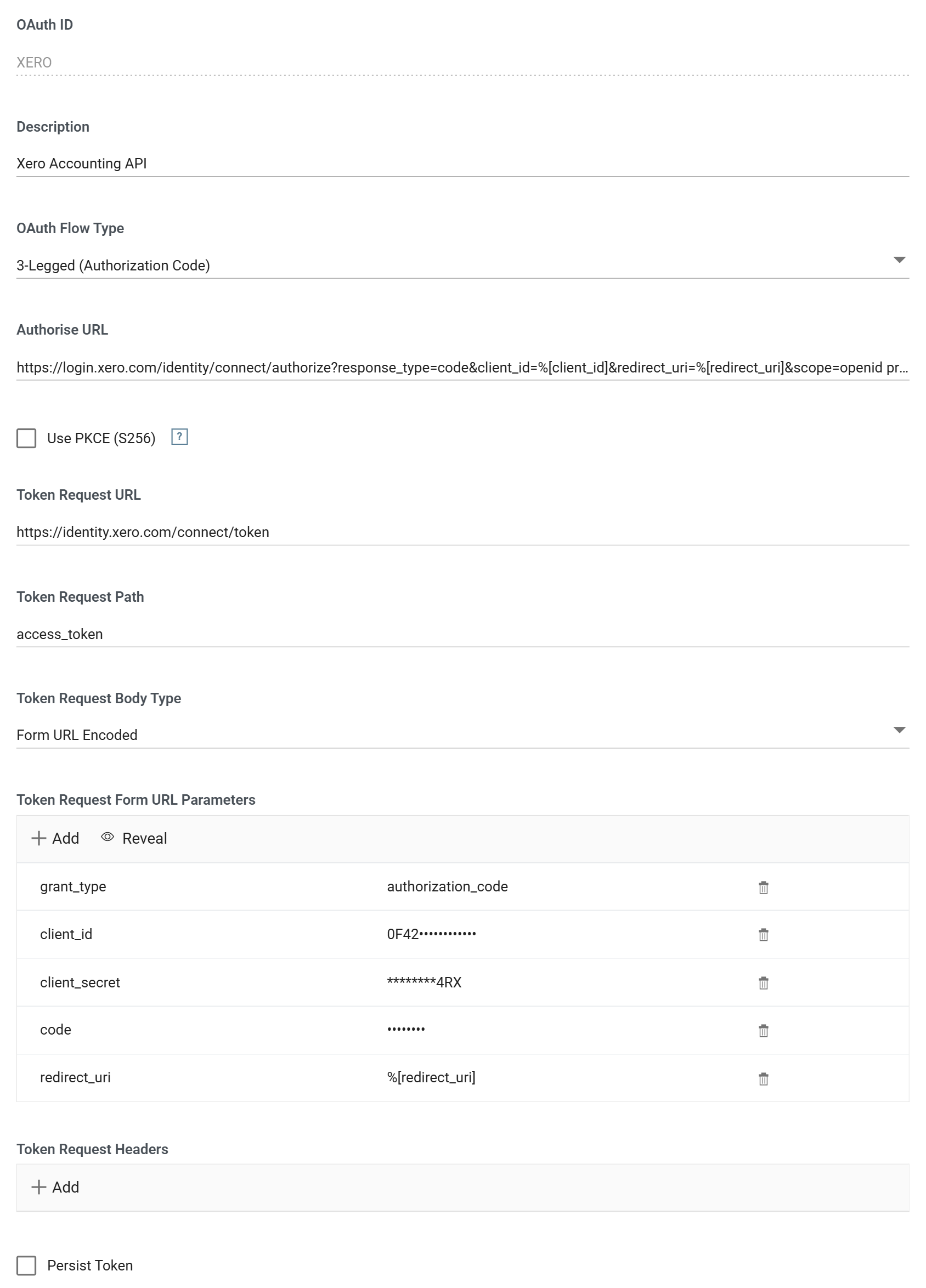
| Field | Value |
|---|---|
| OAuth Flow Type | 3-Legged (Authorisation Code) |
| Authorise URL | https://login.xero.com/identity/connect/authorize?response_type=code&client_id=%[client_id]&redirect_uri=%[redirect_uri]&scope=(the scopes above) |
| Token Request URL | https://identity.xero.com/connect/token |
| Token Request Path | access_token |
| Token Request Body Type | Form URL Encoded |
| Test URL | https://api.xero.com/api.xro/2.0/Organisation |
Token Request Form URL Parameters
| Name | Value |
|---|---|
grant_type |
authorization_code |
client_id |
your client id |
client_secret |
your client secret |
code |
%[code] |
redirect_uri |
%[redirect_uri] |
Changing the flow type to 3-Legged does not correct the parameters IMan seeded for you: grant_type is still client_credentials from the two-legged default, and it has to be changed by hand to authorization_code.
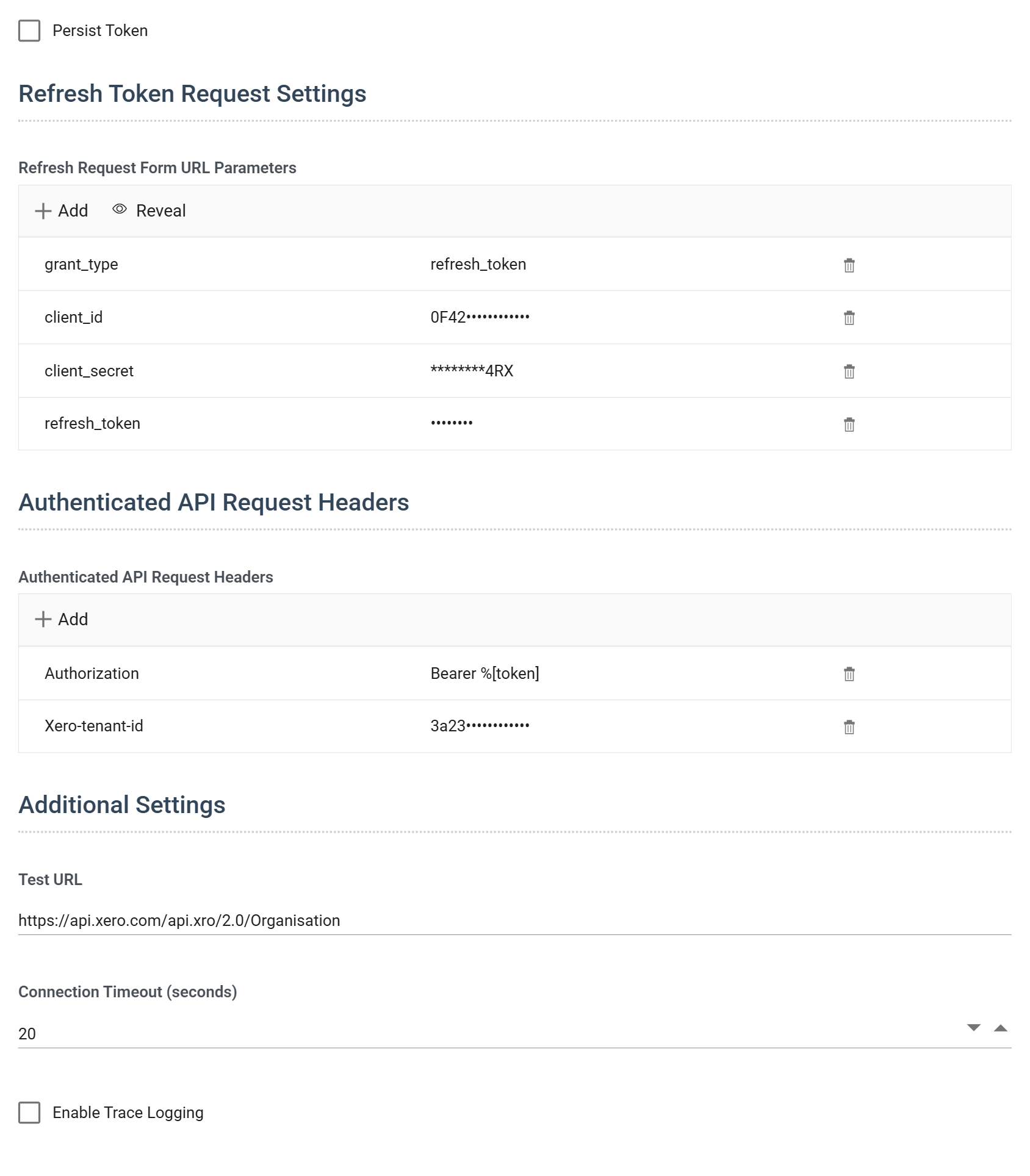
Refresh Request Form URL Parameters — the same four values, with refresh_token in place of the code:
| Name | Value |
|---|---|
grant_type |
refresh_token |
client_id |
your client id |
client_secret |
your client secret |
refresh_token |
%[refresh_token] |
Authenticated API Request Headers
| Name | Value |
|---|---|
Authorization |
Bearer, %[token] |
Xero-tenant-id |
see below |
Persist Token is not what it sounds like
Ticking Persist Token replaces the whole Refresh Request Form URL Parameters section with a box for a token you supply yourself, and the parameters you had entered are discarded. Unticking it gives the section back, empty. It is for a service that issues a long-lived token with no refresh flow — not for keeping the token between runs, which happens anyway.
Authorising
Press Authorise. A browser window opens on Xero's own sign-in, and after that the consent screen.
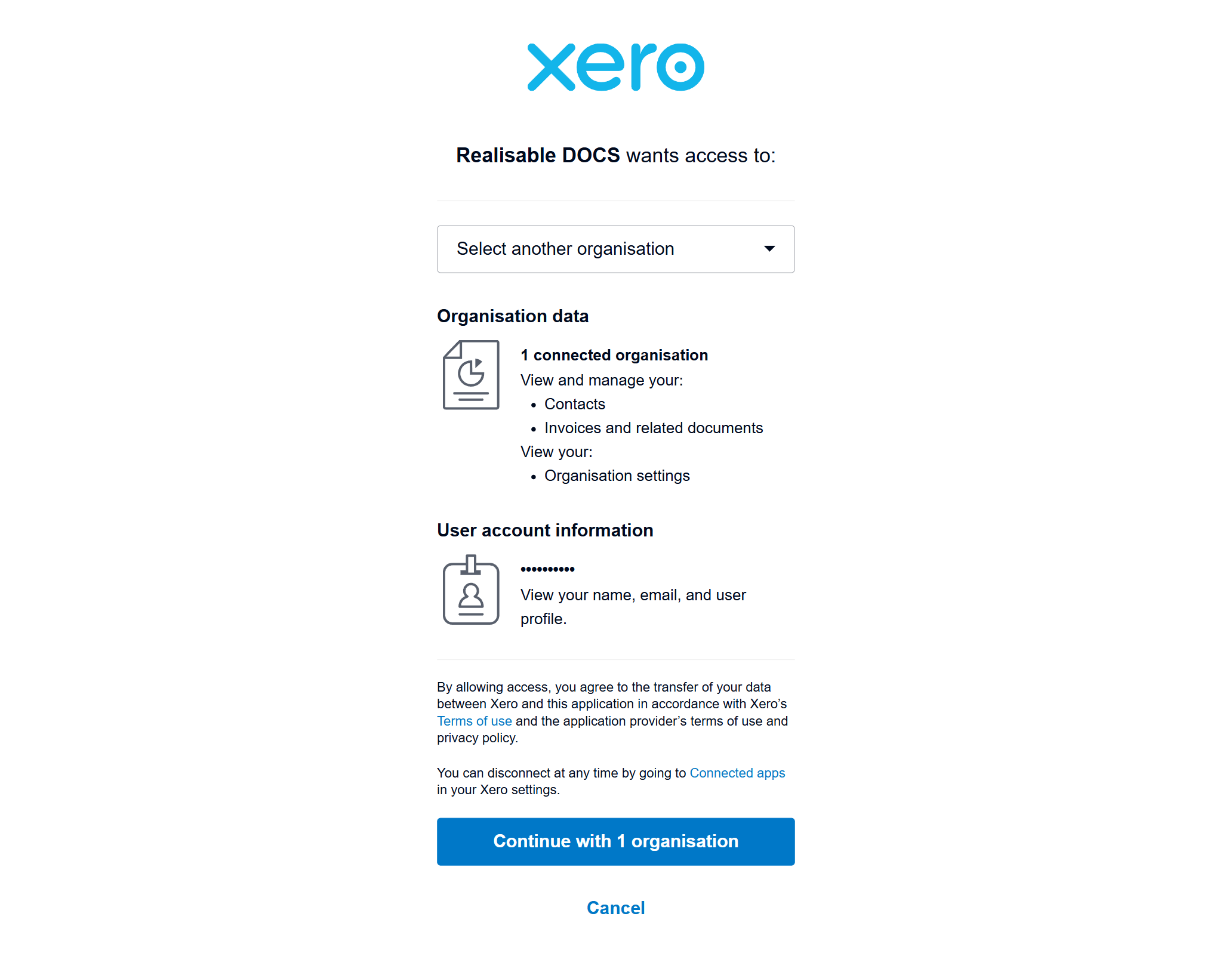
Nothing here is IMan. You are the user in the three-legged flow, and this is the moment the third leg happens.
It is also the best check on your scope list that you will get, because it is that list rendered into English. The accounting.contacts and accounting.invoices scopes have become "View and manage your Contacts, Invoices and related documents"; accounting.settings.read has become "View your Organisation settings"; openid profile email is the whole of the User account information section. Anything on this screen that you did not mean to ask for is a scope to remove. Xero also asks which organisation to connect — choose the Demo Company.
When it finishes, Xero redirects to the Realisable callback, which exchanges the code for tokens and hands them back to IMan. The dialog you left open updates itself.
The tenant id
An access token, on its own, is not enough to call the Xero Accounting API. Consent was granted for a particular organisation, and every call has to name it in a Xero-tenant-id header.
You find it by asking Xero. The connections endpoint is the one call that needs only the bearer token, so it works before you know the tenant:
- Set the Test URL to
https://api.xero.com/connectionsand press Test. -
The response lists every organisation the consent covers. Take the
tenantIdof the one you want: -
Add
Xero-tenant-idwith that value to the Authenticated API Request Headers, and point the Test URL at a real endpoint —https://api.xero.com/api.xro/2.0/Organisation.
That two-step is a shape, not a Xero quirk. Where a service scopes a token to an account, a workspace or a subdomain, there is usually one endpoint that will tell you which — and the answer belongs in the Authenticated API Request Headers, because it describes the consent rather than the request.
Zoho
Xero on its own leaves you with a recipe. A second service turns it into a method, because the flow is identical and almost nothing else is: Zoho wants the same four requests, configured in the same four sections of the same screen, and disagrees with Xero about how to spell nearly every one of them.
Whatever service you are connecting to will differ from Xero in some of these ways and from Zoho in others. Every difference below is the vendor's; the flow underneath them is the same one.
Registering the application
Register the client at api-console.zoho.com, choosing Server-based Applications. That is the client type with a redirect URI — which, by the test at the top of this page, is the one that means three-legged.
It asks for a homepage URL and an Authorized Redirect URI. The redirect URI is the Realisable callback, exactly as for Xero.
Scopes, and the switch that is not a scope
Zoho's scopes are named service.resource.operation. Reading an organisation — the closest thing Zoho CRM has to the Xero endpoint tested above — needs one:
Zoho separates scopes with commas. Xero separates them with spaces. Both are a list in a query parameter, both are obvious once you know, and a space-separated Zoho scope list fails as invalid_scope without ever mentioning the separator.
access_type=offline is what earns the refresh token, and it is not a scope at all — it is a separate parameter on the authorise URL:
https://accounts.zoho.com/oauth/v2/auth?response_type=code&client_id=%[client_id]&redirect_uri=%[redirect_uri]&scope=ZohoCRM.org.READ&access_type=offline&prompt=consent
This is Zoho's offline_access. The consequence of forgetting it is the same as forgetting Xero's, and so is the shape of the failure: Zoho issues an access token with no refresh token, everything works convincingly for an hour, and then the integration is dead until a human authorises it again.
The two vendors put the same switch in different kinds of place. Someone who learned it as "add offline_access to the scope list" will search Zoho's documentation for a scope and not find one. Every service offering unattended access has a refresh-token opt-in, each names it differently, and none of them turn it on for you.
prompt=consent is the third parameter worth having. Without it Zoho skips the consent screen for a user who has already agreed. That suits production, and it is precisely wrong while you are still getting the scopes right and need to see what you are being asked to approve.
The data centre is part of the credential
A Zoho token belongs to a region, and nothing in the token says which
Zoho runs its accounts service in eight regions — accounts.zoho.com, .eu, .in, .com.au, .jp, .ca, .sa and .uk — and each is a separate world with its own users, its own tokens and its own API host: www.zohoapis.com for the US, www.zohoapis.eu for Europe. A token minted in one region is not valid in another.
Which region you are in is decided by the user's account, not by your application. A client is registered in one region by default; the Settings tab of the API console has a multi-DC switch that enables the others and lets you choose whether the client secret is shared across regions or unique to each. The client id is the same either way.
A multi-DC client therefore does not solve this; it is the reason the region matters. The client will now authorise a user in any region, so the authorise URL, the token URL and every API call have to agree with each other about which region that user was in.
This is the second time this page has met something that identifies which account the consent was for, travels outside the token, and has to be attached to every request. Xero calls it a tenant id and Zoho calls it a region, but the question the service is answering is the same, and it is worth asking of any three-legged setup before assuming the token is the whole credential.
IMan setup
The screen is the one built for Xero above; only the values differ.
| Field | Value |
|---|---|
| OAuth Flow Type | 3-Legged (Authorisation Code) |
| Authorise URL | https://accounts.zoho.com/oauth/v2/auth?response_type=code&client_id=%[client_id]&redirect_uri=%[redirect_uri]&scope=ZohoCRM.org.READ&access_type=offline&prompt=consent |
| Token Request URL | https://accounts.zoho.com/oauth/v2/token |
| Token Request Path | access_token |
| Token Request Body Type | Form URL Encoded |
| Test URL | https://www.zohoapis.com/crm/v8/org |
Token Request Form URL Parameters
| Name | Value |
|---|---|
grant_type |
authorization_code |
client_id |
your client id |
client_secret |
your client secret |
code |
%[code] |
redirect_uri |
%[redirect_uri] |
Refresh Request Form URL Parameters
| Name | Value |
|---|---|
grant_type |
refresh_token |
client_id |
your client id |
client_secret |
your client secret |
refresh_token |
%[refresh_token] |
Authenticated API Request Headers
| Name | Value |
|---|---|
Authorization |
Raw, Zoho-oauthtoken %[token] |
The Authorise and Token Request URLs are on one host, accounts.zoho.com, and the Test URL is on another, www.zohoapis.com. Xero splits the same three ways (login.xero.com, identity.xero.com, api.xero.com) and in both cases it reads as untidiness and is not: the accounts host is the identity provider, the API host is the product, and for Zoho the two vary by region together. Change the region and all of them change.
Zoho does not send a Bearer
The field Zoho genuinely breaks convention on is the authenticated request header:
Not Bearer. IMan's Raw authorisation type exists for this: the whole header value is yours to compose, prefix included. Choosing Bearer here produces a header that is correctly formed, obviously right, and refused by every Zoho endpoint.
The cookbook has already met this once. A non-standard prefix on a standard header is the Klaviyo case, and that article's table of which type to choose already has a row for it — an Authorization header with any other prefix means Raw. It applies here unchanged: OAuth decides how the token is obtained, and not how it is presented.
It is expensive because the failure is reported as an authentication error, which sends you to check the client id, the secret, the scopes and the consent. None of those is the cause.
Authorising
Press Authorise. The browser opens on Zoho's sign-in and then the consent screen which, as with Xero, is your scope list rendered into English and the best check on it you will get.
Zoho's authorisation code is valid for two minutes and can be used once. That is short — most services allow ten. It is ample for the exchange, which happens in the same second, and not ample enough to leave the consent screen open while you go and look something up.
The flow preview
The right-hand pane draws the flow from the values you have typed. Three-legged is where it earns its keep: there are four requests, two of them involving parties that are not you, and the diagram is the only place they are all visible at once.
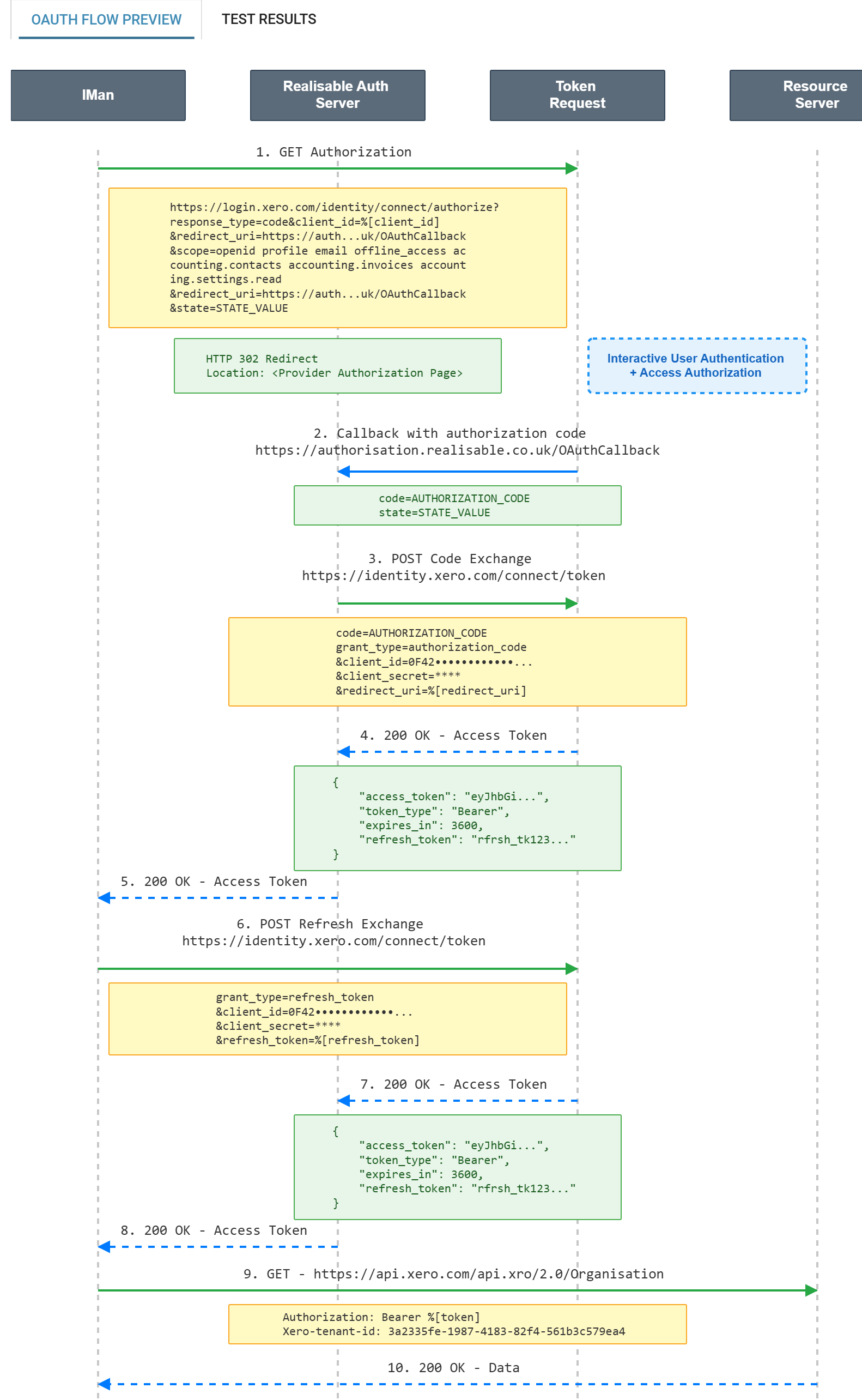
Read it before pressing Test. If the last step carries no Authorization header the API call will go out unauthenticated, and the error you get back will be about credentials, which sends you to look at the client id and secret. Neither is the cause.
Testing it
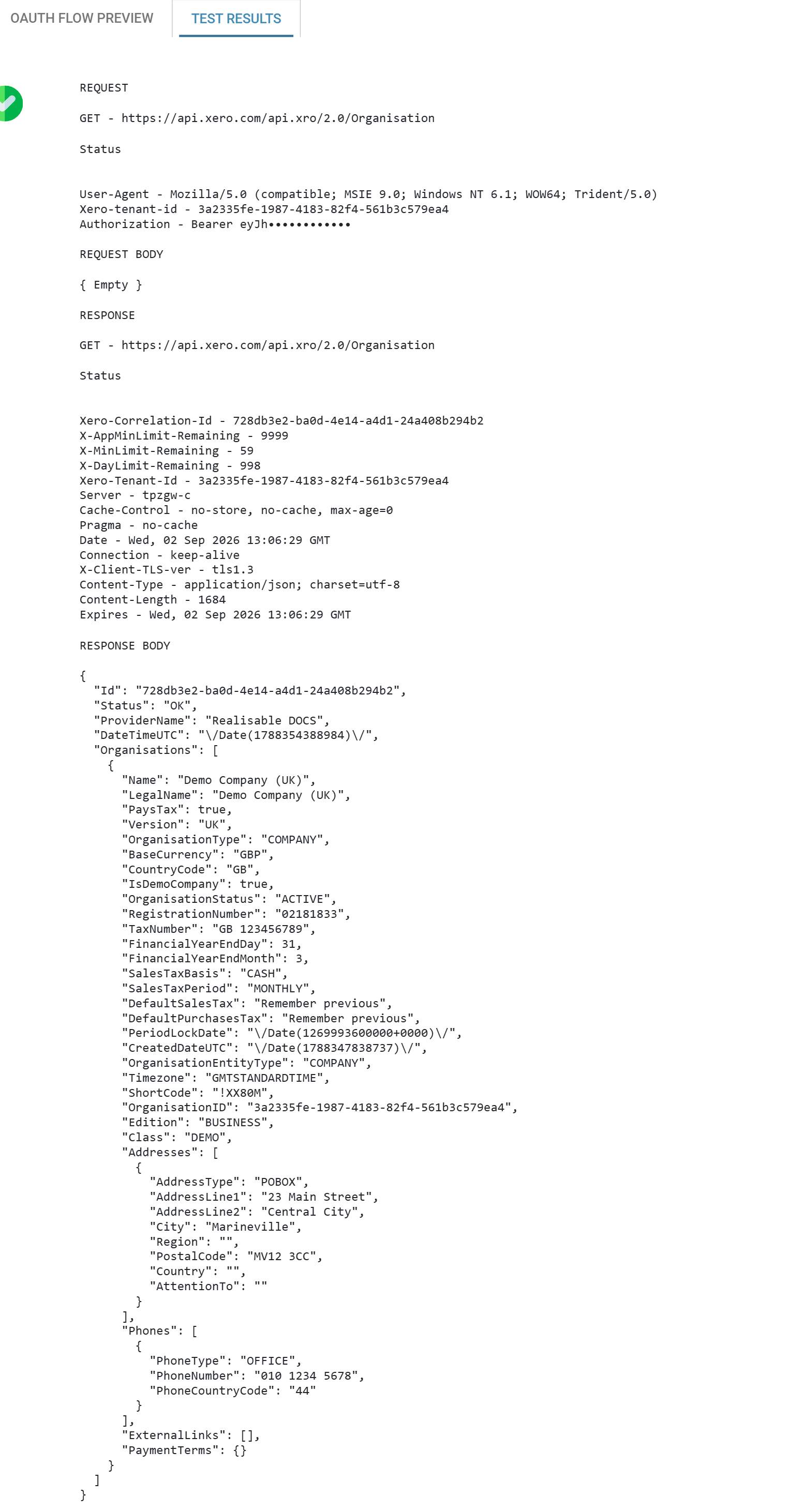
Test performs the whole flow: refreshing the access token if it has expired, then making a real call to the Test URL. A pass therefore proves the refresh parameters as well, which is the half you cannot check any other way.
Keeping it alive
A refresh token turns an attended authorisation into an unattended integration, so its lifetime decides how long "set up once" actually lasts. It is not the same at any two vendors.
Xero:
- an access token lasts 30 minutes;
- a refresh token lasts 60 days, and is replaced every time it is used — IMan stores the new one and discards the old;
- so an integration that runs at least once every 60 days never needs a human again. One that goes quiet for longer has to be authorised by hand.
Zoho:
- an access token lasts one hour;
- a refresh token does not expire. There is no clock and no rolling replacement — the token issued at consent goes on working, so an integration that runs twice a year is fine;
- but a client may hold only 20 active refresh tokens per user, and asking for a twenty-first invalidates the oldest. Authorise the same client against the same Zoho user twenty-one times while experimenting and the first setup stops working, with nothing anywhere to say why;
- and a refresh token will mint ten access tokens per ten minutes, no more.
"Unattended" means something different at each service. At Xero it means run at least once every 60 days. At Zoho it means do not re-authorise this user twenty more times. Both are easy to satisfy once known, and neither is visible on the screen where you would need to know it.
Sources: The standard authorization code flow and Token types in the Xero documentation; Zoho's OAuth 2.0 documentation, Multi-DC support and Token limits in Zoho's.
The two side by side
The differences, in the order they come up:
| Xero | Zoho | |
|---|---|---|
| Refresh-token opt-in | offline_access, a scope |
access_type=offline, a parameter |
| Scope separator | space | comma |
| Authorisation code lasts | 5 minutes | 2 minutes |
| Authenticated header | Authorization: Bearer … |
Authorization: Zoho-oauthtoken … |
| Which account | Xero-tenant-id, fetched from a second endpoint |
the region, chosen by the user, baked into every URL |
| Access token | 30 minutes | 1 hour |
| Refresh token | 60 days, replaced on every use | never expires, but only 20 per user |
Not one of those rows is a disagreement about OAuth. Both services implement the same specification correctly, and every difference is a decision the specification left open. So a webservice recipe is never quite transferable, and the vendor's own documentation is always the authority.
When it fails
- The browser lands on the service's own error page. The authorise request was rejected before any user was involved, so it is the URL, not the credentials. Xero reports these as a generic "Sorry, something went wrong" with an error id and nothing else — but the reason is in the redirect that produced the page. Read the address bar, or the network trace, for
error=invalid_scope,error=unauthorized_clientorerror=invalid_requestbefore assuming anything. redirect_urimismatch. What is registered at the vendor is not character for characterhttps://authorisation.realisable.co.uk/OAuthCallback.invalid_scope. One name in the scope list is wrong, retired, or needs a level of certification the application does not have. Removing scopes one at a time finds it quickly: the authorise endpoint answers a plain GET, so you can try a scope list without an account, a consent or a browser.- It authorises, and the Test fails with a credentials error. The Authenticated API Request Headers list is empty or wrong. Check step 4 of the flow preview.
- It authorises, the token is real, and the API returns 401 or 403 anyway. Something identifying the account is missing — the tenant header, for Xero. A token can be perfectly valid and still not say which set of books you meant.
- It worked yesterday and fails today with no change. The refresh request. Either its parameters were never right —
grant_typestillauthorization_code, or%[code]where%[refresh_token]belongs — or the refresh token has expired and the flow needs authorising again.
Once the Test passes, the authentication is ready to be attached to a service by a Webservice Behaviour.
Verified against IMan 6.1, the Xero Accounting API and the Zoho CRM API on 2 September 2026.