Webservice Behaviour
A Webservice Behaviour is everything that is true of every request to a service, saved once under a name.
The Basic Authentication and OAuth articles produced credentials, and neither sends a request. A behaviour attaches those credentials to a service and adds everything else a request needs: the service's address, its rate limit, its paging scheme and its error format.
Every reader, writer and lookup in the rest of this cookbook names one, and they all name the same one. Configure Xero's paging once here and every request in every integration inherits it.
This article builds three:
- Xero
- The spine. OAuth, a request header the API needs, page-number paging and a leaky bucket.
- Mailchimp
- Paging by record offset rather than by page, which is the commoner of the two and looks nothing like it on the screen.
- JIRA / Atlassian
- Offset paging again with different names, and a service that throttles where it once did not.
Read at least two of the three. Almost all of the difficulty in a behaviour is the four paging fields, and one example is not enough to see what they mean.
The screen
A behaviour is created from Setup > Webservice Behaviours. The form is one dialog split down the middle: the settings on the left, in three sections with a Jump To list above them, and on the right the request that TEST will send, assembled from what you have typed.
The first section is the service itself.
Id and Description
The Id names the behaviour everywhere else and cannot be changed once saved. It is also the name of the trace file, so keep it short and recognisable.
The Description is the name you select by later. The Authentication drop-down on this very screen lists authentications by their Description, not their Id — so an authentication saved with a blank description is one you cannot identify when you come to select it.
Base Url
Combined with the URL on each reader, writer and lookup to make the address actually requested. It is optional, and everything works with it empty and full URLs everywhere — but then the service's address is copied into every transform that touches it, and moving to a sandbox means editing all of them.
Put in it the part that never varies. Deciding where that boundary falls is the first real judgement on this screen, and each recipe below shows the reasoning.
Request Headers
Headers sent with every request through this behaviour. Same control as the one on a Basic Authentication, and it works the same way.
What belongs here and what does not is worth getting straight, because there are three places a header can live and only one of them is right for each:
| Header | Where it goes | Why |
|---|---|---|
Identifies the caller — Authorization |
On the authentication | It is the credential |
Identifies which account the credential is for — Xero's Xero-tenant-id |
On the authentication, in its Authenticated API Request Headers | It describes the consent, not the request |
Describes the conversation — Accept, Content-Type, an API version |
Here, on the behaviour | It is true of every request and has nothing to do with who you are |
| Describes one request | On the reader, writer or lookup | It is not true of the others |
A behaviour with an empty Request Headers list is therefore normal, and a behaviour on an OAuth authentication is usually empty — the interesting headers are on the OAuth object. Xero is the exception, and the reason is a good one.
Authentication Type and Authentication
Three types — None, Basic Authentication, OAuth 2.0 — and the Authentication drop-down under it lists the saved objects of the type chosen. With None the drop-down is empty.
Test Url
Tested against the Base Url, so it can be the path alone. It must answer a GET, exactly as on an authentication — and, as there, the cheapest authenticated endpoint the API has is the right choice.
The Test here proves more than the authentication's did: it proves the Base Url composes into a real address, that the authentication is attached and reachable from this behaviour, and that the request headers are being sent.
Http Request Materialisation
The right-hand pane, and the reason to read it before pressing Test.

It is the whole request: the method, the address the Base Url and the Test Url composed into, and every header the behaviour will add. A // where you meant one slash, a Base Url that has kept a trailing path segment, a header name with a typo — all of them are visible here, and all of them produce the same uninformative 401 or 404 from the service if you press Test first.
What is not here is anything the authentication contributes. The Authorization header and, for Xero, Xero-tenant-id are added later, by the authentication object, and this pane does not show them. An empty-looking materialisation on an OAuth behaviour is therefore correct. To see the request as it actually goes out, headers and all, read the Trace tab after a preview. The tracing section below covers that.
Request Throttling
Two options, None and Leaky Bucket.
None means requests go out one after another as fast as the service replies. That is right when the vendor documents no limit, and it is also right when the vendor limits by concurrency rather than by rate — IMan reads synchronously, one request at a time, so a limit on simultaneous connections cannot be breached.
Leaky Bucket is for a rate limit. IMan runs unthrottled until the service refuses a request with a nominated status code, and from then on holds to the requests-per-second you set. Two fields appear with it:
| Field | What to put in it |
|---|---|
| Requests Per Second | The sustained rate the vendor documents, converted to a per-second figure |
| Throttling Http Status Code | The status the vendor returns when you exceed the limit. 429 unless they say otherwise |
Throttling is per run, not per service
The bucket belongs to the integration that is executing. IMan does not count requests across separate integrations or across separate runs of the same one.
So a limit of "5,000 calls per day" cannot be enforced here at all — if the integration runs four times a day, each run starts with a full bucket and knows nothing about the other three. Throttling protects you from a burst inside one run. A daily quota is a scheduling problem.
Paging
The four fields under Request Paging are the ones people get wrong, and it is because two quite different schemes are configured with the same four boxes.
The type list is Url, JSON Body, XML Body, JSON Response, XML Response and Header Link. The Paging section of the User Guide describes all six; every recipe here is Url, which is by far the commonest, and the whole of the difficulty is in the four fields:
| Field | What it is |
|---|---|
| Paging Start At | The value the parameter takes on the first request |
| Paging Path/Parameter Name | The name of that parameter |
| Paging Increment By | How much it goes up by for each further page |
| Paging Increment/Parameter Name | Optional. The name of a second parameter, which is sent carrying the Increment By value |
The last one is the confusing one: the increment parameter's value is the increment. It is not a separate page size you get to choose. That single fact separates the two schemes:
- A page-number API counts pages.
?page=1, then?page=2. Increment By is1, and there is no increment parameter — the page size, if the API lets you set one at all, goes in the URL as an ordinary fixed parameter. - An offset API counts records.
?offset=0&count=10, then?offset=10&count=10. Increment By is the page size, and the increment parameter carries it. To step over ten records you must have asked for ten.
Xero is the first. Mailchimp and JIRA are the second.
Paging stops when a page comes back empty. Http Status Code for Page End covers services that answer a request past the last page with an error instead — most commonly 404 — and is left empty otherwise.
Paging Start At is the value the parameter takes on the first request, and for an offset API that is 0, not 1. Starting at 1 asks the service to skip one record, and it does — quietly, on every run, for the whole life of the integration.
Error Message Path
When a service refuses a request, IMan has a response body and has to turn it into an error message. Left empty, it formats the whole response — every field name and value it can find. That is never wrong and it is rarely readable.
The Error Message Path is a JPath (or XPath, for an XML service) to the part that is the actual message. Error ID Path does the same for a machine-readable code, where the service returns one.
Both are worth the five minutes. Compare the same failed request without and with:
GET - https://api.xero.com/api.xro/2.0/Invoices?where=NotAField=="x" - 400 - The remote server returned an error: (400) Bad Request.
ErrorNumber - 16
Type - QueryParseException
Message - No property or field 'NotAField' exists in type 'Invoice'
GET - https://api.xero.com/api.xro/2.0/Invoices?where=NotAField=="x" - 400 - The remote server returned an error: (400) Bad Request.
No property or field 'NotAField' exists in type 'Invoice'
A support ticket arrives with the first at three in the morning. The person reading it needs the second. On a real integration the difference is larger than this, because the discarded part is the whole of a response that may run to hundreds of lines.
To find the path, make the service fail on purpose — a misspelt field name in a filter will do it — and read what comes back.
Enable Runtime Tracing
Writes every request and response to \IMan\Debug\WSTRACE-<BehaviourId>.log.
Runtime is the operative word:
The trace you want while you are building is already on
This checkbox affects executed integrations — scheduled runs and manual executions. It has no effect in the Designer, where the trace is always collected and no file is written.
While you are building, the requests and responses are on the Trace tab of the preview pane, next to Preview and Audit. You do not have to turn anything on, and you do not have to go and find a file.
Tick the box when you have a service you are still learning and you need to see what a scheduled run did. Untick it afterwards — the file is appended to indefinitely and it contains every credential you sent.
The Trace tab is the best diagnostic in the product for webservice work:
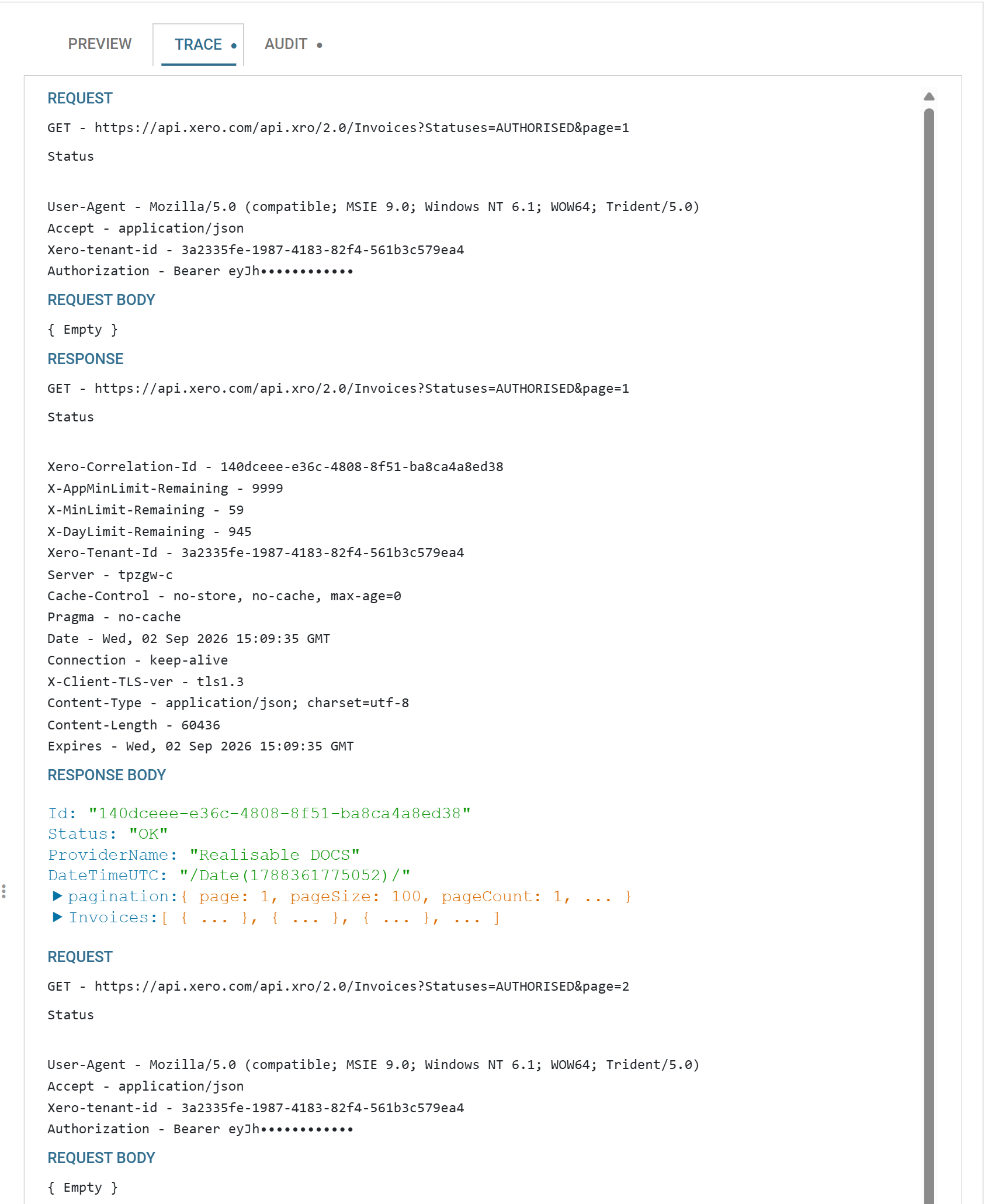
Everything this article configures is visible in there: the URL the Base Url composed, the paging parameter IMan appended, the headers from the behaviour and from the authentication arriving together, and — for Xero — the counters saying how much of your rate limit is left.
The trace holds a usable bearer token
The trace holds the Authorization header in full, which for an OAuth service is a usable bearer token. Redact it before pasting a trace anywhere, and delete the log file when you have finished with it.
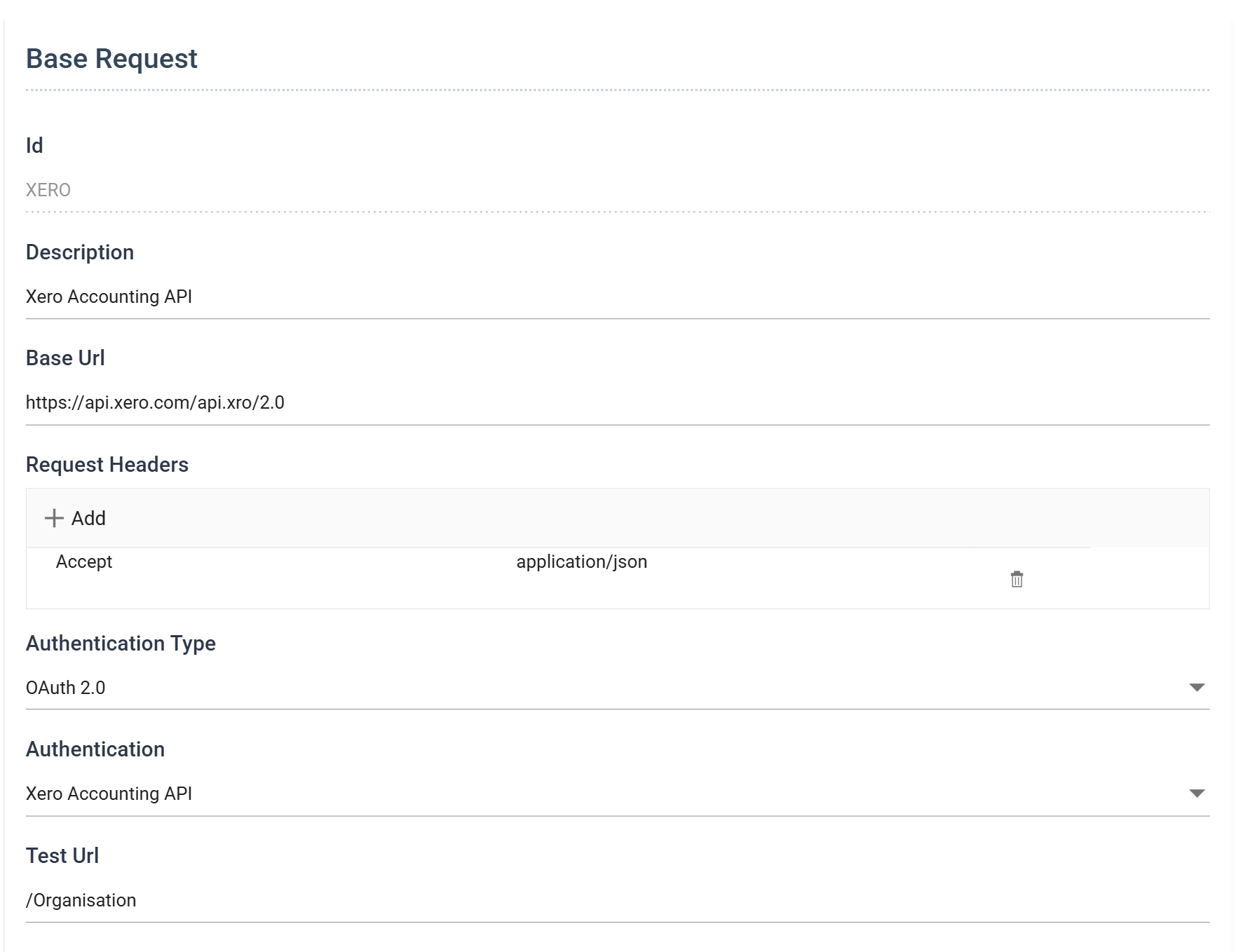
Xero
Xero's setup is the one every later article uses.
Base Url
Xero documents each endpoint with a full URL:
https://api.xero.com/api.xro/2.0/Invoices
Every Accounting API endpoint has the same shape, with only the last segment changing, so the Base Url is everything up to it:
leaving /Invoices, /Contacts, /Organisation for the transforms.
There is a temptation to include the resource — to make a "Xero Invoices" behaviour with /Invoices in the base. Resist it. The behaviour describes a service, not an endpoint, and the moment a lookup needs /Contacts you have a second behaviour to configure identically and keep in step.
The URL Xero gives you is not always the one to strip
Some vendors document a base URL with credentials embedded in it, or with a placeholder for your own site — https://{username}:{password}@{shop}.example.com/admin. Strip the credentials out: IMan supplies them through the authentication, and a URL that carries them will send them twice.
What stays is the part identifying the service and your instance of it. What goes is anything to do with who you are, and anything that changes per request.
Authentication
OAuth 2.0, and the XERO object built in Three-Legged OAuth 2.0.
The Xero-tenant-id header that every Xero call needs is not configured here. It lives on the OAuth object, in its Authenticated API Request Headers, because it identifies the organisation the consent was granted for. Set it here and it would still work; put it there and it stays correct when the same behaviour is pointed at a different Xero authentication for a different organisation.
Request Headers
One, and Xero will not work without it:
| Name | Value |
|---|---|
Accept |
application/json |
"By default all successful responses on the accounting API are returned as XML. JSON formatted responses are also supported by setting the 'Accept' value in the http header to 'application/json'."
A JSON Reader pointed at Xero without this header gets a valid response that it cannot read, and the error is about parsing rather than about content negotiation. It is the clearest example on this page of a header that belongs to the behaviour: nothing to do with credentials, true of every request, and fatal if you leave it out.
Request Throttling
"The concurrent limit is 5 API calls in progress at a time, the minute limit is 60 API calls per minute, and the daily limit is 5,000 API calls per day — each per organisation, per app. When you exceed a limit the API returns a 429 Too Many Requests response."
Three limits, and only one of them belongs on this screen:
- 5 concurrent — nothing to do. IMan reads one request at a time.
- 60 per minute — this is the one. Sixty a minute is 1 per second.
- 5,000 per day — cannot be enforced here; see the warning above. It decides how often you can schedule.
| Field | Value |
|---|---|
| Throttle Type | Leaky Bucket |
| Requests Per Second | 1 |
| Throttling Http Status Code | 429 |
Xero also returns the remaining allowance on every response, as X-MinLimit-Remaining, X-DayLimit-Remaining and X-AppMinLimit-Remaining. They are in the Trace tab, and they are the quickest way to find out whether a slow integration is being throttled or is simply slow.
Paging
"To utilise paging you must append a page query parameter to the URL e.g.
?page=1. In addition to paging, you can set the page size ... The default page size is 100, with a maximum of 1000 and a minimum of 1."
A page-number API, so the increment is one page and there is no increment parameter:
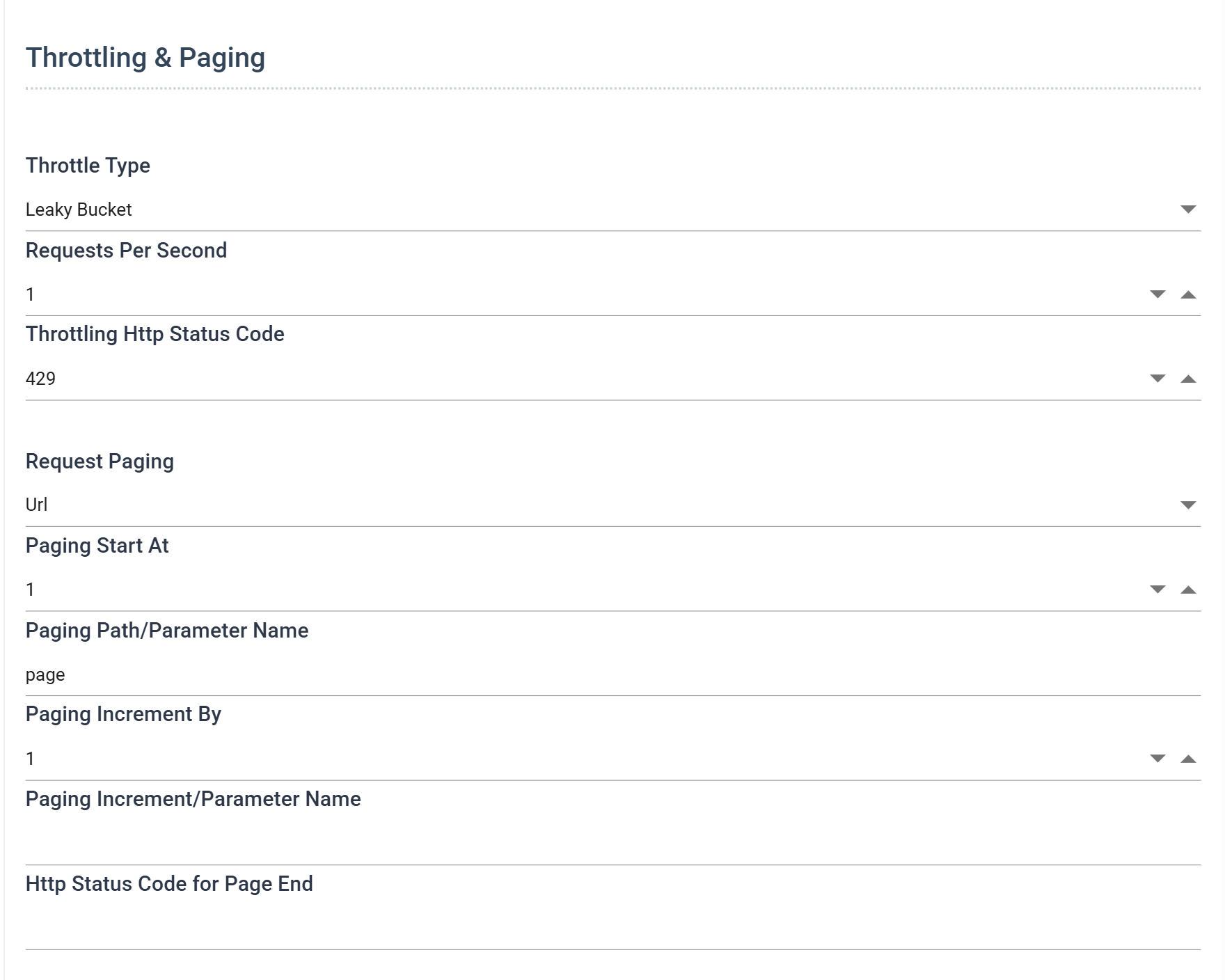
| Field | Value |
|---|---|
| Request Paging | Url |
| Paging Start At | 1 |
| Paging Path/Parameter Name | page |
| Paging Increment By | 1 |
| Paging Increment/Parameter Name | (empty) |
Leave the increment parameter empty even though Xero has a pageSize. If you filled it in, IMan would send pageSize=1, because the increment parameter carries the Increment By value and that value has to be 1 for the page number to advance correctly. To use a page size other than the default 100, put it in the reader's URL as an ordinary parameter — /Invoices?pageSize=250 — and the pager will add page=1, page=2 beside it.
Paging Xero is not optional in the way it looks. Its list endpoints return summarised records when you do not page and full ones when you do, so this setting changes what comes back and not merely how much of it. The reader article is built on that.
Error handling and tracing
Xero's errors are JSON, with the message under a top-level Message:
{
  "ErrorNumber": 16,
  "Type": "QueryParseException",
  "Message": "No property or field 'NotAField' exists in type 'Invoice'"
}
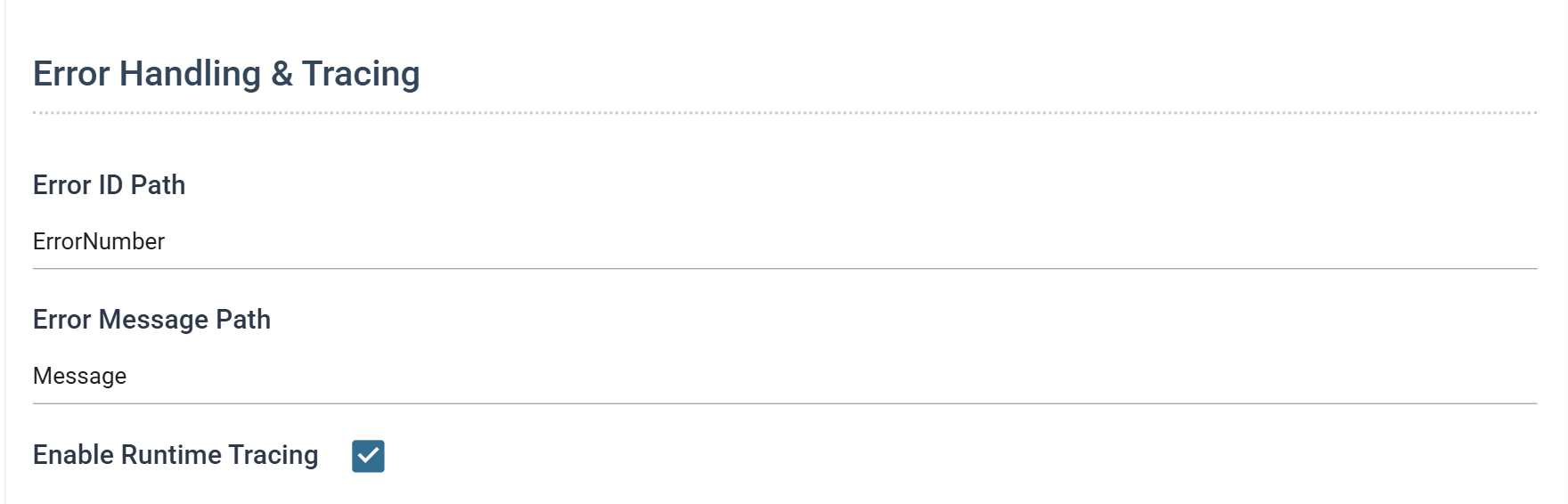
| Field | Value |
|---|---|
| Error ID Path | ErrorNumber |
| Error Message Path | Message |
Validation failures on a write are shaped differently — an array of ValidationErrors under each rejected element — and are covered in Writing to a Webservice.
Test
Test Url /Organisation. It is Xero's smallest authenticated GET, it needs only the accounting.settings.read scope, and it returns one record.
Mailchimp
Base Url
"The format for query string parameters is the full resource URL followed by a question mark and optional parameters:
https://usX.api.mailchimp.com/3.0/campaigns?count=10&offset=10"
The usX is a data centre and it is not the same for everyone — it is the suffix of your own API key, the characters after the last hyphen. A key ending -us2 means:
Getting this wrong produces a 401, which looks exactly like a bad key and sends you to check the credential instead of the address.
Authentication
Basic Authentication, and the MAILCHIMP object from the Basic Authentication article.
Request Throttling
"The Marketing API has a limit of 10 simultaneous connections. You'll receive a 429 error if you reach the limit."
Read that carefully, because it is the interesting case on this page: it is a limit on simultaneous connections, not on requests per second. IMan makes one request at a time and waits for the reply, so it cannot reach ten of anything simultaneously.
Throttle Type: None. Not because Mailchimp has no limit, but because the limit it has is one this client cannot breach. A leaky bucket here would slow every integration down in exchange for nothing.
Paging
"We use
offsetandcountin the URL query string to paginate ... The maximum value forcountis 1000; the default value is 10. If not included,offsetdefaults to 0."
An offset API. offset is a record number, not a page number, so to advance one page it must go up by the page size — and the page size is count. The increment parameter sends exactly that.
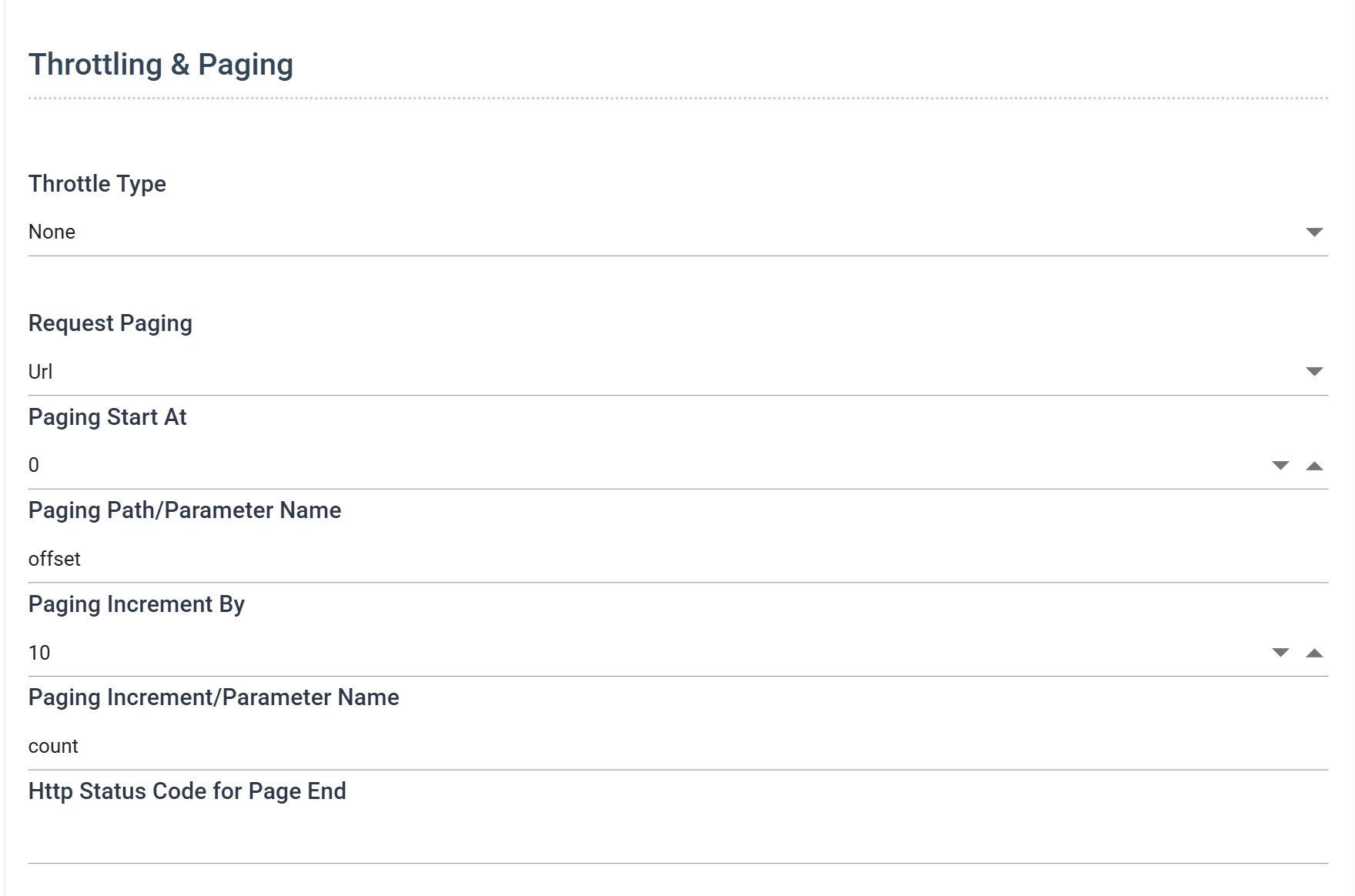
| Field | Value |
|---|---|
| Request Paging | Url |
| Paging Start At | 0 |
| Paging Path/Parameter Name | offset |
| Paging Increment By | 10 |
| Paging Increment/Parameter Name | count |
Producing ?offset=0&count=10, then ?offset=10&count=10, then ?offset=20&count=10.
Raise Increment By to raise the page size — they are the same number, and 250 gives you ?offset=250&count=250 on the second request. Fewer, larger requests are almost always better against a service that limits connections rather than rate.
Error handling
Mailchimp returns RFC 7807 problem documents — type, title, status, detail, instance. The message is detail:
| Field | Value |
|---|---|
| Error Message Path | detail |
Test
Test Url /ping, Mailchimp's health check. It answers a GET with a two-field body and needs no permissions beyond a valid key.
JIRA / Atlassian
Atlassian's documentation is written for developers building applications, so a good deal of it is about a way of connecting — Forge apps, Connect apps, OAuth — that has nothing to do with an integration using an API token. Read past it.
Base Url
Your own site, with no path:
Not /rest/api/3. Jira has several APIs under one host and the version is part of the endpoint rather than part of the site, so a reader's URL is /rest/api/3/search/jql and a lookup's might be /rest/api/2/issue/…. Push the version into the Base Url and you have a behaviour that cannot reach half the product.
This is the same judgement as Xero's, landing in a different place. The same rule decides it both times: put in the Base Url only what is identical for every request you will ever make through this behaviour.
Authentication
Basic Authentication, and the JIRA object from the Basic Authentication article — the account email address as the user, an API token as the password.
Request Throttling
Jira did not rate-limit at all until recently. It does now.
"Enforcement of the new points-based API rate limits and tiered quota rate limits for Jira and Confluence Cloud apps will begin on March 2, 2026 ... API token-based traffic is not affected by this change, and will continue to be governed by existing burst rate limits."
"When any limit is exceeded, Jira returns an HTTP 429 Too Many Requests response ... The values below show the default steady state requests per second (RPS) limits ... GET 100, POST 100, PUT 50, DELETE 50."
Two sentences do the work. The first says the new points-based quota does not apply to us — an API token is not an app — so the numbers to design against are the burst limits. The second gives them.
100 requests per second is far above anything an integration reading synchronously will produce, so the bucket will essentially never engage. Configure it anyway: it costs nothing while nothing is wrong, and it is the difference between a run that slows down and a run that fails when something else on the site is also busy.
| Field | Value |
|---|---|
| Throttle Type | Leaky Bucket |
| Requests Per Second | 10 |
| Throttling Http Status Code | 429 |
10 rather than 100 deliberately. Requests Per Second is the rate IMan falls back to after being refused, so it should be comfortably under the limit, not at it — going straight back to the rate that just failed is how a run oscillates between throttled and refused.
Paging
"When you make a request to a paginated resource, the response wraps the returned array of values in a JSON object with paging metadata ...
startAtis the index of the first item returned in the page.maxResultsis the maximum number of items that a page can return."
Offset paging, exactly as Mailchimp, with the names changed:
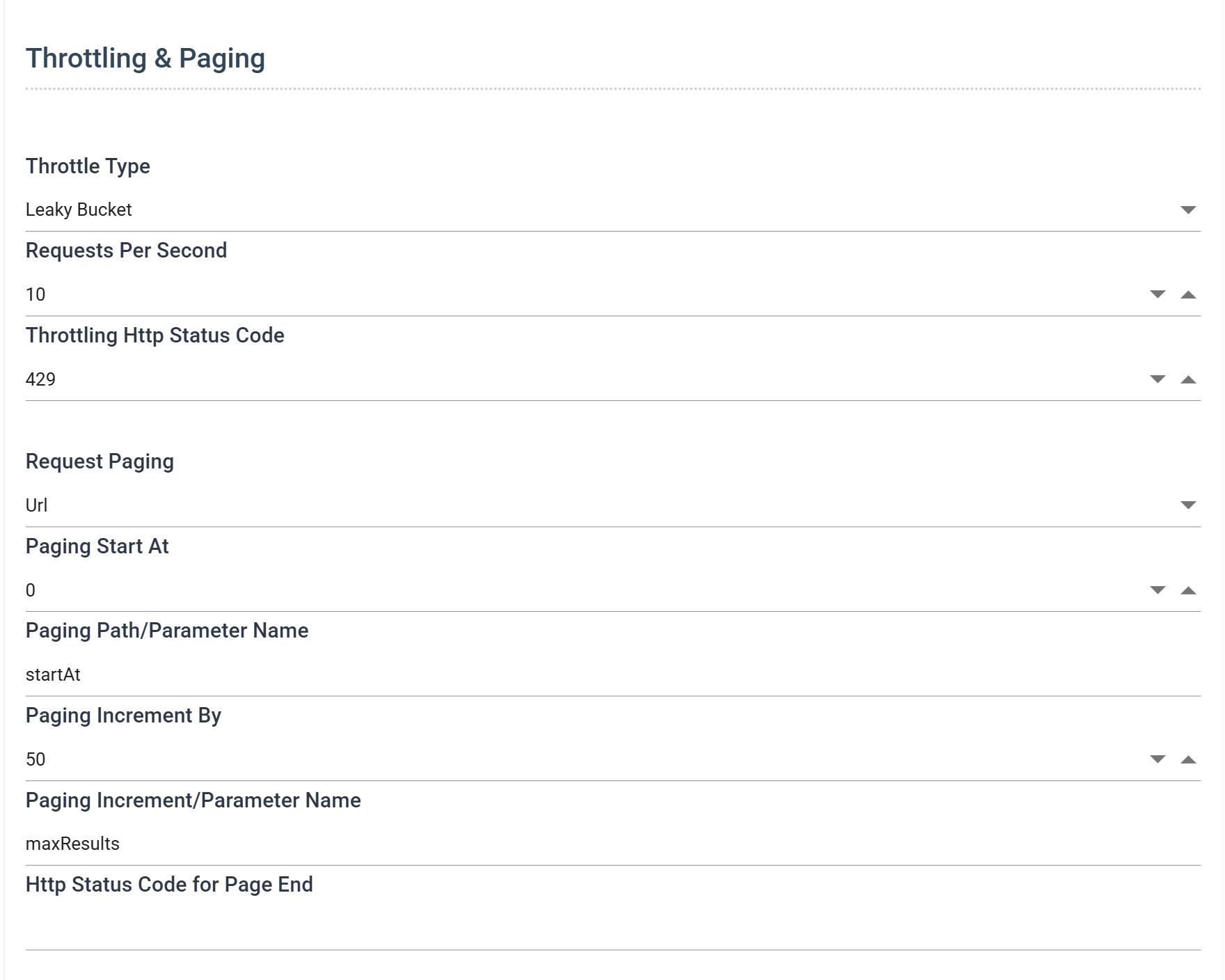
| Field | Value |
|---|---|
| Request Paging | Url |
| Paging Start At | 0 |
| Paging Path/Parameter Name | startAt |
| Paging Increment By | 50 |
| Paging Increment/Parameter Name | maxResults |
Set the same two boxes as Mailchimp with different words in them and you have understood the four fields.
Issue search does not use this any more
Jira's issue search moved off startAt and maxResults to a cursor: /rest/api/3/search/jql returns a nextPageToken, which you send back on the next request.
IMan cannot page that. The URL pager increments a number and a token is not a number; the JSON Response pager follows a URL out of the response body and a token is not a URL. Until IMan grows a cursor pager, read Jira issues in one request — maxResults up to the endpoint's ceiling — or narrow the JQL so that one request is enough.
Everything else in Jira Cloud still pages the documented way, so the behaviour above is correct for the rest of the API.
Error handling
Jira returns errors as {"errorMessages": [...], "errors": {...}}, so the readable part is an array:
| Field | Value |
|---|---|
| Error Message Path | errorMessages |
A path pointing at an array is fine. IMan formats every entry it finds, so a request that failed for more than one reason reports all of them.
Test
Test Url /rest/api/3/myself. It returns the authenticated account, so it confirms not only that the credentials work but whose they are — and on a shared site that is the question you actually have.
When the Test fails
The behaviour's Test exercises more than the authentication's did, so the same message can now mean several things. In order of likelihood:
401or403on an authentication that tested green on its own screen. The Base Url. The credential is fine and it is being sent to the wrong place, or to a data centre it does not belong to.404on a URL that looks right. Read the materialisation pane. Base Url and Test Url are concatenated, and a trailing slash on one with a leading slash on the other gives//, which some services accept and others do not.- A parse error rather than a status code. A content negotiation problem. The service answered in a format IMan did not expect — for Xero, the missing
Acceptheader. 429immediately. Something else is already consuming the quota against the same account. Xero'sX-DayLimit-Remainingin the trace will say so.- The Test passes and a real read returns nothing. Not an authentication problem at all. The paging parameter is wrong and the first request is landing past the end of the data — the case the Paging note describes.
Once the Test passes, the behaviour is ready to be used by a reader. That is Reading Data from a Webservice.
Verified against IMan 6.1, and against the Xero Accounting, Mailchimp Marketing and Jira Cloud APIs, on 2 September 2026.