Order Download
The BigCommerce Connector allows you to download orders from your BigCommerce site. Once you have System Connector setup as in the previous section, you can add a BigCommerce Reader to your job.
The Order Download has several options so you can refine the orders that are read from your site.
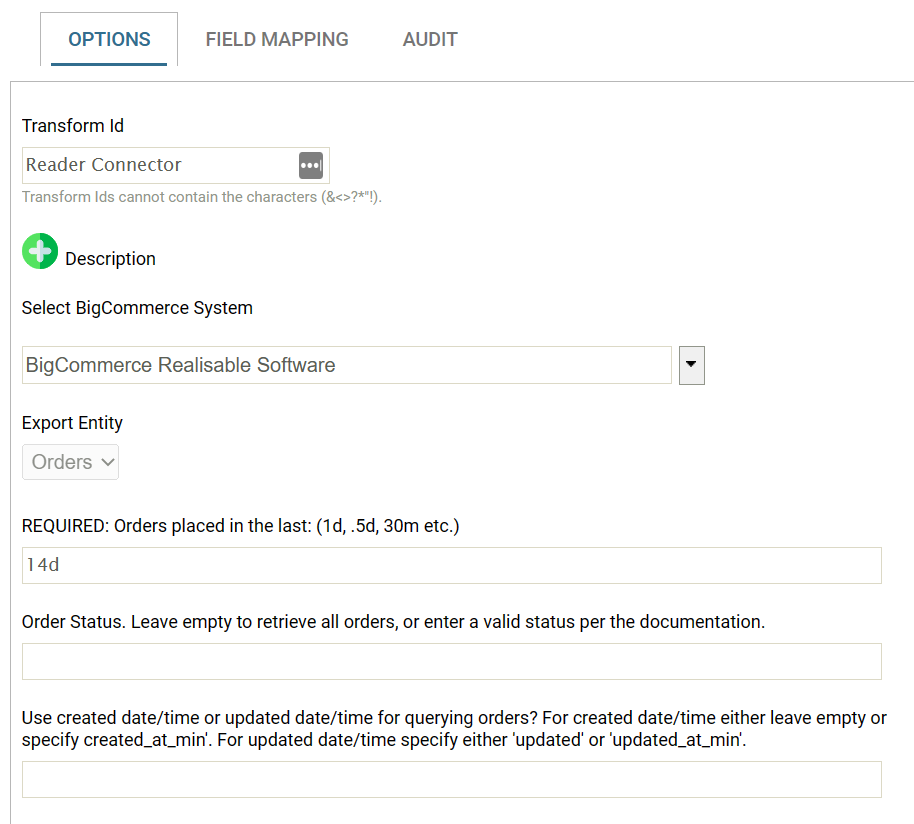
Parameters
| Parameter | Description |
|---|---|
| Orders placed in the Last: | This will limit the order downloads to any order created in the time span. You can specify a timespan by supplying a number (or a fraction) of a time unit. Valid time units are: w = week d = day m = minute Examples: 1w = 1 week 2d = 2 days 0.5d = half a day 30m = 30 minutes |
| Order Status: | The order status to obtain. To obtain all orders leave empty. The valid statuses are:Incomplete, Pending, Shipped, Partially Shipped, Refunded, Cancelled, Declined, Awaiting Payment, Awaiting Pickup, Awaiting Shipment, Completed, Awaiting Fulfillment, Manual Verification Required, Disputed, Partially Refunded |
| Order Created/Updated | By default orders will be query using their created data. To use the updated date enter either min_date_modified or update. |
Available Fields
All fields as part of the standard BigCommerce REST Order endpoint are available as fields on the connector.
See Get an order.
Shipping Addresses
The first three shipping addresses associated with an order are listed on the header as ShipAddx_<field> where x is the first, second shipping address, and <field> are the relevant fields (id, name, street, email, handling, etc) of the shipping address.
Payments
The first three shipping payments associated with an order are listed on the header as Paymentx_<field> where x is the first, second payment, and <field> are the relevant fields (method, amount, current, status, etc) of the payment.
Header Taxes
The first three taxes/tax lines attached to on an order are listed on the header as tax_line_x_<field> where x is the first, second tax, and <field> are the relevant fields (rate, name, class) of the tax.
Line Discounts
The first three discounts application to an order line are listed on the line as Discountx_<field> where x is the first, second discount, and <field> are the relevant fields (name, amount, code) of the discount.
Options
The first five options to an order line are listed on the line as Optionx_<field> where x is the first, second option, and <field> are the relevant fields (name, value) of the option.