Database Requirements
Software
- Supported Versions
- 2016, 2017, 2019, 2022 and 2025.
- SQL Express and every edition above it.
- Unsupported
- Compact or localDb variants.
- Any version earlier than SQL Server 2016.
Database Setup
Security
- Authentication
- SQL User or Integrated Security.
- The user must have full rights to the database.
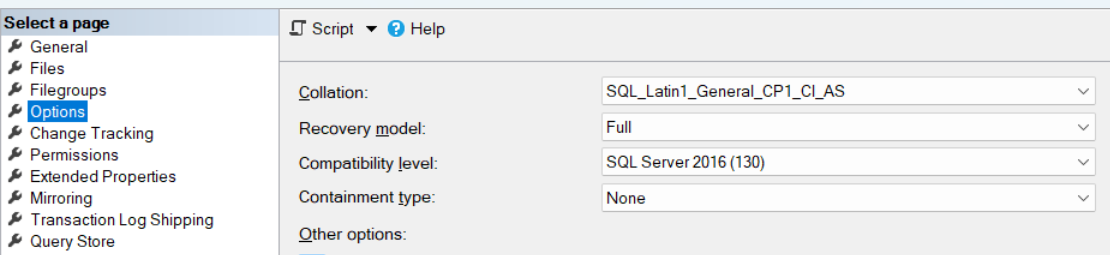
Recovery Model
- Simple or full.
Growth Strategy
- To prevent fragmentation, set the initial file and log sizes to 100MB, with 50% growth.
Collation
- Set the collation to the correct option for your environment before you set up the database.
Binary collation is not supported
Binary collation is not supported.
Compatibility Level
- The latest for the respective SQL version.
- For SQL Server 2016, the earliest supported version, this is SQL Server 2016 (130).
Database Sizing
How much space the database needs depends on the deployment and on how the integrations are set up. Expect it to grow faster where auditing is heavy, or where integrations can raise many warnings or errors. ERP integrations grow it faster too, particularly inventory-based transactional integrations (sales orders, purchase orders, shipping and receiving).
Size
Exact sizing is hard to predict. Use this table as a guide to a year’s growth in the database:
| Usage | Integrations & Frequency | |
|---|---|---|
| Low | One integration extracting master data from a database source to a file or FTP location. Two integrations with an ERP system, running daily. | 300 ~ 600 |
| Medium | Three to ten integrations extracting master data from a database source to a file or FTP location daily. Three to five integrations with an ERP system. Two integrations with an ERP system, running weekly. | 600 ~ 1400 |
| Heavy | Three to ten integrations extracting master data from a database source to a file or FTP location daily or more often. Five or more integrations with an ERP system, running daily or more often. Two or more integrations with an ERP system, running weekly. | 1400+ |