Web Orders into Intacct
This scenario takes paid orders from a Shopify store into Sage Intacct. For each order, the integration:
- skips the order if Intacct already has it;
- creates the customer, or updates one that exists, with a ship-to contact;
- writes a sales order;
- records the payment against the customer;
- marks the order in Shopify.
The same shape fits any web store IMan reads. Only the first reader and the last writer change.
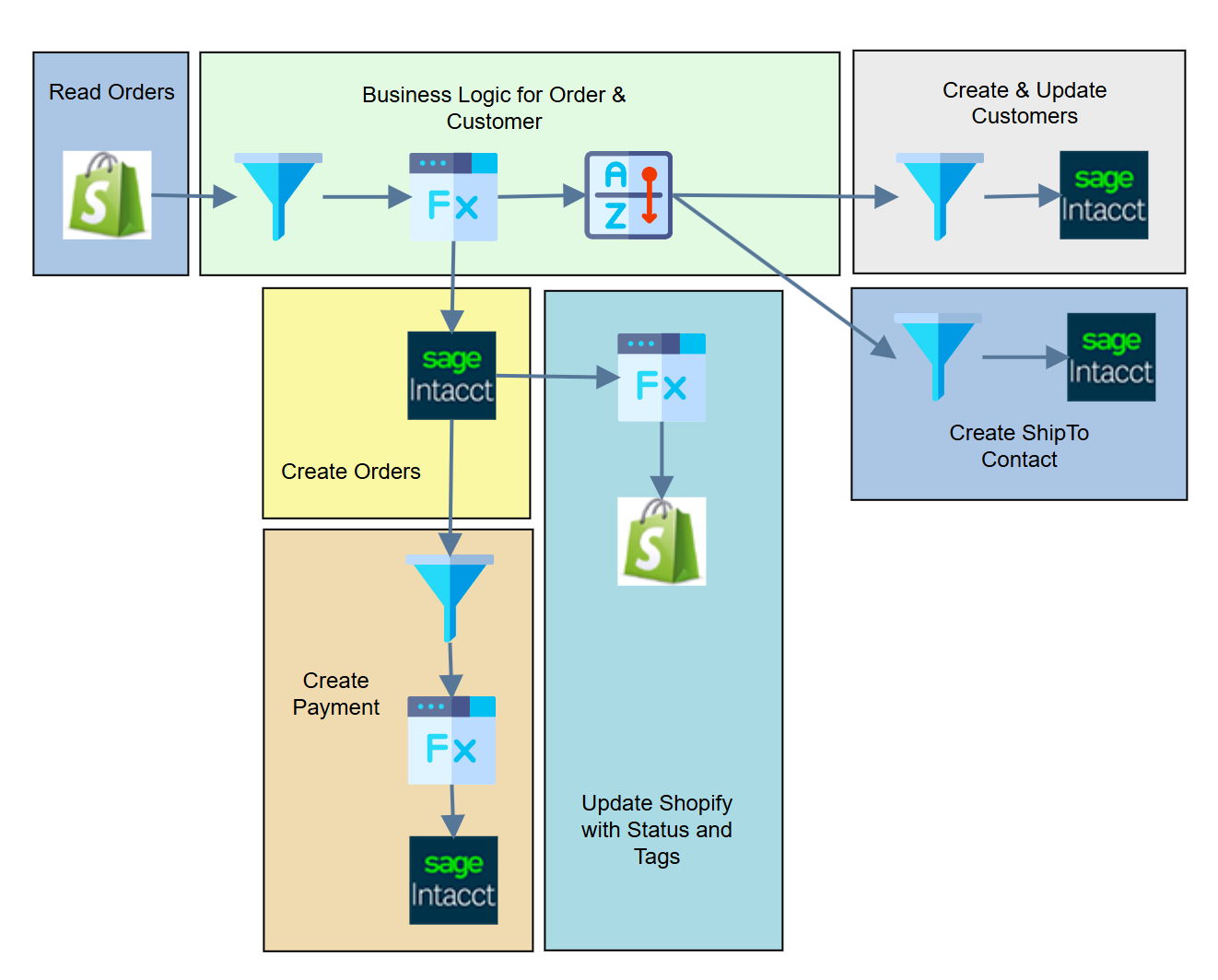
Read the Orders
A Shopify reader on the Orders pull reads the orders since its last run. See Orders in the Shopify Connector Guide.
Skip Orders Intacct Already Has
A run that reads an order twice must not post it twice. The first Filter asks Intacct whether a sales order already carries the Shopify order's ID in its PONUMBER, and keeps only the orders with none:
Dim Result
Dim Filter

Filter = "PONUMBER = " & %id

Result = IntacctLookup("INTACCT", "SODOCUMENT[Sales Order-Inventory]", "PONUMBER", Filter, False)

Result = ""
The writer's duplicate protection covers a lost answer inside one run. This Filter covers the next run. See Intacct Lookups for the function.
Prepare the Order and the Customer
A Map shapes each Shopify order for the writers that follow, such as turning the Shopify customer into an Intacct customer ID. A Sort then passes the orders on to the customer writers.
Create and Update Customers
Two Filters each pass the orders on to an Intacct writer:
- a writer on CUSTOMER creates the customer, or updates one that exists. Use Insert/Update, with
CUSTOMERIDmapped. See Customer. - a second writer creates the order's ship-to contact. The CONTACT import creates a contact and adds it to the customer's contact list. See Contact.
Write the Sales Order
A writer on SODOCUMENT[Sales Order-Inventory] creates the sales order, with Update Operation at Insert. It maps the Shopify order ID into PONUMBER, the field the first Filter checks. IMan writes the new order's record number back for the transforms after it. See Order Entry Transactions.
Record the Payment
A Filter picks the orders with a payment. A Map shapes the payment, and a writer on AR ADVANCE records it as an advance against the customer: a payment received before Intacct invoices the order. See AR Advance. To apply a payment to an invoice from IMan, see AR Payment Apply.
Tell Shopify
A Map and a Shopify writer on Orders, with Update, write a status and tags back to each Shopify order. Staff working in Shopify can then see which orders have reached Intacct.
Running It
Schedule the integration to run as often as orders arrive. For a large backlog, such as the first run after go-live, turn on bulk processing on the Intacct System Connector.