Order Entry Transactions
The Order Entry imports create Sage Intacct sales transactions and update existing ones: quotes, orders, shippers, invoices, credit memos and any other definition your company has set up. They can also convert one transaction into another, such as an invoice from a shipper.
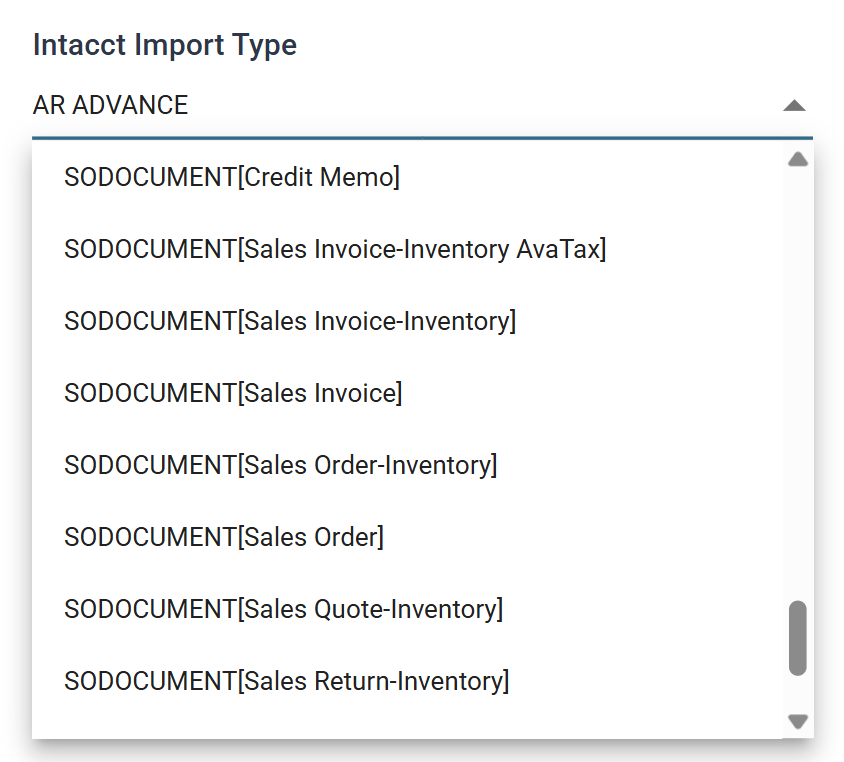
On an Intacct writer, select SODOCUMENT[definition] as the Intacct Import Type. The list holds one entry for each Order Entry transaction definition in the company, read from Intacct when you select the System Connector. On MPP-DEV, for example, it offers SODOCUMENT[Sales Order], SODOCUMENT[Sales Order-Inventory], SODOCUMENT[Shipper-Inventory], SODOCUMENT[Sales Invoice] and SODOCUMENT[Credit Memo]. The definition decides the transaction's numbering, its workflow and the subtotals the import offers.
Creating and Updating
The import offers all three Update Operations:
| Update Operation | Result |
|---|---|
| Insert | Creates a transaction for every record |
| Update | Updates the transaction the record names. IMan writes nothing for a record whose transaction it cannot find |
| Insert/Update | Updates the transaction the record names, or creates one when IMan cannot find it |
To find a record's transaction, IMan takes the first of RECORDNO and documentno that holds a value. It then asks Intacct for a transaction with that document number, in the record's transaction definition. A value that starts with the definition's name and a dash, such as the Sales Order-SO0042 that IMan writes back into RECORDNO, loses the prefix first: IMan looks for document number SO0042.
The record's transaction definition is the one in transactiontype. Leave transactiontype empty to use the definition in the Intacct Import Type.
An update sends only the fields Intacct's update function accepts. It never changes the customer or the document number, and Intacct refuses to update a transaction that is In Progress, Converted or Partially Converted.
Updating Lines
line_num on a line decides what the update does with it:
line_numset: IMan updates the existing line with that number. Intacct's update counts lines from 1. Intacct's reads count them from 0. Add 1 to aLINE_NOyou read with an Intacct Lookup.line_numempty: IMan adds the line to the transaction. Intacct puts a new line at the bottom.
Creating One Transaction from Another
To convert a transaction, such as a shipper into an invoice, create the new transaction with createdfrom set to the source transaction's document ID: the definition name, a dash and the document number, such as Sales Order-SO0042. That is the value IMan writes back into RECORDNO when it creates or updates the source transaction.
On each line, set sourcelinekey to the RECORDNO of the line it converts. Read it from SODOCUMENTENTRY with an Intacct Lookup.
Fields
The header carries the transaction's fields, and sotransitems holds its lines. Each line can hold itemdetails for tracked stock.
| Field | Rule |
|---|---|
transactiontype |
The transaction definition. Empty uses the one in the Intacct Import Type |
RECORDNO |
Finds the transaction to update. IMan writes the document ID back into it after each create or update |
documentno |
The document number. Empty on a create lets the definition number the transaction, if it numbers automatically. Finds the transaction to update when RECORDNO is empty |
customerid |
The customer. Required on a create |
datecreated |
The transaction date. Required on a create |
createdfrom |
The document ID of the transaction this one converts. See Creating One Transaction from Another |
referenceno, customerponumber, message |
The reference, the customer's PO number and the transaction's message |
SYS.SYSCONNECTID |
Sends the record to another entity. See Dynamically Targeting Location/Entity |
The sotransitems line fields:
| Field | Rule |
|---|---|
line_num |
The number of an existing line to update. Empty adds a line. See Updating Lines |
itemid |
The item. Required |
quantity, unit, price |
The quantity, unit of measure and price |
warehouseid |
The warehouse, for an inventory item |
locationid, departmentid and the other dimension fields |
The line's dimensions |
sourcelinekey |
The RECORDNO of the source line this line converts |
linesubtotals_trx_tax, linesubtotals_overridedetailid |
The line's tax amount and the tax detail it overrides |
Custom fields on the header and the lines appear in the field list too. See Custom Fields.
Item Details
itemdetails is a child record of the line. Each row allocates part of the line's quantity to a serial number, a lot or a bin, for an inventory or stockable kit item that Intacct tracks:
| Field | Rule |
|---|---|
quantity |
How much of the line this row covers |
serialno, lotno |
The serial number or lot number |
aisle, row, bin |
Where the stock sits |
itemexpiration |
The expiry date |
A line of five serialised items needs five itemdetails rows, one for each serial number.
Subtotals
The definition's subtotals, such as a discount or a shipping charge, appear as header fields named after the subtotal. For a subtotal named Discount:
| Field | Rule |
|---|---|
Discount_total |
The subtotal's amount |
Discount_absval |
The amount the subtotal applies, when the definition sets it as an amount |
Discount_percentval |
The percentage the subtotal applies, when the definition sets it as a percentage |
Discount_locationid, Discount_departmentid and the other dimension fields |
The subtotal's dimensions |
IMan sends each subtotal under its name, after the lines.
Writeback
After each create or update, IMan writes the transaction's document ID, such as Sales Order-SO0042, into RECORDNO. Use it to update the transaction later, or as the createdfrom of the transaction that converts it. See Writeback.
Errors
When the read that looks for an existing transaction fails, the record fails with:
The rest of the message is Intacct's.
Intacct Reference
Create Order Entry Transaction (Legacy) and Update Order Entry Transaction (Legacy) in Intacct's API reference.