Writing XML Documents
The XML Writer builds its document from XPath expressions: an Initial XPath, a Transaction Type XPath per transaction, and an XPath and Attribute per field. The recipes below are the four things that expression syntax is asked to do that are not obvious from the field grid.
The integration
All four are photographed against DOCSWRITE, whose CSV Reader reads three
orders out of orders-ordered.csv as Order, OrderLine and Charge, and
whose Xml Writer targets a file:
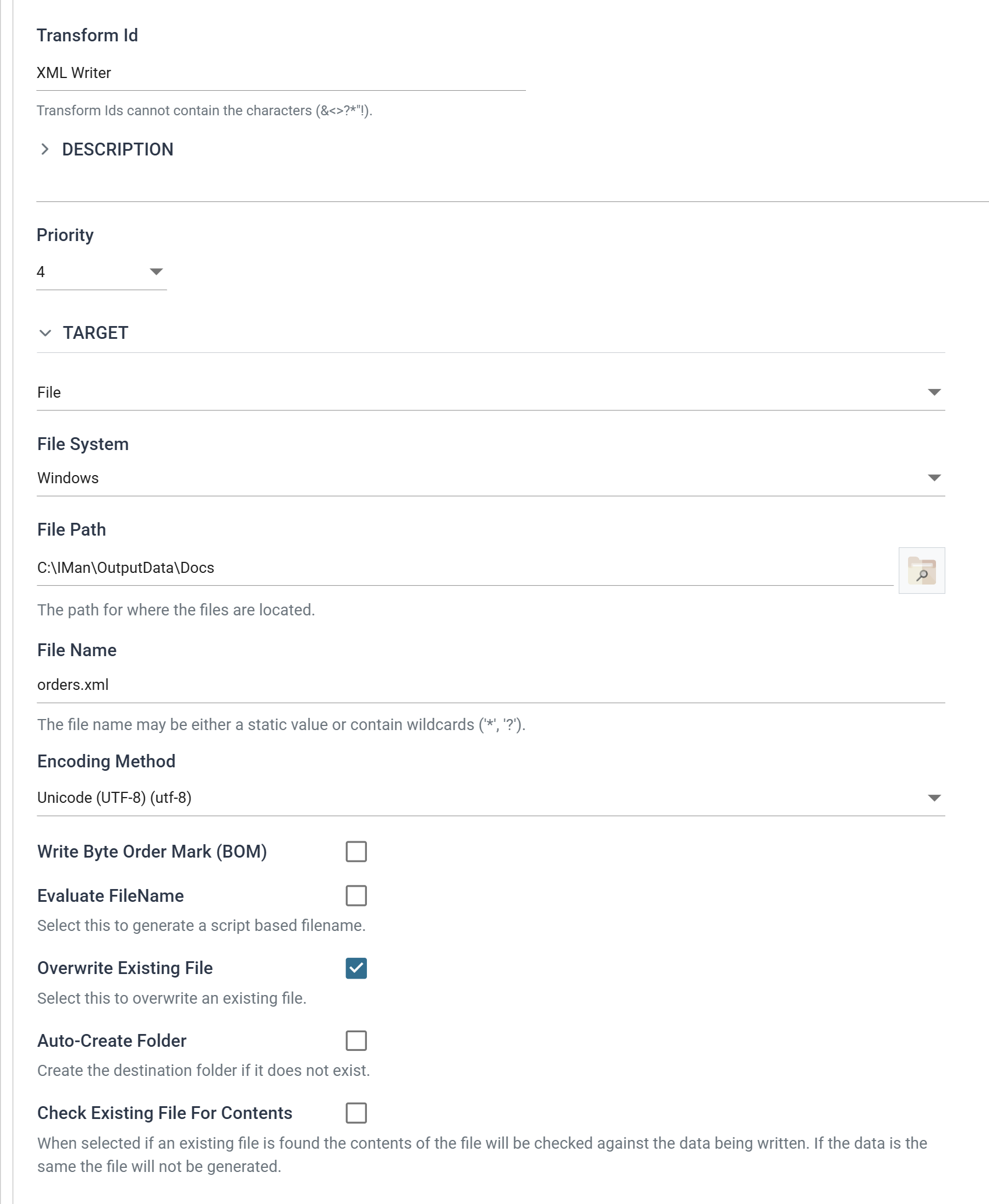
| Field | Value | |
|---|---|---|
| Target | File | Or http(s) Url — see the Webservices cookbook |
| File System | Windows | |
| File Path | C:\IMan\OutputData\Docs |
|
| File Name | orders.xml |
|
| Encoding Method | Unicode (UTF-8) | |
| Overwrite Existing File | ✔ | Otherwise each run writes a new, uniquely named file |
The document it produces, trimmed to one order:
<?xml version="1.0" encoding="utf-8"?>
<Orders>
  <Order id="FBRN-309242">
    <Reference type="Web" currency="USD" />
    <Party Type="Contact">
      <Title>Mr</Title>
      <FirstName>Ronald</FirstName>
      <LastName>English</LastName>
      <Email>[email protected]</Email>
    </Party>
    <Party Type="SoldTo">
      <Name>Imperial Soap Inc</Name>
      <City>Fairbanks</City>
      <Country>USA</Country>
      <PostalCode>79160</PostalCode>
    </Party>
    <OrderDate>2016-03-11</OrderDate>
    <SalesTotal>282.00</SalesTotal>
    <Lines>
      <Line no="1">
        <Qty>5</Qty>
        <SkuCode>A1-103/0</SkuCode>
        <Description>Big Desklamp</Description>
        <UnitPrice>20.00</UnitPrice>
      </Line>
      <Line no="2">
        <Qty>30</Qty>
        <SkuCode>A1-401/0</SkuCode>
        <Description>Big Style Notepad</Description>
        <UnitPrice>5.10</UnitPrice>
      </Line>
    </Lines>
    <Charges>
      <Charge type="Delivery">
        <Amount>29.00</Amount>
      </Charge>
    </Charges>
  </Order>
</Orders>
Which XPath names the repeating node
This is the first thing to get right and the writer gives no hint about it. A child transaction's Transaction Type XPath names the container, and the repeating node is the first step of every field's XPath.
That is the opposite of the Xml Reader, where the entry point names the repeating element itself.
The root transaction
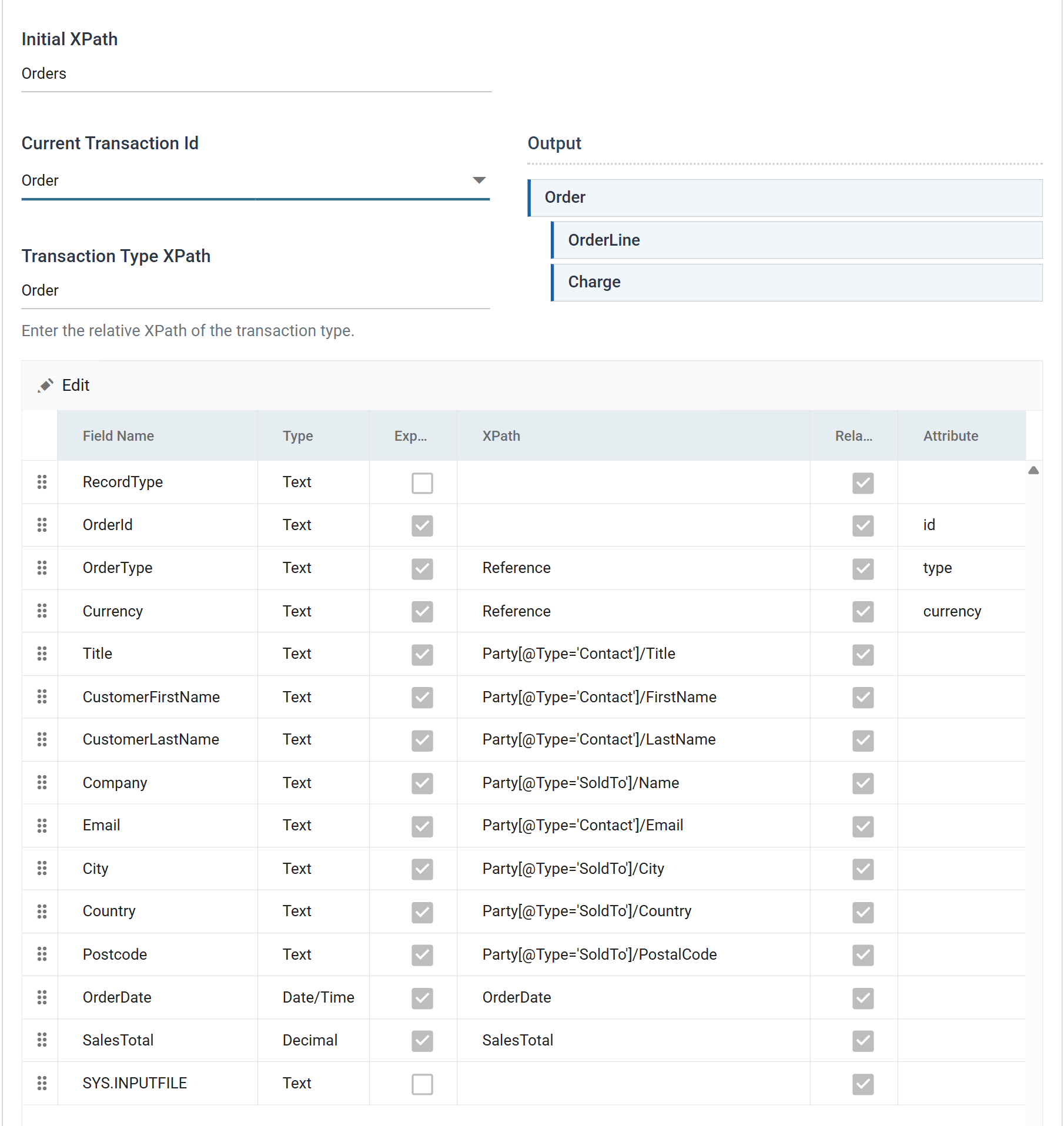
| Control | Value | |
|---|---|---|
| Initial XPath | Orders |
The outermost element; everything is built beneath it |
| Current Transaction Id | Order |
Which transaction the grid below is showing |
| Transaction Type XPath | Order |
Relative to the Initial XPath |
The root behaves the way you would expect: Order is created once per record,
so three orders produce three <Order> elements inside one <Orders>.
The child transactions
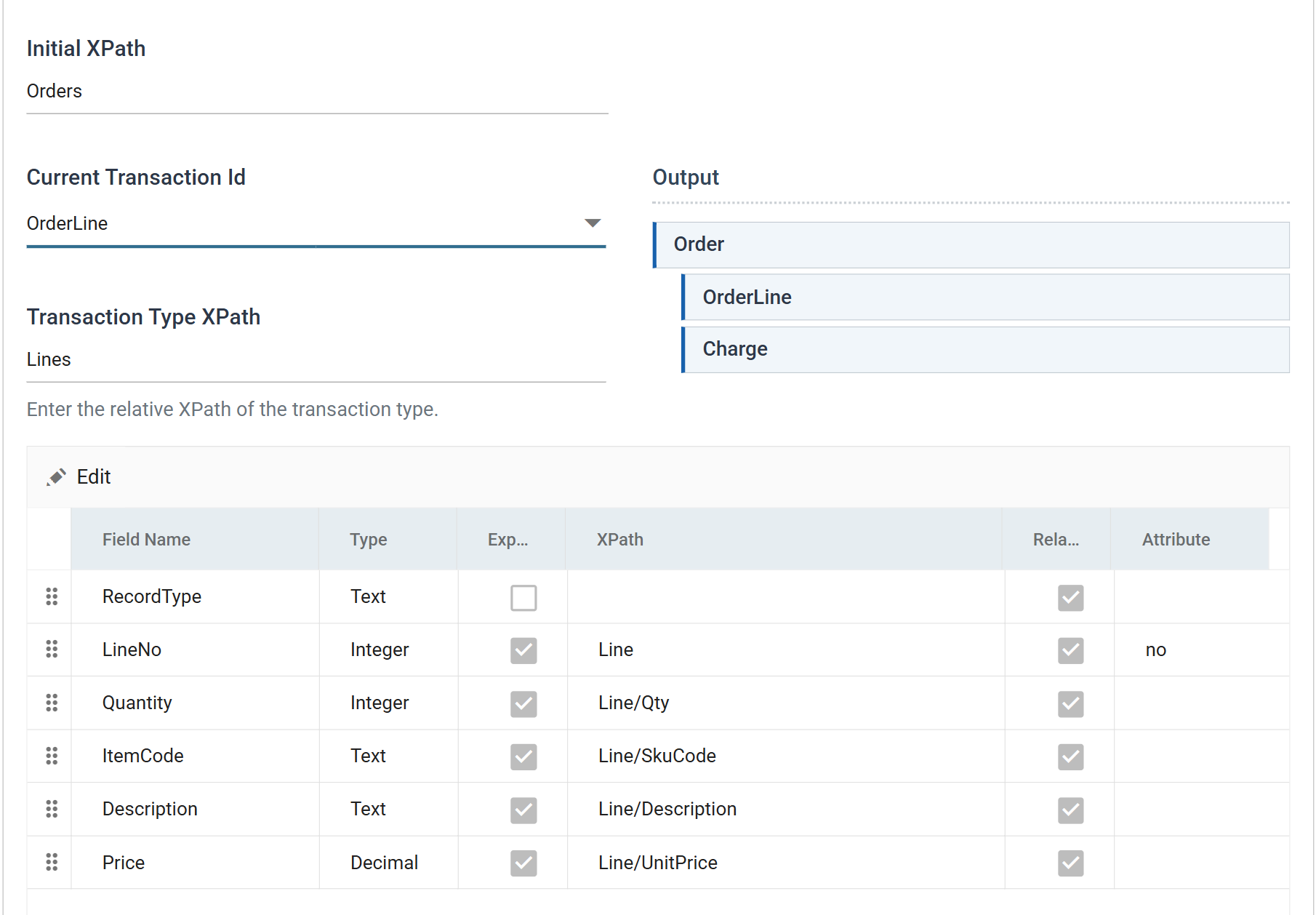
OrderLine's Transaction Type XPath is Lines, not Lines/Line — and
every field beneath it starts Line/:
| Field | XPath | Attribute |
|---|---|---|
LineNo |
Line |
no |
Quantity |
Line/Qty |
|
ItemCode |
Line/SkuCode |
|
Description |
Line/Description |
|
Price |
Line/UnitPrice |
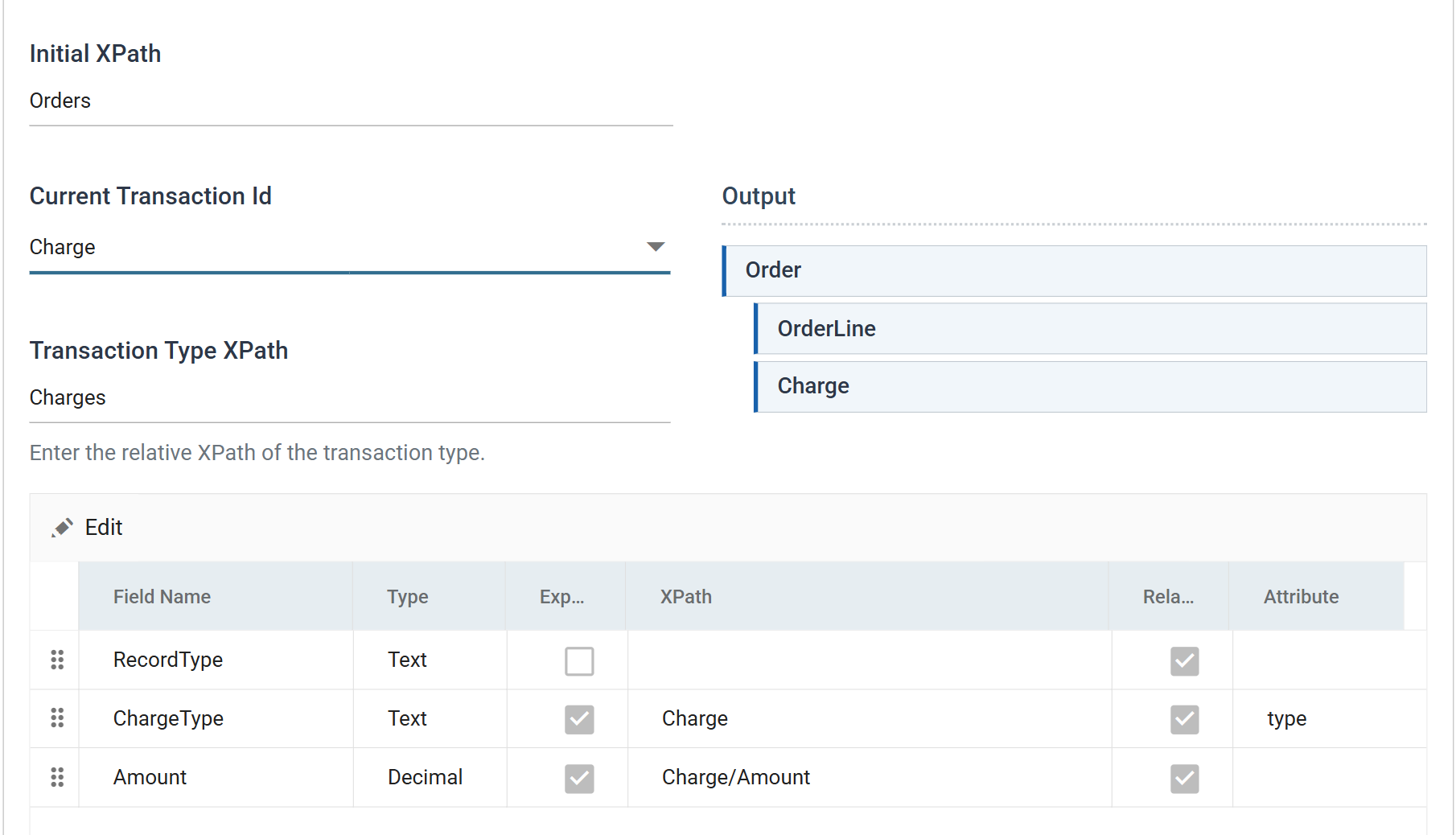
Charge is built the same way — Charges on the transaction, Charge/ on the
fields:
Lines/Line on the transaction merges every line into one node
Give the transaction the full path and the writer creates Lines/Line
once, then writes every record's fields into that same <Line>. Two
order lines come out as:
<Lines>
  <Line no="2">
    <Qty>5</Qty><SkuCode>A1-103/0</SkuCode>
    <Qty>30</Qty><SkuCode>A1-401/0</SkuCode>
  </Line>
</Lines>
One node, both lines' values in it, and the no attribute holding whichever
record was written last. Nothing errors and the preview grid is correct, so
the only way to notice is to read the file.
The mechanism explains it: the writer creates the transaction's skeleton once per parent record and positions itself inside it. Whatever repeats has to come from the field paths, which are rebuilt for every record.
The root is the exception
The root transaction re-creates its own node per record, so
Order — a single step naming the repeating element — is right there and
wrong on a child. It is asymmetric, and it is the reason a mapping that
looks consistent across all three transactions is wrong on two of them.
Writing attributes
A value is written as an attribute rather than as element content by naming the attribute in the field's Attribute box. The XPath still says which node it goes on.
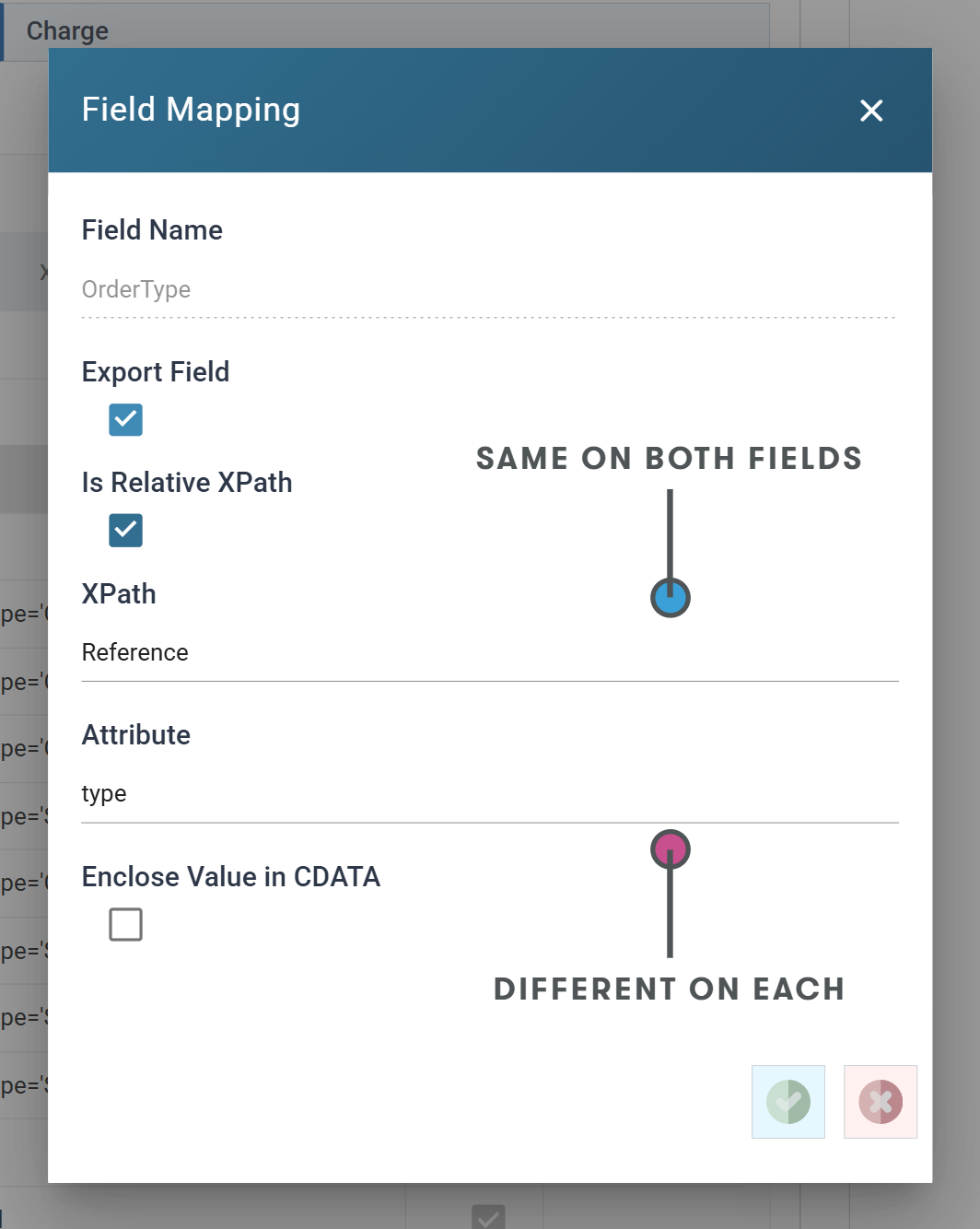
Two fields carrying the same XPath and different Attributes produce one node
with two attributes. OrderType and Currency both have the XPath
Reference; their Attribute boxes hold type and currency:
| Field | XPath | Attribute | |
|---|---|---|---|
OrderType |
Reference |
type |
|
Currency |
Reference |
currency |
The node is created once and each field adds its own attribute to it. In a real
document the XPath is usually several steps — Header/Reference — and the same
rule applies at whatever depth it names.
An empty XPath puts the attribute on the transaction's own node
OrderId has no XPath at all and an Attribute of id, and together they
produce <Order id="FBRN-309242">. The same is true of LineNo (XPath
Line, Attribute no) — there the XPath names the repeating node, so the
attribute lands on it rather than on a child.
An empty XPath and an empty Attribute is not valid: the field has nowhere to go, and the transform reports it rather than writing nothing.
Attribute paths
An XPath step may carry an attribute subexpression:
This writes separate nodes of the same name, distinguished by an attribute, out of a single record — without the several transforms it would otherwise take to hierarchise the data first.
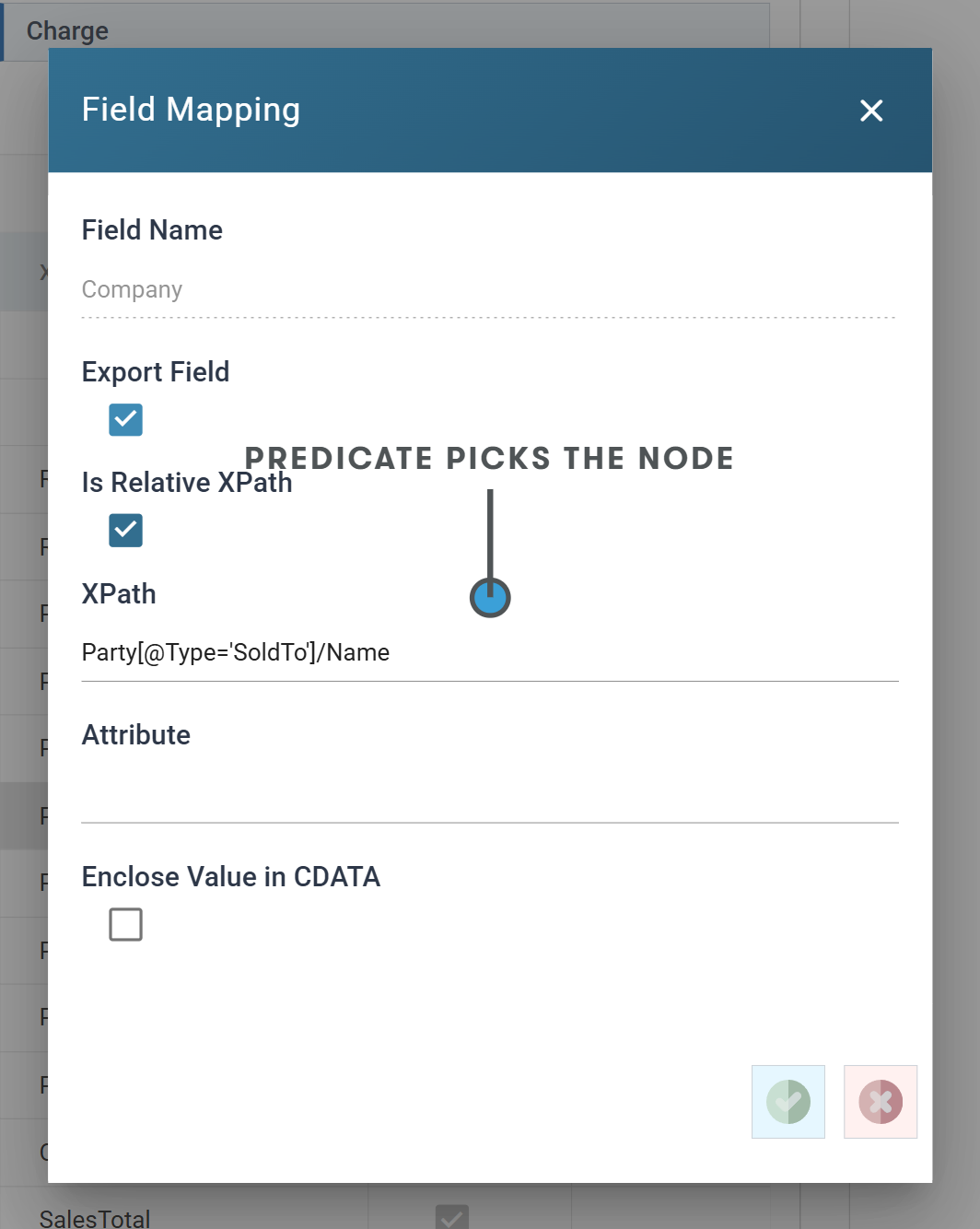
The order's own address and its contact are both on one record, and both come
out as Party nodes:
| Field | XPath |
|---|---|
Company |
Party[@Type='SoldTo']/Name |
City |
Party[@Type='SoldTo']/City |
Country |
Party[@Type='SoldTo']/Country |
Postcode |
Party[@Type='SoldTo']/PostalCode |
Title |
Party[@Type='Contact']/Title |
CustomerFirstName |
Party[@Type='Contact']/FirstName |
CustomerLastName |
Party[@Type='Contact']/LastName |
Email |
Party[@Type='Contact']/Email |
<Party Type="Contact">
  <Title>Mr</Title>
  <FirstName>Ronald</FirstName>
  <LastName>English</LastName>
  <Email>[email protected]</Email>
</Party>
<Party Type="SoldTo">
  <Name>Imperial Soap Inc</Name>
  <City>Fairbanks</City>
  <Country>USA</Country>
  <PostalCode>79160</PostalCode>
</Party>
Eight fields, two nodes. Fields sharing a predicate are gathered into the node
that predicate describes; a different predicate value makes a different node.
The classic case is a billing and a delivery address on one order row —
Address[@Type='BillTo']/Address1 and Address[@Type='ShipTo']/Address1.
The attribute named in the predicate is written for you. Nothing maps to
Type, and both nodes carry it.
The node order is the field order, not the predicate order
Contact comes out before SoldTo because Title is above Company in
the field grid. If the receiving system cares about element order, reorder
the rows.
Using a template document
Scenario
The receiving system expects a fixed envelope. A SOAP Envelope and Body; a
header block carrying a version and a sender id; constant values inside each
record that no field in the dataset supplies.
That can be built from the field grid, but it is built badly: it needs a Map transform carrying one static field per constant node, and the constants then live in the integration rather than in the document they belong to. The shape of the document is nowhere visible in one piece.
Solution
Give the Writer a Template Document — an XML file that becomes the output document, with the Writer's XPath expressions filling in the parts that vary.
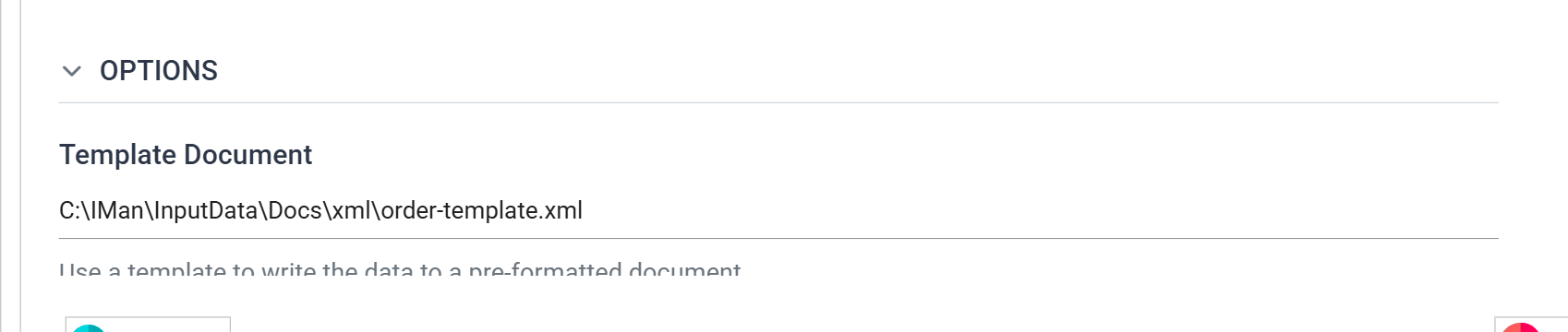
The control is on the Writer's Setup tab, in the Options section; entering a path is the only thing that turns the feature on.
The template is reloaded for every document the transform writes, so with Generate File Per Transaction in use each file starts from the template again.
Worked example
sample-data/xml/order-template.xml, a document that must go out inside a fixed
envelope:
<?xml version="1.0" encoding="utf-8"?>
<Transmission>
  <Header>
    <Version>2.1</Version>
    <Sender>REALISABLE</Sender>
  </Header>
  <Orders>
    <Order>
      <DocumentType>ORDERS</DocumentType>
      <!-- kept: no field maps to this comment or to DocumentType -->
      <SalesTotal>0.00</SalesTotal>
    </Order>
  </Orders>
</Transmission>
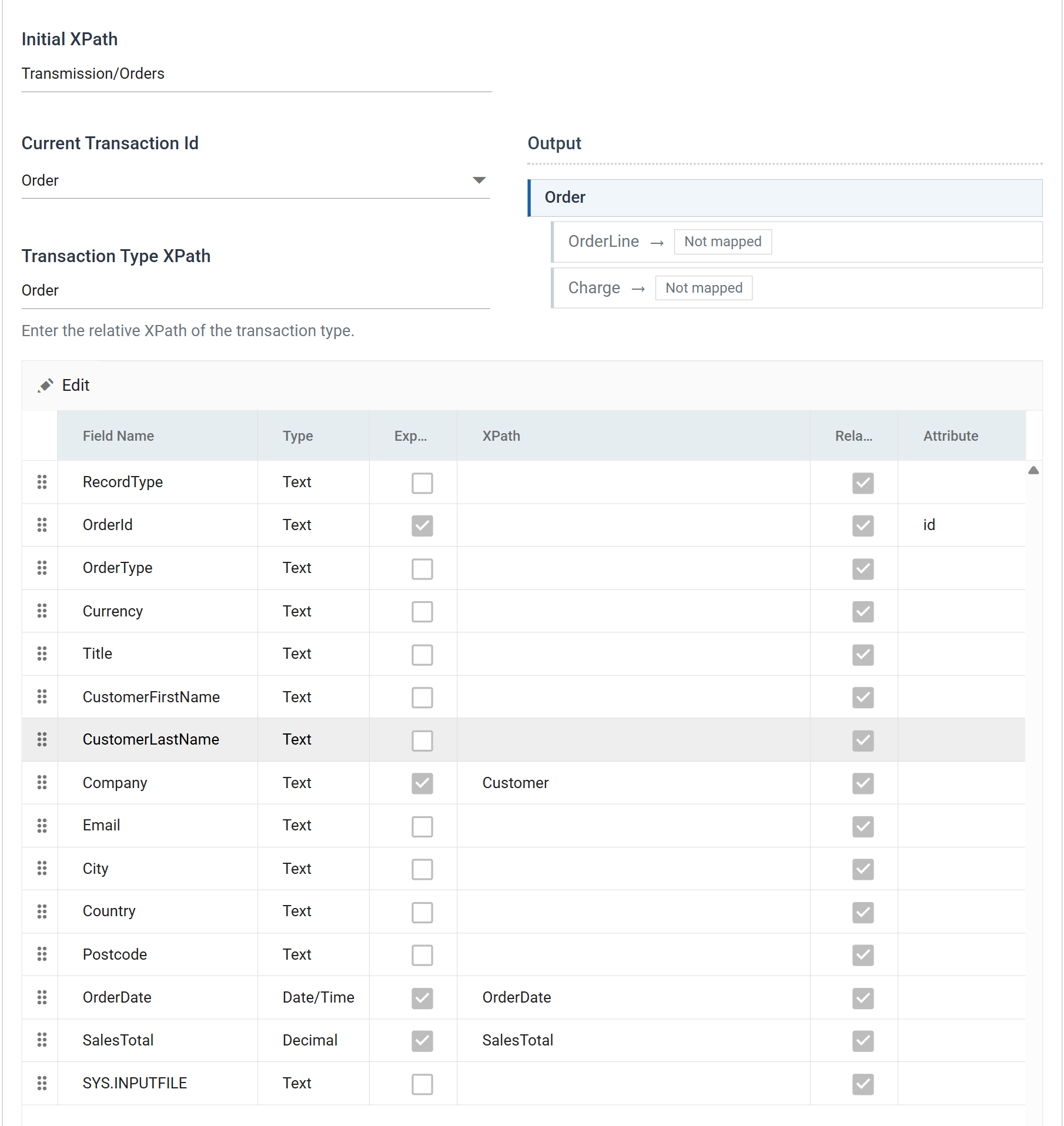
- Initial XPath —
Transmission/Orders. With a template this node is not created: the Writer navigates to the one already in the template. - Transaction Type XPath for the order transaction —
Order, so each record produces oneOrderbeneathOrders.
The single <Order> in the template is the pattern for every order written.
Four fields are mapped: OrderId as the id attribute, SalesTotal onto the
template's own SalesTotal, and Company and OrderDate onto nodes the
template does not have.
What survives, what is overwritten, and what is added
This is the part that makes templates worth using, and it is not obvious. The output for one order, from the template above:
<Transmission>
  <Header><Version>2.1</Version><Sender>REALISABLE</Sender></Header>
  <Orders>
    <Order id="FBRN-309242">
      <DocumentType>ORDERS</DocumentType>
      <!-- kept: no field maps to this comment or to DocumentType -->
      <SalesTotal>282.00</SalesTotal>
      <Customer>Imperial Soap Inc</Customer>
      <OrderDate>2016-03-11</OrderDate>
    </Order>
    …
  </Orders>
</Transmission>
- Everything outside the Initial XPath is kept verbatim — the
Headerblock above, and in a SOAP document the whole envelope. Attributes and text on the Initial XPath node itself are kept too, as are comments outside the root. - Everything inside the Initial XPath is cleared. Its child elements are
deleted before writing, so the template's example
<Order>does not appear in the output in addition to the real ones. - Inside the record pattern, anything no field maps to is kept — including
literal values, attributes and XML comments.
DocumentTypeand the comment beside it are written on every order without any field carrying them. - A mapped field whose XPath matches a node in the pattern replaces its
value.
SalesTotalcomes out as282.00, not the template's0.00. - A mapped field with no matching node is appended after the template's nodes within that record, in field-grid order.
A transaction whose Transaction Type XPath is not found in the template is built from scratch as normal, so only part of a document need be templated.
Picking one of several patterns
Where the template holds more than one candidate node, the Transaction Type
XPath may carry a predicate to choose between them — Order[@type='Sales'].
Without one the first match is used.
Three things to get right
The Initial XPath must exist in the template
There is no validation of this, at design time or at load. If the Initial XPath names a node the template does not contain, nothing is created and nothing reports it — the transform fails on the first record instead.
For the same reason do not set the Initial XPath to / while a template is
in use. That selects every element in the document, and the template is
deleted rather than filled in.
The template's namespace prefixes are the ones your XPaths must use
Namespaces declared on the template's root element are registered automatically, so XPath expressions can use those prefixes without the namespace being listed again under Xml Options.
Listing it again is not an error, but it is not an override either: a declaration whose URI the template already declares is discarded, prefix and all. Where the two disagree the template wins. Match the template's prefixes rather than trying to rename them.
The path is a plain file path on the IMan server
It is read directly from the file system of the machine running the integration — not through a File System connection, so no FTP, SFTP or cloud location — and it is read once, as the transform starts. It cannot contain field references and cannot vary per transaction.
Because the path is stored in the integration, it also has to be valid on every machine that integration is deployed to. A missing file fails the transform with "File [...] could not be opened.", which does not mention the word template.
When it does not work
- Every child record's values in one node. The child transaction's XPath names the repeating element rather than its container. See above.
- A second, empty wrapper appears. A field path repeating the container —
Lines/Line/Qtybeneath a transaction already onLines— builds aLinesinsideLines. - An attribute is written on the wrong node. The Attribute goes on whatever
node the XPath ends at, so
Header/Referencewith an Attribute writes it onReference, not onHeader. - No file, and no error. Overwrite Existing File unticked with a file already there.
Verified against IMan 6.1 on 3 September 2026, against the DOCSWRITE
integration described in sample-data/README.md.