Installing IMan
- Run
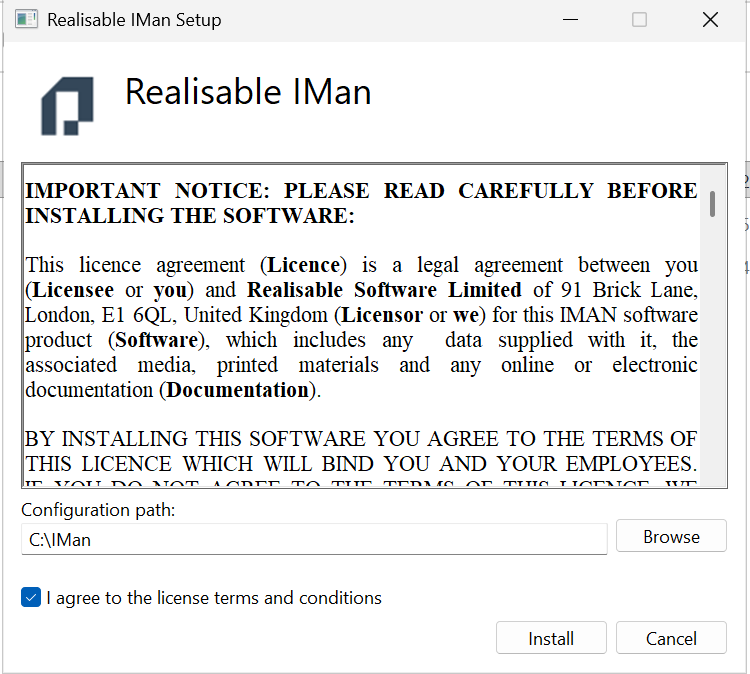
IManInstaller.exeto start the IMan installer. Make sure the file is unblocked first. Windows asks you to approve the installer. - Read the licence agreement. In Configuration path, enter the folder for IMan's configuration and integration files. Use a path that is local to the server.
- Tick I agree to the license terms and conditions and press Install.
Important
Realisable recommends a folder named IMan directly under the root of a
drive, as shown above. This folder holds the integration files. Back it up.
- Setup Progress shows the installation. When it shows Installation Successfully Completed, press Close.
After the Installation
Before you can use IMan, set up its database in the Admin Console:
- Open the Admin Console and enter the Database Settings.
- Press Test, then Save.
- Press Create for a new database, or Update when you upgrade an existing one.
- The Admin Console shows the recovery code that protects IMan's stored secrets. Record it and keep it safe, away from the server. See The recovery code.
Then sign in to IMan and complete its setup. See Setting Up IMan.