Bulk Operations
A push normally sends its records to Shopify as it reads them, a few records to a request, and each request counts against the store's rate limit. With bulk operations, IMan holds the run's records, uploads them to Shopify as files, and Shopify applies them in the background. The store's rate limit does not apply to bulk operations, and a large load finishes sooner.
Imports with Bulk Operations
These push imports have a Use Bulk Operations field:
| Area | Imports |
|---|---|
| Products & Inventory | Products, Inventory Levels v2 |
| Metafields | Metafields, Product MetaFields, Customer MetaFields |
| Customers & Companies | Customers, Company Locations |
| Orders | Orders, Cancel Order, Fulfillments, Transactions (Payment) |
| Pricing & Catalogs | Pricelist, PricelistQtyBreak, CatalogUpdate |
Each import's page says what bulk operations change for that import.
Switching it On
Map Use Bulk Operations to True on the import's top-level record. A constant True is the usual mapping. Leave it unmapped, or map it to False, for a normal run.
The run's first record decides how IMan sends the whole run. A later record whose Use Bulk Operations differs from the first record's fails with:
Use Bulk Operations is False on this record but True on the run's first record; a run goes through bulk operations for all its records or none.
A preview or refresh in the Designer always sends records the normal way, whatever the field holds. Only a run outside the Designer uses bulk operations.
How a Bulk Run Works
- IMan reads every record and holds it. The records do not go to Shopify yet.
- Some imports first read what they need from Shopify with a bulk query, such as the store's open fulfillment orders or its existing company locations. If the query fails, IMan writes nothing and fails every record with the reason.
- IMan writes the records into files of up to 16 MB and starts one bulk operation for each file.
MaxBulkOperationsin the connection string sets how many operations run at once, from 1 to 5, and the default is 1. Shopify allows an app five bulk operations at a time on each store, across all its jobs. When the store has none free, IMan waits for one. - Where two records change the same Shopify record, such as two updates to one product, IMan sends them in successive rounds. Each round waits for the one before it to finish.
- IMan follows each operation until it ends, and writes its progress to the job's log.
- When every operation has ended, IMan reports each record. It writes the ids Shopify returned back into the record, counts an applied record as inserted or updated, and logs a failure against its record.
The push transform finishes only when every operation has ended. A later transform in the integration sees the ids Shopify returned.
Progress Entries
A bulk run logs nothing against its records until its operations end. While it waits, IMan writes progress entries to the job's log. Each operation logs when it starts and when it ends, and at most once a minute while it runs or waits for the store to free an operation:
Shopify bulk productSet, file 1 of 3: operation gid://shopify/BulkOperation/1234567890 started, 0 of 4,000 lines processed.
Shopify bulk productSet, file 1 of 3: operation gid://shopify/BulkOperation/1234567890 is RUNNING, 2,150 of 4,000 lines processed after 0:01:00.
Shopify bulk productSet, file 1 of 3: operation gid://shopify/BulkOperation/1234567890 ended COMPLETED, 4,000 of 4,000 lines processed in 0:01:48.
A bulk query logs the number of objects it has read in the same way.
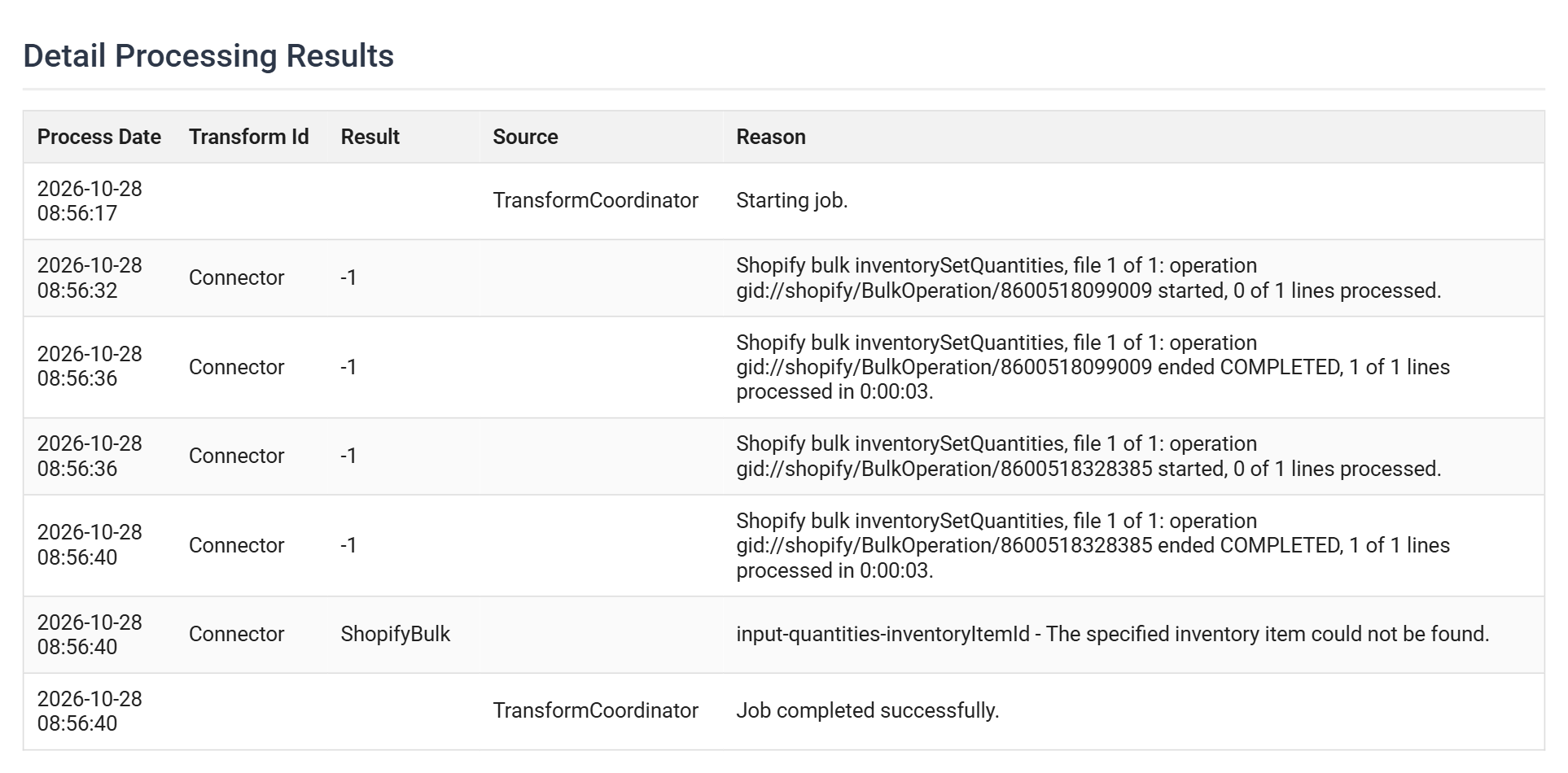
The entries sit with the run's other messages in its audit report, which opens from the Audit Log Query screen. This report is from a bulk Inventory Levels v2 run of four records under Reject Record. One record named an inventory item the store doesn't have, so Shopify set none of the first line. IMan logged that record's failure and sent the other three again in a second operation:
Record Outcomes
Each record ends in one of four ways:
| Outcome | Meaning |
|---|---|
| Applied | Shopify applied the record. IMan writes back the ids and counts it as inserted or updated. |
| Failed | Shopify refused the record. IMan logs Shopify's reason against it, as on a normal run. |
| Not sent | IMan never sent the record. The message says why: the record was larger than a file, an earlier failure stopped the run, someone stopped the job, or Shopify refused to start the operation. |
| Outcome unknown | The operation ended without an answer for the record. Shopify may or may not have applied it. Shopify fails an operation that runs for more than 24 hours, and its unanswered records end this way. |
IMan never sends an Outcome unknown record again, because a second send could apply it twice. Check the record in Shopify before you run it again.
A record that writes to Shopify in several steps, such as a product and then its variants, logs the steps already applied when a later step fails. For example:
Errors and Stopping a Run
Action on Transform Error decides what a failure does to the run:
- Abort: once a file has a record that was not applied, IMan starts no further operations. The records that never went are Not sent. IMan logs every failure against its record, then fails the transform.
- Reject Record or Continue: IMan sends every file, and logs each failure against its record.
On IMan 6.1, stopping the job cancels each running operation. IMan waits for Shopify to end it, then reports the records Shopify had already answered. The records it had not answered are Outcome unknown, and the files that had not started are Not sent. IMan 6.0 cannot cancel a bulk operation. An operation Shopify has started runs to its end.
When to Use Bulk Operations
Leave Use Bulk Operations off for routine runs of up to a few thousand records. A normal run starts sending at once and logs each record as it goes, and for a run of that size it finishes as soon as a bulk run or sooner.
Switch it on for large loads, such as:
- an initial load of the catalogue or the customers;
- a full price list or catalog;
- a stock take across every location;
- a backlog of orders or fulfillments.
A bulk run costs a fixed start-up time to upload its files and wait for Shopify to start them. In exchange, a large load avoids the store's rate limit. Every record's result arrives only when its operation ends.