Preventing Duplicate Transactions
If an integration reads the same data twice, it writes the same transaction twice. This happens more often than it sounds: a run fails part way through and is re-run from the start; a webservice reader downloads the last three days of orders every morning; a cloud file system delivers a file it has already delivered. The target solution rarely objects: most will accept a second order with the same reference, and a database table without a unique key on the column certainly will.
The training manuals deal with this by setting the order import to Reject Record, so that a failed run can be re-run without duplicating the orders it had already written, and note that a Filter and a Lookup give a more thorough answer. This article sets that up.
The shape
The recipe has three parts, two of them under Setup:
| 1 | A reference on the target | The source's own identifier, stored on the record the writer creates |
| 2 | A Lookup | Asks the target whether a record with that reference is already there |
| 3 | A Filter | Sits before the writer and keeps only the records the Lookup could not find |
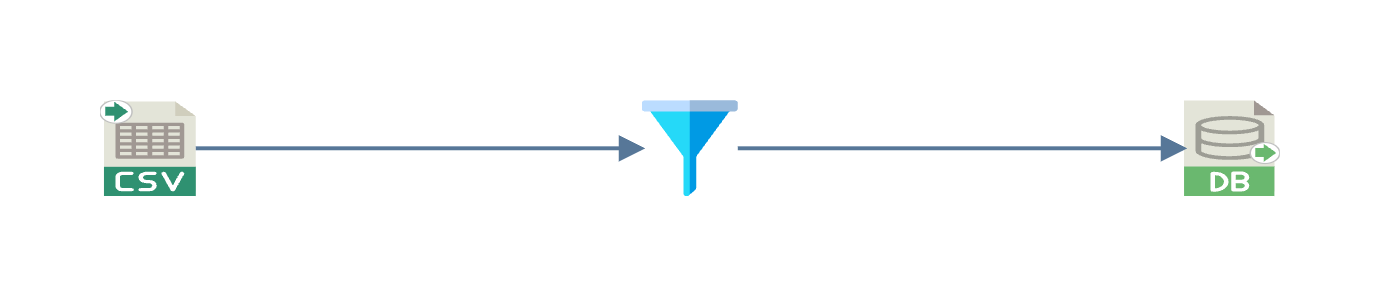
The example reads the three web orders the rest of the cookbook uses —
FBRN-309242, FBRN-309243 and FBRN-309244 — from a CSV file and writes
them to an Orders table with a
Database Writer. The
target could as well be an accounting system, a webservice or anything else a
writer can put a reference on; the last section gives the
Sage 300 and Sage 200 versions.
1. A reference on the target
The Lookup has to have something to find. The record the writer creates must carry the source's own identifier — the web order number, the marketplace order id, the invoice number in the file — and it must land somewhere the Lookup can query. Most targets have a field for it: Order Reference in Sage 300, Customer Document No in Sage 200, an optional field or an analysis code where there is nothing better, a column of your own in a database table.
If the writer does not already put the reference there, add the mapping before
building the rest. The training manuals' order import does this from the
start: OrderId goes into the reference field in step 7 of each manual.
Here the writer maps the order's OrderId to the OrderId column of the
Orders table, and the Lookup reads that column.
2. The Lookup
Go to Setup, then Lookups, and press Add. This is an external lookup — it queries the target's database, not one of IMan's own tables — so Use IMan Lookup Table stays clear and the connection and the three SQL clauses get filled in. The Lookups setup page describes every control; these are the values.
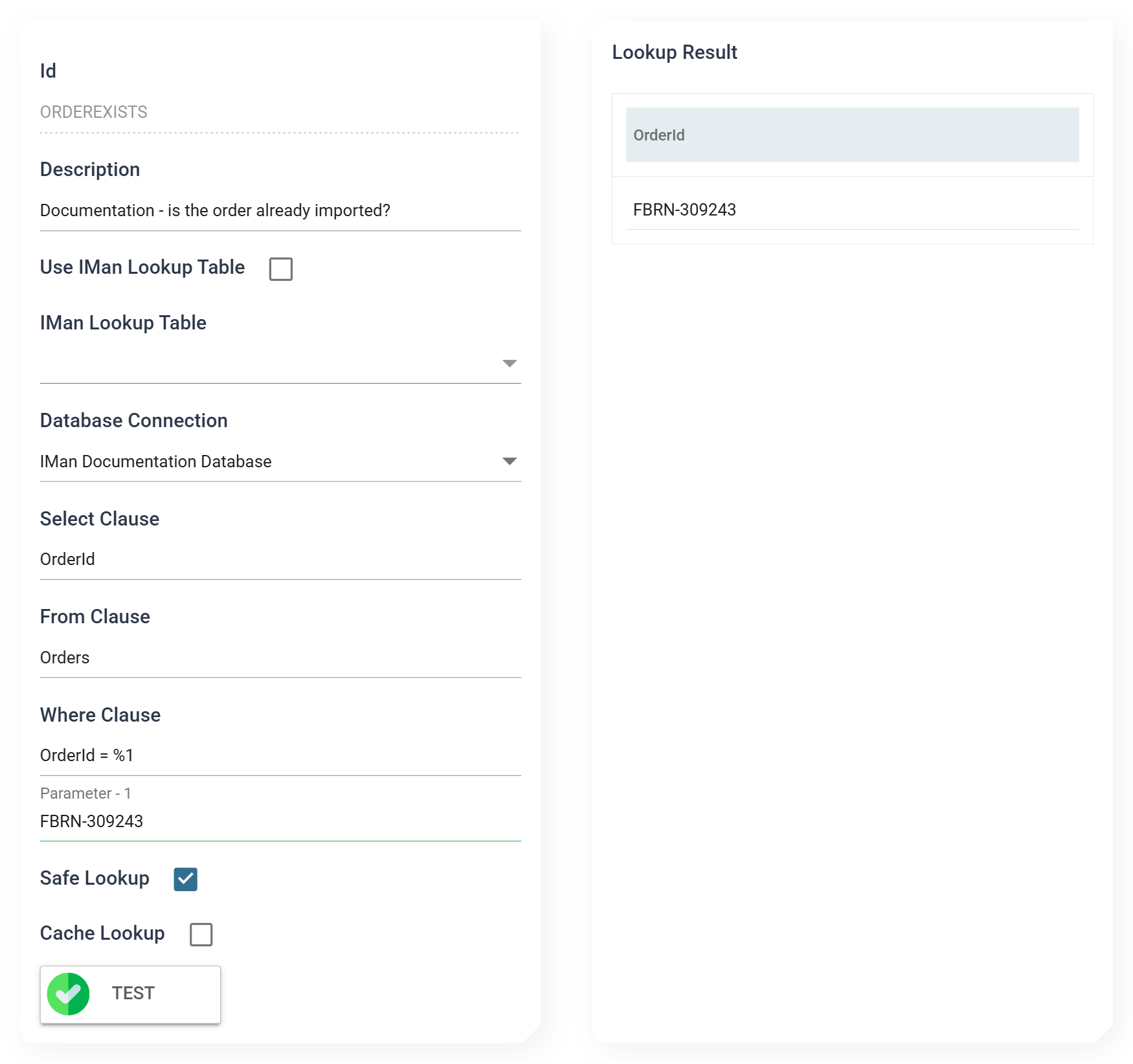
| Field | Value | |
|---|---|---|
| Id | ORDEREXISTS |
What the Filter will call. Up to twelve characters, and it cannot be changed afterwards |
| Description | Is the order already imported? |
For whoever reads the list |
| Use IMan Lookup Table | clear | The question is for the target's database |
| Database Connection | the target's | The same connection the writer uses — a saved one from the drop-down, or a connection string typed in |
| Select Clause | OrderId |
The column to return. Any column would do; returning the reference itself makes the test result read plainly |
| From Clause | Orders |
The header table |
| Where Clause | OrderId = %1 |
%1 is the value the Filter passes in |
| Safe Lookup | ticked | The value is sent to the database as a parameter rather than pasted into the SQL. Always, for a value that arrived in a file or from a webservice |
| Cache Lookup | clear | See below |
Test it both ways before leaving the form. Type a reference you know is in the table into Parameter - 1 and press TEST: the Lookup Result panel shows the row. Then type one that is not there and press TEST again: the panel reads No records to display. Both are correct results; the second is the one the Filter relies on.
Cache Lookup can stay clear; ticking it would make no difference. A lookup that finds nothing is not cached, so a run is never told "not there" from memory about an order it has just written, and an order already in the table stays there, so a cached "found" is never stale.
3. The Filter
Drag a Filter onto the design
surface between the reader and the writer, and connect the three in a row. Open
it, go to Field Mapping, and set Current Transaction Id to the header
transaction — Order here. The Record Evaluation is one line:
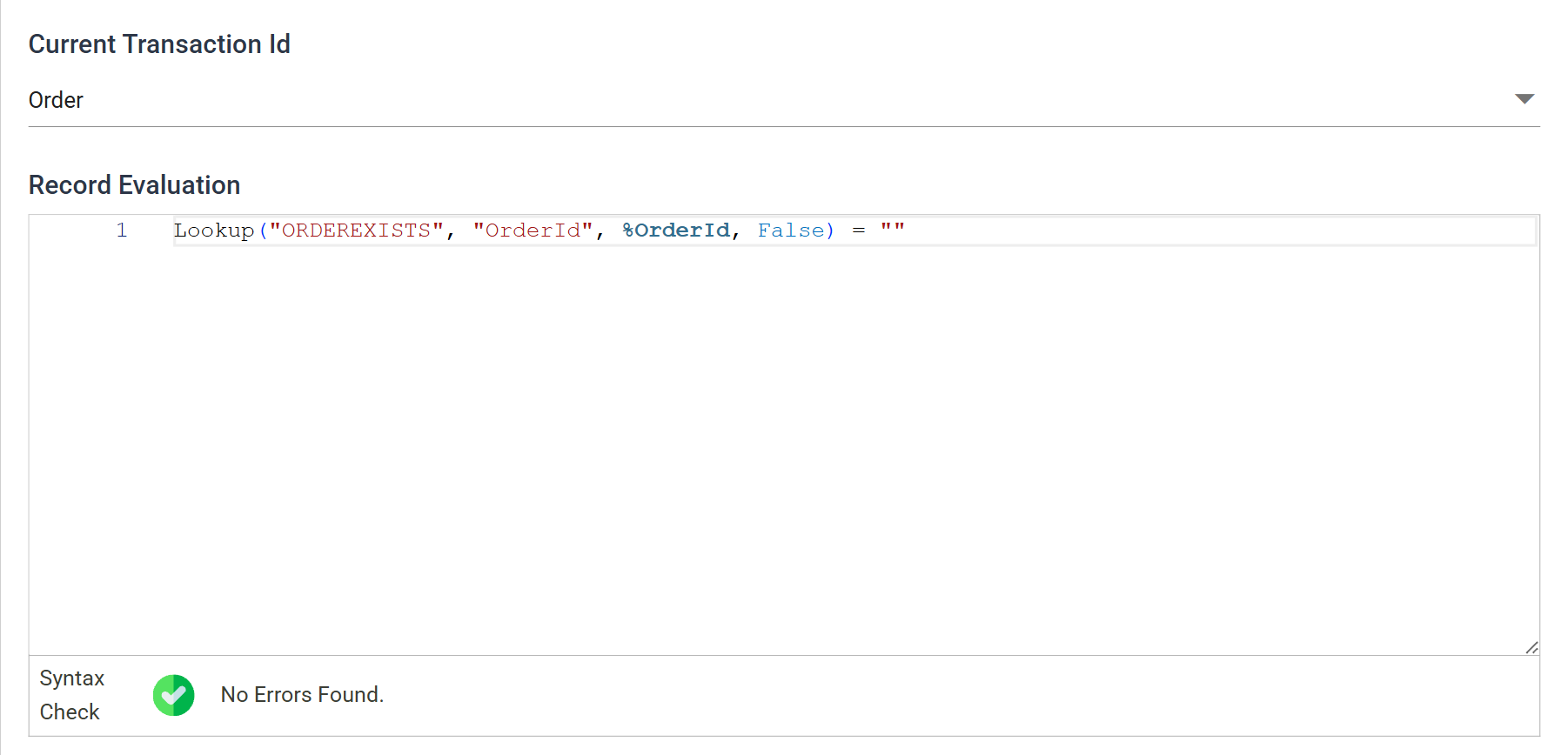
| Argument | ||
|---|---|---|
| 1 | "ORDEREXISTS" |
The Lookup's Id |
| 2 | "OrderId" |
The column to return — one of the columns in the Select Clause |
| 3 | %OrderId |
This record's reference, which becomes the %1 in the Where Clause |
| 4 | False |
Do not raise an error when nothing is found |
The fourth argument is the one to get right. The
settings lookup passes True,
because a missing setting is a configuration error and the job should fail.
Here a missing order is a new order, the normal case, so the argument is
False and the
Lookup function
returns an empty string instead of raising an error. The comparison with ""
is the whole test: nothing found, the record is kept; something found, the
target already has the order and the Filter deletes the record.
Filter the header, not the lines. The lines carry no reference of their own, and a header the Filter deletes takes its lines and charges with it.
4. Test it
The table already holds one of the three orders in the file, FBRN-309243,
which an earlier run wrote. Press Refresh on the Filter:

Two of the three come through. The one that is already in the table does not, and neither do its lines.
With the table empty, all three come through. Once the writer has run, none do: a second run reads the same file, finds all three references in the table, and writes nothing. The integration can be re-run, re-scheduled or handed the same file twice, and each order reaches the target once.
What it does and does not catch
- Anything a previous run wrote, however that run ended. The re-run after a failure, the case the training manuals describe, is the main one.
- The same transaction twice in one file: no. The Filter evaluates every record before the writer writes any, so both copies are looked up against a table that holds neither, and both pass. If a source can repeat a transaction within one delivery, deal with that before this Filter.
- A reference the target already holds twice. The Lookup expects one row
or none. Two rows fail it with Lookup returned multiple records but
expected 1, and the job stops on that record. Either remove the duplicates,
or change the Select Clause to return the first matching record —
TOP 1
  OrderId
on SQL Server — so that the Lookup answers and the Filter drops the order as usual.
Logging the duplicates (optional)
The Filter drops a duplicate silently: it is not an error, so the audit report says nothing about it. To leave a record of each one, extend the Record Evaluation so that it logs the order before returning the result:
Dim Result

Result = Lookup("ORDEREXISTS", "OrderId", %OrderId, False) = ""
If Not Result Then
  WriteToLog -1, "Order [" & %OrderId & "] is already in the target and was skipped."
End If

Result
WriteToLog writes the code and the message to the run's audit log, and the last line is still the result the Filter acts on. Refresh the Filter with the same order pre-loaded and the entry appears under the preview's AUDIT tab, as it will on the audit report of a real run:
![The preview's AUDIT tab: one entry with the process date and time, result code -1, and the message Order [FBRN-309243] is already in the target and was skipped.](../../../assets/Documentation/Resources/Images/ICB/shaping-data/nodupe-filter-audit.png)
The training manuals' order import
The integration built in the
Sage 300 and
Sage 200 training manuals already stores
the reference: step 7 of each maps OrderId to the order's reference field.
What it lacks is the Lookup and the Filter. Add a Filter on Orders between
the step 6.3 Filter and the order import connector, with the Record Evaluation
above, and create the Lookup against the company database the connector
writes to:
| Sage 300 | Sage 200 | |
|---|---|---|
| Reference field, step 7 | Order Reference (REFERENCE) |
Customer Document No |
| Select Clause | ORDNUMBER |
DocumentNo |
| From Clause | OEORDH |
SOPOrderReturn |
| Where Clause | REFERENCE = %1 |
CustomerDocumentNo = %1 |
| Record Evaluation | Lookup("ORDEREXISTS", "ORDNUMBER", %OrderId, False) = "" |
Lookup("ORDEREXISTS", "DocumentNo", %OrderId, False) = "" |
The customer import in the same integration needs none of this, so the manuals leave it on Abort: customers are keyed on the account number, and the connector updates an existing one rather than creating it again. Orders are not keyed that way, so they need the Lookup and the Filter.
Verified against IMan 6.1, September 2026.