IMan Setup
IMan will need to have a System Connector setup for the connector to use. You will need the key and the secret from the previous steps.
System Connector
Log into IMan and navigate to:
Setup -> System Connectors
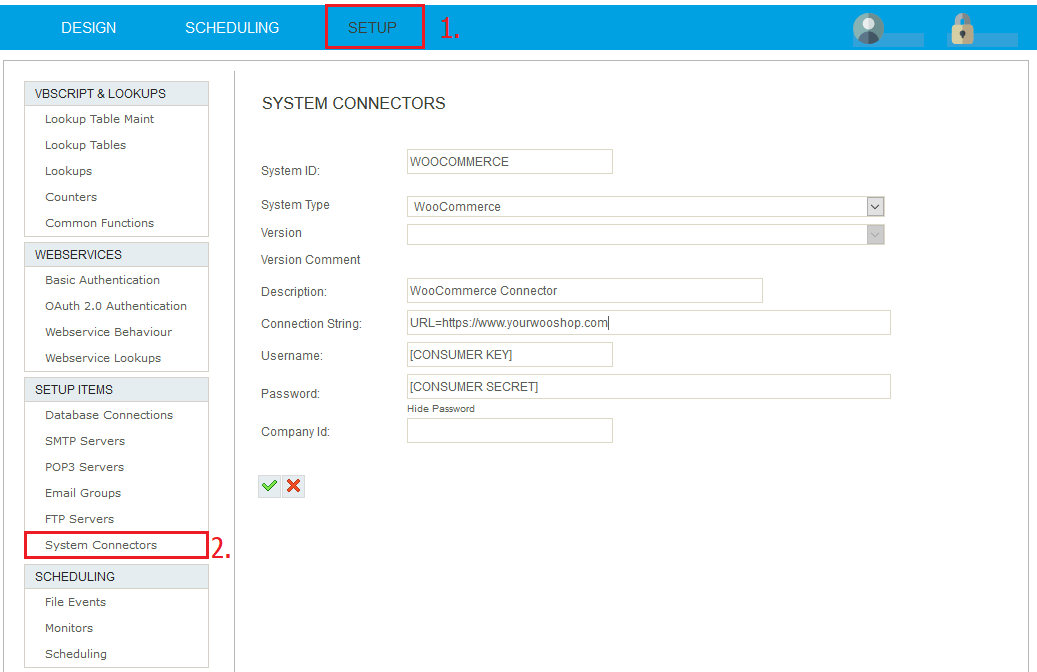
Add a new System Connector and fill out the following fields:
- System ID – A meaningful name for the connection
- Description – A short description of the WOO site.
- Connection String – URL=https://[your domain] **
- Username – The Consumer Key from the REST API setup
- Password – The Consumer Secret from the REST API setup
** Note that the URL must use https for authentication to work.
** To enable a log file in the IMan debug folder add the TRACE property
e.g. URL=https://www.wooshop.com;TRACE=True