IMan System Connector Setup
- Log into IMan
- Go to the Setup tab > System Connectors
- Double click the empty row at the top of the grid to create a new entry:
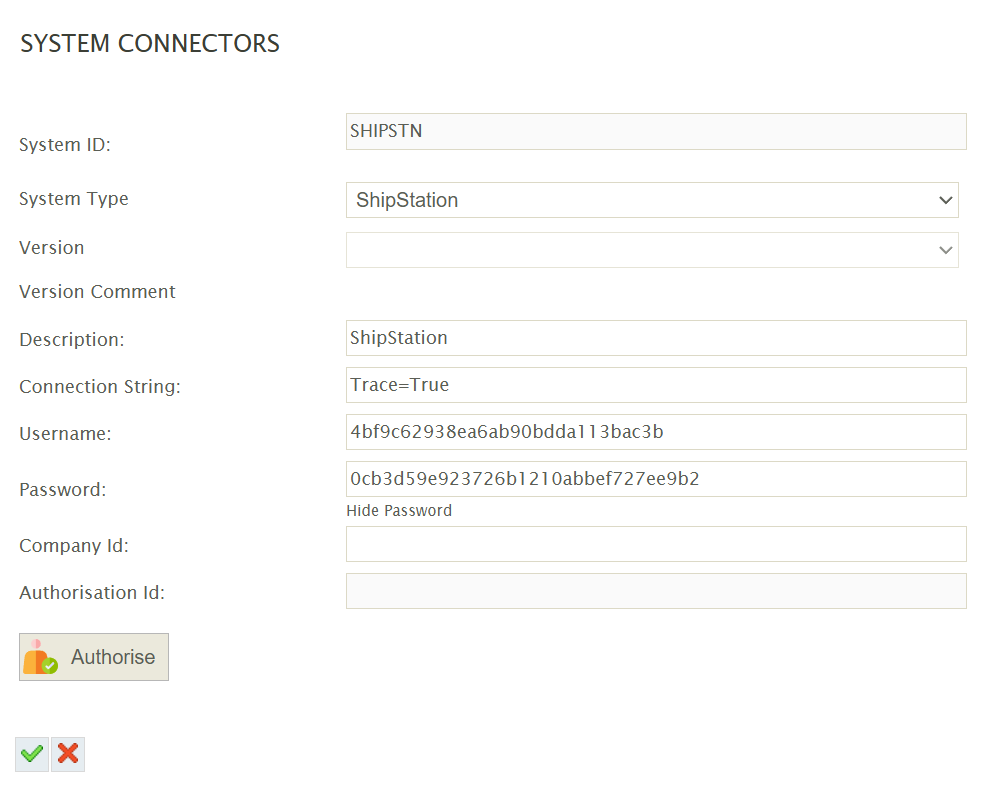
System ID
Can be any non-blank value.
System Type
Select ShipStation from the drop down.
If ShipStation is not present in the drop down, try:
- Pressing Restart Services in the IMan Admin Console.
- Check \IMan\Debug\CustomAddinLoadLog.log for any errors or messages.
Description
A description for the connection.
Connection String
The connection string is a series of key/values for controlling the authentication and tracing.
The above screenshot of the System Connector shows the connection string specifying both.
- TRACE - The TRACE flag enables/disables the trace output useful for debugging. The resulting trace file will be written to: \IMan\Debug\WSTRACE-ShipStation.log.
- TRACE=True
To enable tracing. - TRACE=False
To disable tracing or remove the key/value altogether.
- TRACE=True
Username
This is the API Key taken from the ShipStation Setup.
Password
The corresponding API Secret from the ShipStation Setup.
Company Id
Leave empty.